



(19)protected 保护权限的成员函数 :
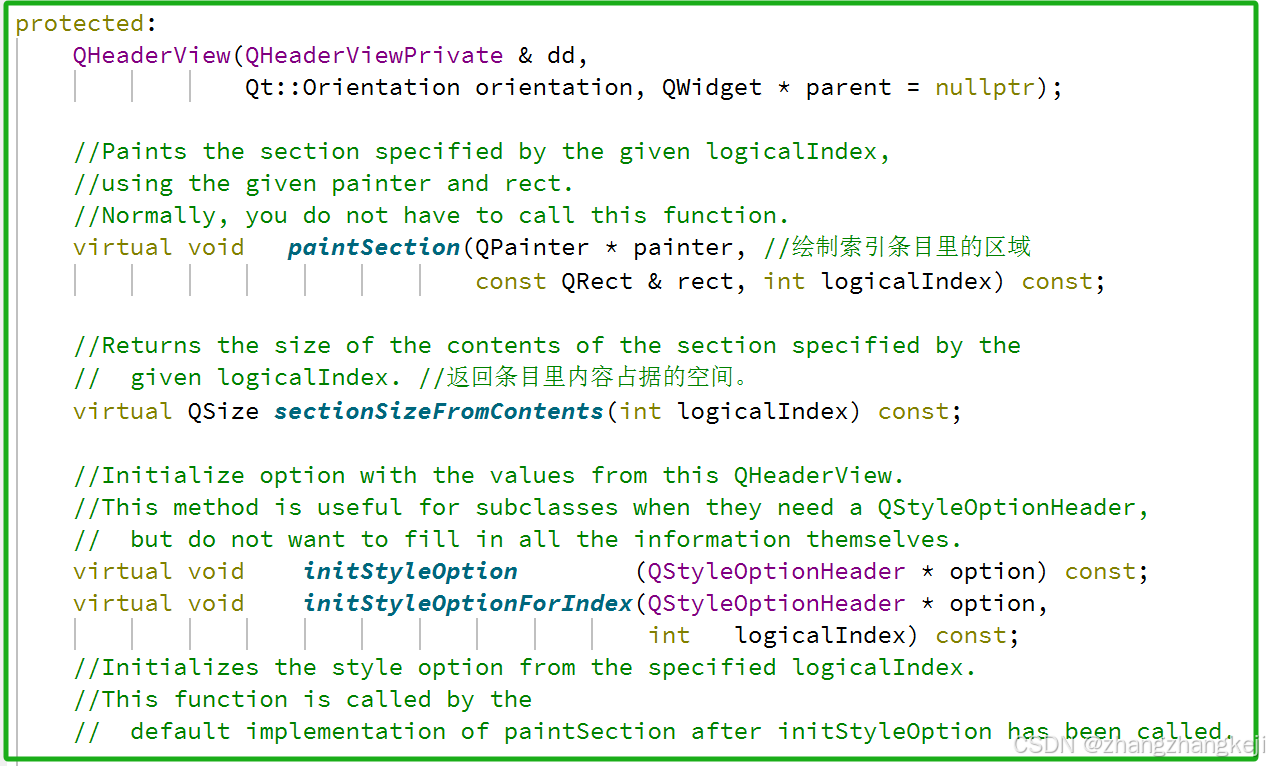
++剩下的保护权限的成员函数都是重载其基类中的虚函数,故不再列举出来。
(20)接着学习槽函数 :
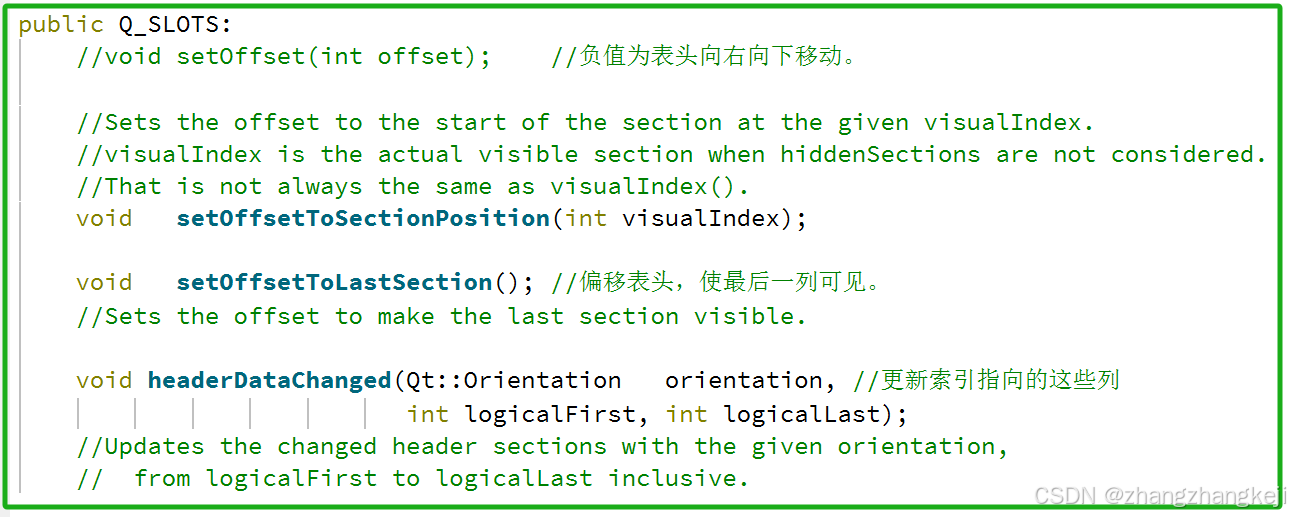
++
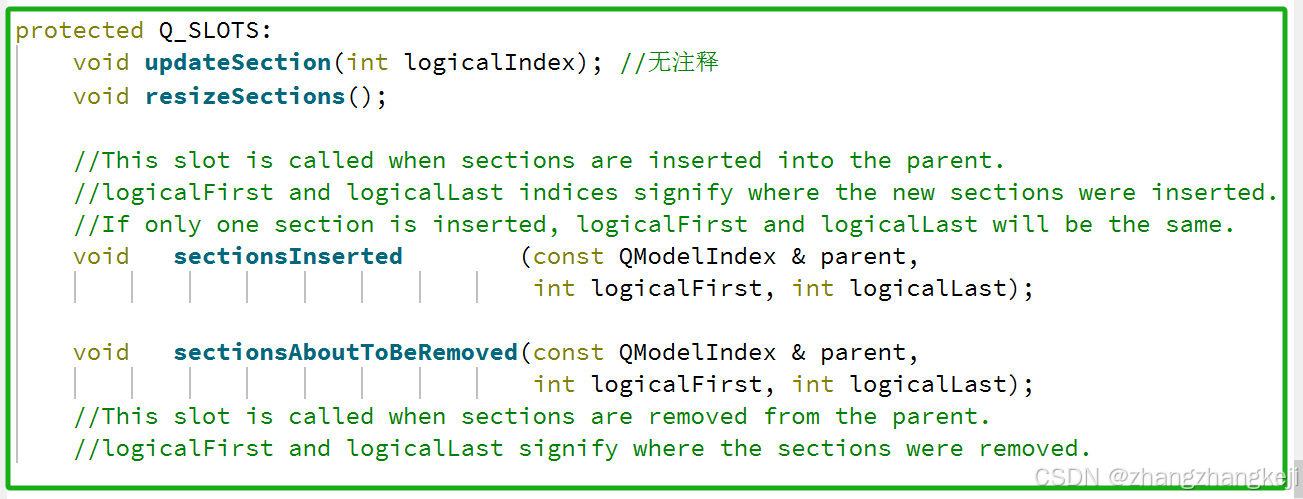
(21)以下开始本类的信号函数的学习 :
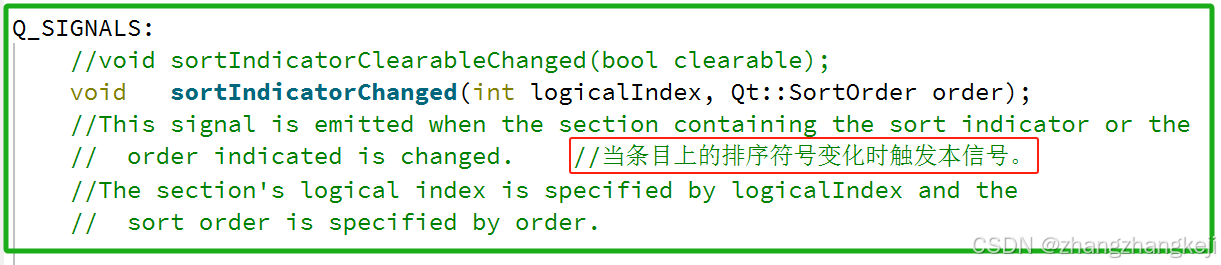
++测试 :
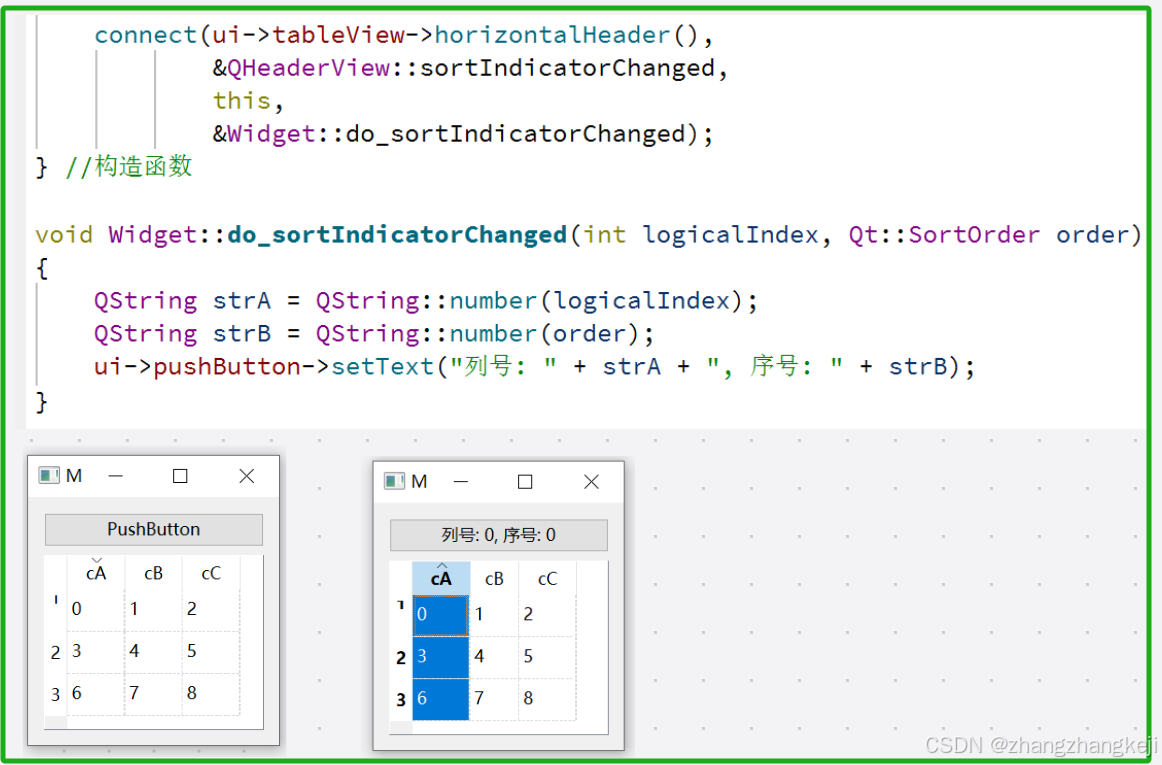
++
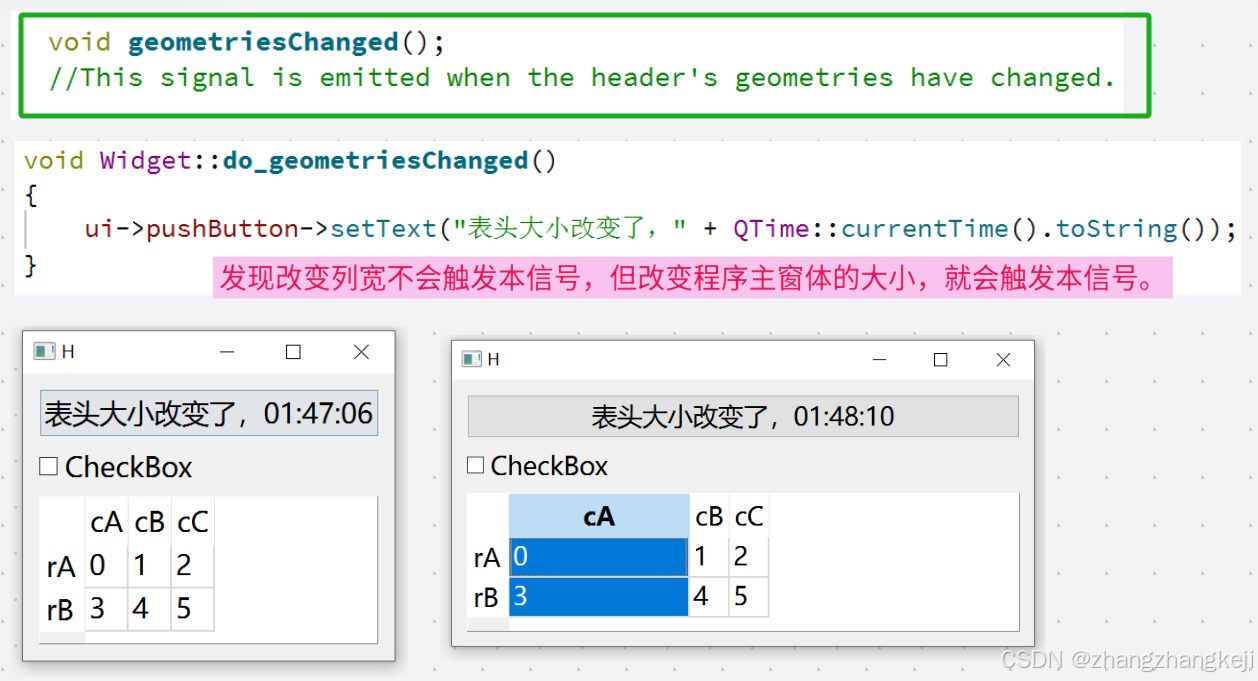
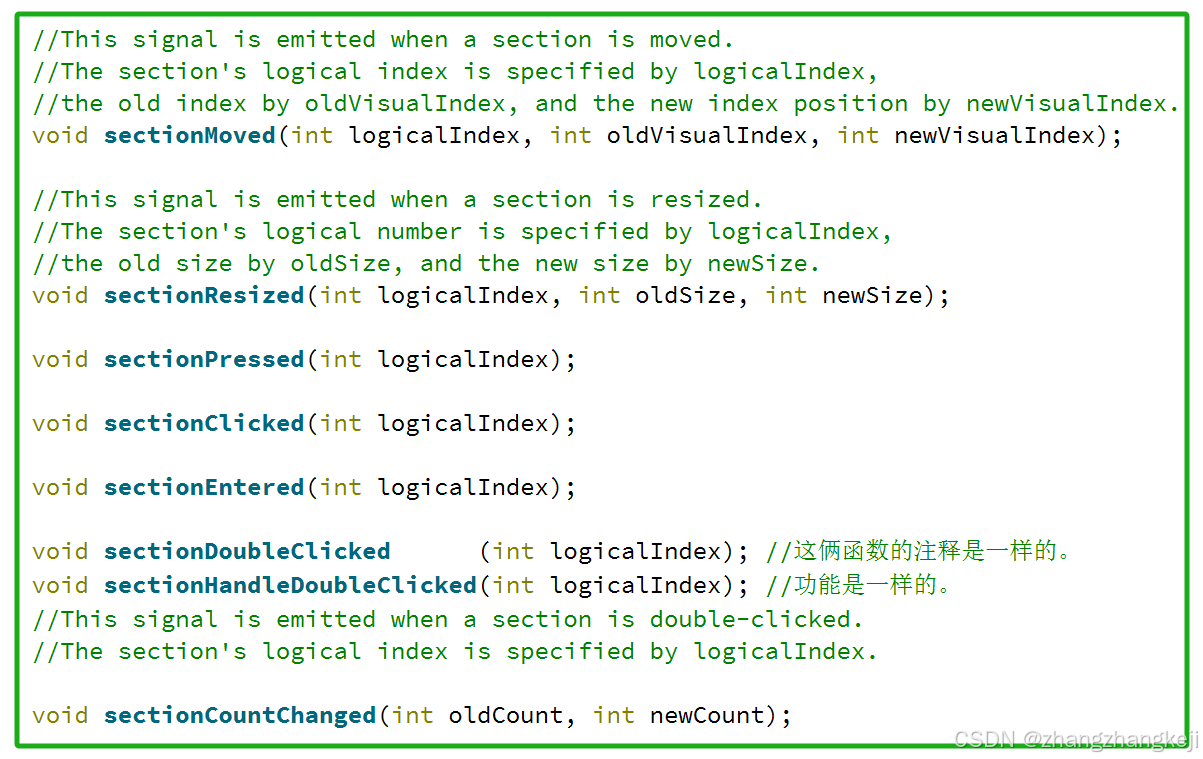
++以下这几个信号函数就不再测试了。主要原因是时间不够。再者,这几个信号函数也很好理解,以为是啥样,就这样用。以后再研究,再核实 :
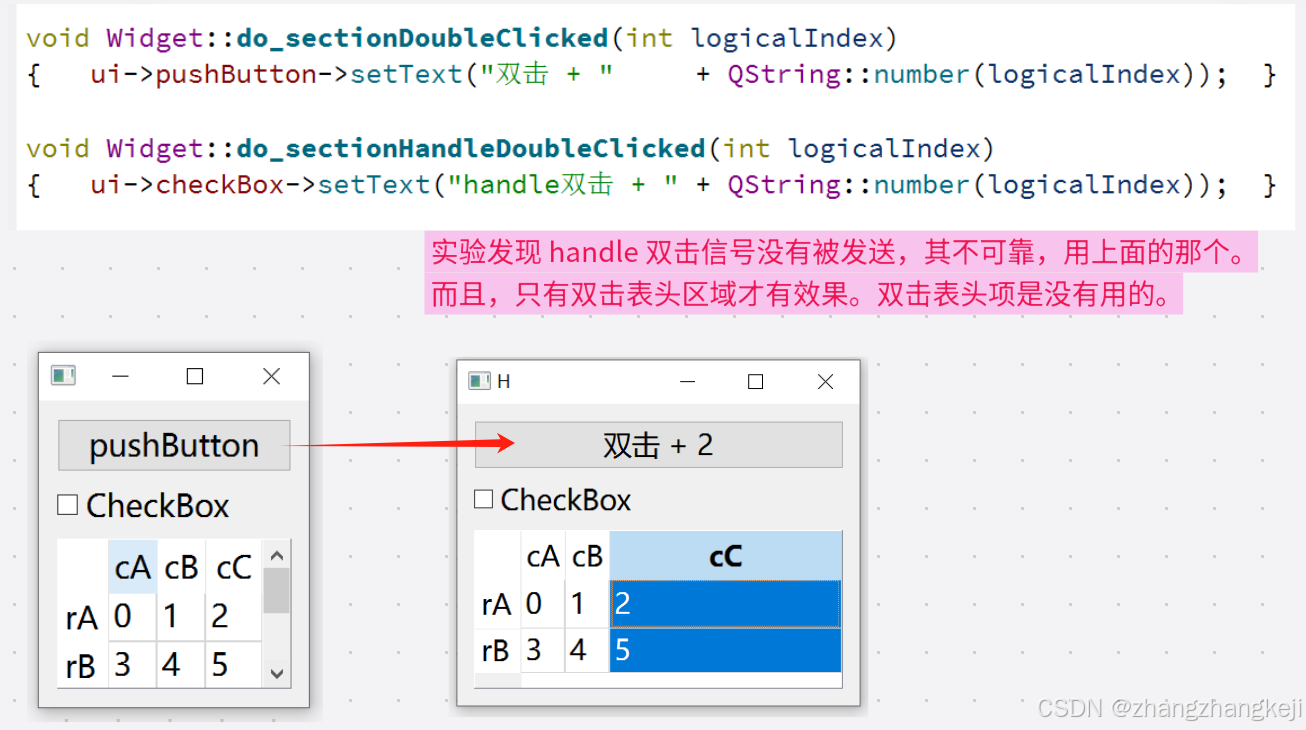
++只举例一个 :
(22)给出本类的源代码 ,定义于头文件 qheaderview . h :
#ifndef QHEADERVIEW_H
#define QHEADERVIEW_H

#include <QtWidgets/qtwidgetsglobal.h>
#include <QtWidgets/qabstractitemview.h>

QT_REQUIRE_CONFIG(itemviews);

QT_BEGIN_NAMESPACE

class QHeaderViewPrivate;
class QStyleOptionHeader;

/*
The QHeaderView class provides a header row or header column for item views.

Detailed Description :
QHeaderView用于显示在QTableView和QTreeView等项视图中使用的标题。
它取代了Qt3中先前用于相同目的的QHeader类,但采用了Qt的模型/视图架构,以与项视图类保持一致。

QHeaderView类是模型/视图类之一,是Qt的模型/视图框架的一部分。

标头使用  QAbstractltemModel::   headerData()函数从模型中获取每个部分的数据。
您可以使用QAbstractltemModel::setHeaderData()设置数据。

每个标题都有一个`orientation()方法和由`count()函数给出的若干节。
一节指的是标题的一部分--根据方向而定,要么是一行,要么是列。

可以通过使用moveSection()和resizeSection()移动和调整大小;
它们也可以通过hideSection()和showSection()隐藏和显示。

标头的每个部分都由一个部分ID描述,该ID由其section()指定,
并且可以位于标头中的特定 visualIndex () 处。
一个部分可以使用 setSortlndicator ()设置排序指示符;
这指示Associated Item 视图中的项是否将按照Section 给出的顺序进行排序。

对于水平页眉,该部分在模型中相当于列;对于垂直页眉,该部分在模型中相当于行。

Moving Header Sections:
一个标题可以固定不动,也可以使用`setSectionsMovable()'方法使其可移动。
它可以使用 `setSectionsclickable ()'方法使其可点击,
并且可以根据`setSectionResizeMode()、设置具有相应的调整大小行为。

Note: Double-clicking on a header to resize a section only applies for visible rows.

一个标题会在用户移动某个部分时发出`sectionMoved()、事件,
在用户   调整某个部分的大小时发出sectionResized()、事件,
           在响应鼠标点击时发出`sectionclicked()`以及sectionHandleDoubleClicked()'事件。
此外,标题还会发出`sectionCountchanged()、事件。

您可以使用`logicalIndex()、和`logicalIndexAt ()、函数,
或通过其索引位置,使用`visualIndex()、和visualIndexAt ()'函数来标识一个部分。
如果部分被移动,视觉索引会随之变化,但逻辑索引不会改变。

Appearance:
QTableWidget和 QTableView 会创建默认标题。如果你想让标题可见,可以使用 setVisibility() 方法。

并非所有ItemDataRoles都会对QHeaderView产生影响。
如果您需要绘制其他角色,可以子类化QHeaderView并重写paintEvent ()函数。
QHeaderView遵循以下ItemDataRoles,
除非这些角色与样式发生冲突(对于遵循桌面主题样式的样式可能发生这种情况):
    TextAlignmentRole, DisplayRole, FontRole, DecorationRole,
    ForegroundRole   , and BackgroundRole.

注:每个标题本身会呈现相应部分的数据,并不依赖于委托。
因此,调用标题的settltemDelegate()函数将不会产生任何效果。

*/

class Q_WIDGETS_EXPORT QHeaderView : public QAbstractItemView
{
    Q_OBJECT

    //此属性控制用户是否可以移动第一列。在QTreeView中,第一列包含树结构,因此默认情况下是不可移动的,
    //即使在setSectionsMovable(true)之后也是如此。
    //它可以再次被移动,例如在没有树结构的平面列表中,通过调用这个方法。
    //在这种情况下,建议也调用 QTreeView:setRootlsDecorated(false)。
    //除非调用setSectionsMovable(true),否则将其设置为true没有效果。
    Q_PROPERTY(bool    firstSectionMovable   //此属性控制用户是否可以移动第一列。
                READ isFirstSectionMovable   WRITE   setFirstSectionMovable)

    //This property holds whether the sort indicator is shown
    //By default, this property is false.
    Q_PROPERTY(bool    showSortIndicator     //默认不显示排序指示符
                READ     isSortIndicatorShown
                WRITE   setSortIndicatorShown)

    Q_PROPERTY(bool        sortIndicatorClearable //是否允许通过多次敲击来取消本列上的排序指示符
                READ     isSortIndicatorClearable //本属性不在 UI 界面上可见,需要经代码设置。
                WRITE   setSortIndicatorClearable //本属性默认为 F。
                NOTIFY  sortIndicatorClearableChanged)
    //此属性控制是否可以通过多次点击一个部分来清除排序指示器。
    //此属性控制用户是否能够通过多次单击某个给定部分来移除该部分上的排序指示符。
    //通常,单击某个部分只会更改该部分的排序顺序。
    //通过将此属性设置为true,排序指示符将在交替到升隆浮沉之后被清除,这通常会恢复模型的原始排序。
    //将此属性设置为 true并不会产生任何效果,除非sectionsclickable()也设置为 true
    //(对于某些视图(如QTableView)而言,这是默认设置;
    //或者在创建可排序视图时,如通过调用 QTreeView:setSortingEnabled 而被自动设置)。


    //This property holds whether the sections containing selected items are highlighted
    //By default, this property is false.
    Q_PROPERTY(bool    highlightSections     //被选中条目所在的行头或列头是否高亮显示。默认 F
                READ   highlightSections     WRITE   setHighlightSections)

    //This property holds whether the last visible section in the
    //  header takes up all the available space。The default value is false.
    //注:由QTreeView提供的水平标题栏配置中,此属性被设置为true,
    //以确保视图不会浪费分配给其标题栏的任何空间。
    //如果将此值设置为true,则此属性将覆盖标题栏中最后一个部分的调整模式 resize mode set设置。
    Q_PROPERTY(bool    stretchLastSection    //是否自动扩展最后一列或一行的宽度,默认为 F。
                READ   stretchLastSection    WRITE   setStretchLastSection)

    //这个属性决定了,一旦由用户缩放的节达到其最小尺寸,交互式缩放功能是否将顺延至后续的节。
    //此属性仅影响其调整大小模式为交互式的部分。  默认值为false。
    //This property holds whether interactive resizing will be cascaded to the
    //  following sections once the section being resized by the
    //  user has reached its minimum size。
    //This property only affects sections that have Interactive as their resize mode.
    Q_PROPERTY(bool         cascadingSectionResizes  //本属性为true后,再继续压缩本列(行)。
                READ        cascadingSectionResizes  //后邻的列(行)的宽度(高度)会自动变宽(高)。
                WRITE    setCascadingSectionResizes) //调整行列大小时是否触发级联,默认 F

    //此属性在调整大小之前保存了标题部分的默认大小。 此属性仅影响其调整大小模式为交互式或固定的部分。
    //默认情况下,此属性的值是依赖于样式的。因此,当样式发生变化时,此属性会从样式中更新。
    //调用setDefaultSectionSize()、会停止更新,而调用`resetDefaultSectionSize()'将恢复默认行为。
    //This property holds the default size of the header sections before resizing.
    //This property only affects sections that have Interactive or Fixed as their
    //  resize mode. By default, the value of this property is style dependent.
    //Thus, when the style changes, this property updates from it.
    //Calling setDefaultSectionSize() stops the updates,
    //calling resetDefaultSectionSize() will restore default behavior.
    Q_PROPERTY(int         defaultSectionSize
                READ       defaultSectionSize    //设置表格的初始列宽与行高
                WRITE   setDefaultSectionSize
                RESET resetDefaultSectionSize)

    //此属性表示页眉部分的最小大小。最小节大小是允许的最小节大小。
    //如果将最小节大小设置为-1,QHeaderView将使用字体指标大小。此属性被所有调整大小模式所尊重。
    //This property holds the minimum size of the header sections.
    //The minimum section size is the smallest section size allowed.
    //If the minimum section size is set to -1, QHeaderView will use the font metrics size.
    //This property is honored by all resize modes.
    Q_PROPERTY(int         minimumSectionSize    //列宽,行高的允许的最小值,Qt6默认都是 24
                READ       minimumSectionSize    WRITE    setMinimumSectionSize)

    Q_PROPERTY(int         maximumSectionSize
                READ       maximumSectionSize    WRITE    setMaximumSectionSize)
    //此属性表示页眉部分的最大大小。最大段大小是允许的最大段大小。此属性的默认值为1048575,
    //这也是段可能达到的最大大小。将最大值设为-1会将该值重置为最大段大小。
    //除了拉伸模式外,此属性在所有调整大小模式中都受到尊重。    此属性在Qt 5.2中引入。
    //This property holds the maximum size of the header sections.
    //The maximum section size is the largest section size allowed.
    //The default value for this property is 1048575,
    //which is also the largest possible size for a section.
    //Setting maximum to -1 will reset the value to the largest section size.
    //With exception of stretch this property is honored by all resize modes

    //This property holds the default alignment of the text in each header section。
    Q_PROPERTY(Qt::Alignment    defaultAlignment  //本属性设置表头里的文本对齐方式。
                READ            defaultAlignment
                WRITE        setDefaultAlignment)

private:
    void initStyleOption(QStyleOptionFrame *option) const override;

    // ### Qt6: make them protected slots in QHeaderViewPrivate
    Q_PRIVATE_SLOT(d_func(), void _q_sectionsRemoved(
            const QModelIndex &parent, int logicalFirst, int logicalLast))

    Q_PRIVATE_SLOT(d_func(), void _q_sectionsAboutToBeMoved(
            const QModelIndex &sourceParent, int logicalStart,
            int logicalEnd, const QModelIndex &destinationParent, int logicalDestination))

    Q_PRIVATE_SLOT(d_func(), void _q_sectionsMoved(
            const QModelIndex &sourceParent, int logicalStart,
            int logicalEnd, const QModelIndex &destinationParent, int logicalDestination))

    Q_PRIVATE_SLOT(d_func(), void _q_sectionsAboutToBeChanged(
    const QList<QPersistentModelIndex> &parents = QList<QPersistentModelIndex>(),
    QAbstractItemModel::LayoutChangeHint hint = QAbstractItemModel::NoLayoutChangeHint))

    Q_PRIVATE_SLOT(d_func(), void _q_sectionsChanged(
    const QList<QPersistentModelIndex> &parents = QList<QPersistentModelIndex>(),
    QAbstractItemModel::LayoutChangeHint hint = QAbstractItemModel::NoLayoutChangeHint))

    Q_DECLARE_PRIVATE(QHeaderView)
    Q_DISABLE_COPY(QHeaderView)

public:

    explicit QHeaderView(Qt::Orientation orientation, QWidget * parent = nullptr);
    virtual ~QHeaderView();


//   Q_PROPERTY(Qt::Alignment      defaultAlignment  //本属性设置表头里的文本对齐方式。
//              READ               defaultAlignment
//              WRITE           setDefaultAlignment)
                Qt::Alignment      defaultAlignment() const;
                void            setDefaultAlignment(Qt::Alignment alignment);

//   Q_PROPERTY(bool      showSortIndicator         //默认不显示排序指示符
//              READ        isSortIndicatorShown
//              WRITE      setSortIndicatorShown)
                bool        isSortIndicatorShown() const;
                void       setSortIndicatorShown(bool show);


//   Q_PROPERTY(bool          sortIndicatorClearable //是否允许通过多次敲击来取消本列上的排序指示符
//              READ        isSortIndicatorClearable //本属性不在 UI 界面上可见,需要经代码设置。
//              WRITE      setSortIndicatorClearable //本属性默认为 F。
//              NOTIFY        sortIndicatorClearableChanged)
                bool        isSortIndicatorClearable() const;
                void       setSortIndicatorClearable(bool clearable);
Q_SIGNALS:
                void          sortIndicatorClearableChanged(bool clearable);

public:
                //Returns the logical index of the section that has a sort indicator.
                //By default this is section 0.
                int           sortIndicatorSection() const; //返回具有排序符的列的下标
                Qt::SortOrder sortIndicatorOrder  () const; //返回该列上的排序方向。
                //Returns the order for the sort indicator.
                //如果没有任何部分具有排序指示器,此函数的返回值是未定义的。
                void       setSortIndicator(int logicalIndex, Qt::SortOrder order);
                //将 logicalIndex列的排序符号改为形参 2 的order。
    //Sets the sort indicator for the section specified by the given logicalIndex in the
    //direction specified by order,
    //and removes the sort indicator from any other section that was showing it.
    //logicalIndex may be -1, in which case no sort indicator will be shown and
    //the model will return to its natural, unsorted order.
    //Note that not all models support this and may even crash in this case.

public:
//   Q_PROPERTY(bool      firstSectionMovable     //此属性控制用户是否可以移动第一列。
//              READ    isFirstSectionMovable     WRITE   setFirstSectionMovable)
                bool    isFirstSectionMovable() const;
                void   setFirstSectionMovable(bool movable);

//Returns true if the header can be moved by the user; otherwise returns false.
//By default, sections are movable in QTreeView (except for the first one),
//and not movable in QTableView. 默认树表里的行列是可移动的,二维表里的行列是不可移动的。
                bool           sectionsMovable() const;
                void        setSectionsMovable(bool movable);


//   Q_PROPERTY(bool    highlightSections     //被选中条目所在的行头或列头是否高亮显示。默认 F
//              READ    highlightSections     WRITE   setHighlightSections)
                bool    highlightSections() const;
                void setHighlightSections(bool highlight);


//   Q_PROPERTY(bool    stretchLastSection    //是否自动扩展最后一列或一行的宽度,默认为 F。
//              READ    stretchLastSection    WRITE   setStretchLastSection)
                bool    stretchLastSection() const;
                void setStretchLastSection(bool stretch);

//   Q_PROPERTY(bool        cascadingSectionResizes  //本属性为true后,再继续压缩本列(行)。
//              READ        cascadingSectionResizes  //后邻的列(行)的宽度(高度)会自动变宽(高)。
//              WRITE    setCascadingSectionResizes) //调整行列大小时是否触发级联,默认 F
                bool        cascadingSectionResizes() const;
                void     setCascadingSectionResizes(bool enable);

//   Q_PROPERTY(int          defaultSectionSize
//              READ         defaultSectionSize      //设置表格的初始列宽与行高
//              WRITE     setDefaultSectionSize
//              RESET   resetDefaultSectionSize)
                int          defaultSectionSize() const;
                void      setDefaultSectionSize(int size);
                void    resetDefaultSectionSize();

//   Q_PROPERTY(int          minimumSectionSize      //列宽,行高的允许的最小值,Qt6默认都是 24
//              READ         minimumSectionSize      WRITE    setMinimumSectionSize)
                int          minimumSectionSize() const;
                void      setMinimumSectionSize(int size);


//   Q_PROPERTY(int          maximumSectionSize
//              READ         maximumSectionSize      WRITE    setMaximumSectionSize)
                int          maximumSectionSize() const;
                void      setMaximumSectionSize(int size);


    void  setModel  (QAbstractItemModel * model) override;
    void  setVisible(bool                 v    ) override;
    //Reimplements an access function for property: QWidget::visible.
    //QWidget::Q_PROPERTY(bool visible READ isVisible WRITE setVisible DESIGNABLE false)

    void  doItemsLayout()       override;

    //Reimplements: QAbstractItemView::reset().
    void  reset        ()       override;

    Qt::Orientation   orientation() const;

    //Returns the offset of the header: this is the header's left-most
    //  (or top-most for vertical headers) visible pixel.
    int     offset() const; //返回行头,列头的偏移量,不是 0 么 ?
public Q_SLOTS:
    void setOffset(int offset); //Sets the header's offset to offset.
    //偏移量为负值则表头向右向下移动。

public:
    int length() const; //返回表头的长度
    //Returns the length along the orientation of the header.


    //Returns the number of sections in the header.
    int               count() const;
    int stretchSectionCount() const;
    //Returns the number of sections that are set to resize mode stretch.
    //返回已设置为调整模式拉伸的节的数量。
    //在视图中,这可用于检查当视图的几何形状发生变化时,头部视图是否需要调整节的大小。


    QSize         sizeHint() const override;
    int    sectionSizeHint(int logicalIndex) const;
    //Returns a suitable size hint for the section specified by logicalIndex.

    //Saves the current state of this header view.
    //To restore the saved state, pass the return value to restoreState().
    QByteArray    saveState() const;
    bool       restoreState(const QByteArray & state);
    //Restores the state of this header view.
    //This function returns true if the state was restored; otherwise returns false.

//*********************************************************************************
//**********************列头与行头是对称的。以下注释,均以行头举例************************
//*********************************************************************************

    //Hides the section specified by logicalIndex. //列头与行头是对称的。以下注释,均以行头举例
    inline void  hideSection(int logicalIndex)    //隐藏     索引 logicalIndex指向的列
    {   setSectionHidden(logicalIndex, true ); }
    inline void  showSection(int logicalIndex)    //重新可视化索引 logicalIndex指向的列
    {   setSectionHidden(logicalIndex, false); }
    //Shows the section specified by logicalIndex.

    //Returns the visual index of the
    //            section that covers the given position in the viewport.
    int  visualIndexAt(int position      ) const;  //返回形参坐标处的列的视觉索引
    int logicalIndexAt(int position      ) const;  //返回形参坐标处的列的逻辑索引。
    //Returns the section that covers the given position in the viewport.

    //Returns the section that covers the given position in the viewport.
    inline
    int logicalIndexAt(int  x,    int  y ) const  //这里构成了函数重载。
    {   return  orientation() == Qt::Horizontal
                ? logicalIndexAt(x) : logicalIndexAt(y); }
    inline
    int logicalIndexAt(const QPoint & pos) const  //第一个只有一个参数的形式已经足够用了。
    {   return logicalIndexAt(pos.x(), pos.y()); }
    //Returns the logical index of the section at the position given in pos.
    //If the header is horizontal the x-coordinate will be used,
    //  otherwise the y-coordinate will be used to find the logical index.

    //Returns the visual index position of the section specified by the given logicalIndex,
    //  or -1 otherwise.  Hidden sections still have valid visual indexes.
    //返回由给定逻辑索引指定的节的视觉索引位置,否则返回-1。隐藏部分仍然具有有效的视觉索引。
    int  visualIndex  (int logicalIndex  ) const;  //若列被移动,视觉索引会随之变化,但逻辑索引不变。
    int logicalIndex  (int visualIndex   ) const;  //返回视觉索引对应的逻辑索引。
    //Returns the logicalIndex for the section at the given visualIndex position,
    //  or -1 if visualIndex < 0 or visualIndex >= QHeaderView::count().
    //Note that the visualIndex is not affected by hidden sections.

    //Returns the width (or height for vertical headers) of the given logicalIndex.
    int sectionSize            (int logicalIndex) const; //返回形参列的宽度。
    int sectionPosition        (int logicalIndex) const; //返回形参列的坐标。隐藏列返 -1。
    //Returns the section position of the given logicalIndex,
    //  or -1 if the section is hidden. The position is measured in pixels from the
    //  first visible item's top-left corner to the top-left corner of the
    //  item with logicalIndex. The measurement is along the
    //  x-axis for horizontal headers and along the y-axis for vertical headers
    int sectionViewportPosition(int logicalIndex) const; //返回形参列的在视口内的坐标。
    //Returns the section viewport position of the given logicalIndex.
    //If the section is hidden, the return value is undefined.

    //Moves the section at visual index from to occupy visual index to.
    void    moveSection (int from , int to    ); //依据视觉索引移动整列
    void    swapSections(int first, int second); //依据视觉索引互换列
    //Swaps the section at visual index first with the section at visual index second.

    //Returns true if the section specified by logicalIndex is explicitly hidden from the
    //  user; otherwise returns false.
    bool      isSectionHidden(int logicalIndex) const;
    void     setSectionHidden(int logicalIndex, bool hide);
    //If hide is true the section specified by logicalIndex is hidden;
    //  otherwise the section is shown.
    int   hiddenSectionCount() const;           //统计本列中被隐藏的列的数目
    //Returns the number of sections in the header that has been hidden.

    //Returns true if sections in the header has been moved; otherwise returns false;
    bool sectionsMoved () const;                //若有列被移动,则返回 true。
    bool sectionsHidden() const;                //若有列被隐藏,则返回 true。
    //Returns true if sections in the header has been hidden; otherwise returns false;

    //如果该标题是可点击的,则返回 true;否则返回false。
    //可点击的标题可以被设置,以允许用户更改与标题相关的视图中的数据呈现方式。
    bool    sectionsClickable() const;          //如果表头无法被单击选中,
    void setSectionsClickable(bool clickable);  //就无法通过单击表头来选中整列条目。
    //If clickable is true, the header will respond to single clicks.


    //调整大小模式规定了标题部分的显示行为。
    //它可以通过调用`setSectionResizeMode()、来设置整个标题视图或单个部分的调整大小模式。
    enum ResizeMode
    {
        Interactive     ,   //用户可调整该部分的尺寸。即可与用户互动。
            //此外,还可以通过调用`resizeSection()、函数以编程方式调整该部分的尺寸。
            //该部分的默认尺寸为`defaultSectionsize~。(另请参阅`cascadingSectionResizes。)
        Stretch         ,   //QHeaderView将自动调整部分大小以填充可用空间。自动扩展。变大。
                            //该大小不能由用户或编程更改。
        Fixed           ,   //用户无法调整该部分的尺寸。固定,但仍可以用编程的方式改变列宽。
            //该部分只能通过调用`resizeSection()、函数以编程方式进行调整。
            //该部分的默认尺寸为`defaultSectionsize。
        ResizeToContents,   //QHeaderView会根据整个列或行的内容自动调整节的大小,自动调整,变小。
            //使其达到最佳状态。用户或程序无法手动更改其大小。(此值是在4.2版本中引入的)
        Custom = Fixed      //该值已经过时。
    };
    Q_ENUM(ResizeMode);

    //Returns the resize mode that applies to the  //读取与设置某列上的变形方式。
    //  section specified by the given logicalIndex.
    ResizeMode     sectionResizeMode(int               logicalIndex) const;
    void        setSectionResizeMode(int logicalIndex, ResizeMode mode);
    //Sets the constraints on how the section specified by logicalIndex in the
    //  header can be resized to those described by the given mode.
    //The logical index should exist at the time this function is called.
    //Note: This setting will be ignored for the last section if the
    //  stretchLastSection property is set to true.
    //This is the default for the horizontal headers provided by QTreeView.
    void        setSectionResizeMode(                  ResizeMode  mode);
    //Sets the constraints on how the              //设置整个表头所有列的扩展方式。
    //  header can be resized to those described by the given mode.

    //Resizes the section specified by logicalIndex to size measured in pixels.
    //将逻辑索引指定的部分调整为以像素为单位的尺寸。尺寸参数必须是一个大于或等于零的值。
    //然而,不建议使用等于零的尺寸。在这种情况下,应使用“隐藏部分”选项。
    void     resizeSection (int logicalIndex,   int size);
    void     resizeSections(QHeaderView::ResizeMode mode);
    //Resizes the sections according to the given mode,
    //  ignoring the current resize mode.


    //Returns how precise QHeaderView will calculate on ResizeToContents.
    int     resizeContentsPrecision() const;       //默认自动调整列宽时考虑 1000行。
    void setResizeContentsPrecision(int precision);//0只考虑视口内,-1考虑所有行。
    //设定当使用“调整为内容大小”时,QHeaderView应如何精确计算其大小。
    //较低的值将提供不那么精确但速度更快的自动调整大小功能,
    //而较高的值将提供更精确的调整大小功能,但可能较为缓慢。
    //数字精度指定在计算首选大小时应考虑的分段数量。
    //默认值为1000,这意味着一个自动调整大小的水平列在进行自动调整大小时会查看最多1000行。
    //特殊值0表示只查看可见区域。特殊值-1将意味着查看所有元素。
    //这个值被用于QTableView::sizeHintForColumn()函数、QTableView:sizeHintForRow()函数
    //  以及QTreeView:sizeHintForColumn()中。重写这些函数可以使这个函数失去作用。


protected:
    QHeaderView(QHeaderViewPrivate & dd,
                Qt::Orientation orientation, QWidget * parent = nullptr);

    //Paints the section specified by the given logicalIndex,
    //using the given painter and rect.
    //Normally, you do not have to call this function.
    virtual void   paintSection(QPainter * painter, //绘制索引条目里的区域
                                const QRect & rect, int logicalIndex) const;

    //Returns the size of the contents of the section specified by the
    //  given logicalIndex. //返回条目里内容占据的空间。
    virtual QSize sectionSizeFromContents(int logicalIndex) const;

    //Initialize option with the values from this QHeaderView.
    //This method is useful for subclasses when they need a QStyleOptionHeader,
    //  but do not want to fill in all the information themselves.
    virtual void    initStyleOption        (QStyleOptionHeader * option) const;
    virtual void    initStyleOptionForIndex(QStyleOptionHeader * option,
                                            int   logicalIndex) const;
    //Initializes the style option from the specified logicalIndex.
    //This function is called by the
    //  default implementation of paintSection after initStyleOption has been called.

    friend class QTableView;
    friend class  QTreeView;

    void initialize();                           //无注释
    void initializeSections();                   //无注释
    void initializeSections(int start, int end); //无注释

    void currentChanged(const QModelIndex & current, const QModelIndex & old) override;

    bool                 event(QEvent      * e) override;
    void            paintEvent(QPaintEvent * e) override;
    void        mouseMoveEvent(QMouseEvent * e) override;
    void       mousePressEvent(QMouseEvent * e) override;
    void     mouseReleaseEvent(QMouseEvent * e) override;
    void mouseDoubleClickEvent(QMouseEvent * e) override;
    bool         viewportEvent(QEvent      * e) override;


    int horizontalOffset() const override;
    int   verticalOffset() const override;
    void updateGeometries()      override;

    void scrollContentsBy(int dx, int dy) override;
    void scrollTo(const QModelIndex & index, ScrollHint hint) override;

    void dataChanged(const QModelIndex & topLeft, const QModelIndex & bottomRight,
                     const QList<int>  & roles = QList<int>()) override;

    void rowsInserted(const QModelIndex & parent, int start, int end) override;

    QRect visualRect(const QModelIndex & index) const override;

    QModelIndex   indexAt(const QPoint & p) const override;
    bool          isIndexHidden(const QModelIndex & index) const override;

    QModelIndex   moveCursor(CursorAction, Qt::KeyboardModifiers) override;

    void    setSelection(const QRect & rect,
                        QItemSelectionModel::SelectionFlags flags) override;

    QRegion visualRegionForSelection(const QItemSelection & selection) const override;


public Q_SLOTS:
    //void setOffset(int offset);    //负值为表头向右向下移动。

    //Sets the offset to the start of the section at the given visualIndex.
    //visualIndex is the actual visible section when hiddenSections are not considered.
    //That is not always the same as visualIndex().
    void   setOffsetToSectionPosition(int visualIndex);

    void   setOffsetToLastSection(); //偏移表头,使最后一列可见。
    //Sets the offset to make the last section visible.

    void headerDataChanged(Qt::Orientation   orientation, //更新索引指向的这些列
                           int logicalFirst, int logicalLast);
    //Updates the changed header sections with the given orientation,
    //  from logicalFirst to logicalLast inclusive.


protected Q_SLOTS:
    void updateSection(int logicalIndex); //无注释
    void resizeSections();

    //This slot is called when sections are inserted into the parent.
    //logicalFirst and logicalLast indices signify where the new sections were inserted.
    //If only one section is inserted, logicalFirst and logicalLast will be the same.
    void   sectionsInserted        (const QModelIndex & parent,
                                    int logicalFirst, int logicalLast);

    void   sectionsAboutToBeRemoved(const QModelIndex & parent,
                                    int logicalFirst, int logicalLast);
    //This slot is called when sections are removed from the parent.
    //logicalFirst and logicalLast signify where the sections were removed.

Q_SIGNALS:
    //void sortIndicatorClearableChanged(bool clearable);
    void   sortIndicatorChanged(int logicalIndex, Qt::SortOrder order);
    //This signal is emitted when the section containing the sort indicator or the
    //  order indicated is changed.    //当条目上的排序符号变化时触发本信号。
    //The section's logical index is specified by logicalIndex and the
    //  sort order is specified by order.

    //This signal is emitted when a section is moved.
    //The section's logical index is specified by logicalIndex,
    //the old index by oldVisualIndex, and the new index position by newVisualIndex.
    void sectionMoved(int logicalIndex, int oldVisualIndex, int newVisualIndex);

    //This signal is emitted when a section is resized.
    //The section's logical number is specified by logicalIndex,
    //the old size by oldSize, and the new size by newSize.
    void sectionResized(int logicalIndex, int oldSize, int newSize);

    void sectionPressed(int logicalIndex);

    void sectionClicked(int logicalIndex);

    void sectionEntered(int logicalIndex);

    void sectionDoubleClicked      (int logicalIndex); //这俩函数的注释是一样的。
    void sectionHandleDoubleClicked(int logicalIndex); //但下面的无法双击触发。
    //This signal is emitted when a section is double-clicked.
    //The section's logical index is specified by logicalIndex.

    void sectionCountChanged(int oldCount, int newCount);

    void geometriesChanged();
    //This signal is emitted when the header's geometries have changed.

}; //完结 class QHeaderView : public QAbstractItemView


QT_END_NAMESPACE

#endif // QHEADERVIEW_H
(23)
谢谢





 扫一扫
扫一扫


 1021
1021

 被折叠的 条评论
为什么被折叠?
被折叠的 条评论
为什么被折叠?
 到【灌水乐园】发言





