



(1)本枚举类定义于头文件 qnamespace . h :
//QVariant QComboBox::itemData(int index, int role = Qt::UserRole) const;
//模型中的每个项目都有一组与之关联的数据元素,每个数据元素都有自己的角色。
//视图使用这些角色向模型指示它需要哪种类型的数据。自定义模型应返回这些类型的数据。
enum ItemDataRole {     //本枚举类用于组合框里, Item等控件里获取条目的数据
    DisplayRole = 0,
    //The key data to be rendered in the form of text. (QString)

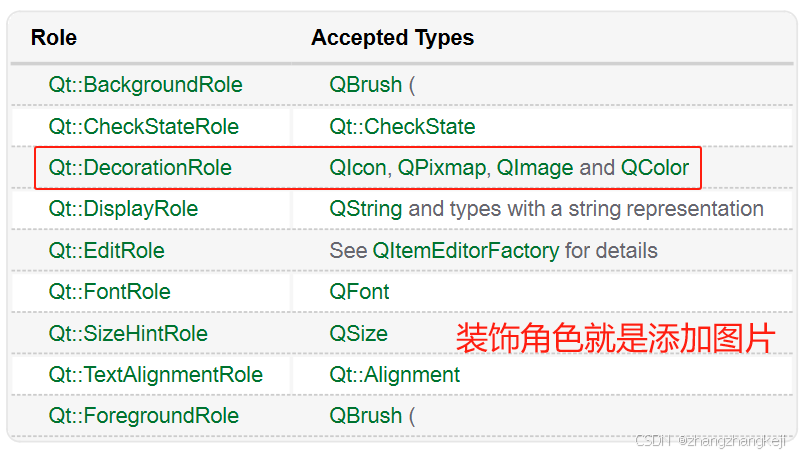
    DecorationRole = 1,
    //The data to be rendered as a decoration in the form of an icon.
    //  (QColor, QIcon or QPixmap)

    EditRole = 2,
    //The data in a form suitable for editing in an editor. (QString)

    ToolTipRole = 3, //The data displayed in the item's tooltip. (QString)
    StatusTipRole = 4, //The data displayed in the status bar. (QString)

    WhatsThisRole = 5,
    //The data displayed for the item in "What's This?" mode. (QString)

    // Metadata:Roles describing appearance and meta data (with associated types):
    FontRole =  6,
    //The font used for items rendered with the default delegate. (QFont)

    TextAlignmentRole =  7,
    //The alignment of the text for items rendered with the default delegate.
    //  (Qt::Alignment)

    BackgroundRole =  8, //The background brush used for
    //  items rendered with the default delegate. (QBrush)

    ForegroundRole =  9, //The foreground brush (text color, typically) used for
    //  items rendered with the default delegate. (QBrush)

    CheckStateRole = 10, //This role is used to obtain the
    //  checked state of an item. (Qt::CheckState)

    // Accessibility :Accessibility roles (with associated types):
    AccessibleTextRole = 11, //The text to be used by
    //accessibility extensions and plugins, such as screen readers. (QString)

    AccessibleDescriptionRole = 12,
    //A description of the item for accessibility purposes. (QString)

    // More general purpose
    SizeHintRole = 13,
    InitialSortOrderRole = 14,

    // Internal UiLib roles. Start worrying when public roles go that high.
    DisplayPropertyRole = 27,
    DecorationPropertyRole = 28,
    ToolTipPropertyRole = 29,
    StatusTipPropertyRole = 30,
    WhatsThisPropertyRole = 31,

    // Reserved
    UserRole = 0x0100
    //The first role that can be used for application-specific purposes

};
(2)给个图,易于理解 :
(3)
谢谢





 扫一扫
扫一扫


 2396
2396

 被折叠的 条评论
为什么被折叠?
被折叠的 条评论
为什么被折叠?
 到【灌水乐园】发言





