


 本文介绍了使用PaddleDetection在C++端进行半自动标注的过程,利用预训练的Mask R-CNN模型对图像进行预测,并详细阐述了掩膜输出、轮廓处理、JSON文件写入及图片Base64编码等步骤。
paddledetection C++端半自动标注(mask rcnn)
paddle下通过已经训练的模型对图片进行预测,保存成labelme的json文件(C++端)
c++端mask掩膜的输出
#include <sstream>
// for setprecision
#include <iomanip>
#include "include/object_detector.h"
using namespace cv;
using namespace std;

namespace PaddleDetection {

// Load Model and create model predictor
void ObjectDetector::LoadModel(const std::string& model_dir,
                               bool use_gpu,
                               const int min_subgraph_size,
                               const int batch_size,
                               const std::string& run_mode,
                               const int gpu_id) {
  paddle::AnalysisConfig config;
  std::string prog_file = model_dir + OS_PATH_SEP + "__model__";
  std::string params_file = model_dir + OS_PATH_SEP + "__params__";
  config.SetModel(prog_file, params_file);
  if (use_gpu) {
    config.EnableUseGpu(100, gpu_id);
    if (run_mode != "fluid") {
      auto precision = paddle::AnalysisConfig::Precision::kFloat32;
      if (run_mode == "trt_fp16") {
        precision = paddle::AnalysisConfig::Precision::kHalf;
      } else if (run_mode == "trt_int8") {
        printf("TensorRT int8 mode is not supported now, "
               "please use 'trt_fp32' or 'trt_fp16' instead");
      } else {
        if (run_mode != "trt_fp32") {
          printf("run_mode should be 'fluid', 'trt_fp32' or 'trt_fp16'");
        }
      }
      config.EnableTensorRtEngine(
          1 << 10,
          batch_size,
          min_subgraph_size,
          precision,
          false,
          false);
   }
  } else {
    config.DisableGpu();
  }
  config.SwitchUseFeedFetchOps(false);
  config.SwitchSpecifyInputNames(true);
  config.DisableGlogInfo();
  // Memory optimization
  config.EnableMemoryOptim();
  predictor_ = std::move(CreatePaddlePredictor(config));
}

// Visualiztion MaskDetector results
cv::Mat VisualizeResult(const cv::Mat& img,
                        const std::vector<ObjectResult>& results,
                        const std::vector<std::string>& lable_list,
                        const std::vector<int>& colormap) {
  cv::Mat vis_img = img.clone();
  for (int i = 0; i < results.size(); ++i) {
    int w = results[i].rect[1] - results[i].rect[0];
    int h = results[i].rect[3] - results[i].rect[2];
    cv::Rect roi = cv::Rect(results[i].rect[0], results[i].rect[2], w, h);

    // Configure color and text size
    std::ostringstream oss;
    oss << std::setiosflags(std::ios::fixed) << std::setprecision(4);
    oss << lable_list[results[i].class_id] << " ";
    oss << results[i].confidence;
    std::string text = oss.str();
    int c1 = colormap[3 * results[i].class_id + 0];
    int c2 = colormap[3 * results[i].class_id + 1];
    int c3 = colormap[3 * results[i].class_id + 2];
    cv::Scalar roi_color = cv::Scalar(c1, c2, c3);
    int font_face = cv::FONT_HERSHEY_COMPLEX_SMALL;
    double font_scale = 0.5f;
    float thickness = 0.5;
    cv::Size text_size = cv::getTextSize(text,
                                         font_face,
                                         font_scale,
                                         thickness,
                                         nullptr);
    cv::Point origin;
    origin.x = roi.x;
    origin.y = roi.y;

    // Configure text background
    cv::Rect text_back = cv::Rect(results[i].rect[0],
                                  results[i].rect[2] - text_size.height,
                                  text_size.width,
                                  text_size.height);

    // Draw roi object, text, and background
    cv::rectangle(vis_img, roi, roi_color, 2);
    cv::rectangle(vis_img, text_back, roi_color, -1);
    cv::putText(vis_img,
                text,
                origin,
                font_face,
                font_scale,
                cv::Scalar(255, 255, 255),
                thickness);
  }
  return vis_img;
}

void ObjectDetector::Preprocess(const cv::Mat& ori_im) {
  // Clone the image : keep the original mat for postprocess
  cv::Mat im = ori_im.clone();
  cv::cvtColor(im, im, cv::COLOR_BGR2RGB);
  preprocessor_.Run(&im, &inputs_);
}

void ObjectDetector::Postprocess(  const cv::Mat& raw_mat,std::vector<ObjectResult>* result)
{
  result->clear();
  int rh = 1;
  int rw = 1;
  if (config_.arch_ == "SSD" || config_.arch_ == "Face") {
    rh = raw_mat.rows;
    rw = raw_mat.cols;
  }

  int total_size = output_data_.size() / 6;
  auto label_lists = GetLabelList();
  int n_class = label_lists.size();

  for (int j = 0; j < total_size; ++j) {
    // Class id
    int class_id = static_cast<int>(round(output_data_[0 + j * 6]));
    // Confidence score
    float score = output_data_[1 + j * 6];
    int xmin = (output_data_[2 + j * 6] * rw);
    int ymin = (output_data_[3 + j * 6] * rh);
    int xmax = (output_data_[4 + j * 6] * rw);
    int ymax = (output_data_[5 + j * 6] * rh);
    int wd = xmax - xmin;
    int hd = ymax - ymin;

    //int mask_begin = j * 14 * 14 * 12 + class_id * 14 * 14;
    //int mask_end = mask_begin + 14 * 14;
    int mask_begin = j * mask_shape[2] * mask_shape[3] * mask_shape[1] + class_id * mask_shape[2] * mask_shape[3];
    int mask_end = mask_begin + mask_shape[2] * mask_shape[3];

    if (score > 0.8 && class_id > -1) {  //threshold_
      ObjectResult result_item;
      result_item.rect = {xmin, xmax, ymin, ymax};
      result_item.class_id = class_id;
      result_item.confidence = score;
      //输出掩膜代码
      double num = 0;
      std::vector<float>mask_temp = std::vector<float>(mask_data_.begin() + mask_begin, mask_data_.begin() + mask_end);
   /*   for (std::vector<float>::iterator iter = mask_data_.begin(); iter != mask_data_.end(); iter++)
      {
          std::cout << *iter << " ";
          num++;
      }*/


      //cv::Mat mask(14, 14, CV_8UC1);
      cv::Mat mask(mask_shape[2], mask_shape[3], CV_8UC1);
      for (int j = 0; j < mask_shape[2]; j++)
      {
          for (int k = 0; k < mask_shape[3]; k++)
          {
              mask.at<uchar>(j, k) = mask_temp[j * mask_shape[2] + k] * 255;    //掩膜
          }
      }

      cv::Mat re_mask;                                 //
      cv::resize(mask, re_mask, cv::Size(wd, hd));      //映射回原圖尺寸
      cv::threshold(re_mask, mask, 124, 255, cv::THRESH_BINARY);    //二值化輸出是mask
      mask.copyTo(result_item.mask);


      //可視化代碼
      vector<vector<Point>> contours;
      vector<Vec4i> hierarcy;
      findContours(mask, contours, hierarcy, CV_RETR_EXTERNAL, CV_CHAIN_APPROX_NONE);
      vector<Rect> boundRect(contours.size());  //定义外接矩形集合
      vector<RotatedRect> box(contours.size()); //定义最小外接矩形集合
      Point2f rect1[4];
      for (int i = 0; i < contours.size(); i++)
      {
          box[i] = minAreaRect(Mat(contours[i]));  //计算每个轮廓最小外接矩形
          boundRect[i] = boundingRect(Mat(contours[i]));

         //circle(dstImg, Point(box[i].center.x, box[i].center.y), 5, Scalar(0, 255, 0), -1, 8);  //绘制最小外接矩形的中心点
         box[i].points(result_item.rect_me);  //把最小外接矩形四个端点复制给rect数组
         box[i].points(rect1);
        // std::cout << rect1[0] << "    " << rect1[1] << "    " << rect1[2] << "    " << rect1[2] << "    " << endl;


          for (int j = 0; j < 4; j++)
          {
            // line(dstImg, rect[j], rect[(j + 1) % 4], Scalar(0, 0, 255), 2, 8);  //绘制最小外接矩形每条边
          }

      }

      result->push_back(result_item);
    }
  }
}

void ObjectDetector::Predict(const cv::Mat& im,
      const double threshold,
      const int warmup,
      const int repeats,
      const bool run_benchmark,
      std::vector<ObjectResult>* result) {
  // Preprocess image
  Preprocess(im);
  // Prepare input tensor
  auto input_names = predictor_->GetInputNames();
  for (const auto& tensor_name : input_names) {
    auto in_tensor = predictor_->GetInputTensor(tensor_name);
    if (tensor_name == "image") {
      int rh = inputs_.eval_im_size_f_[0];
      int rw = inputs_.eval_im_size_f_[1];
      in_tensor->Reshape({1, 3, rh, rw});
      in_tensor->copy_from_cpu(inputs_.im_data_.data());
    } else if (tensor_name == "im_size") {
      in_tensor->Reshape({1, 2});
      in_tensor->copy_from_cpu(inputs_.ori_im_size_.data());
    } else if (tensor_name == "im_info") {
      in_tensor->Reshape({1, 3});
      in_tensor->copy_from_cpu(inputs_.eval_im_size_f_.data());
    } else if (tensor_name == "im_shape") {
      in_tensor->Reshape({1, 3});
      in_tensor->copy_from_cpu(inputs_.ori_im_size_f_.data());
    } else if (tensor_name == "scale_factor") {
      in_tensor->Reshape({1, 4});
      in_tensor->copy_from_cpu(inputs_.scale_factor_f_.data());
    }
  }
  // Run predictor
  for (int i = 0; i < warmup; i++)
  {
    predictor_->ZeroCopyRun();
    // Get output tensor
    auto output_names = predictor_->GetOutputNames();
    auto out_tensor = predictor_->GetOutputTensor(output_names[0]);
    auto mask_tensor = predictor_->GetOutputTensor(output_names[1]);
    std::vector<int> output_shape = out_tensor->shape();
    std::vector<int> mask_shape = mask_tensor->shape();

    //std::cout << "In warmup mask shape:" <<mask_shape.size()<< std::endl;
    // Calculate output length
    int output_size = 1;
    for (int j = 0; j < output_shape.size(); ++j) {
      output_size *= output_shape[j];
    }

    if (output_size < 6) {
      std::cerr << "[WARNING] No object detected." << std::endl;
    }
    output_data_.resize(output_size);
    out_tensor->copy_to_cpu(output_data_.data());
  }

  std::clock_t start = clock();
  for (int i = 0; i < repeats; i++)
  {
    predictor_->ZeroCopyRun();
    // Get output tensor
    auto output_names = predictor_->GetOutputNames();
    auto out_tensor = predictor_->GetOutputTensor(output_names[0]);
    auto mask_tensor = predictor_->GetOutputTensor(output_names[1]);
    std::vector<int> output_shape = out_tensor->shape();
    mask_shape = mask_tensor->shape();//std::vector<int>
    for (std::vector<int>::iterator iter = mask_shape.begin(); iter != mask_shape.end(); iter++)
    {
        std::cout << *iter << " ";
    }
    cout << mask_shape[0] << mask_shape[1] << mask_shape[2] << mask_shape[3] << endl;
    // Calculate output length
    int output_size = 1;
    for (int j = 0; j < output_shape.size(); ++j) {
      output_size *= output_shape[j];
    }

    int mask_size = 1;
    for (int j = 0; j < mask_shape.size(); ++j) {
        mask_size *= mask_shape[j];
    }

    if (output_size < 6) {
      std::cerr << "[WARNING] No object detected." << std::endl;
    }

    output_data_.resize(output_size);
    mask_data_.resize(mask_size);

    out_tensor->copy_to_cpu(output_data_.data());
    mask_tensor->copy_to_cpu(mask_data_.data());
  }              //
  std::clock_t end = clock();

  float ms = static_cast<float>(end - start) / CLOCKS_PER_SEC / repeats * 1000.;
  printf("Inference: %f ms per batch image\n", ms);
  // Postprocessing result
  if(!run_benchmark) {
    Postprocess(im,  result);
  }
}

std::vector<int> GenerateColorMap(int num_class) {
  auto colormap = std::vector<int>(3 * num_class, 0);
  for (int i = 0; i < num_class; ++i) {
    int j = 0;
    int lab = i;
    while (lab) {
      colormap[i * 3] |= (((lab >> 0) & 1) << (7 - j));
      colormap[i * 3 + 1] |= (((lab >> 1) & 1) << (7 - j));
      colormap[i * 3 + 2] |= (((lab >> 2) & 1) << (7 - j));
      ++j;
      lab >>= 3;
    }
  }
  return colormap;
}

}  // namespace PaddleDetection
掩膜取轮廓再做处理
vector<Point> mask_vector(Mat srcImg) {      //输入为单个目标掩膜,多边形逼近法


    vector<vector<Point>> contours;
    vector<Vec4i> hierarcy;
    findContours(srcImg, contours, hierarcy, CV_RETR_EXTERNAL, CV_CHAIN_APPROX_NONE);
    vector<vector<Point>> contours_poly(contours.size());
    vector<Point>point_vector;
    approxPolyDP(Mat(contours[0]), point_vector, 1, true);//true曲线封闭,反之不封闭
    return  point_vector;
}

vector<Point> mask_vector_(Mat srcImg) {     //点距加长法

    vector<vector<Point>> contours;
    vector<Vec4i> hierarcy;
    findContours(srcImg, contours, hierarcy, CV_RETR_EXTERNAL, CV_CHAIN_APPROX_NONE);
    vector<vector<Point>> contours_poly(contours.size());
    vector<Point>point_vector;

    for (const auto& pin : contours[0])
    {
        static int num = 0;
        num++;
        if (num >= 10)
        {
            point_vector.push_back(pin);
            num = 0;
        }
    }
    return  point_vector;
}
写入json文件
void writeFileJson(vector<PaddleDetection::ObjectResult> result)   //
{

    Mat img = imread(image_path);
    vector<uchar> vecImg;                               //Mat 图片数据转换为vector<uchar>
    vector<int> vecCompression_params;
    vecCompression_params.push_back(CV_IMWRITE_JPEG_QUALITY);
    vecCompression_params.push_back(90);
    imencode(".png", img, vecImg, vecCompression_params);

    ZBase64 base64;
    string imgbase64 = base64.Encode(vecImg.data(), vecImg.size());     //实现图片的base64编码

   // cout << imgbase64 << endl;

///////////////////////////以上为labelme的imagadata的输出,不要也可
    std::string labellist[13] = {"1","2","3","4", "5","6","7" ,"8","9","10" ,"11","12","13" };

    std::string filePath = "D:\\labelmetest\\666.json";
    std::ofstream fout;
    fout.open(filePath.c_str());
    assert(fout.is_open());
    //根节点
    Json::Value root;

    //根节点属性
    root["version"] = Json::Value("4.5.6");
    root["flags"] = Json::Value(Json::objectValue);
    root["imagePath"] = Json::Value(image_path);
    root["imageData"] = Json::Value(imgbase64);
    root["imageHeight"] = Json::Value(960);
    root["imageWidth"] = Json::Value(1024);
    Json::Value shapes(Json::arrayValue);
    //每个目标一个信息
    for (const auto& item : result) {
        Json::Value point_arry(Json::arrayValue);
        vector<Point>mask_temp = mask_vector(item.mask);   //多边形点集

        for (const auto& temp : mask_temp) //int i = 0; i <sizeof(mask_temp); i++
        {
            Json::Value point_temp(Json::arrayValue);
            point_temp.append((temp.x+ item.rect[0]));
            point_temp.append(temp.y + item.rect[2]);
            point_arry.append(point_temp);
        }

        //一个目标的信息
        Json::Value ifo_one;
        ifo_one["label"] = Json::Value(labellist[item.class_id]);
        ifo_one["points"] = Json::Value(point_arry); //点的集合挂在point
        ifo_one["group_id"] = Json::Value();
        ifo_one["shape_type"] = Json::Value("polygon");
        ifo_one["flags"] = Json::Value(Json::objectValue);

        shapes.append(ifo_one);       //每个物体的点添加进去

    }
    root["shapes"] = Json::Value(shapes);

    std::string out = root.toStyledString();
    std::cout << out << std::endl;
    fout << out << std::endl;
}
jison文件的imagedata,图片转base64编码
#include "ZBase64.h"

string ZBase64::Encode(const unsigned char* Data, int DataByte)
{
    //编码表
    const char EncodeTable[] = "ABCDEFGHIJKLMNOPQRSTUVWXYZabcdefghijklmnopqrstuvwxyz0123456789+/";
    //返回值
    string strEncode;
    unsigned char Tmp[4] = { 0 };
    int LineLength = 0;
    for (int i = 0; i < (int)(DataByte / 3); i++)
    {
        Tmp[1] = *Data++;
        Tmp[2] = *Data++;
        Tmp[3] = *Data++;
        strEncode += EncodeTable[Tmp[1] >> 2];
        strEncode += EncodeTable[((Tmp[1] << 4) | (Tmp[2] >> 4)) & 0x3F];
        strEncode += EncodeTable[((Tmp[2] << 2) | (Tmp[3] >> 6)) & 0x3F];
        strEncode += EncodeTable[Tmp[3] & 0x3F];
        if (LineLength += 4, LineLength == 76) { strEncode += "\r\n"; LineLength = 0; }
    }
    //对剩余数据进行编码
    int Mod = DataByte % 3;
    if (Mod == 1)
    {
        Tmp[1] = *Data++;
        strEncode += EncodeTable[(Tmp[1] & 0xFC) >> 2];
        strEncode += EncodeTable[((Tmp[1] & 0x03) << 4)];
        strEncode += "==";
    }
    else if (Mod == 2)
    {
        Tmp[1] = *Data++;
        Tmp[2] = *Data++;
        strEncode += EncodeTable[(Tmp[1] & 0xFC) >> 2];
        strEncode += EncodeTable[((Tmp[1] & 0x03) << 4) | ((Tmp[2] & 0xF0) >> 4)];
        strEncode += EncodeTable[((Tmp[2] & 0x0F) << 2)];
        strEncode += "=";
    }

    return strEncode;
}

string ZBase64::Decode(const char* Data, int DataByte, int& OutByte)
{
    //解码表
    const char DecodeTable[] =
    {
        0, 0, 0, 0, 0, 0, 0, 0, 0, 0, 0, 0, 0, 0, 0, 0, 0, 0, 0, 0, 0, 0, 0, 0,
        0, 0, 0, 0, 0, 0, 0, 0, 0, 0, 0, 0, 0, 0, 0, 0, 0, 0, 0,
        62, // '+'
        0, 0, 0,
        63, // '/'
        52, 53, 54, 55, 56, 57, 58, 59, 60, 61, // '0'-'9'
        0, 0, 0, 0, 0, 0, 0,
        0, 1, 2, 3, 4, 5, 6, 7, 8, 9, 10, 11, 12,
        13, 14, 15, 16, 17, 18, 19, 20, 21, 22, 23, 24, 25, // 'A'-'Z'
        0, 0, 0, 0, 0, 0,
        26, 27, 28, 29, 30, 31, 32, 33, 34, 35, 36, 37, 38,
        39, 40, 41, 42, 43, 44, 45, 46, 47, 48, 49, 50, 51, // 'a'-'z'
    };
    //返回值
    string strDecode;
    int nValue;
    int i = 0;
    while (i < DataByte)
    {
        if (*Data != '\r' && *Data != '\n')
        {
            nValue = DecodeTable[*Data++] << 18;
            nValue += DecodeTable[*Data++] << 12;
            strDecode += (nValue & 0x00FF0000) >> 16;
            OutByte++;
            if (*Data != '=')
            {
                nValue += DecodeTable[*Data++] << 6;
                strDecode += (nValue & 0x0000FF00) >> 8;
                OutByte++;
                if (*Data != '=')
                {
                    nValue += DecodeTable[*Data++];
                    strDecode += nValue & 0x000000FF;
                    OutByte++;
                }
            }
            i += 4;
        }
        else// 回车换行,跳过
        {
            Data++;
            i++;
        }
    }
    return strDecode;
}
最后效果
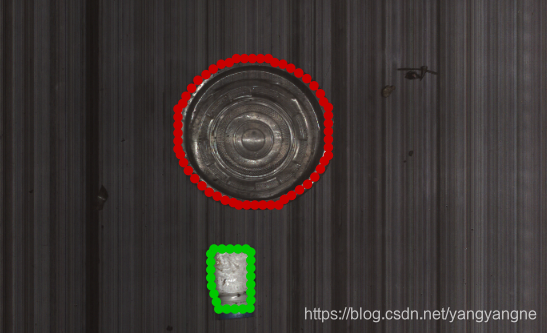
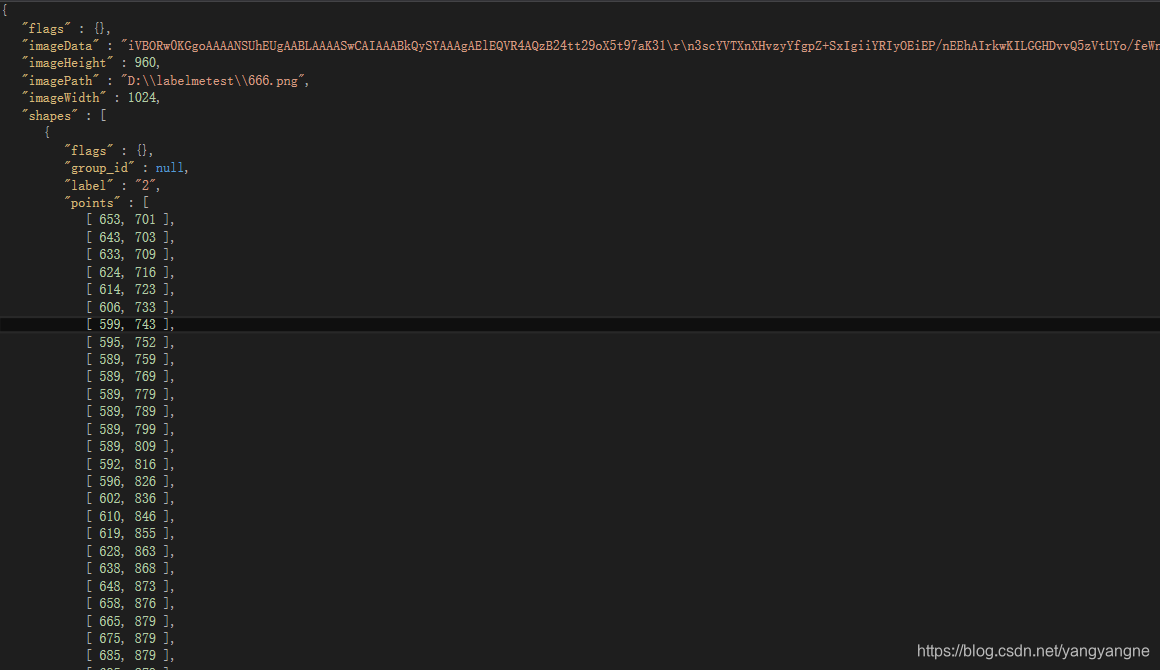





 扫一扫
扫一扫


 2076
2076

 被折叠的 条评论
为什么被折叠?
被折叠的 条评论
为什么被折叠?
 到【灌水乐园】发言





