



 本文深入探讨了使用GPU进行粒子系统模拟的技术,详细介绍了如何利用OpenGL的Transform Feedback特性实现实时的粒子更新与渲染,以及其在烟花效果模拟中的具体应用。
http://ogldev.atspace.co.uk/www/tutorial28/tutorial28.html
particle system is a general name of a large number of techniques that simulate natural phenomena such as smoke, dust, fireworks, rain, etc.
the common theme in all these phenomena is that they are composed of a large amount of small particles that move together in a way which is characteristic of each type of phenomenon.
in order to simulate a natural phenomenon made from particles we usually matian the position as well as other attributes for each particle (velocity, color, etc) and perform the following steps once per frame:
1/ update the attributes of each particle. this step involves some math calculations (ranging from very simple to very complex–depending on the complexity of the phenomenon.
2/ render the particles (as simple colored points or full blown texture mapped billboard quads).
in the past step 1 usually took place on the CPU. the application would access the vertex buffer, scan its contents and update the attributes of each and very particle. step 2 was more straightforward and took place on the GPU as any other of rendering. there are two problems with this approach:
-
updating the particles on the CPU requires the opengl driver to copy the contents of the vertex buffer from the gpu memory (on discrete cards this means over the PC bus) to the CPU memory. the phenomenon that we are interested in usually require a light amout of particles. 10,000 particles is not a rare number in that regard. if each particle takes up 64 bytes and we are running at 60 frames per second (very good frame rate) this means copying back and forth 640k frorm the GPU to the CPU 60 times each second. this can have an negative effect on the performance of the application. as the number of particles grows larger the effect increases.
-
updating the particle attributes means running the same mathematical formula on different data items. this is a perfect example of distributed computing that the GPU excels at. running it on the GPU means serializing the entire update process. if our CPU is multi core we can take advantage of if and reduce the total amount of time but that requires more work from the application. running the update process on the GPU means that we get parallel execution for free.
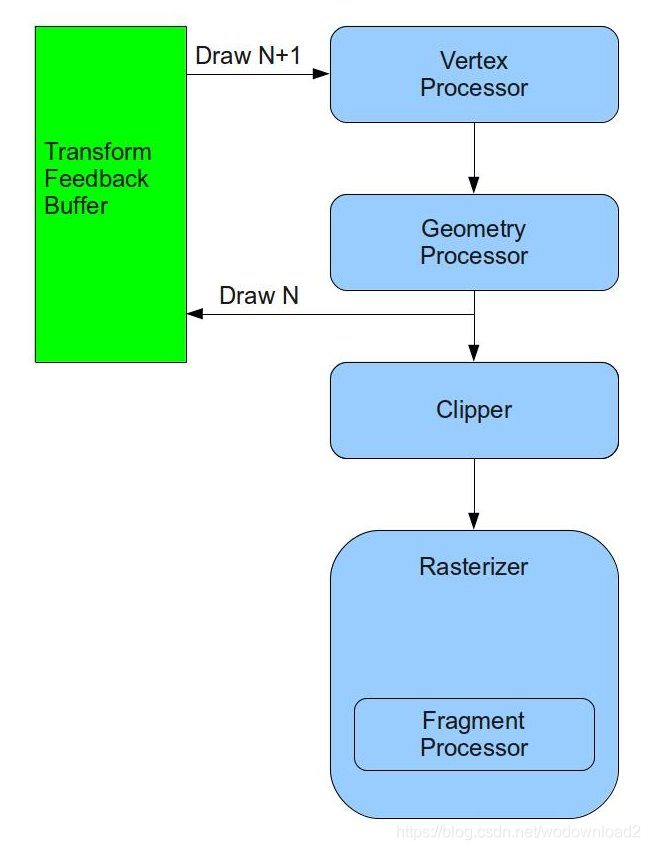
directX10 introduced a new feature known as Stream Output that is very useful for implementing particle system. opengl followed in version 3.0 with the same feature and named it Transform Feedback. the idea behind this feature is that we can connect a special type of buffer called Transform Feedback Buffer right after the GS (or the VS if the GS is absent) and send our transformed primitives to it.
in addition, we can decide whether the primitives will also continue on their regular route to the rasterizer.
the same buffer can be connected as a vertex buffer in the next draw and provide the vertices that were output in the previous draw as input into the next draw.
this loop enables the two steps above to take place entirely on the GPU with no application involvement (other than connecting the proper buffers for each draw and setting up some state).
the following diagram shows the new architecture of the pipeline:
how many primitives end up in the transform feedback buffer?
well, if there is no GS the answer is simple - it is based on the number of vertices from the draw call parameters.
however, if the GS is present the number of primitives is unknown.
since the GS is capable of creating and destroying primitives on the fly (and can also incude loops and branches)
we can not always calculate the totoal number of primitives that will end up in the buffer.
so how can we draw from it later when we do not know exactly the number of vertices it contains?
to overcome this challenge transform feedback also introduced a new type of draw call that does not take the number of vertices as a parameter.
they system automatically tracks the number of vertices for us for each buffer and later uses that number internally when the buffer is used for input.
if we append several times to the transform feedback buffer (by drawing into it several times without using it as input) the number of vertices is increased accordingly.
we have the option of reseting the offset inside the buffer whenever we want and the system will also reset the number of vertices.
in this tutorial we will use transform feedback in order to simulate the effect of fireworks.
fireworks are relatively easy to simluate in terms of the math involved so we will be able to focus on getting transform feedback up and running.
the same framework can later be used for other types of particle systems as well.
opengl enfores a general limitation that the same resource can not be bound for both input and output in the same draw call.
this means that if we want to update the particles in a vertex buffer we actually need two transform feedback buffers and toggle between them.
on frame 0 we will update the particles in buffer A and render the particles from buffer B and
on frame 1 we will update the particles in buffer B and render the particles from buffer A.
all this is transparent to the viewer.
in addition, we will also have two techniques – one technique will be responsible for updating the particles and the other for rendering.
we will use the billboarding technique from the previous tutorial for rendering so make sure u are familiar with it.
Source walkthru
(particle_system.h:29)

class ParticleSystem
{
public:
    ParticleSystem();

    ~ParticleSystem();

    bool InitParticleSystem(const Vector3f& Pos);

    void Render(int DeltaTimeMillis, const Matrix4f& VP, const Vector3f& CameraPos);

private:

    bool m_isFirst;
    unsigned int m_currVB;
    unsigned int m_currTFB;
    GLuint m_particleBuffer[2];
    GLuint m_transformFeedback[2];
    PSUpdateTechnique m_updateTechnique;
    BillboardTechnique m_billboardTechnique;
    RandomTexture m_randomTexture;
    Texture* m_pTexture;
    int m_time;
};
the ParticleSystem class encapsulates all the mechanics involved in managing the transform feedback buffer.
one instance of this class is created by the application and initialized with the world space position of the fireworks launcher.
in the main render loop the ParticleSystem::Render() function is called and takes three parameters: the delta time from the previous call in milliseconds, the product of the viewport and projectoin matrices and the world space position of the camera.
the class also has a few attributes:
an indicator for the first time Render() is called,
two indices that specify which buffer is currently the vertex buffer (input) and which is the transform feedback buffer (output),
two handles for the vertex buffers,
two handles for the transform feedback objects,
the update and render techniques,
a texture that contains random numbers,
the texture that will be mapped on the particles and
the current global time variable.
(particle_system.cpp:31)

struct Particle
{
    float Type;
    Vector3f Pos;
    Vector3f Vel;
    float LifetimeMillis;
};
each particle has the above structure.
a particle can be either a launcher,
a shell or a secondary shell.
the launcher is static and is responsible for generating the other particles.
it is unique in the system.
the launcher periodically creats shell particles and fires them upwards.
after a few seconds the shell explode into secondary shells that fly into random directions.
all particles except the launcher has a lifetime which is tracked by the system in milliseconds.
when the lifetime reaches a certain threshold the particle is removed.
each particle also has a current position and velocity.
when a particle is created it is given some velocity (a vector).
this velocity is influenced by gravity which pulls the particle down.
on every frame we use the velocity to update the world position of the particle.
this positoin is used later to render the pipeline.
(particle_system.cpp:67)

bool ParticleSystem::InitParticleSystem(const Vector3f& Pos)
{
    Particle Particles[MAX_PARTICLES];
    ZERO_MEM(Particles);

    Particles[0].Type = PARTICLE_TYPE_LAUNCHER;
    Particles[0].Pos = Pos;
    Particles[0].Vel = Vector3f(0.0f, 0.0001f, 0.0f);
    Particles[0].LifetimeMillis = 0.0f;

    glGenTransformFeedbacks(2, m_transformFeedback);
    glGenBuffers(2, m_particleBuffer);

    for (unsigned int i = 0; i < 2 ; i++) {
        glBindTransformFeedback(GL_TRANSFORM_FEEDBACK, m_transformFeedback[i]);
        glBindBuffer(GL_ARRAY_BUFFER, m_particleBuffer[i]);
        glBufferData(GL_ARRAY_BUFFER, sizeof(Particles), Particles, GL_DYNAMIC_DRAW);
        glBindBufferBase(GL_TRANSFORM_FEEDBACK_BUFFER, 0, m_particleBuffer[i]);
    }
this is the first part of the initialization of the particle system.
we set up storage for all the particles on the stack and initialize just the first particle as a launcher(the remaining particles will be created at render time).
the position of the launcher is also the starting position of all the particles it is going to create and the velocity of the launcher is their starting velocity (the launcher itself is static).
we are gonig to use two transform feedback buffers and toggle between them (drawing into one while using the other as input and vice verse).
so we create two tansform feedback objects using the function glGenTransformFeedbacks. the transform feedback object encapsulates all the state that is attached to the transform feedback object.
we also create two buffer objects – one for each transform feedback object.
we then perform the same series of operations for both objects (see below).
we start by binding a transform feedback object to the GL_TRANSFORM_FEEDBACK target using glBindTransformFeedback() function. this makes the object “current” so that following operations (relevant to transform feedback) are performed on it.
next we bind the corresponding buffer object to the GL_ARRAY_BUFFER which makes it a regular vertex buffer and load the contents of the particle array into it.
finally we bind the corresponding buffer object to the GL_TRANSFORM_FEEDBACK_BUFFER target and specify the buffer index as zero.
this makes this buffer a transform feedback buffer and places it as index zero.
we can have the primitives redirected into more than one buffer by binding several buffers at different indices.
here we only need one buffer.
so now we have two transform feedback objects with cooresponding buffer objects that can serve both as vertex buffers as well as transform feedback buffers.
we will not review the remainder of the InitParticleSystem() function because there is nothing new there.
we simply need to initialize the two techniques (memebers of the ParticleSystem class)
and set some static state into them as well as load the texture that will be mapped on the particles. check the code for more details.
(particle_system.cpp:124)

void ParticleSystem::Render(int DeltaTimeMillis, const Matrix4f& VP, const Vector3f& CameraPos)
{
    m_time += DeltaTimeMillis;

    UpdateParticles(DeltaTimeMillis);

    RenderParticles(VP, CameraPos);

    m_currVB = m_currTFB;
    m_currTFB = (m_currTFB + 1) & 0x1;
}
this is the main render function of the ParticleSystem class. it is responsible for updating the global time counter and toggling between the two buffer indices (m_currVB is the current vertex buffer and is initialized to 0 while m_currTFB is the current transform feedback buffer and is initialized to 1).
the main job of this function is to call the two private functions that update the particle attributes and then render them.
let us take a look at how we update the particles.
(particle_system.cpp:137)

void ParticleSystem::UpdateParticles(int DeltaTimeMillis)
{
    m_updateTechnique.Enable();
    m_updateTechnique.SetTime(m_time);
    m_updateTechnique.SetDeltaTimeMillis(DeltaTimeMillis);

    m_randomTexture.Bind(RANDOM_TEXTURE_UNIT);
we start the particle update by enabling the cooresponding technique and setting some dynamic state into it.
the technique will need to know the amount of time that has passed from the previous render because this is the factor in the movement equation and it needs the global time as a semi randome seed for accessing the random texture.
we dedicate GL_TEXTURE3 as the texture unit for binding random textures.
the random texture is used to provide directions for the generated particles (we will later see how this texture is created).
glEnable(GL_RASTERIZER_DISCARD);
the next function call is something that we have not seen before.
since the only purpose of the draw call further down this function is to upate the transform feedback buffer we prefer to cut the flow of primitives after that and prevent them from also being rasterized to the screen.
we have another draw call later on that does that.
Calling glEnable() with the GL_RASTERIZER_DISCARD
flags tells the pipeline to discard all primitives before they reach the rasterizer (but after the optional transform feedback stage).
glBindBuffer(GL_ARRAY_BUFFER, m_particleBuffer[m_currVB]);
glBindTransformFeedback(GL_TRANSFORM_FEEDBACK, m_transformFeedback[m_currTFB]);
the next two calls handle the toggling between the roles of the two buffers that we have created.
m_currVB is used as an index (either 0 or 1) into the array of VBs and we bind the buffer in that slot as a vertex buffer (for input).
m_currTFB is used as an index (always opposing m_currVB) into the transform feedback object array and we
bind the object in that slot as transform feedback (which brings along with it the attached state–the actual buffer).
 	glEnableVertexAttribArray(0);
    glEnableVertexAttribArray(1);
    glEnableVertexAttribArray(2);
    glEnableVertexAttribArray(3);

    glVertexAttribPointer(0,1,GL_FLOAT,GL_FALSE,sizeof(Particle),0); // type
    glVertexAttribPointer(1,3,GL_FLOAT,GL_FALSE,sizeof(Particle),(const GLvoid*)4); // position
    glVertexAttribPointer(2,3,GL_FLOAT,GL_FALSE,sizeof(Particle),(const GLvoid*)16); // velocity
    glVertexAttribPointer(3,1,GL_FLOAT,GL_FALSE,sizeof(Particle),(const GLvoid*)28); // lifetime
we already know the next few function calls.
they simply set up the vertex attributes of the particles in the vertex buffer.
u will later see how we make sure that the input layout is the same as the output layout.
glBeginTransformFeedback(GL_POINTS);
the real fun starts here. glBeginTransformFeedback() makes transform feedback active.
all the draw calls after that, and until glEndTransformFeedback() is called, redirect their output to the transform feedback buffer according to the currently bound transform feedback object.
this function also takes a topology parameter.
the way transform feedback works is that only complete primitives (i.e. lists) can be written into the buffer.
this means that if u draw four vertices in triangle strip topology or six vertices in triangle
list topology, u end up with six vertices (two triangles) in the feedback buffer in both cases.
the available topologies to this function are therefore:
GL_POINTS - the draw call topology must also be GL_POINTS.
GL_LINES - the draw call topology must be GL_LINES, GL_LINE_LOOP or GL_LINE_STRIP.
GL_TRIANGLES - the draw call topology must be GL_TRIANGLES, GL_TRIANGLE_STRIP or GL_TRIANGLE_FAN.





 扫一扫
扫一扫


 6024
6024

 被折叠的 条评论
为什么被折叠?
被折叠的 条评论
为什么被折叠?
 到【灌水乐园】发言





