


 本文介绍了一种使用C#实现的离线语音合成方法,并对比了在线语音合成方式。通过引入特定SDK及参数配置,实现了流畅自然的语音输出。文中详细记录了从SDK下载到代码实现的全过程。
好久没有更新文章了,今天我们继续更新科大讯飞的语音的文章。
之前在语音合成部分由于在线语音合成的处理时间太长,所以使用了C#自带的语音合成,处理是快了,但是合成的声音特别难听。
所以今天更新一个离先语音合成的文章。
废话不多说,直接进入正题。
1.下载语音合成SDK,需要选择离线的,否者无法使用离线的。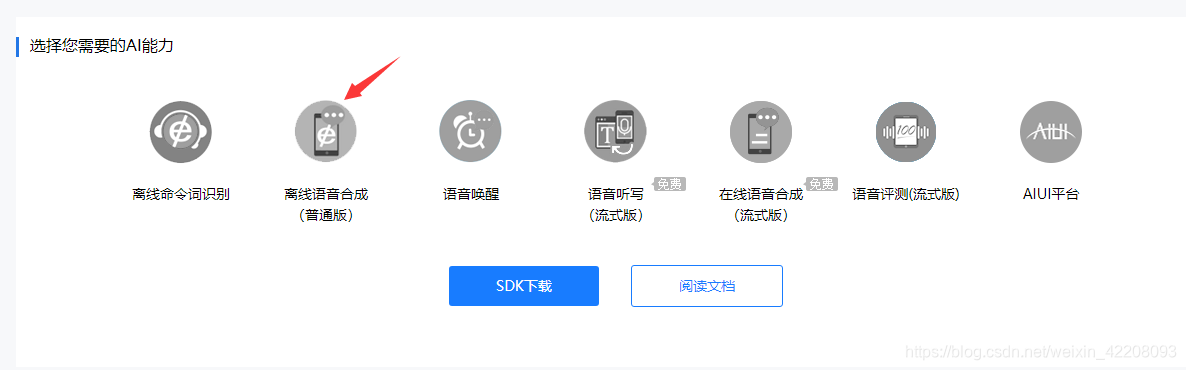
2.解压SDK,这里我们需要用到common.jet;xiaofeng.jet;xiaoyan.jet这三个.jet文件必须要,缺一不可,否则会报错误代码:文件缺失。然后就是msc_x64.dll库。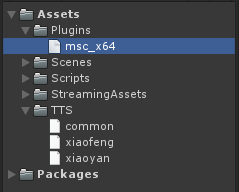
3.代码部分
using UnityEngine;
using msc;
using System;
using System.Text;
using System.IO;
using System.Runtime.InteropServices;
using System.Threading;
using UnityEngine.Networking;
using System.Collections;

public class Main : MonoBehaviour
{
    private const string speekText = "北京市今天全天晴,气温7℃ ~ 19℃,空气质量优,有北风4-5级,挺凉快的。";
    private const string session_begin_params = "voice_name = xiaoyan, text_encoding = utf8, sample_rate = 16000, speed = 50, volume = 50, pitch = 50, rdn = 0";
    private string offline_session_begin_params;
    private IntPtr session_id;
    private int err_code;

    private byte[] bytes;

    private void Awake()
    {
        string xiaoyan_path = (Application.dataPath + "/TTS/xiaoyan.jet").Replace("/", "\\");
        string common_path = (Application.dataPath + "/TTS/common.jet").Replace("/", "\\");
        offline_session_begin_params = "engine_type = local, voice_name = xiaoyan, text_encoding = utf8, tts_res_path = fo|" + xiaoyan_path + ";fo|" + common_path + ", sample_rate = 16000, speed = 50, volume = 50, pitch = 50, rdn = 0";
    }

    private void Start()
    {
        int message = MSCDLL.MSPLogin("", "", "appid=5f80198b,word_dir= . ");
        if (message != (int)Errors.MSP_SUCCESS)
        {
            Debug.LogError("登录失败!错误信息:" + message);
        }
        Debug.Log("登录成功");
    }

    private void Update()
    {
        if (Input.GetMouseButtonDown(0))
        {
            //Online_TTS(speekText);
            Offline_TTS(speekText);
        }
    }

    private void Online_TTS(string speekText)
    {
        //语音合成开始
        session_id = MSCDLL.QTTSSessionBegin(session_begin_params, ref err_code);

        if (err_code != (int)Errors.MSP_SUCCESS)
        {
            Debug.LogError("初始化语音合成失败,错误信息:" + err_code);
            return;
        }
        //语音合成设置文本
        err_code = MSCDLL.QTTSTextPut(session_id, speekText, (uint)Encoding.Default.GetByteCount(speekText), string.Empty);
        if (err_code != (int)Errors.MSP_SUCCESS)
        {
            Debug.LogError("向服务器发送数据失败,错误信息:" + err_code);
            return;
        }

        uint audio_len = 0;
        SynthStatus synth_status = SynthStatus.MSP_TTS_FLAG_STILL_HAVE_DATA;
MemoryStream memoryStream = new MemoryStream() 最低0.47元/天 解锁文章






 扫一扫
扫一扫


 8743
8743


 到【灌水乐园】发言



