


步骤
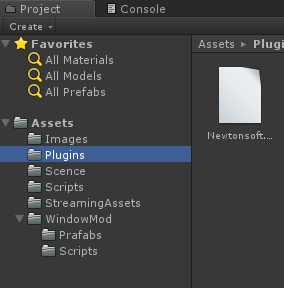
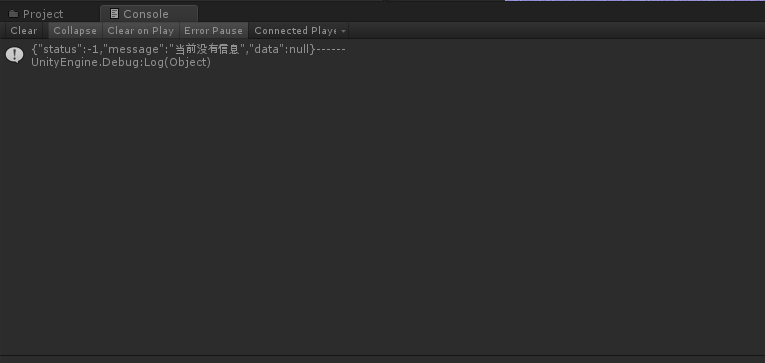
1.新建工程,再工程新建文件夹,取名为Plugins,名字切记不要打错,如下图所示: 2.将Newtonsoft.Json文件导入到Plugins文件夹中,这个文件的作用是解析json文件,如下图所示: 3.完成解析网络json功能的代码,代码如下所示: ` using System; using System.Collections; using System.Collections.Generic; using UnityEngine; using UnityEngine.Networking; using Newtonsoft.Json;

public class HttpNet : MonoBehaviour { Action callback;
     // Start is called before the first frame update


     void

     Start
     (
     )


     {

    callback
     +=
      Dispchater
     ;


     StartCoroutine
     (
     GetData
     (
     callback
     )
     )
     ;


     }


     private

     void

     Dispchater
     (
     )


     {

    Debug
     .
     log
     (
     "触发事件!"
     )
     ;


     }


     //加载路径图片,循环解析json


     IEnumerator

     GetData
     (
     Action
      action
     )
     //Action action


     {


     while

     (
     true
     )


     {


     yield

     return

     new

     WaitForSeconds
     (
     2.0f
     )
     ;


     //链接就不写了


     UnityWebRequest
      unityWebRequest
     =
      UnityWebRequest
     .
     Get
     (
     "xxxxxxxx"
     )
     ;


     //UnityWebRequest unityWebRequest = UnityWebRequest.Get(jsonUrl);


     yield

     return
      unityWebRequest
     .
     SendWebRequest
     (
     )
     ;


     if

     (
     !
     unityWebRequest
     .
     isNetworkError
     )


     {


     string
      data
     =
      unityWebRequest
     .
     downloadHandler
     .
     text
     ;


     Data
      d
     =
      JsonConvert
     .
     DeserializeObject
     <
     Data
     >
     (
     data
     )
     ;


     if

     (
     d
     !=

     null
     )


     {

                Debug
     .
     Log
     (
     data
     +

     "------"
     )
     ;


     if

     (
     d
     .
     status
     ==

     "1"
     )


     {


     if

     (
     action
     !=

     null
     )


     {


     action
     (
     )
     ;


     }


     }


     }

        }

     }


     }
} public class Data { public string status; public String message; public object data; }` 4.将此脚本挂载到场景中的物体上,运行工程,可以 看到已经解析到数据了,如下图所示:





 扫一扫
扫一扫


 1619
1619

 被折叠的 条评论
为什么被折叠?
被折叠的 条评论
为什么被折叠?
 到【灌水乐园】发言





