



1、环境介绍
硬件:t527板卡
软件:原厂t527-tina5.0-aiot-v1.4 sdk(buildroot,Linux 5.15)
2、前言
本文主要记录 T527 下 MIPI 屏的调试,只专注于链路调试,不介绍具体屏幕的调试(初始化序列,时序等)。
3、T527 MIPI-DSI 资源
T527 内置双 MIPI DSI 控制器,单路 4-lane 支持 1080p@60Hz,双路 4+4 lane 可上 4K,适用于高分双屏产品,支持命令/视频模式与完整 LP/HS 功能。
4、T527 显示通路路由
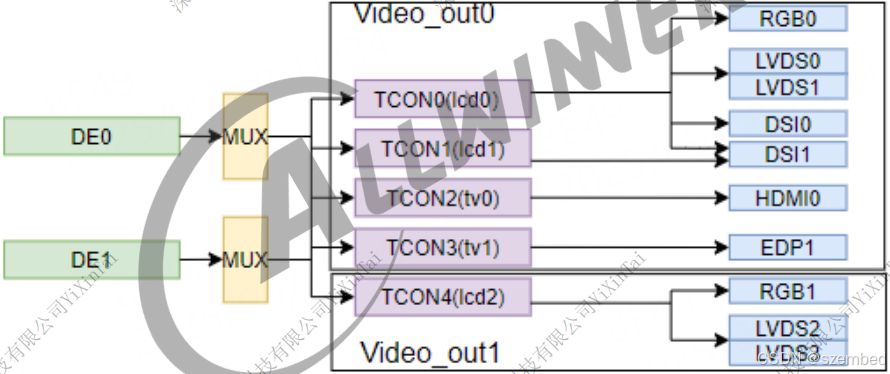
5、原理图查看
T527板卡板载两路 MIPI-DSI 接口:
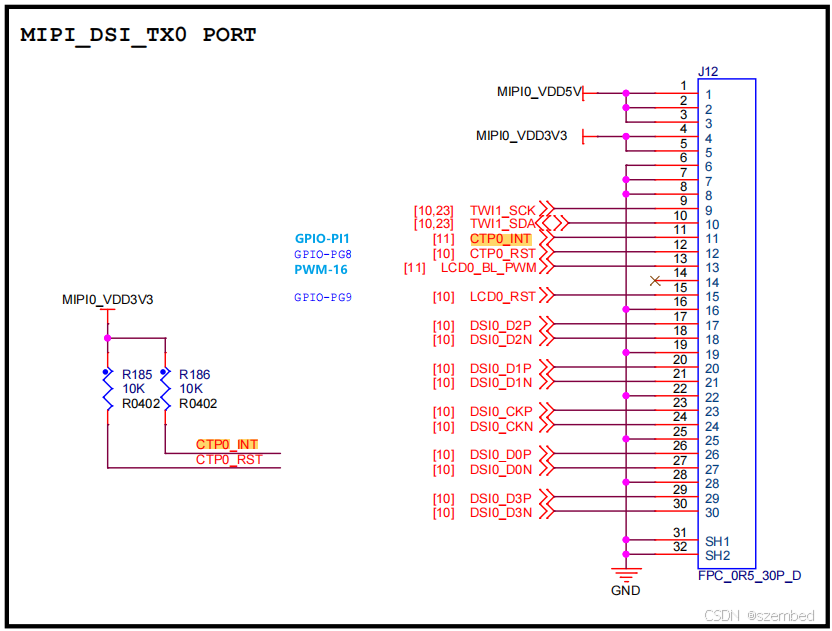
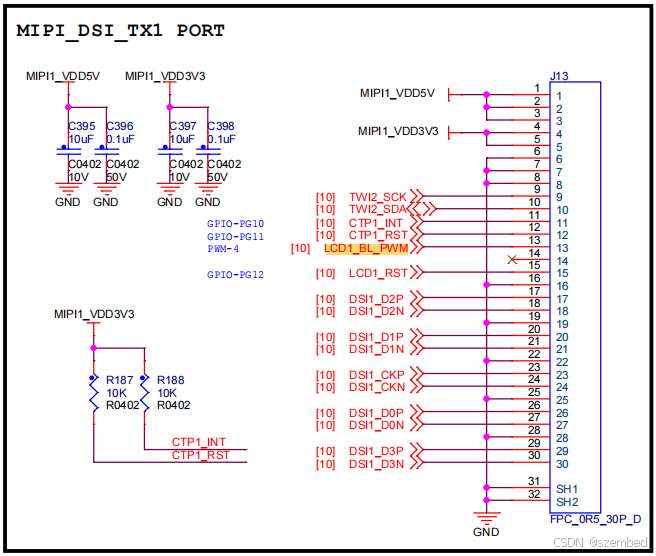
原理图小节如下:
MIPI-DSI0:
- 触摸:TWI1
- CTP0_INT:PI1
- CTP0_RST:PG8
- PWM:PWM0_16
- LCD_RST:PG9
MIPI-DSI1:
- 触摸:TWI2
- CTP0_INT:PG10
- CTP0_RST:PG11
- PWM:PWM0_4
- LCD_RST:PG12
6、内核配置



7、T527 DRM 显示通路
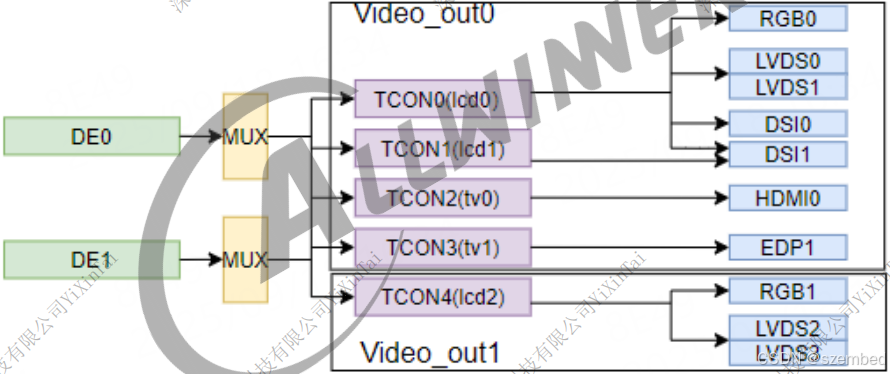
8、设备树配置
以下将直接展示 MIPI 屏配置的相关设备树节点,不再详细介绍 MIPI 屏本身如何适配。如果只配置一路就是单显,配置两路就是双屏异显。T527 有两个 DE,至多支持双显。
# mipi dsi0
&de -> &vo0 -> &dlcd0(tcon) -> &dsi0 -> &dsi0combophy -> &dsi0_panel
# mipi dsi1
&de -> &vo0 -> &dlcd0(tcon) -> &dsi1 -> &dsi1combophy -> &dsi1_panel
配置两个 MIPI 接口时,需要把其它显示链路关闭,比如 HDMI、LVDS、EDP。
8.1、MIPI-DSI0
# &de -> &vo0 -> &dlcd0(tcon) -> &dsi0 -> &dsi0combophy -> &dsi0_panel
/ {
dsi0_backlight: backlight0 {
compatible = "pwm-backlight";
status = "okay";
brightness-levels = <
0 1 2 3 4 5 6 7
8 9 10 11 12 13 14 15
16 17 18 19 20 21 22 23
24 25 26 27 28 29 30 31
32 33 34 35 36 37 38 39
40 41 42 43 44 45 46 47
48 49 50 51 52 53 54 55
56 57 58 59 60 61 62 63
64 65 66 67 68 69 70 71
72 73 74 75 76 77 78 79
80 81 82 83 84 85 86 87
88 89 90 91 92 93 94 95
96 97 98 99 100 101 102 103
104 105 106 107 108 109 110 111
112 113 114 115 116 117 118 119
120 121 122 123 124 125 126 127
128 129 130 131 132 133 134 135
136 137 138 139 140 141 142 143
144 145 146 147 148 149 150 151
152 153 154 155 156 157 158 159
160 161 162 163 164 165 166 167
168 169 170 171 172 173 174 175
176 177 178 179 180 181 182 183
184 185 186 187 188 189 190 191
192 193 194 195 196 197 198 199
200 201 202 203 204 205 206 207
208 209 210 211 212 213 214 215
216 217 218 219 220 221 222 223
224 225 226 227 228 229 230 231
232 233 234 235 236 237 238 239
240 241 242 243 244 245 246 247
248 249 250 251 252 253 254 255>;
default-brightness-level = <200>;
pwms = <&pwm0 13 5000000 0>;
};
dsi0_panel_0: dsi0_panel_0@0 {
compatible = "allwinner,panel-dsi";
status = "okay";
reg = <0>;
gpio-num = <1>;
enable0-gpios = <&pio PC 3 GPIO_ACTIVE_HIGH>;
enable-delay-ms = <10>;
reset-gpios = <&pio PG 9 GPIO_ACTIVE_HIGH>;
reset-on-sequence = <1 10>, <0 20>, <1 100>;
reset-off-sequence = <0 100>;
backlight = <&dsi0_backlight>;
dsi,flags = <(MIPI_DSI_MODE_VIDEO | MIPI_DSI_MODE_VIDEO_BURST)>;
dsi,lanes = <4>;
dsi,format = <0>;
panel-init-sequence = [
15 00 02 80 AC
15 00 02 81 B8
15 00 02 82 09
15 00 02 83 78
15 00 02 84 7F
15 00 02 85 BB
15 00 02 86 70
05 C8 01 11
05 C8 01 29
];
panel-exit-sequence = [
05 78 01 28
05 00 01 10
];
display-timings {
native-mode = <&dsi0_timing0>;
dsi0_timing0: dsi0_timing0 {
clock-frequency = <51668640>;
hback-porch = <160>;
hactive = <1024>;
hfront-porch = <160>;
hsync-len = <10>;
vback-porch = <23>;
vactive = <600>;
vfront-porch = <12>;
vsync-len = <1>;
};
};
port {
dsi0_panel0_in: endpoint@0 {
#address-cells = <2>;
#size-cells = <1>;
reg = <0>;
remote-endpoint = <&dsi0_panel_output_0>;
};
};
};
};
&de {
chn_cfg_mode = <3>;
status = "okay";
};
&vo0 {
status = "okay";
};
&dlcd0 {
status = "okay";
};
&dsi0combophy {
status = "okay";
};
&dsi0 {
status = "okay";
pinctrl-0 = <&dsi0_4lane_pins_a>;
pinctrl-1 = <&dsi0_4lane_pins_b>;
pinctrl-names = "active","sleep";
ports {
dsi0_out: port@1 {
dsi0_out_panel: endpoint@0 {
#address-cells = <2>;
#size-cells = <1>;
reg = <0>;
remote-endpoint = <&dsi0_panel_input>;
};
};
};
dsi0_panel: dsi0_panel@0 {
compatible = "allwinner,virtual-panel";
status = "okay";
reg = <0>;
ports {
dsi0_panel_in: port@0 {
reg = <0>;
dsi0_panel_input: endpoint@0 {
reg = <0>;
remote-endpoint = <&dsi0_out_panel>;
};
};
dsi0_panel_out: port@1 {
reg = <1>;
dsi0_panel_output_0: endpoint@0 {
reg = <0>;
remote-endpoint = <&dsi0_panel0_in>;
};
};
};
};
};
&pio {
twi1_pins_default: twi1@0 {
/* pins = "PB4", "PB5"; */
pins = "PE11", "PE12";
/* pins = "PH2", "PH3"; */
function = "twi1";
drive-strength = <10>;
bias-pull-up;
};
twi1_pins_sleep: twi1@1 {
/* pins = "PB4", "PB5"; */
pins = "PE11", "PE12";
/* pins = "PH2", "PH3"; */
function = "gpio_in";
};
pwm0_13_pin_active: pwm0_13@0 {
/* pins = "PI12"; */
/* pins = "PD13"; */
pins = "PI12";
function = "pwm0_13";
};
pwm0_13_pin_sleep: pwm0_13@1 {
/* pins = "PI12"; */
/* pins = "PD13"; */
pins = "PI12";
function = "gpio_in";
bias-pull-down;
};
};
&pwm0_13 {
pinctrl-names = "active", "sleep";
pinctrl-0 = <&pwm0_13_pin_active>;
pinctrl-1 = <&pwm0_13_pin_sleep>;
status = "okay";
};
&twi1 {
clock-frequency = <100000>;
pinctrl-0 = <&twi1_pins_default>;
pinctrl-1 = <&twi1_pins_sleep>;
pinctrl-names = "default", "sleep";
/* For stability and backwards compatibility, we recommend setting ‘twi_drv_used’ to 1 */
twi_drv_used = <1>;
twi-supply = <®_dcdc4>;
status = "okay";
/* LCD0 Touch */
ctp: ctp@5d {
compatible = "allwinner,goodix";
device_type = "ctp";
reg = <0x5d>;
status = "okay";
ctp_name = "gt9xxnew_ts";
ctp_twi_id = <0x1>;
ctp_twi_addr = <0x5d>;
ctp_screen_max_x = <1024>;
ctp_screen_max_y = <600>;
ctp_revert_x_flag = <0x1>;
ctp_revert_y_flag = <0x1>;
ctp_exchange_x_y_flag = <0x0>;
ctp_int_port = <&pio PI 1 GPIO_ACTIVE_HIGH>;
ctp_wakeup = <&pio PG 8 GPIO_ACTIVE_HIGH>;
};
};
8.2、MIPI-DSI1
# &de -> &vo0 -> &dlcd0(tcon) -> &dsi1 -> &dsi1combophy -> &dsi1_panel
/ {
dsi1_backlight: backlight1 {
compatible = "pwm-backlight";
status = "okay";
brightness-levels = <
0 1 2 3 4 5 6 7
8 9 10 11 12 13 14 15
16 17 18 19 20 21 22 23
24 25 26 27 28 29 30 31
32 33 34 35 36 37 38 39
40 41 42 43 44 45 46 47
48 49 50 51 52 53 54 55
56 57 58 59 60 61 62 63
64 65 66 67 68 69 70 71
72 73 74 75 76 77 78 79
80 81 82 83 84 85 86 87
88 89 90 91 92 93 94 95
96 97 98 99 100 101 102 103
104 105 106 107 108 109 110 111
112 113 114 115 116 117 118 119
120 121 122 123 124 125 126 127
128 129 130 131 132 133 134 135
136 137 138 139 140 141 142 143
144 145 146 147 148 149 150 151
152 153 154 155 156 157 158 159
160 161 162 163 164 165 166 167
168 169 170 171 172 173 174 175
176 177 178 179 180 181 182 183
184 185 186 187 188 189 190 191
192 193 194 195 196 197 198 199
200 201 202 203 204 205 206 207
208 209 210 211 212 213 214 215
216 217 218 219 220 221 222 223
224 225 226 227 228 229 230 231
232 233 234 235 236 237 238 239
240 241 242 243 244 245 246 247
248 249 250 251 252 253 254 255>;
default-brightness-level = <200>;
pwms = <&pwm0 4 5000000 0>;
};
dsi1_panel_0: dsi1_panel_0@0 {
compatible = "allwinner,panel-dsi";
status = "okay";
reg = <0>;
gpio-num = <1>;
enable0-gpios = <&pio PC 4 GPIO_ACTIVE_HIGH>;
enable-delay-ms = <10>;
reset-gpios = <&pio PG 12 GPIO_ACTIVE_HIGH>;
reset-on-sequence = <1 10>, <0 20>, <1 100>;
reset-off-sequence = <0 100>;
backlight = <&dsi1_backlight>;
dsi,flags = <(MIPI_DSI_MODE_VIDEO | MIPI_DSI_MODE_VIDEO_BURST)>;
dsi,lanes = <4>;
dsi,format = <0>;
panel-init-sequence = [
15 00 02 80 AC
15 00 02 81 B8
15 00 02 82 09
15 00 02 83 78
15 00 02 84 7F
15 00 02 85 BB
15 00 02 86 70
05 C8 01 11
05 C8 01 29
];
panel-exit-sequence = [
05 78 01 28
05 00 01 10
];
display-timings {
native-mode = <&dsi1_timing0>;
dsi1_timing0: dsi1_timing0 {
clock-frequency = <51668640>;
hback-porch = <160>;
hactive = <1024>;
hfront-porch = <160>;
hsync-len = <10>;
vback-porch = <23>;
vactive = <600>;
vfront-porch = <12>;
vsync-len = <1>;
};
};
port {
dsi1_panel0_in: endpoint@0 {
#address-cells = <2>;
#size-cells = <1>;
reg = <0>;
remote-endpoint = <&dsi1_panel_output_0>;
};
};
};
};
&de {
chn_cfg_mode = <3>;
status = "okay";
};
&vo0 {
status = "okay";
};
&dlcd1 {
status = "okay";
};
&dsi1combophy {
status = "okay";
};
&dsi1 {
status = "okay";
pinctrl-0 = <&dsi1_4lane_pins_a>;
pinctrl-1 = <&dsi1_4lane_pins_b>;
pinctrl-names = "active","sleep";
ports {
dsi1_out: port@1 {
dsi1_out_panel: endpoint@0 {
#address-cells = <2>;
#size-cells = <1>;
reg = <0>;
remote-endpoint = <&dsi1_panel_input>;
};
};
};
dsi1_panel: dsi1_panel@0 {
compatible = "allwinner,virtual-panel";
status = "okay";
reg = <0>;
ports {
dsi1_panel_in: port@0 {
reg = <0>;
dsi1_panel_input: endpoint@0 {
reg = <0>;
remote-endpoint = <&dsi1_out_panel>;
};
};
dsi1_panel_out: port@1 {
reg = <1>;
dsi1_panel_output_0: endpoint@0 {
reg = <0>;
remote-endpoint = <&dsi1_panel0_in>;
};
};
};
};
};
&pio {
twi2_pins_default: twi2@0 {
pins = "PE1", "PE2";
/* pins = "PI15", "PI16"; */
/* pins = "PK4", "PK5"; */
/* pins = "PK19", "PK20"; */
function = "twi2";
drive-strength = <20>;
bias-pull-up;
};
twi2_pins_sleep: twi2@1 {
pins = "PE1", "PE2";
/* pins = "PI15", "PI16"; */
/* pins = "PK4", "PK5"; */
/* pins = "PK19", "PK20"; */
function = "gpio_in";
};
pwm0_4_pin_active: pwm0_4@0 {
pins = "PB13";
/* pins = "PD4"; */
/* pins = "PI3"; */
function = "pwm0_4";
};
pwm0_4_pin_sleep: pwm0_4@1 {
pins = "PB13";
/* pins = "PD4"; */
/* pins = "PI3"; */
function = "gpio_in";
bias-pull-down;
};
};
&pwm0_4 {
pinctrl-names = "active", "sleep";
pinctrl-0 = <&pwm0_4_pin_active>;
pinctrl-1 = <&pwm0_4_pin_sleep>;
status = "okay";
};
&twi2 {
clock-frequency = <100000>;
pinctrl-0 = <&twi2_pins_default>;
pinctrl-1 = <&twi2_pins_sleep>;
pinctrl-names = "default", "sleep";
/* For stability and backwards compatibility, we recommend setting ‘twi_drv_used’ to 1 */
twi_drv_used = <1>;
twi-supply = <®_dcdc4>;
status = "okay";
/* LCD1 Touch */
ctp: ctp@5d {
compatible = "allwinner,goodix";
device_type = "ctp";
reg = <0x5d>;
status = "okay";
ctp_name = "gt9xxnew_ts";
ctp_twi_id = <0x2>;
ctp_twi_addr = <0x5d>;
ctp_screen_max_x = <1024>;
ctp_screen_max_y = <600>;
ctp_revert_x_flag = <0x1>;
ctp_revert_y_flag = <0x1>;
ctp_exchange_x_y_flag = <0x0>;
ctp_int_port = <&pio PG 10 GPIO_ACTIVE_HIGH>;
ctp_wakeup = <&pio PG 11 GPIO_ACTIVE_HIGH>;
};
};
9、验证调试
正常情况下进入系统后,会显示 weston 桌面。
确认驱动加载情况:
root@lubancat:~ # ls /sys/class/drm/
card0  card0-DSI-1  card0-DSI-2  card0-Writeback-1  version
查看显示接口:
root@lubancat:~ # modetest -M sunxi-drm -c | grep "DSI" && modetest -M sunxi-drm | grep -A 2 "CRTCs"
147     146     connected       DSI-1           0x0             1       146
149     148     connected       DSI-2           0x0             1       148
查看触摸设备:
root@lubancat:~ # cat /proc/bus/input/devices

...

I: Bus=0018 Vendor=dead Product=beef Version=28bb
N: Name="gt9xxnew_ts"
P: Phys=
S: Sysfs=/devices/virtual/input/input4
U: Uniq=
H: Handlers=kbd event4
B: PROP=2
B: EV=b
B: KEY=400 0 7f800000000 0 0 0
B: ABS=265000000000000
查看背光是否正常注册:
root@lubancat:~ # ls /sys/class/backlight/
backlight0  backlight1  edp_backlight

root@lubancat:~ # cat /sys/kernel/debug/pwm
platform/2000c00.pwm0, 16 PWM devices
 pwm-0   ((null)              ): period: 0 ns duty: 0 ns polarity: normal
 pwm-1   (edp_backlight       ): requested period: 1000000 ns duty: 0 ns polarity: normal
 pwm-2   (pwm-fan             ): requested enabled period: 50000 ns duty: 49999 ns polarity: normal
 pwm-3   ((null)              ): period: 0 ns duty: 0 ns polarity: normal
 pwm-4   (backlight1          ): requested enabled period: 5000000 ns duty: 3921568 ns polarity: normal
 pwm-5   ((null)              ): period: 0 ns duty: 0 ns polarity: normal
 pwm-6   ((null)              ): period: 0 ns duty: 0 ns polarity: normal
 pwm-7   ((null)              ): period: 0 ns duty: 0 ns polarity: normal
 pwm-8   ((null)              ): period: 0 ns duty: 0 ns polarity: normal
 pwm-9   ((null)              ): period: 0 ns duty: 0 ns polarity: normal
 pwm-10  ((null)              ): period: 0 ns duty: 0 ns polarity: normal
 pwm-11  ((null)              ): period: 0 ns duty: 0 ns polarity: normal
 pwm-12  ((null)              ): period: 0 ns duty: 0 ns polarity: normal
 pwm-13  (backlight0          ): requested enabled period: 5000000 ns duty: 3921568 ns polarity: normal
 pwm-14  ((null)              ): period: 0 ns duty: 0 ns polarity: normal
 pwm-15  ((null)              ): period: 0 ns duty: 0 ns polarity: normal
0、参考文章
《AW_DRM屏幕适配_调试指南.pdf》
11、总结
本文主要记录了 T527 下 MIPI 屏的调试。
T527 USB 调试





 扫一扫
扫一扫


 807
807

 被折叠的 条评论
为什么被折叠?
被折叠的 条评论
为什么被折叠?
 到【灌水乐园】发言





