





 本文详细介绍TensorFlow的基础操作,包括模块导入、图形构建、占位符和变量的使用。通过实例展示了如何定义网络结构,以及各组件的作用和用法。
import
import tensorflow as tf
导入 Tensorflow 模块,并用 tf 做别名。
from tensorflow.examples.tutorials.mnist import input_data
tensorflow.examples.tutorials.mnist
其中 tensorflow.examples.tutorials.mnist 是个什么鬼?我在命令行运行了一下上面这条命令,结果显示 input_data 内容如下:
>>> input_data
<module 'tensorflow.examples.tutorials.mnist.input_data' from 'C:\\Users\\xuyeping\\Anaconda3\\lib\\site-packages\\tensorflow\\examples\\tutorials\\mnist\\input_data.py'>
打开我的电脑,按照给定路径查一下文件所在位置,截图如下:
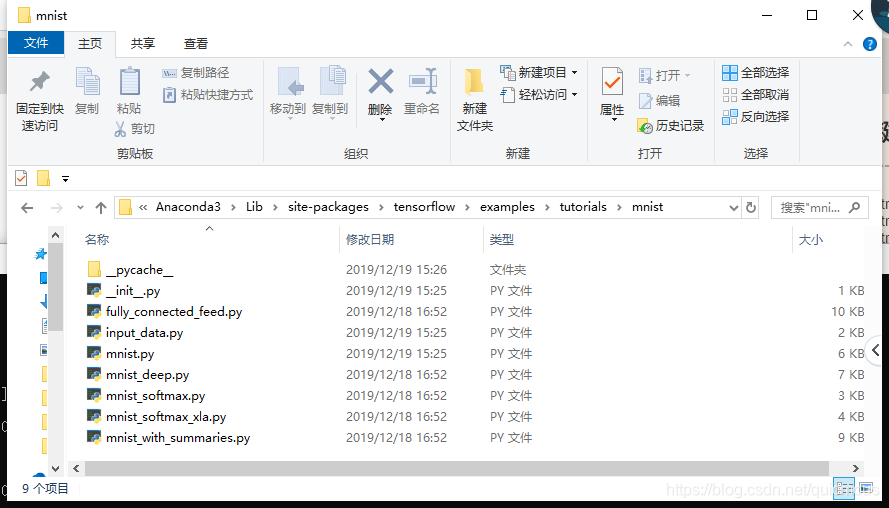
python 每个模块都对应一个文件夹,每个文件夹,包括路径的中间节点文件夹,里面都有一个 __init__.py 文件,这个是做初始化的。这个 input_data.py 是其中一个模块文件,内容如下:
...
from tensorflow.contrib.learn.python.learn.datasets.mnist import read_data_sets
...
在这个里面导入了模块 read_data_sets,我们看看这个模块在哪里,里面有些什么。
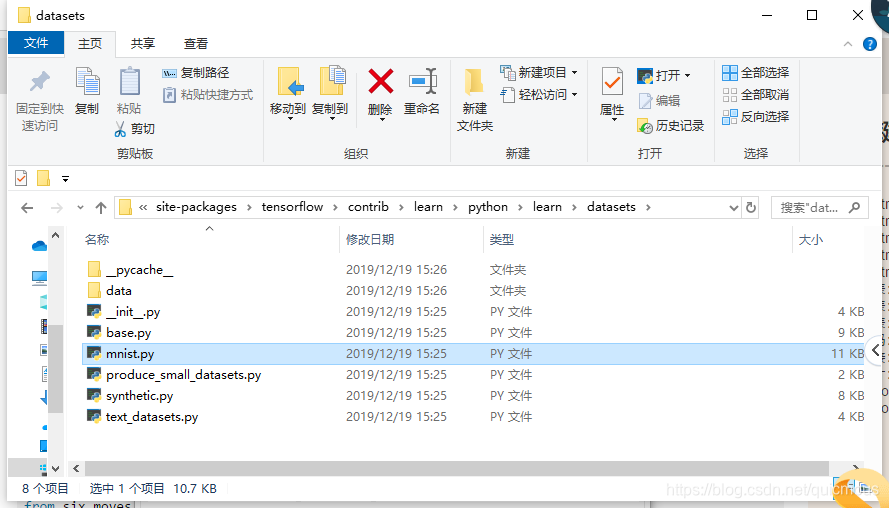
...
def read_data_sets(train_dir,
                   fake_data=False,
                   one_hot=False,
                   dtype=dtypes.float32,
                   reshape=True,
                   validation_size=5000,
                   seed=None,
                   source_url=DEFAULT_SOURCE_URL):
  ... ...
  return base.Datasets(train=train, validation=validation, test=test)
...
import pylab
在 python 命令行里输入下面的内容:
>>> import pylab
>>> pylab
<module 'pylab' from 'C:\\Users\\xuyeping\\Anaconda3\\lib\\site-packages\\pylab.py'>
打开 pylab.py 程序,内容很简单,只是简单地导入了matplotlib.pylab:
from matplotlib.pylab import *
import matplotlib.pylab
__doc__ = matplotlib.pylab.__doc__
__doc__ 提供了详细的说明,下面展示一部分:
>>> print(pylab.__doc__)

This is a procedural interface to the matplotlib object-oriented
plotting library.

The following plotting commands are provided; the majority have
MATLAB |reg| [*]_ analogs and similar arguments.

.. |reg| unicode:: 0xAE

_Plotting commands
  acorr     - plot the autocorrelation function
  annotate  - annotate something in the figure
  arrow     - add an arrow to the axes
  axes      - Create a new axes
  axhline   - draw a horizontal line across axes
  axvline   - draw a vertical line across axes
  axhspan   - draw a horizontal bar across axes
  axvspan   - draw a vertical bar across axes
  ... ...
tf.reset_default_graph()
如下是官网对tf.reset_default_graph()函数描述的翻译:
tf.reset_default_graph 函数用于清除默认图形堆栈并重置全局默认图形。
注意:默认图形是当前线程的一个属性。该 f.reset_default_graph 函数只适用于当前线程。当一个 tf.Session 或者 tf.InteractiveSession 激活时调用这个函数会导致未定义的行为。调用此函数后使用任何以前创建的 tf.Operation 或 tf.Tensor 对象将导致未定义的行为。
Tensorflow 把网络模型保存成图(Graph)的形式,我们可以在 Python 中定义这个图的结构。
tf.placeholder
先看代码:
x = tf.placeholder(tf.float32, [None, 784])
y = tf.placeholder(tf.float32, [None, 10])
在 Python 命令行窗口用 help 命令看一下 tf.placeholder 的位置:
>>> help(tf.placeholder)
Help on function placeholder in module tensorflow.python.ops.array_ops:

placeholder(dtype, shape=None, name=None)
    Inserts a placeholder for a tensor that will be always fed.

    **Important**: This tensor will produce an error if evaluated. Its value must
    be fed using the `feed_dict` optional argument to `Session.run()`,
    `Tensor.eval()`, or `Operation.run()`.

    For example:

    ```python
    x = tf.placeholder(tf.float32, shape=(1024, 1024))
    y = tf.matmul(x, x)

    with tf.Session() as sess:
      print(sess.run(y))  # ERROR: will fail because x was not fed.

      rand_array = np.random.rand(1024, 1024)
      print(sess.run(y, feed_dict={x: rand_array}))  # Will succeed.
    ```

    @compatibility(eager)
    Placeholders are not compatible with eager execution.
    @end_compatibility

    Args:
      dtype: The type of elements in the tensor to be fed.
      shape: The shape of the tensor to be fed (optional). If the shape is not
        specified, you can feed a tensor of any shape.
      name: A name for the operation (optional).

    Returns:
      A `Tensor` that may be used as a handle for feeding a value, but not
      evaluated directly.

    Raises:
      RuntimeError: if eager execution is enabled
tf.placeholder 是一个函数,定义如下:
tf.placeholder(dtype, shape = None, name = None)
参数:
- dtype:数据类型。常用的是tf.float32,tf.float64等数值类型。
- shape:数据形状。默认是None,就是一维值,也可以是多维(比如[2,3], [None, 3]表示列是3,行不定)。
- name:名称。
返回值:
- 按照 help 提供的说明,返回值是一个 Tensor,即返回一个张量。
tf.Variable
先看代码:
W = tf.Variable(tf.random_normal([784, 10]))
b = tf.Variable(tf.zeros([10]))
tf.Variable 是个什么东西?在 Python 命令行窗口里打印一下看看:
>>> tf.Variable
<class 'tensorflow.python.ops.variables.Variable'>
打开文件夹:
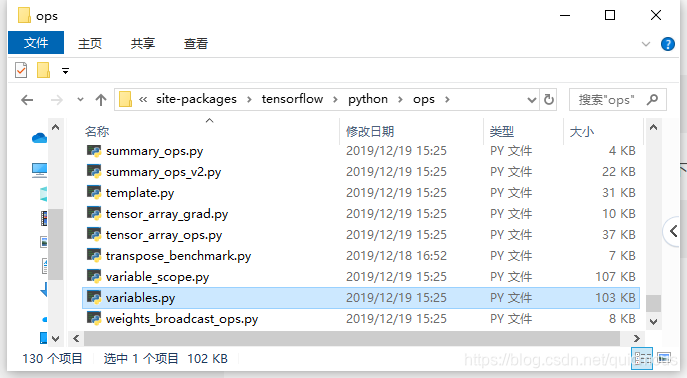
打开 variable.py, 可看到类 Variable 定义:
class Variable(six.with_metaclass(VariableMetaclass, checkpointable.CheckpointableBase)):
...
很有意思, placeholder 是个函数,定义了网络的节点,网络的连接权重用一个类 Variable 来定义。注意,函数名以小写字母开头,类名以大写字母开头。
… … 待续






 扫一扫
扫一扫


 547
547

 被折叠的 条评论
为什么被折叠?
被折叠的 条评论
为什么被折叠?
 到【灌水乐园】发言





