


 文章介绍了如何在Unity中编写一个脚本,实现在编辑环境下实例化预制体,并通过Inspector中的自定义按钮控制。脚本包括实例化功能、数组存储、以及避免在编辑模式下永久销毁对象的解决方案。
应美术要求,实现一个在编辑环境下,不运行,可以实例化预制体的脚本
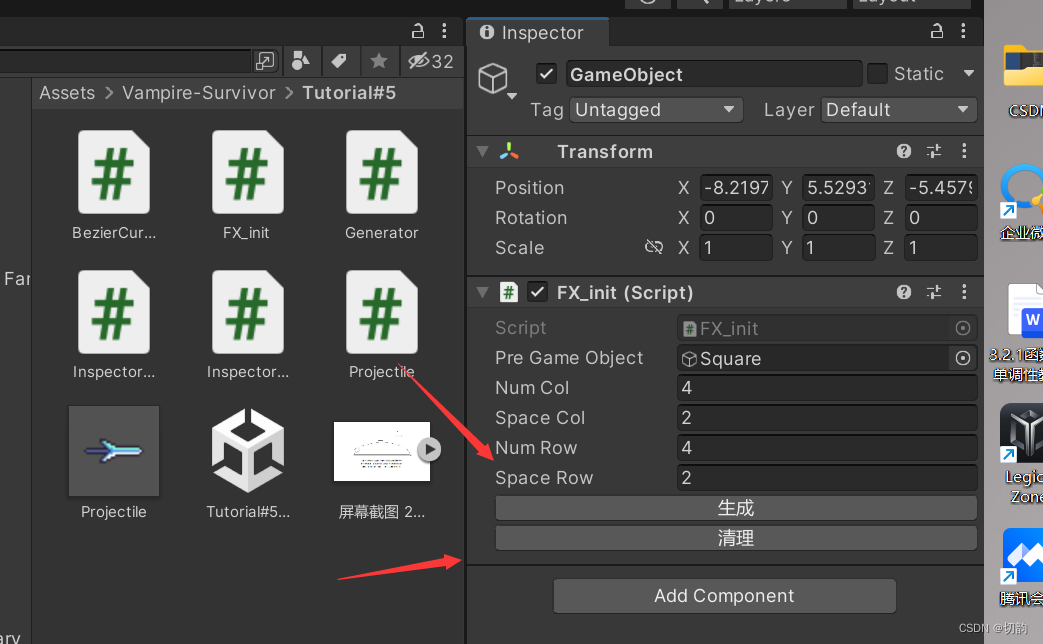
效果如上图所示
1.去实现一个简单的 行、列实例化物体脚本
2.在Inspector下提供按钮
3.将方法暴露出来(通过自定义标签实现)
需求一
using System.Collections;
using System.Collections.Generic;
using UnityEngine;
public class FX_init : MonoBehaviour
{
// Start is called before the first frame update
public GameObject PreGameObject;
public int numCol = 4;
public float spaceCol = 2.0f;
public int numRow = 4;
public float spaceRow = 2.0f;
private List<GameObject> cubeTemp;
void Start()
{
SetInit();
}
public void SetInit()
{
for (int i = 0; i < numCol; i++)
{
for (int j = 0; j< numRow; j++)
{
float xPos = i * spaceRow;
float 最低0.47元/天 解锁文章






 扫一扫
扫一扫


 2万+
2万+

 被折叠的 条评论
为什么被折叠?
被折叠的 条评论
为什么被折叠?
 到【灌水乐园】发言





