% 31×31大卷积核感受野热力图可视化(蓝底版本)
% 基于《Scaling Up Your Kernels to 31x31: Revisiting Large Kernel Design in CNNs》
% 使用蓝色系热力图
clear; close all; clc;
fprintf('31×31大卷积核感受野热力图可视化(蓝底版本)\n');
fprintf('基于《Scaling Up Your Kernels to 31x31: Revisiting Large Kernel Design in CNNs》\n\n');
% 创建输入图像
inputSize = [224, 224, 3]; % 标准ImageNet尺寸
inputImg = createTestImage(inputSize);
% 创建蓝色系颜色映射
blueColormap = createBlueColormap(256);
% 创建图形窗口
figure('Position', [100, 100, 1200, 800], 'Name', '31×31大卷积核感受野热力图可视化(蓝底版本)', 'Color', [0.9, 0.9, 0.95]);
% 显示输入图像
subplot(2, 3, 1);
imshow(inputImg);
title('输入图像', 'FontSize', 12, 'FontWeight', 'bold', 'Color', [0.2, 0.2, 0.5]);
% 生成并显示31×31卷积核的感受野热力图
subplot(2, 3, 2);
rf_31x31 = [31, 31]; % 31×31卷积核的感受野
heatmap_31x31 = generate31x31ReceptiveFieldHeatmap(inputSize(1), inputSize(2), rf_31x31);
imagesc(heatmap_31x31);
colormap(blueColormap);
colorbar;
axis image;
title('31×31卷积核感受野热力图', 'FontSize', 12, 'FontWeight', 'bold', 'Color', [0.2, 0.2, 0.5]);
hold on;
plot(inputSize(2)/2, inputSize(1)/2, 'w+', 'MarkerSize', 10, 'LineWidth', 2);
hold off;
% 生成并显示3×3卷积核的感受野热力图作为对比
subplot(2, 3, 3);
rf_3x3 = [3, 3]; % 3×3卷积核的感受野
heatmap_3x3 = generate3x3ReceptiveFieldHeatmap(inputSize(1), inputSize(2), rf_3x3);
imagesc(heatmap_3x3);
colormap(blueColormap);
colorbar;
axis image;
title('3×3卷积核感受野热力图', 'FontSize', 12, 'FontWeight', 'bold', 'Color', [0.2, 0.2, 0.5]);
hold on;
plot(inputSize(2)/2, inputSize(1)/2, 'w+', 'MarkerSize', 10, 'LineWidth', 2);
hold off;
% 显示两种卷积核感受野的对比
subplot(2, 3, 4);
compareReceptiveFields(inputSize, rf_31x31, rf_3x3);
title('31×31 vs 3×3感受野对比', 'FontSize', 12, 'FontWeight', 'bold', 'Color', [0.2, 0.2, 0.5]);
% 显示31×31卷积核的权重分布
subplot(2, 3, 5);
visualize31x31KernelWeights(blueColormap);
title('31×31卷积核权重分布', 'FontSize', 12, 'FontWeight', 'bold', 'Color', [0.2, 0.2, 0.5]);
% 显示不同位置像素的感受野影响
subplot(2, 3, 6);
visualizeMultipleReceptiveFields(inputSize);
title('不同位置像素的感受野影响', 'FontSize', 12, 'FontWeight', 'bold', 'Color', [0.2, 0.2, 0.5]);
% 添加标题
sgtitle('31×31大卷积核感受野热力图可视化 (基于《Scaling Up Your Kernels to 31x31》)', 'FontSize', 16, 'FontWeight', 'bold', 'Color', [0.1, 0.1, 0.4]);
% 添加说明文本
annotation('textbox', [0.3, 0.02, 0.4, 0.05], 'String', ...
'颜色表示感受野影响强度 (浅蓝=高, 深蓝=低) | 白色十字表示中心点', ...
'FontSize', 10, 'EdgeColor', 'none', 'HorizontalAlignment', 'center', ...
'BackgroundColor', [0.8, 0.8, 0.95], 'Color', [0.2, 0.2, 0.5]);
% 创建蓝色系颜色映射函数
function cmap = createBlueColormap(n)
% 创建从深蓝到浅蓝的颜色映射
cmap = zeros(n, 3);
for i = 1:n
intensity = (i-1)/(n-1); % 0到1的线性渐变
cmap(i, 1) = 0.2 * intensity; % R
cmap(i, 2) = 0.4 * intensity + 0.2; % G
cmap(i, 3) = 0.8 * intensity + 0.2; % B
end
end
% 31×31卷积核感受野热力图生成函数
function heatmap = generate31x31ReceptiveFieldHeatmap(height, width, rf)
% 生成31×31卷积核的感受野热力图
% 基于论文中的思想,大卷积核具有更广泛、更均匀的感受野
% 创建网格
[X, Y] = meshgrid(1:width, 1:height);
% 计算中心点
centerX = width / 2;
centerY = height / 2;
% 计算每个点到中心的距离
distance = sqrt((X - centerX).^2 + (Y - centerY).^2);
% 31×31卷积核的感受野特性
% 大卷积核具有更广泛、更均匀的影响
sigma = min(rf) / 2.5; % 较大的标准差,表示更广泛的影响
exponent = 1.2; % 较低的指数,表示更平缓的衰减
% 生成高斯分布热力图
heatmap = exp(-(distance.^exponent) / (2 * sigma^exponent));
% 添加轻微的边缘效应,模拟大卷积核的边缘响应
edgeEffect = 0.1 * sin(2*pi*X/width) .* sin(2*pi*Y/height);
heatmap = heatmap + edgeEffect;
% 归一化到[0,1]范围
heatmap = heatmap - min(heatmap(:));
if max(heatmap(:)) > 0
heatmap = heatmap / max(heatmap(:));
end
end
% 3×3卷积核感受野热力图生成函数
function heatmap = generate3x3ReceptiveFieldHeatmap(height, width, rf)
% 生成3×3卷积核的感受野热力图
% 小卷积核具有更集中、更局部的影响
% 创建网格
[X, Y] = meshgrid(1:width, 1:height);
% 计算中心点
centerX = width / 2;
centerY = height / 2;
% 计算每个点到中心的距离
distance = sqrt((X - centerX).^2 + (Y - centerY).^2);
% 3×3卷积核的感受野特性
% 小卷积核具有更集中、更局部的影响
sigma = min(rf) / 1.5; % 较小的标准差,表示更集中的影响
exponent = 2.5; % 较高的指数,表示更陡峭的衰减
% 生成高斯分布热力图
heatmap = exp(-(distance.^exponent) / (2 * sigma^exponent));
% 归一化到[0,1]范围
heatmap = heatmap - min(heatmap(:));
if max(heatmap(:)) > 0
heatmap = heatmap / max(heatmap(:));
end
end
% 感受野对比函数
function compareReceptiveFields(inputSize, rf_31x31, rf_3x3)
% 比较31×31和3×3卷积核的感受野
% 生成31×31卷积核的感受野轮廓
heatmap_31x31 = generate31x31ReceptiveFieldHeatmap(inputSize(1), inputSize(2), rf_31x31);
% 生成3×3卷积核的感受野轮廓
heatmap_3x3 = generate3x3ReceptiveFieldHeatmap(inputSize(1), inputSize(2), rf_3x3);
% 创建图像
imagesc(ones(inputSize(1), inputSize(2)) * 0.7); % 浅蓝色背景
colormap(gray);
hold on;
% 绘制31×31卷积核的感受野轮廓
contour(heatmap_31x31, [0.5, 0.5], 'r-', 'LineWidth', 3);
% 绘制3×3卷积核的感受野轮廓
contour(heatmap_3x3, [0.5, 0.5], 'b-', 'LineWidth', 3);
% 添加中心点标记
plot(inputSize(2)/2, inputSize(1)/2, 'w+', 'MarkerSize', 10, 'LineWidth', 2);
% 添加图例
text(inputSize(2)*0.7, inputSize(1)*0.15, '31×31感受野', 'Color', 'r', 'FontSize', 12, 'FontWeight', 'bold');
text(inputSize(2)*0.7, inputSize(1)*0.1, '3×3感受野', 'Color', 'b', 'FontSize', 12, 'FontWeight', 'bold');
axis image;
hold off;
end
% 31×31卷积核权重可视化函数
function visualize31x31KernelWeights(blueColormap)
% 可视化31×31卷积核的权重分布
% 基于论文中的思想,大卷积核的权重通常具有中心-周围结构
% 创建31×31网格
[X, Y] = meshgrid(1:31, 1:31);
% 计算中心点
centerX = 15.5;
centerY = 15.5;
% 计算每个点到中心的距离
distance = sqrt((X - centerX).^2 + (Y - centerY).^2);
% 生成中心-周围权重分布
% 基于论文中的观察,大卷积核通常具有高斯分布的权重
sigma = 8; % 控制权重分布的范围
weights = exp(-(distance.^2) / (2 * sigma^2));
% 添加一些随机变化,模拟实际学习到的权重
randomVariation = 0.1 * randn(31);
weights = weights + randomVariation;
% 可视化权重
imagesc(weights);
colormap(blueColormap);
colorbar;
axis image;
title('权重值');
% 添加中心点标记
hold on;
plot(15.5, 15.5, 'w+', 'MarkerSize', 10, 'LineWidth', 2);
hold off;
end
% 多位置感受野可视化函数
function visualizeMultipleReceptiveFields(inputSize)
% 可视化不同位置像素的感受野影响
% 创建图像
imagesc(ones(inputSize(1), inputSize(2)) * 0.7); % 浅蓝色背景
colormap(gray);
hold on;
% 定义多个位置
positions = [
inputSize(2)/2, inputSize(1)/2; % 中心
inputSize(2)/4, inputSize(1)/4; % 左上
3*inputSize(2)/4, inputSize(1)/4; % 右上
inputSize(2)/4, 3*inputSize(1)/4; % 左下
3*inputSize(2)/4, 3*inputSize(1)/4 % 右下
];
colors = ['r', 'g', 'b', 'c', 'm'];
% 为每个位置生成并绘制感受野轮廓
for i = 1:size(positions, 1)
% 生成以该位置为中心的感受野热力图
[X, Y] = meshgrid(1:inputSize(2), 1:inputSize(1));
distance = sqrt((X - positions(i, 1)).^2 + (Y - positions(i, 2)).^2);
% 31×31卷积核的感受野特性
sigma = 15; % 较大的标准差,表示广泛的影响
heatmap = exp(-(distance.^2) / (2 * sigma^2));
% 绘制轮廓
contour(heatmap, [0.5, 0.5], [colors(i) '-'], 'LineWidth', 2);
% 标记位置
plot(positions(i, 1), positions(i, 2), [colors(i) 'o'], 'MarkerSize', 8, 'LineWidth', 2);
end
axis image;
hold off;
end
% 测试图像创建函数
function img = createTestImage(inputSize)
% 创建测试图像,特别设计以展示31×31大卷积核的优势
% 创建空白图像
img = zeros(inputSize(1), inputSize(2), 3);
% 添加大范围渐变背景
[X, Y] = meshgrid(1:inputSize(2), 1:inputSize(1));
background = sin(0.02*X) .* cos(0.02*Y);
img(:,:,1) = 0.5 + 0.3 * background; % 红色通道
img(:,:,2) = 0.5 + 0.2 * background; % 绿色通道
img(:,:,3) = 0.5 + 0.1 * background; % 蓝色通道
% 添加长距离结构 - 水平线
img(50, 20:200, :) = 1;
img(150, 50:220, :) = 1;
% 添加长距离结构 - 垂直线
img(30:180, 80, :) = 1;
img(70:200, 180, :) = 1;
% 添加大尺寸形状
center = [inputSize(1)/2, inputSize(2)/2];
radius = 40;
for x = 1:inputSize(2)
for y = 1:inputSize(1)
distance = sqrt((x - center(2))^2 + (y - center(1))^2);
if distance <= radius && distance >= radius-5
img(y, x, :) = 1; % 白色圆环
end
end
end
% 添加一些局部细节
img(100:102, 100:102, :) = 0; % 小黑块
img(180:182, 180:182, :) = 0; % 小黑块
img = im2single(img);
end
最新发布
 大核卷积在CNN中的应用



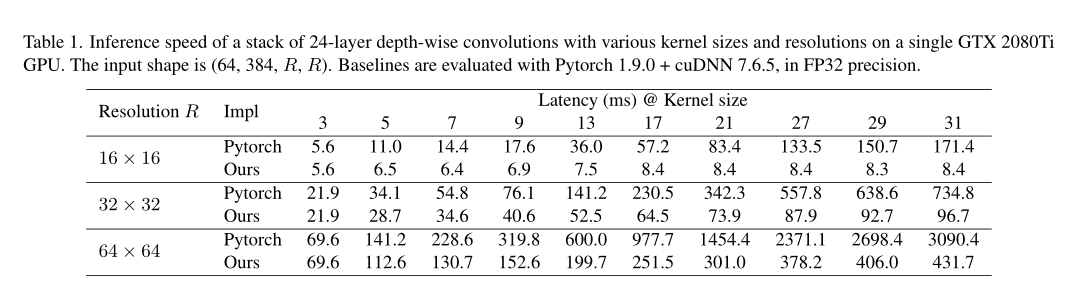
 本文探讨了在传统CNN中使用大核卷积代替小核卷积的可能性及其优势。通过对MobileNetV2的实验表明,大核卷积能够提高模型在ImageNet分类及下游任务上的性能,尤其是在结合re-parameterizing技巧时效果更为显著。
 最低0.47元/天 解锁文章






 扫一扫
扫一扫


 2103
2103

 被折叠的 条评论
为什么被折叠?
被折叠的 条评论
为什么被折叠?
 到【灌水乐园】发言





