





本文内容参考:
如何在 Ubuntu 20.04 上安装 Visual Studio Code-腾讯云开发者社区-腾讯云
特此致谢!
1. 背景
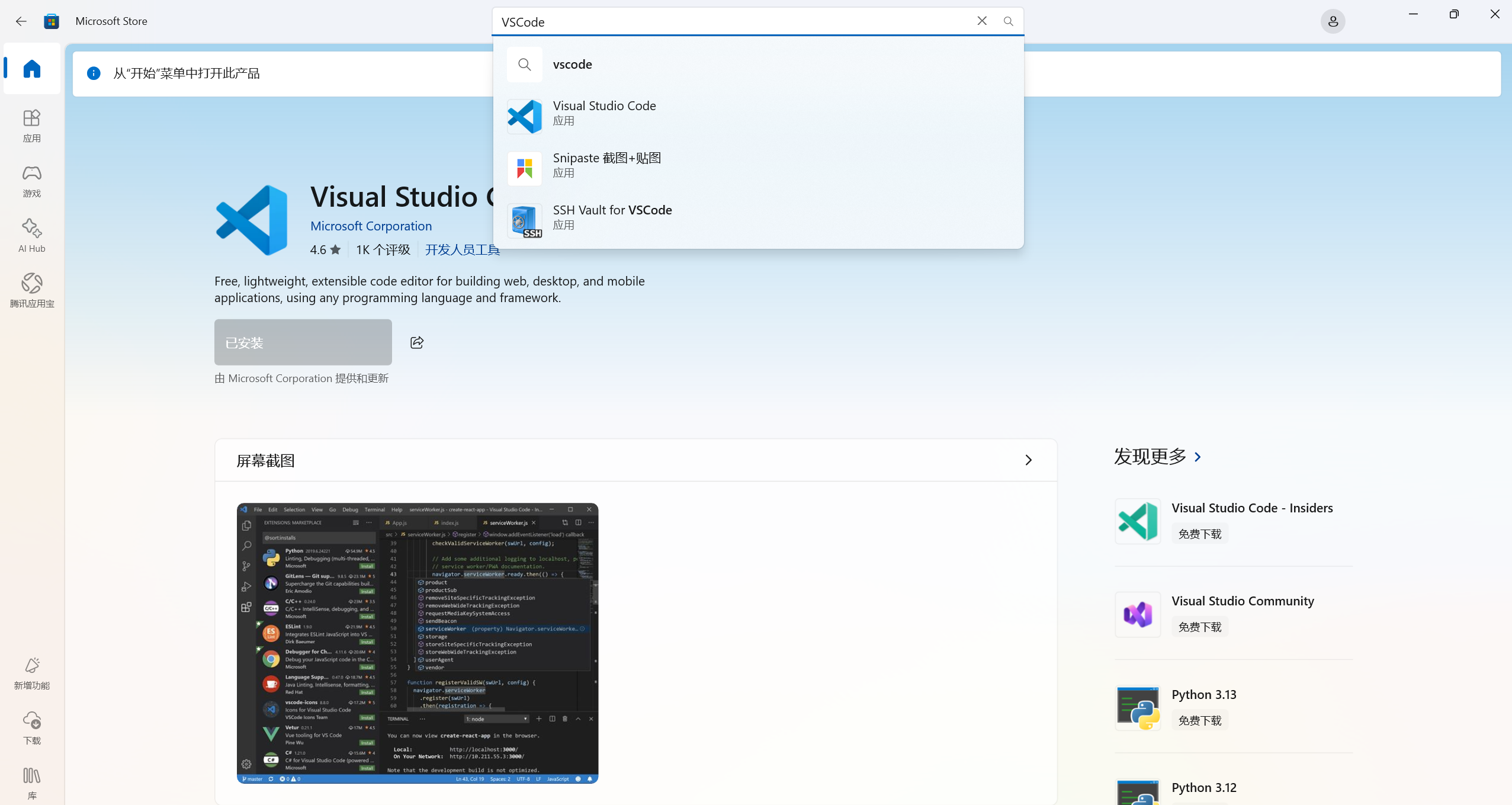
VSCode(Visual Studio Code)是一款非常好用且功能强大的工具。笔者平时是在Windows下使用,在Windows中下载也比较容易,Windows软件中心(Microsoft Store)中直接搜索“VSCode”就可以下载(当然,也可以网上直接搜索下载)。
但是,如果在Ubuntu下想使用VSCode,该如何下载安装呢?笔者最近就有这个需求,于是就走了一次下载安装流程。为了方便将来有同样需求的人(包括我自己),在此将完整过程记录下来。
这里顺便说一下,笔者所用的Ubuntu版本为20.04。
2. 完整步骤
笔者在网上找了一些步骤说明,也尝试了一部分,不是都能成功。最终笔者按照此篇博文中的步骤操作,成功安装了VSCode。
如何在 Ubuntu 20.04 上安装 Visual Studio Code-腾讯云开发者社区-腾讯云
在此表示感谢!
这篇文章中提到了两种Ubuntu下安装VSCode的方法:
1)作为一个Snap软件包安装Visual Studio Code
2)使用apt安装Visual Studio Code
笔者实际尝试的是第2种方法。步骤如下:
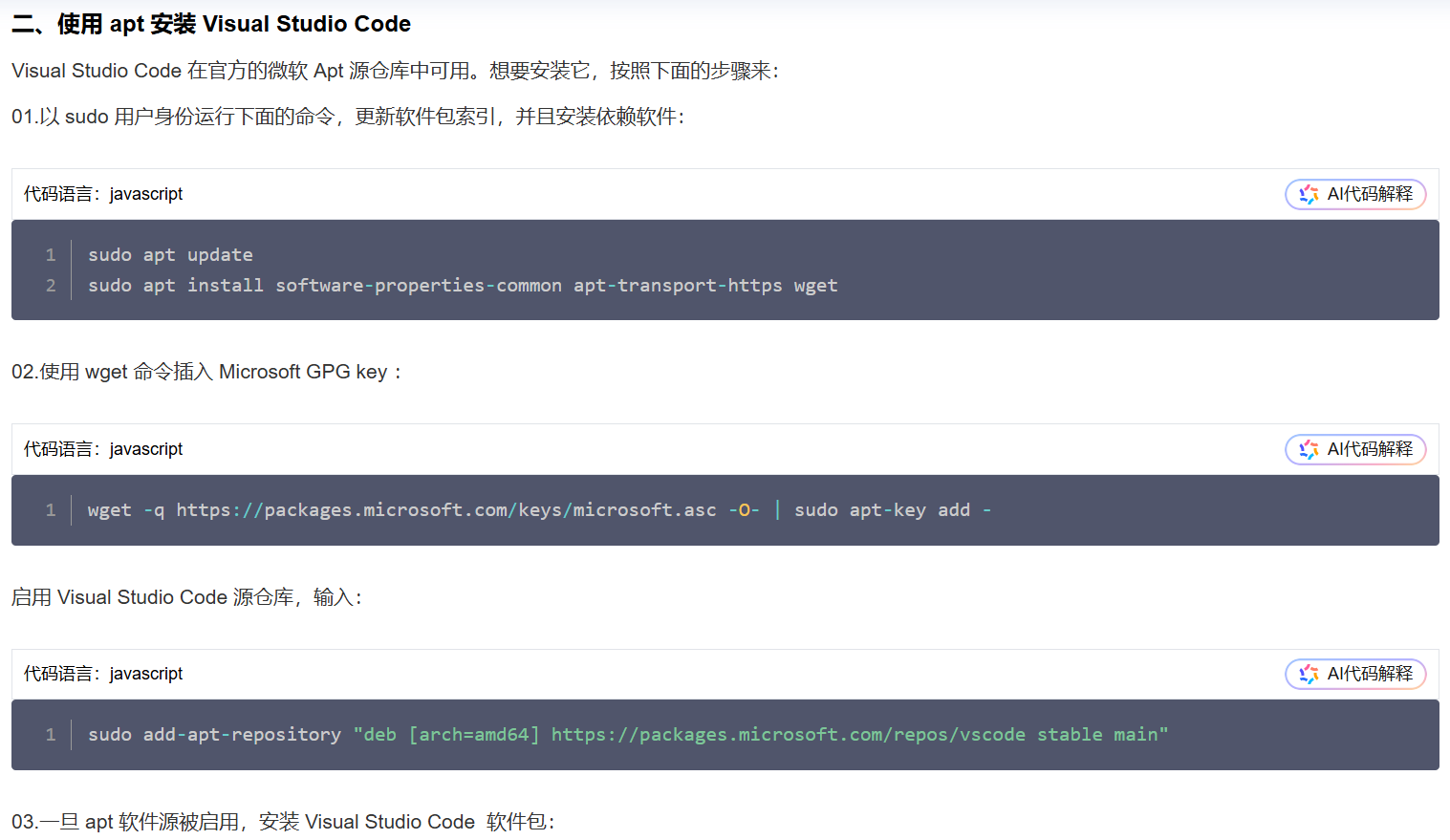
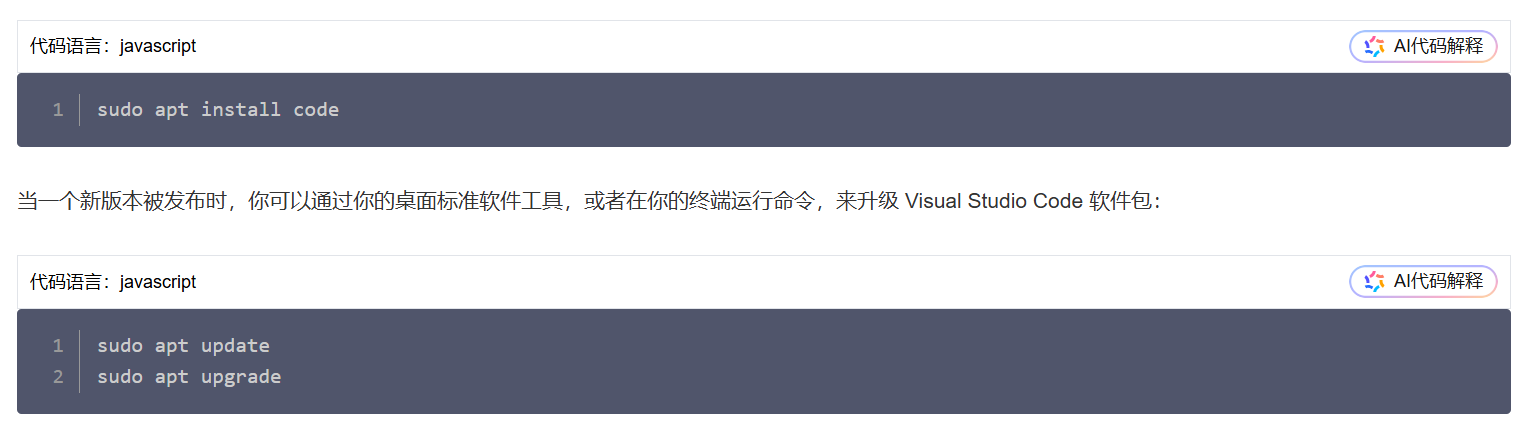
下边列出笔者按照以上步骤实际操作的过程和结果。
(1)以sudo用户身份运行下面的命令,更新软件包索引,并且安装依赖软件
命令如下:
sudo apt update
sudo apt install software-properties-common apt-transport-https wget
实际命令及结果如下:
- sudo apt update
habit@ubuntu:~$ sudo apt update
Get:1 https://packages.microsoft.com/repos/vscode stable InRelease [3,594 B]
Hit:2 http://security.ubuntu.com/ubuntu focal-security InRelease
Err:1 https://packages.microsoft.com/repos/vscode stable InRelease
  The following signatures couldn't be verified because the public key is not available: NO_PUBKEY EB3E94ADBE1229CF
Hit:3 http://us.archive.ubuntu.com/ubuntu focal InRelease
Hit:4 http://us.archive.ubuntu.com/ubuntu focal-updates InRelease
Hit:5 http://us.archive.ubuntu.com/ubuntu focal-backports InRelease
Reading package lists... Done
W: GPG error: https://packages.microsoft.com/repos/vscode stable InRelease: The following signatures couldn't be verified because the public key is not available: NO_PUBKEY EB3E94ADBE1229CF
E: The repository 'https://packages.microsoft.com/repos/vscode stable InRelease' is not signed.
N: Updating from such a repository can't be done securely, and is therefore disabled by default.
N: See apt-secure(8) manpage for repository creation and user configuration details.
habit@ubuntu:~$ sudo apt install code
Reading package lists... Done
Building dependency tree
Reading state information... Done

No apt package "code", but there is a snap with that name.
Try "snap install code"

E: Unable to locate package code
- sudo apt install software-properties-common apt-transport-https wget
habit@ubuntu:~$ sudo apt install software-properties-common apt-transport-https wget
Reading package lists... Done
Building dependency tree
Reading state information... Done
software-properties-common is already the newest version (0.99.9.12).
software-properties-common set to manually installed.
wget is already the newest version (1.20.3-1ubuntu2.1).
The following NEW packages will be installed:
  apt-transport-https
0 upgraded, 1 newly installed, 0 to remove and 0 not upgraded.
Need to get 1,704 B of archives.
After this operation, 162 kB of additional disk space will be used.
Do you want to continue? [Y/n] y
Get:1 http://us.archive.ubuntu.com/ubuntu focal-updates/universe amd64 apt-transport-https all 2.0.11 [1,704 B]
Fetched 1,704 B in 1s (2,849 B/s)
Selecting previously unselected package apt-transport-https.
(Reading database ... 181314 files and directories currently installed.)
Preparing to unpack .../apt-transport-https_2.0.11_all.deb ...
Unpacking apt-transport-https (2.0.11) ...
Setting up apt-transport-https (2.0.11) ...
habit@ubuntu:~$
(2)使用wget命令插入Microsoft GPG key
命令如下:
wget -q https://packages.microsoft.com/keys/microsoft.asc -O- | sudo apt-key add -实际命令及结果如下:
habit@ubuntu:~$ wget -q https://packages.microsoft.com/keys/microsoft.asc -O- | sudo apt-key add -
OK
habit@ubuntu:~$
(3)启用Visual Studio Code源仓库
命令如下:
sudo add-apt-repository "deb [arch=amd64] https://packages.microsoft.com/repos/vscode stable main"实际命令及结果如下:
habit@ubuntu:~$ sudo add-apt-repository "deb [arch=amd64] https://packages.microsoft.com/repos/vscode stable main"
Hit:1 http://security.ubuntu.com/ubuntu focal-security InRelease
Get:2 https://packages.microsoft.com/repos/vscode stable InRelease [3,594 B]
Hit:3 http://us.archive.ubuntu.com/ubuntu focal InRelease
Get:4 https://packages.microsoft.com/repos/vscode stable/main amd64 Packages [28.2 kB]
Hit:5 http://us.archive.ubuntu.com/ubuntu focal-updates InRelease
Hit:6 http://us.archive.ubuntu.com/ubuntu focal-backports InRelease
Fetched 28.2 kB in 1s (23.3 kB/s)
Reading package lists... Done
habit@ubuntu:~$
(4)一旦apt软件源被启用,安装Visual Studio Code软件包
命令如下:
sudo apt install code实际命令及结果如下:
habit@ubuntu:~$ sudo apt install code
Reading package lists... Done
Building dependency tree
Reading state information... Done
The following NEW packages will be installed:
  code
0 upgraded, 1 newly installed, 0 to remove and 0 not upgraded.
Need to get 114 MB of archives.
After this operation, 461 MB of additional disk space will be used.
Get:1 https://packages.microsoft.com/repos/vscode stable/main amd64 code amd64 1.106.2-1763572306 [114 MB]
Fetched 114 MB in 14s (7,858 kB/s)
Preconfiguring packages ...
Selecting previously unselected package code.
(Reading database ... 181318 files and directories currently installed.)
Preparing to unpack .../code_1.106.2-1763572306_amd64.deb ...
Unpacking code (1.106.2-1763572306) ...
Setting up code (1.106.2-1763572306) ...
Processing triggers for mime-support (3.64ubuntu1) ...
Processing triggers for gnome-menus (3.36.0-1ubuntu1) ...
Processing triggers for shared-mime-info (1.15-1) ...
Processing triggers for desktop-file-utils (0.24-1ubuntu3) ...
habit@ubuntu:~$
3. 后记
笔者尝试了第二种方法,至于第一种方法,留待后来者补充了。在此把原始步骤也贴出来。
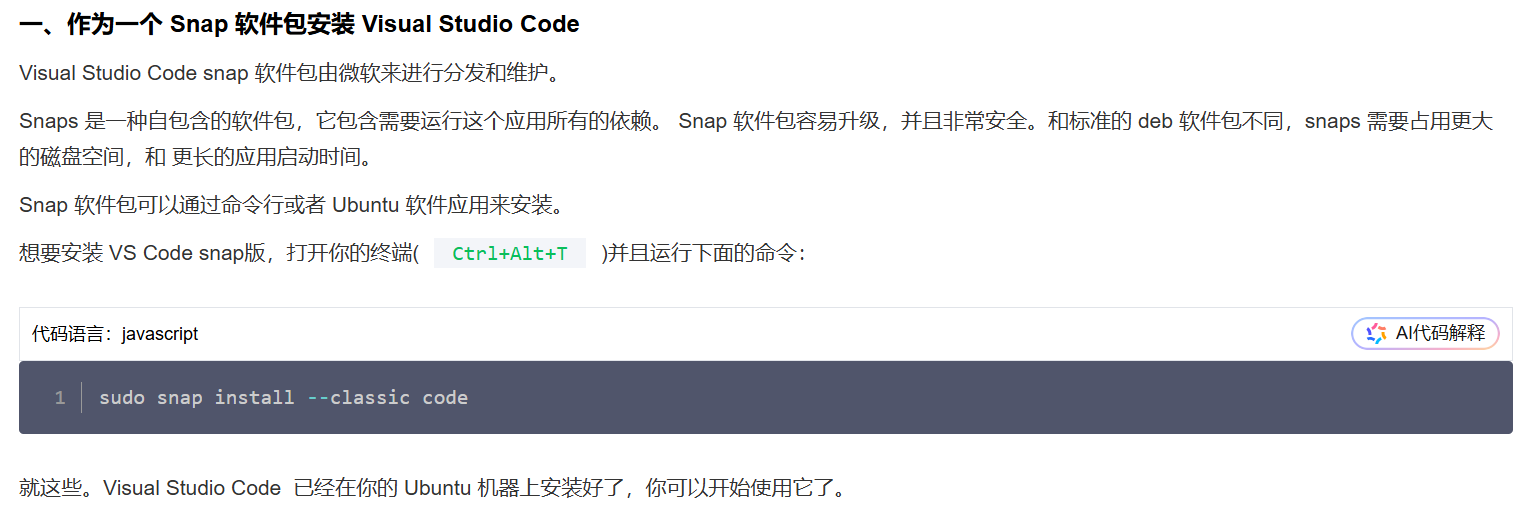
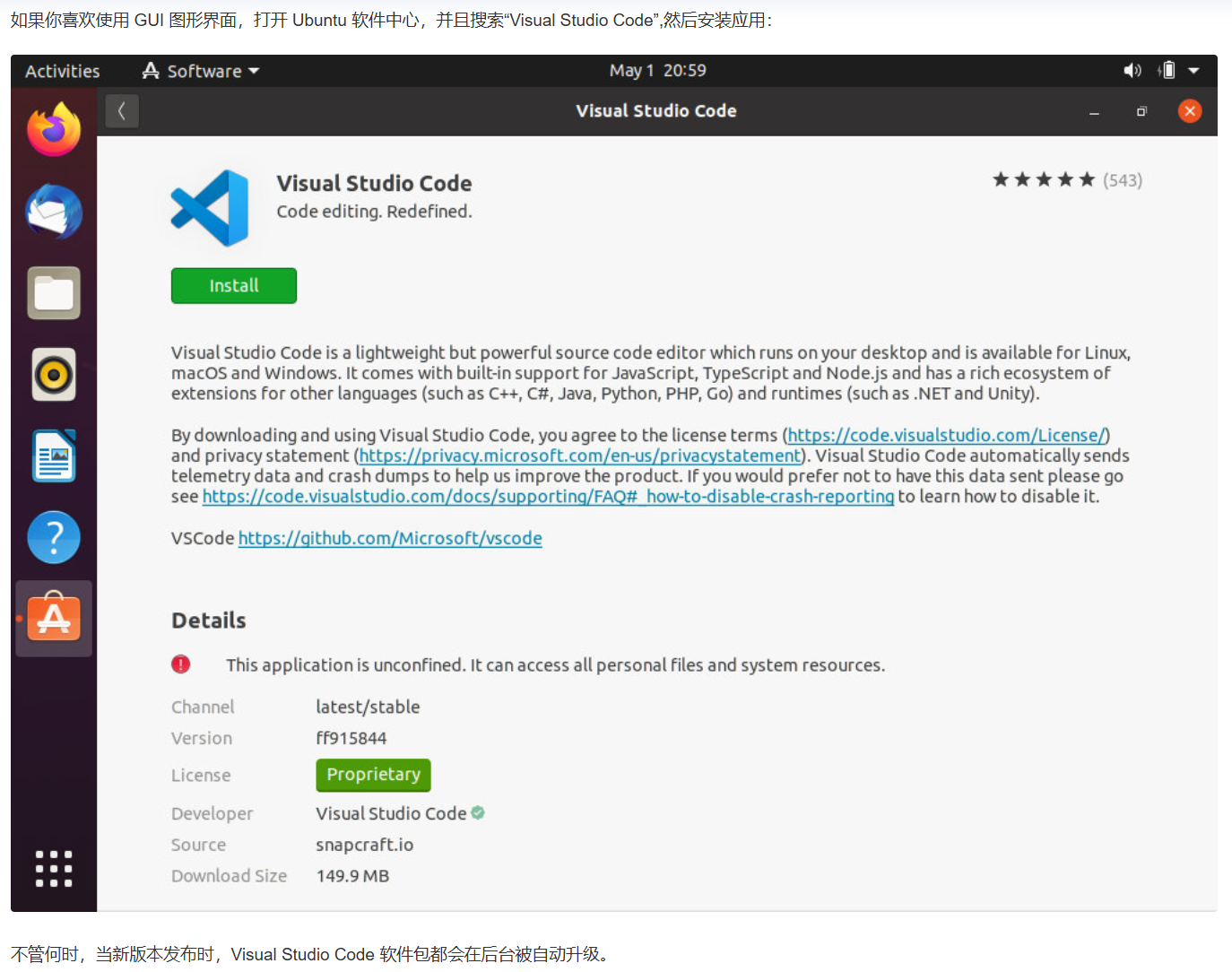
这样来看,Ubuntu下也可以通过软件中心来下载安装VSCode。这个方法应该更为简便。






 扫一扫
扫一扫


 196
196

 被折叠的 条评论
为什么被折叠?
被折叠的 条评论
为什么被折叠?
 到【灌水乐园】发言





