


crewai介绍
CrewAI 是一个用于协调自主 AI 代理的前沿框架。
CrewAI 允许你创建 AI 团队,其中每个代理都有特定的角色、工具和目标,协同工作以完成复杂任务。
把它想象成组建你的梦之队——每个成员(代理)都带来独特的技能和专业知识,无缝协作以实现你的目标。
最近使用了crewai这个框架,我觉得是一个比较好用的AI Agent框架,因此推荐给大家。
在crewai中涵盖了Agents、Tasks、Crews、Flows、Knowledge、LLMs与Tools等这些核心概念。
接下来我将以一个具体的例子,介绍一下crewai的使用。
crewai的GitHub地址为:https://github.com/crewAIInc/crewAI
使用crewai构建一个翻译代理
创建一个python虚拟环境,安装crewai与crewai-tools。
运行命令:
crewai create crew translation_agent
会出现一个模板项目。
在config目录下,使用yaml配置agent与task:
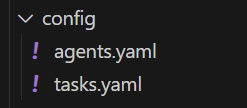
先来设置一下代理:
file_reader:
  role: >
    读取文件代理
  goal: >
    根据文件路径,读取文件内容
  backstory: >
    你是一个文件读取代理,你的任务是根据文件路径,读取文件内容

translation_agent:
  role: >
    翻译代理
  goal: >
    根据用户需求翻译文本
  backstory: >
    你是一个翻译代理,你的任务是根据用户需求翻译文本

file_saver:
  role: >
    文件保存代理
  goal: >
    根据用户需求保存文件
  backstory: >
    你是一个文件保存代理,你的任务是根据用户需求保存文件
在这里设置了三个代理,分别是读取文件代理、翻译代理与文件保存代理。
再来配置一下task:
file_read_task:
  description: >
    根据用户需求:{question}
    获取需要读取的文件路径
    使用工具读取文件内容
  expected_output: >
    返回文件内容
  agent: file_reader

translation_task:
  description: >
    根据file_reader获取的文件内容,将文本翻译成英文
  expected_output: >
    返回翻译后的文本内容
  agent: translation_agent

file_save_task:
  description: >
   根据用户需求:{question}提取出需要保存到的文件路径及相关信息
   将translation_agent的翻译内容,保存至指定文件
  expected_output: >
    返回保存结果
  agent: file_saver
设置了三个任务,分别是file_read_task、translation_task与file_save_task。
完成这些任务,需要代理能够使用读取文件与保存文件的工具。
在tools目录下可以写工具代码:
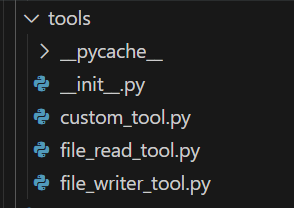
file_read_tool工具代码:
from typing import Any, Optional, Type
from crewai.tools import BaseTool
from pydantic import BaseModel, Field
class FileReadToolSchema(BaseModel):
"""Input for FileReadTool."""
# Mandatory file full path to read the file
# 必须的文件全路径,以读取文件
file_path: str = Field(..., description="Mandatory file full path to read the file")
class FileReadTool(BaseTool):
"""A tool for reading file contents.
This tool inherits its schema handling from BaseTool to avoid recursive schema
definition issues. The args_schema is set to FileReadToolSchema which defines
the required file_path parameter. The schema should not be overridden in the
constructor as it would break the inheritance chain and cause infinite loops.
The tool supports two ways of specifying the file path:
1. At construction time via the file_path parameter
2. At runtime via the file_path parameter in the tool's input
Args:
file_path (Optional[str]): Path to the file to be read. If provided,
this becomes the default file path for the tool.
**kwargs: Additional keyword arguments passed to BaseTool.
Example:
>>> tool = FileReadTool(file_path="/path/to/file.txt")
>>> content = tool.run() # Reads /path/to/file.txt
>>> content = tool.run(file_path="/path/to/other.txt") # Reads other.txt
用于读取文件内容的工具。
该工具继承自 BaseTool 的 schema 处理,以避免递归 schema 定义问题。args_schema 设置为 FileReadToolSchema,定义了必需的 file_path 参数。构造函数中不应该覆盖 schema,否则会破坏继承链并导致无限循环。
该工具支持两种指定文件路径的方法:
在构造时通过 file_path 参数
在运行时通过工具的输入参数 file_path
参数:
file_path (可选[str]): 要读取的文件路径。如果提供,则成为工具的默认文件路径。
**kwargs: 传递给 BaseTool 的其他关键字参数。
示例:
>>> tool = FileReadTool(file_path="/path/to/file.txt")
>>> content = tool.run() # 读取 /path/to/file.txt
>>> content = tool.run(file_path="/path/to/other.txt") # 读取 other.txt
"""
name: str = "Read a file's content"
description: str = "A tool that reads the content of a file. To use this tool, provide a 'file_path' parameter with the path to the file you want to read."
args_schema: Type[BaseModel] = FileReadToolSchema
file_path: Optional[str] = None
def __init__(self, file_path: Optional[str] = None, **kwargs: Any) -> None:
"""
Initialize the FileReadTool.
Args:
file_path (Optional[str]): Path to the file to be read. If provided,
this becomes the default file path for the tool.
**kwargs: Additional keyword arguments passed to BaseTool.
初始化 FileReadTool。
参数:
file_path(可选[str]):要读取的文件路径。如果提供,则此路径成为工具的默 最低0.47元/天 解锁文章






 扫一扫
扫一扫


 449
449

 被折叠的 条评论
为什么被折叠?
被折叠的 条评论
为什么被折叠?
 到【灌水乐园】发言





