



 本文介绍如何在UE4中创建自定义编辑器组件,包括编辑器模块设置、菜单命令定义、组件类实现及组件可视化器设计。通过实例演示,实现动态调整目标点位置并提供复制、删除等功能。
源码地址
https://download.youkuaiyun.com/download/maxiaosheng521/11584159
最新4.23更新一下 源码中VisualTarget.cpp中
需要额外再添加一个头文件#include "Editor/UnrealEdEngine.h"
否则会报GUnrealED为定义错误
最终效果 可以通过component中添加target点 动态调整点的位置 也可以在点上右键 进行复制 创建
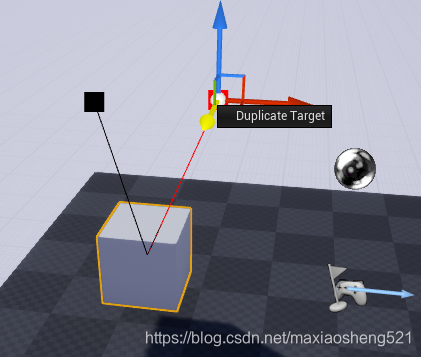
下面的代码可能有省略 以最终链接中的工程为准
1.首先 创建一个editor module 这里不具体描述了创建过程了 参考上一篇教程
额外要注意的是 我们需要添加一些系统模块
PrivateDependencyModuleNames.AddRange(new string[] { "Slate", "SlateCore", "EditorStyle", "UnrealEd" });2.定义HTargetProxy 类 用来保存target点的信息 这里只保存了点的index
struct HTargetingVisProxy : public HComponentVisProxy
{
	DECLARE_HIT_PROXY();
	HTargetingVisProxy(const UActorComponent* InComponent)
		:HComponentVisProxy(InComponent, HPP_Wireframe)
	{}


};

struct HTargetProxy :public HTargetingVisProxy
{
	DECLARE_HIT_PROXY();

	HTargetProxy(const UActorComponent* Incomponent, int32 index)
		:HTargetingVisProxy(Incomponent), TargetIndex(index)
	{

	}
	int32 TargetIndex;
};
3.定义菜单命令
.h文件

class FTargetingVisualizerCommands :public TCommands<FTargetingVisualizerCommands>
{
public:
	FTargetingVisualizerCommands():TCommands<FTargetingVisualizerCommands>("TargetingComponent", FText::FromString(FString(TEXT("Visualizer"))), NAME_None, FEditorStyle::GetStyleSetName())
	{

	}

	virtual void RegisterCommands() override;

	TSharedPtr<FUICommandInfo> Duplicate;

};

.cpp

void FTargetingVisualizerCommands::RegisterCommands()
{
	UI_COMMAND(Duplicate, "Duplicate Target", "Duplicate the CurrentTarget", EUserInterfaceActionType::Button, FInputGesture());
}
4.定义component类
.h文件

// Fill out your copyright notice in the Description page of Project Settings.

#pragma once

#include "CoreMinimal.h"
#include "Components/ActorComponent.h"
#include "TargetComponent.generated.h"


UCLASS( ClassGroup=(Custom), meta=(BlueprintSpawnableComponent) )
class VISUALTARGET_API UTargetComponent : public USceneComponent
{
	GENERATED_BODY()

public:
	// Sets default values for this component's properties
	UTargetComponent();

protected:
	// Called when the game starts
	virtual void BeginPlay() override;

public:
	// Called every frame
	virtual void TickComponent(float DeltaTime, ELevelTick TickType, FActorComponentTickFunction* ThisTickFunction) override;
	void DeleteTarget(int32 deleteIndex); //用于执行删除target点操作

	UPROPERTY(EditAnywhere, BlueprintReadWrite, Category = Target)
		TArray<FVector> Targets; //用于保存target点


	UPROPERTY(EditAnywhere, BlueprintReadWrite, Category = Target)
		FLinearColor EditorSelectedColor; //选中点的颜色

	UPROPERTY(EditAnywhere, BlueprintReadWrite, Category = Target)
		FLinearColor UnSelectedColor;  //没有选中点的颜色
};


.cpp文件

// Fill out your copyright notice in the Description page of Project Settings.


#include "TargetComponent.h"

// Sets default values for this component's properties
UTargetComponent::UTargetComponent()
{
	// Set this component to be initialized when the game starts, and to be ticked every frame.  You can turn these features
	// off to improve performance if you don't need them.
	PrimaryComponentTick.bCanEverTick = true;

	// ...
	EditorSelectedColor = FLinearColor(1.0f, 0.0f, 0.0f, 1.0f);
	UnSelectedColor = FLinearColor(0.0f, 0.0f, 0.0f, 1.0f);
}


// Called when the game starts
void UTargetComponent::BeginPlay()
{
	Super::BeginPlay();

	// ...

}


// Called every frame
void UTargetComponent::TickComponent(float DeltaTime, ELevelTick TickType, FActorComponentTickFunction* ThisTickFunction)
{
	Super::TickComponent(DeltaTime, TickType, ThisTickFunction);

	// ...
}

void UTargetComponent::DeleteTarget(int32 deleteIndex)
{
	Targets.RemoveAt(deleteIndex);
}
5.定义ComponentVisualizer 注释写在代码里了
.h文件
// Copyright 1998-2019 Epic Games, Inc. All Rights Reserved.

#pragma once

#include "CoreMinimal.h"
#include "InputCoreTypes.h"
#include "Components/ActorComponent.h"
#include "HitProxies.h"

class AActor;
class FCanvas;
class FEditorViewportClient;
class FPrimitiveDrawInterface;
class FSceneView;
class FViewport;
class SWidget;
struct FViewportClick;

struct HComponentVisProxy : public HHitProxy
{
	DECLARE_HIT_PROXY(UNREALED_API);

	HComponentVisProxy(const UActorComponent* InComponent, EHitProxyPriority InPriority = HPP_Wireframe)
	: HHitProxy(InPriority)
	, Component(InComponent)
	{}

	virtual EMouseCursor::Type GetMouseCursor() override
	{
		return EMouseCursor::Crosshairs;
	}

	TWeakObjectPtr<const UActorComponent> Component;
};


/** Base class for a component visualizer, that draw editor information for a particular component class */
class UNREALED_API FComponentVisualizer : public TSharedFromThis<FComponentVisualizer>
{
public:
	FComponentVisualizer() {}
	virtual ~FComponentVisualizer() {}

	/** */
	virtual void OnRegister() {}
	/** Draw visualization for the supplied component */
	virtual void DrawVisualization(const UActorComponent* Component, const FSceneView* View, FPrimitiveDrawInterface* PDI) {}
	/** Draw HUD on viewport for the supplied component */
	virtual void DrawVisualizationHUD(const UActorComponent* Component, const FViewport* Viewport, const FSceneView* View, FCanvas* Canvas) {}
	/** */
	virtual bool VisProxyHandleClick(FEditorViewportClient* InViewportClient, HComponentVisProxy* VisProxy, const FViewportClick& Click) { return false; }
	/** */
	virtual void EndEditing() {}
	/** */
	virtual bool GetWidgetLocation(const FEditorViewportClient* ViewportClient, FVector& OutLocation) const { return false; }
	/** */
	virtual bool GetCustomInputCoordinateSystem(const FEditorViewportClient* ViewportClient, FMatrix& OutMatrix) const { return false; }
	/** */
	virtual bool HandleInputDelta(FEditorViewportClient* ViewportClient, FViewport* Viewport, FVector& DeltaTranslate, FRotator& DeltalRotate, FVector& DeltaScale) { return false; }
	/** */
	virtual bool HandleInputKey(FEditorViewportClient* ViewportClient,FViewport* Viewport,FKey Key,EInputEvent Event) { return false; }
	/** */
	virtual TSharedPtr<SWidget> GenerateContextMenu() const { return TSharedPtr<SWidget>(); }
	/** */
	virtual bool IsVisualizingArchetype() const { return false; }

	struct FPropertyNameAndIndex
	{
		FPropertyNameAndIndex()
			: Name(NAME_None)
			, Index(INDEX_NONE)
		{}

		explicit FPropertyNameAndIndex(FName InName, int32 InIndex = 0)
			: Name(InName)
			, Index(InIndex)
		{}

		bool IsValid() const { return Name != NAME_None && Index != INDEX_NONE; }

		void Clear()
		{
			Name = NAME_None;
			Index = INDEX_NONE;
		}

		FName Name;
		int32 Index;
	};

	/** Find the name of the property that points to this component */
	static FPropertyNameAndIndex GetComponentPropertyName(const UActorComponent* Component);

	/** Get a component pointer from the property name */
	static UActorComponent* GetComponentFromPropertyName(const AActor* CompOwner, const FPropertyNameAndIndex& Property);

	/** Notify that a component property has been modified */
	static void NotifyPropertyModified(UActorComponent* Component, UProperty* Property);

	/** Notify that many component properties have been modified */
	static void NotifyPropertiesModified(UActorComponent* Component, const TArray<UProperty*>& Properties);
};

struct FCachedComponentVisualizer
{
	TWeakObjectPtr<UActorComponent> Component;
	TSharedPtr<FComponentVisualizer> Visualizer;

	FCachedComponentVisualizer(UActorComponent* InComponent, TSharedPtr<FComponentVisualizer>& InVisualizer)
		: Component(InComponent)
		, Visualizer(InVisualizer)
	{}
};
// Fill out your copyright notice in the Description page of Project Settings.


#include "TargetingComponentVisualizer.h"

IMPLEMENT_HIT_PROXY(HTargetingVisProxy, HComponentVisProxy);
IMPLEMENT_HIT_PROXY(HTargetProxy, HTargetingVisProxy);

#define LOCTEXT_NAMESPACE "ComponentVisualizer"

void FTargetingComponentVisualizer::OnRegister()
{
	FTargetingVisualizerCommands::Register(); //创建菜单instance
	TargetingComponentVisualizerActions = MakeShareable(new FUICommandList());

	const auto& Commands = FTargetingVisualizerCommands::Get();
	TargetingComponentVisualizerActions->MapAction(Commands.Duplicate, FExecuteAction::CreateSP(this, &FTargetingComponentVisualizer::OnDuplicateTarget)); //绑定菜单项
}

//实时绘制target点 线
void FTargetingComponentVisualizer::DrawVisualization(const UActorComponent* Component, const FSceneView* View, FPrimitiveDrawInterface* PDI)
{
	if (const UTargetComponent* TargetingComponent = Cast<const UTargetComponent>(Component))
	{
		CurrentTargetComponent = const_cast<UTargetComponent*>(TargetingComponent);
		const FLinearColor SelectedColor = TargetingComponent->EditorSelectedColor;
		const FLinearColor UnSelectedColor = TargetingComponent->UnSelectedColor;

		const FVector Location = TargetingComponent->GetComponentLocation();

		for (int i = 0; i < TargetingComponent->Targets.Num(); i++)
		{
			FLinearColor Color = (i == SelectedTargetIndex) ? SelectedColor : UnSelectedColor;

			PDI->SetHitProxy(new HTargetProxy(Component, i));
			PDI->DrawLine(Location, TargetingComponent->Targets[i], Color, SDPG_Foreground);
			PDI->DrawPoint(TargetingComponent->Targets[i], Color, 20.0f, SDPG_Foreground);
			PDI->SetHitProxy(NULL);
		}
	}
}

//处理选中target点
bool FTargetingComponentVisualizer::VisProxyHandleClick(FEditorViewportClient* InViewportClient, HComponentVisProxy* VisProxy, const FViewportClick& Click)
{
	bool bEditing = false;
	if (VisProxy && VisProxy->Component.IsValid())
	{
		bEditing = true;
		if (VisProxy->IsA(HTargetProxy::StaticGetType()))
		{
			HTargetProxy* Proxy = (HTargetProxy*)VisProxy;
			SelectedTargetIndex = Proxy->TargetIndex;
		}
	}
	else
	{
		SelectedTargetIndex = INDEX_NONE;
	}

	return bEditing;
}

//实时获得选中的target位置
bool FTargetingComponentVisualizer::GetWidgetLocation(const FEditorViewportClient* ViewportClient, FVector& OutLocation) const
{
	if (IsValid(GetEditedTargetingComponent()) && SelectedTargetIndex != INDEX_NONE)
	{
		OutLocation = GetEditedTargetingComponent()->Targets[SelectedTargetIndex];
		return true;
	}
	return false;
}

//处理在editor中 旋转 缩放 等操作
bool FTargetingComponentVisualizer::HandleInputDelta(FEditorViewportClient* ViewportClient, FViewport* Viewport, FVector& DeltaTranslate, FRotator& DeltalRotate, FVector& DeltaScale)
{
	bool bHandled = false;
	if (IsValid(GetEditedTargetingComponent()) && SelectedTargetIndex != INDEX_NONE)
	{
		GetEditedTargetingComponent()->Targets[SelectedTargetIndex] += DeltaTranslate;
		bHandled = true;
	}
	return bHandled;
}

//处理在editor中快捷键操作(这里只添加了删除键的响应)
bool FTargetingComponentVisualizer::HandleInputKey(FEditorViewportClient* ViewportClient, FViewport* Viewport, FKey Key, EInputEvent Event)
{
	bool bHandled = false;
	if (Key == EKeys::Delete)
	{
		if (IsValid(GetEditedTargetingComponent()) && SelectedTargetIndex != INDEX_NONE)
		{
			GetEditedTargetingComponent()->DeleteTarget(SelectedTargetIndex);
			SelectedTargetIndex--;
			SelectedTargetIndex = FMath::Max<int32>(SelectedTargetIndex, 0);
			bHandled = true;
		}
	}

	return bHandled;
}

//右键创建菜单
TSharedPtr<SWidget> FTargetingComponentVisualizer::GenerateContextMenu() const
{
	FMenuBuilder MenuBuilder(true, TargetingComponentVisualizerActions);
	{
		MenuBuilder.BeginSection("Target Actions");
		{
			MenuBuilder.AddMenuEntry(FTargetingVisualizerCommands::Get().Duplicate);
		}
		MenuBuilder.EndSection();
	}

	TSharedPtr<SWidget> MenuBuilderWidget = MenuBuilder.MakeWidget();
	return MenuBuilderWidget;
}

UTargetComponent* FTargetingComponentVisualizer::GetEditedTargetingComponent() const
{

	return CurrentTargetComponent;
}

//菜单项复制功能回调
void FTargetingComponentVisualizer::OnDuplicateTarget()
{
	GetEditedTargetingComponent()->Targets.Add(GetEditedTargetingComponent()->Targets[SelectedTargetIndex]);
}

void FTargetingVisualizerCommands::RegisterCommands()
{
	UI_COMMAND(Duplicate, "Duplicate Target", "Duplicate the CurrentTarget", EUserInterfaceActionType::Button, FInputGesture());
}

#undef LOCTEXT_NAMESPACE





 扫一扫
扫一扫


 2557
2557

 被折叠的 条评论
为什么被折叠?
被折叠的 条评论
为什么被折叠?
 到【灌水乐园】发言





