



 本文介绍了一种基于MATLAB GUI的幼儿水果识别系统。系统通过图像处理技术,如二值化和边缘检测,实现对香蕉、苹果、杨桃、柠檬和猕猴桃的分类。代码示例展示了GUI界面的创建和图像显示,最终结果以彩图形式呈现。该系统有助于幼儿在电子设备上学习识别水果。
1 简介
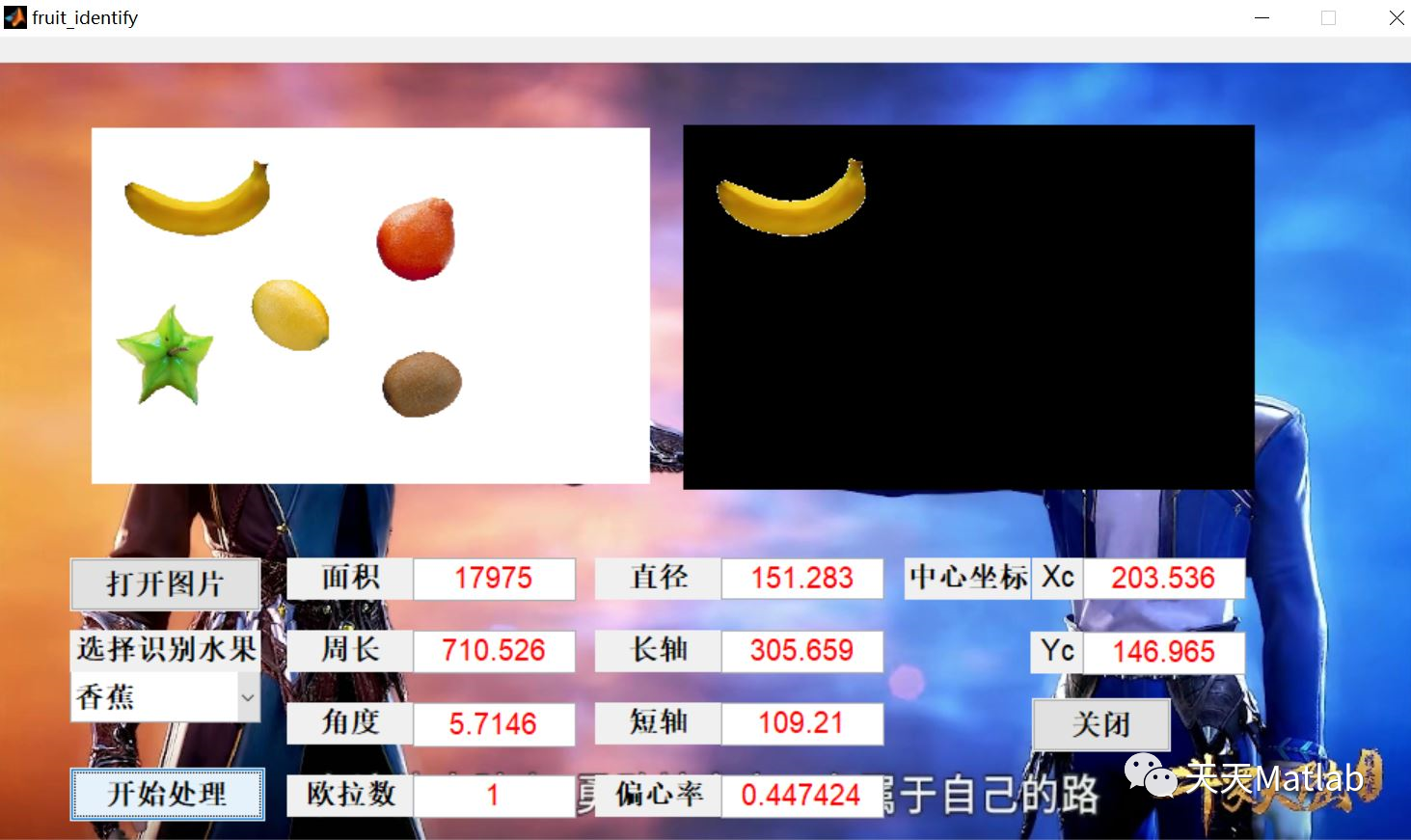
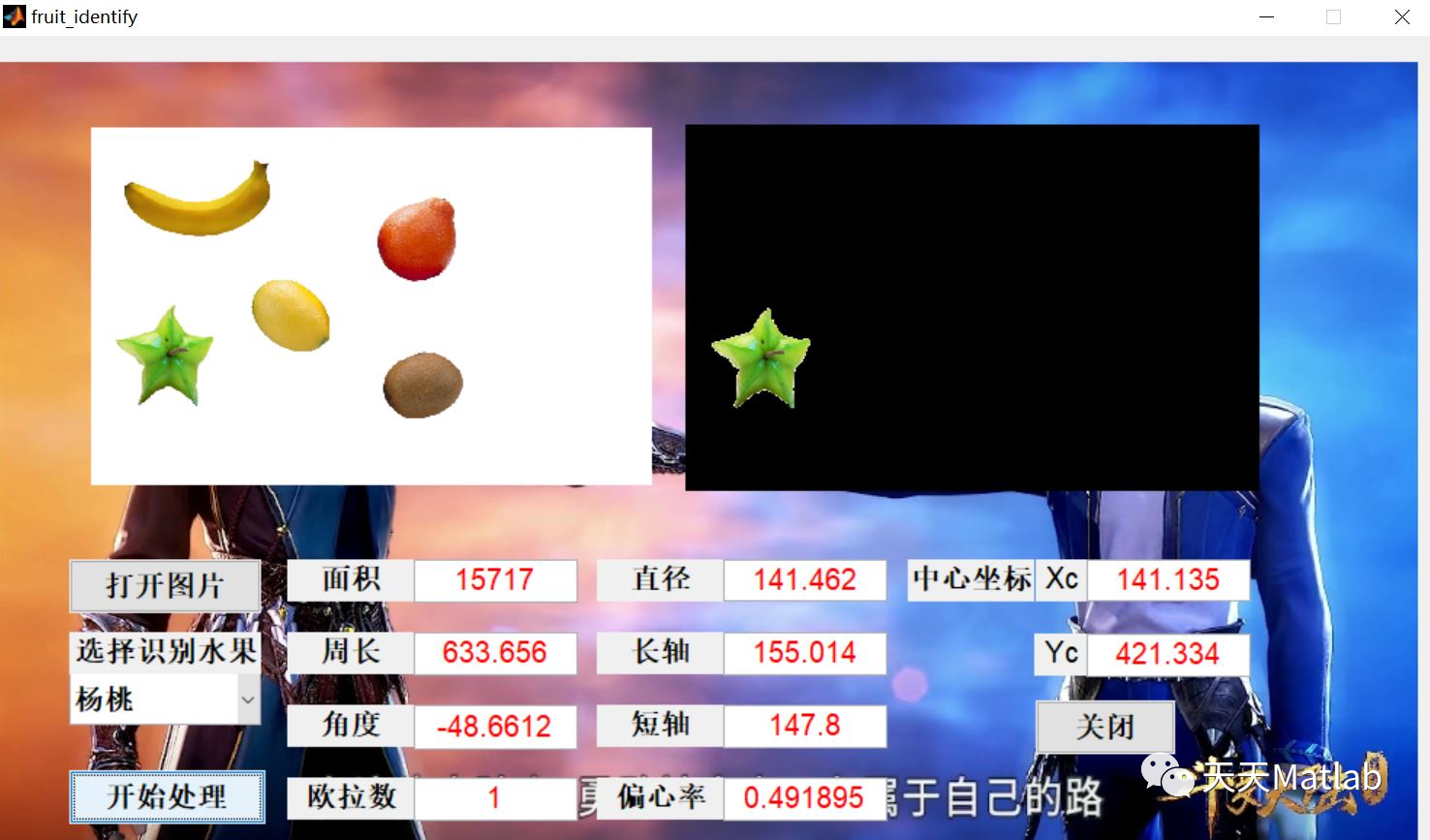
在现实生活中成人识别水果是十分简易的但对于幼儿来说在没有实物之前是无法识别水果的,因此本文设计了一个简易水果识别系统为幼儿在电子设备上识别水果提供可能.本文通过matlab GUI设计了一个水果识别系统界面并通过对水果图像进行二值化处理,边缘处理最后实现了水果分类,结果由设计的GUI界面所示.我们通过算法成功的识别了香蕉,苹果,杨桃,柠檬和猕猴桃.我们可以通过该算法实现的水果识别并为教导幼儿实现电子识别水果提供方便.
2 部分代码
function varargout = fruit_identify(varargin)% FRUIT_IDENTIFY M-file for fruit_identify.fig% FRUIT_IDENTIFY, by itself, creates a new FRUIT_IDENTIFY or raises the existing% singleton*.%% H = FRUIT_IDENTIFY returns the handle to a new FRUIT_IDENTIFY or the handle to% the existing singleton*.%% FRUIT_IDENTIFY('CALLBACK',hObject,eventData,handles,...) calls the local% function named CALLBACK in FRUIT_IDENTIFY.M with the given input arguments.%% FRUIT_IDENTIFY('Property','Value',...) creates a new FRUIT_IDENTIFY or raises the% existing singleton*. Starting from the left, property value pairs are% applied to the GUI before fruit_identify_OpeningFcn gets called. An% unrecognized property name or invalid value makes property application% stop. All inputs are passed to fruit_identify_OpeningFcn via varargin.%% *See GUI Options on GUIDE's Tools menu. Choose "GUI allows only one% instance to run (singleton)".%% See also: GUIDE, GUIDATA, GUIHANDLES% Edit the above text to modify the response to help fruit_identify% Last Modified by GUIDE v2.5 22-May-2021 10:27:49% Begin initialization code - DO NOT EDITgui_Singleton = 1;gui_State = struct('gui_Name', mfilename, ...'gui_Singleton', gui_Singleton, ...'gui_OpeningFcn', @fruit_identify_OpeningFcn, ...'gui_OutputFcn', @fruit_identify_OutputFcn, ...'gui_LayoutFcn', [] , ...'gui_Callback', []);if nargin && ischar(varargin{1})gui_State.gui_Callback = str2func(varargin{1});endif nargout[varargout{1:nargout}] = gui_mainfcn(gui_State, varargin{:});elsegui_mainfcn(gui_State, varargin{:});end% End initialization code - DO NOT EDIT% --- Executes just before fruit_identify is made visible.function fruit_identify_OpeningFcn(hObject, eventdata, handles, varargin)% This function has no output args, see OutputFcn.% hObject handle to figure% eventdata reserved - to be defined in a future version of MATLAB% handles structure with handles and user data (see GUIDATA)% varargin command line arguments to fruit_identify (see VARARGIN)% Choose default command line output for fruit_identifyhandles.output = hObject;im=imread('pic.jpg');axes(handles.axes1)imshow(im)% Update handles structureguidata(hObject, handles);% UIWAIT makes fruit_identify wait for user response (see UIRESUME)% uiwait(handles.figure1);% --- Outputs from this function are returned to the command line.function varargout = fruit_identify_OutputFcn(hObject, eventdata, handles)% varargout cell array for returning output args (see VARARGOUT);% hObject handle to figureend%变换生成最终的结果图像,图像中显示的结果即对应分类器中指定的类别fruit_matrix = hsv2rgb(fruit_HSV); %转换为RGB彩图,彩图中已经滤去了其余物体,只剩下当前目标物axes(handles.axes3);imshow(fruit_matrix);end%%%%%%%%%%%%%%%%%%%%%%%%%%%%%%%%%%%%%%%%%%%%%%%%%%%%
3 仿真结果
4 参考文献
[1]杨霈. 基于matlab GUI的水果识别系统[J]. 电子制作, 2021(12):2.
博主简介:擅长智能优化算法、神经网络预测、信号处理、元胞自动机、图像处理、路径规划、无人机等多种领域的Matlab仿真,相关matlab代码问题可私信交流。
部分理论引用网络文献,若有侵权联系博主删除。





 扫一扫
扫一扫


 1441
1441

 被折叠的 条评论
为什么被折叠?
被折叠的 条评论
为什么被折叠?
 到【灌水乐园】发言





