





 本文介绍了一种新的信号重构方法——卷积法,并通过Matlab代码实现了不同采样频率下的信号重构。结果显示,当采样频率高于信号频率两倍时,重构效果良好;反之则出现频率降低的现象。
Usually we describe reconstruction as interpolation, and there are many approaches to reach it. In this article, I introduce a new method- convulsion
Main
-
signal function
f(x)=sin(15πx+π/10)f(x)=sin(15\pi x+\pi/10)f(x)=sin(15πx+π/10) -
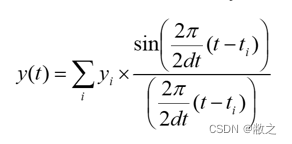
Convulsion Method
-
Description of code
In this practice, I tested 3 different sample frequencies: 100, 20 and 10 Hz respectively. And the reconstruct frequency is 1000 Hz. As the signal function shows above, the signal frequency is 7.5 Hz. -
Matlab code
clc;
clear;
sP=0.01;
sX=[0:sP:1];
sY=sin(15*pi*sX+pi/10);
sR=0.001;
xR=[0:sR:1];
N = length(sX);         % number of samples
yR = zeros(size(xR));
for t = 1:length(xR)
    for n = 0:N-1
        yR(t) = yR(t) + sY(n+1)*sin(pi*(xR(t)-n*sP)/sP)/(pi*(xR(t)-n*sP)/sP);
    end
end
subplot(3,1,1)
plot(sX,sY, ".");
hold on;
plot(xR,yR, "-");
title('0.01s intervals')

sP=0.05;
sX=[0:sP:1];
sY=sin(15*pi*sX+pi/10);
sR=0.001;
xR=[0:sR:1];
N = length(sX);         % number of samples
yR = zeros(size(xR));
for t = 1:length(xR)
    for n = 0:N-1
        yR(t) = yR(t) + sY(n+1)*sin(pi*(xR(t)-n*sP)/sP)/(pi*(xR(t)-n*sP)/sP);
    end
end
subplot(3,1,2)
plot(sX,sY, ".");
hold on;
plot(xR,yR, "-");
title('0.05s intervals')

sP=0.1;
sX=[0:sP:1];
sY=sin(15*pi*sX+pi/10);
sR=0.001;
xR=[0:sR:1];
N = length(sX);         % number of samples
yR = zeros(size(xR));
for t = 1:length(xR)
    for n = 0:N-1
        yR(t) = yR(t) + sY(n+1)*sin(pi*(xR(t)-n*sP)/sP)/(pi*(xR(t)-n*sP)/sP);
    end
end
subplot(3,1,3)
plot(sX,sY, ".");
hold on;
plot(xR,yR, "-");
title('0.1s intervals')
- Result
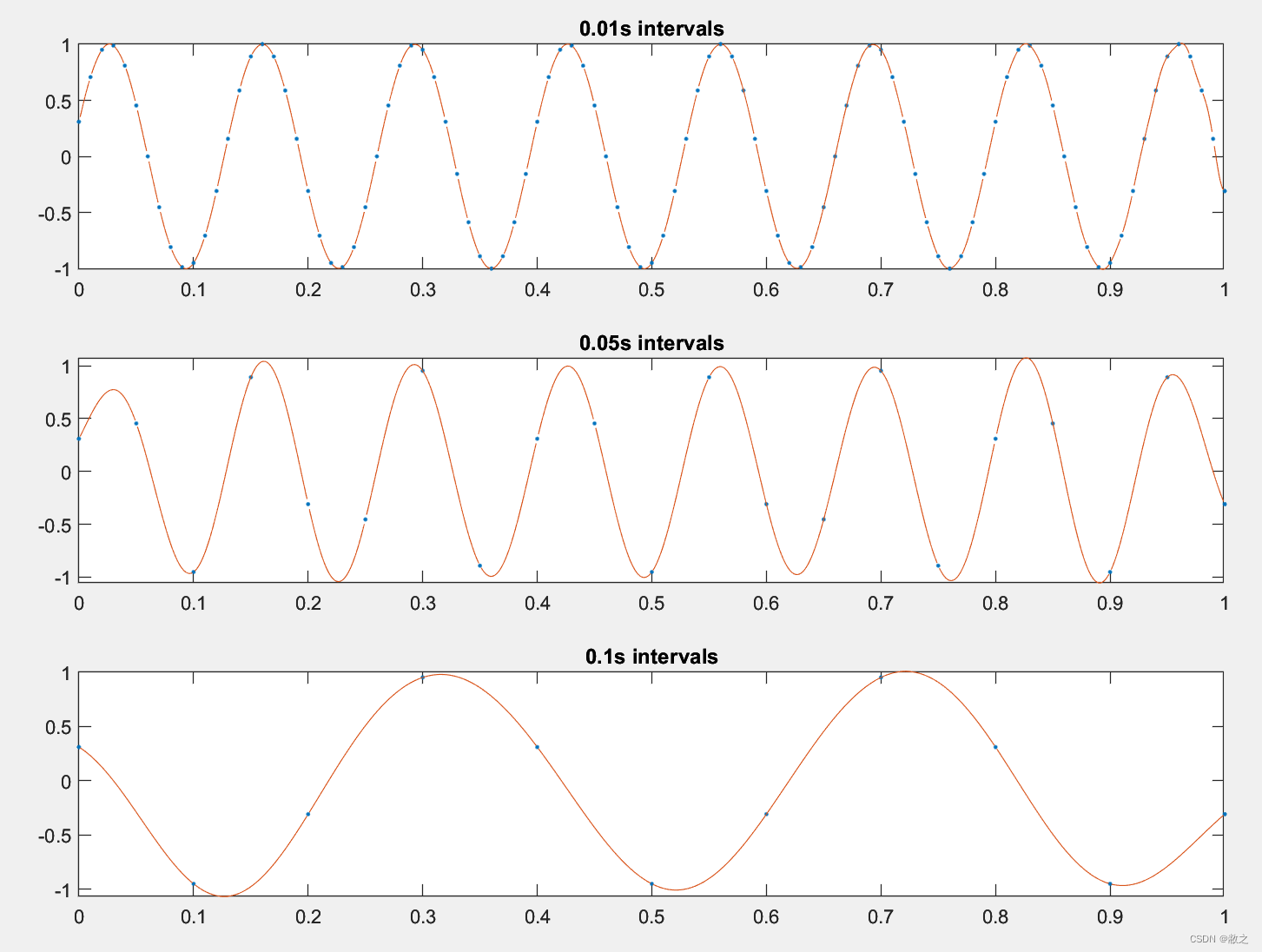
- analysis
- As result shown above, the first and second graph revice the original signal perfectly with correct frequency and amplitude. But the frequency of the third one is not right due to the sample frequency (10Hz) is lower than 2 times of signal its original frequency (15Hz). Hence, the reconstruct signal has lower frequency.





 扫一扫
扫一扫


 9817
9817

 被折叠的 条评论
为什么被折叠?
被折叠的 条评论
为什么被折叠?
 到【灌水乐园】发言





