



 本文介绍了如何利用OpenCV的SIFT类进行图像特征提取和匹配,由于OpenCV3.0不包含SIFT,因此使用了OpenCV2.4.9。文中提供了代码示例,并详细解释了`drawKeypoints`和`drawMatches`函数的参数意义,展示了运行结果。
一个物体,不管远近以及角度如何,我们人都能判断为同一物体,因为我们人脑是根据物体的特征来判断是不是同一物体的,计算机在处理图像时,我们也希望具备这样的能力,所以需要对图像进行特征提取。
本文给出利用OpenCV的SIFT类来进行图像的特征提取与匹配的代码。
由于OpenCV3.0没有编译nonfree,而SIFT类包含在这个模块中,所以我们使用OpenCV2.4.9。
OpenCV2.4.9的Windows版安装包下载链接及配置方法请搜索公众号"qxsf321",关注后回复0045获取!
代码如下:
图像处理开发资料、图像处理开发需求、图像处理接私活挣零花钱,可以搜索公众号"qxsf321",并关注!
代码中用到的图像下载链接:https://pan.baidu.com/s/1eSAPnVG 密码:usrm
//opencv版本:OpenCV2.4.9
//VS版本:VS2012
//Author:qxsf321.net

#include <highgui/highgui.hpp>
#include <opencv2/nonfree/nonfree.hpp>
#include <opencv2/legacy/legacy.hpp>

using namespace cv;
using namespace std;

int main()
{
    Mat image01=imread("17.jpg");
    Mat image02=imread("18.jpg");
    Mat image1,image2;
    GaussianBlur(image01,image1,Size(3,3),0.5);
    GaussianBlur(image02,image2,Size(3,3),0.5);

    //提取特征点
    SiftFeatureDetector siftDetector(30);  //30为检测算子的阀值
    vector<KeyPoint> keyPoint1,keyPoint2;
    siftDetector.detect(image1,keyPoint1);
    siftDetector.detect(image2,keyPoint2);

    //绘制特征点
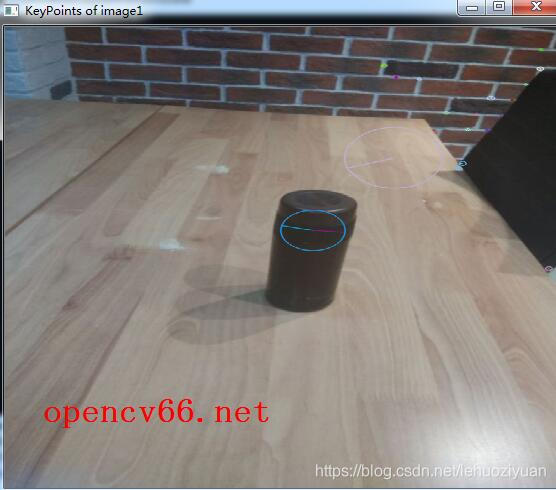
    drawKeypoints(image1,keyPoint1,image1,Scalar::all(-1),DrawMatchesFlags::DRAW_RICH_KEYPOINTS);
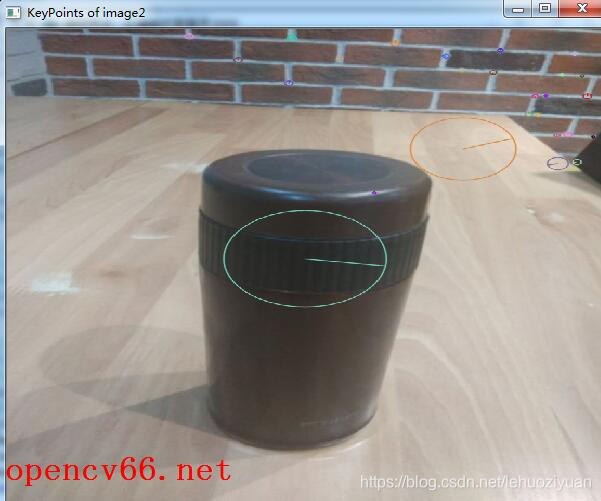
    drawKeypoints(image2,keyPoint2,image2,Scalar::all(-1),DrawMatchesFlags::DRAW_RICH_KEYPOINTS);
    namedWindow("KeyPoints of image1",0);
    namedWindow("KeyPoints of image2",0);

    imshow("KeyPoints of image1",image1);
    imshow("KeyPoints of image2",image2);

    //特征点描述,为下边的特征点匹配做准备
    SiftDescriptorExtractor siftDescriptor;
    Mat imageDesc1,imageDesc2;
    siftDescriptor.compute(image1,keyPoint1,imageDesc1);
    siftDescriptor.compute(image2,keyPoint2,imageDesc2);

    //特征点匹配并显示匹配结果
    BruteForceMatcher<L2<float>> matcher;
    vector<DMatch> matchePoints;
    matcher.match(imageDesc1,imageDesc2,matchePoints,Mat());
    Mat imageOutput;
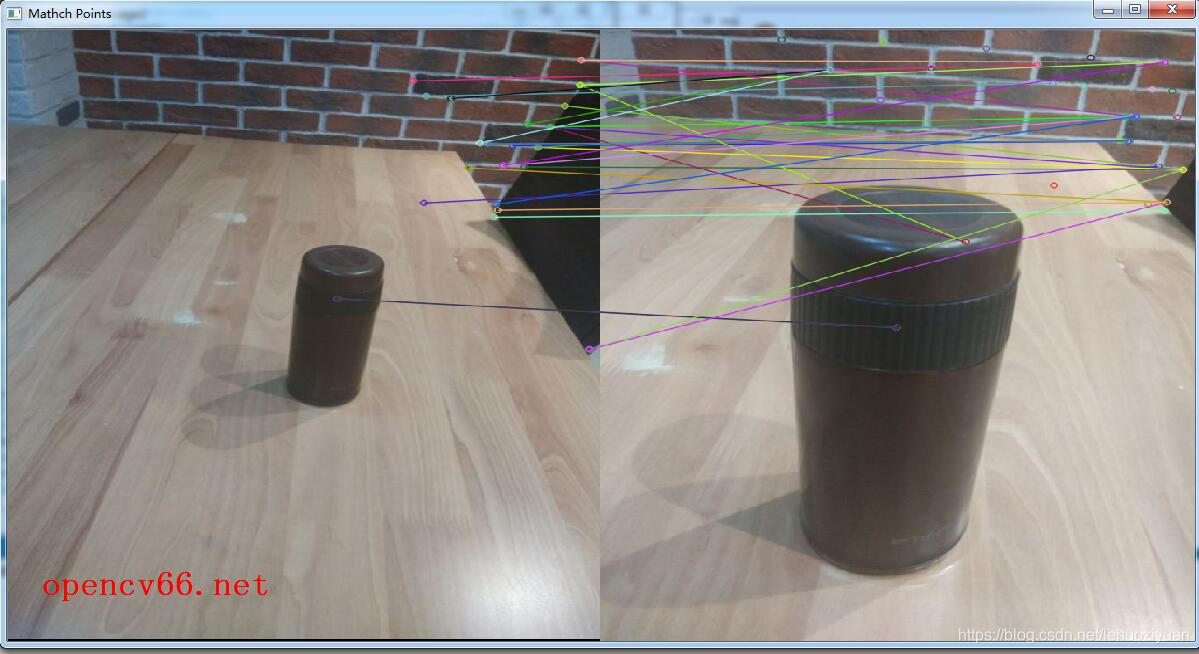
    drawMatches(image01,keyPoint1,image02,keyPoint2,matchePoints,imageOutput);
    namedWindow("Mathch Points",0);
    imshow("Mathch Points",imageOutput);
    waitKey();
    return 0;
}
相关绘制函数说明:
drawKeypoints函数,原型如下:
C++: void drawKeypoints(const Mat& image, const vector<KeyPoint>& keypoints, Mat& outImage, const Scalar& color=Scalar::all(-1), int flags=DrawMatchesFlags::DEFAULT )
参数意义如下:
image:源图像
keypoints:存储特征点的矢量
outImage:输出图像
color:特征点颜色,如果设置为Scalar::all(-1),则颜色随机。
flags:绘图设置的标志,可能的值如下:
struct DrawMatchesFlags
{
enum
{
DEFAULT = 0, // Output image matrix will be created (Mat::create),
// i.e. existing memory of output image may be reused.
// Two source images, matches, and single keypoints
// will be drawn.
// For each keypoint, only the center point will be
// drawn (without a circle around the keypoint with the
// keypoint size and orientation).
DRAW_OVER_OUTIMG = 1, // Output image matrix will not be
// created (using Mat::create). Matches will be drawn
// on existing content of output image.
NOT_DRAW_SINGLE_POINTS = 2, // Single keypoints(没有匹配到的点) will not be drawn.
DRAW_RICH_KEYPOINTS = 4 // For each keypoint, the circle around
// keypoint with keypoint size and orientation will
// be drawn.
};
};
drawMatches函数,原型如下:
C++: void drawMatches(const Mat& img1, const vector<KeyPoint>& keypoints1, const Mat& img2, const vector<KeyPoint>& keypoints2, const vector<DMatch>& matches1to2, Mat& outImg, const Scalar& matchColor=Scalar::all(-1), const Scalar& singlePointColor=Scalar::all(-1), const vector<char>& matchesMask=vector<char>(), int flags=DrawMatchesFlags::DEFAULT )
C++: void drawMatches(const Mat& img1, const vector<KeyPoint>& keypoints1, const Mat& img2, const vector<KeyPoint>& keypoints2, const vector<vector<DMatch>>& matches1to2, Mat& outImg, const Scalar& matchColor=Scalar::all(-1), const Scalar& singlePointColor=Scalar::all(-1), const vector<vector<char>>& matchesMask=vector<vector<char> >(), int flags=DrawMatchesFlags::DEFAULT )
参数意义如下:
img1:第一张图像
keypoints1:来自第一张图像的特征点
img2:第二张图像
keypoints2:来自第二张图像的特征点
matches1to2:第一张图像向第二张图像的匹配特征点。
outImg:输出图像,它的内容取决于flags的设置。
matchColor:匹配图的颜色设置(特征点和线的颜色),如果设置为Scalar::all(-1),则颜色随机。
singlePointColor:没有匹配到的点的颜色。如果设置为Scalar::all(-1),则颜色随机。
matchesMask:匹配掩码,可以通过设置它来设置哪些特征点被绘制。
flags:绘图设置的标志,可能的值如下:
struct DrawMatchesFlags
{
enum
{
DEFAULT = 0, // Output image matrix will be created (Mat::create),
// i.e. existing memory of output image may be reused.
// Two source images, matches, and single keypoints
// will be drawn.
// For each keypoint, only the center point will be
// drawn (without a circle around the keypoint with the
// keypoint size and orientation).
DRAW_OVER_OUTIMG = 1, // Output image matrix will not be
// created (using Mat::create). Matches will be drawn
// on existing content of output image.
NOT_DRAW_SINGLE_POINTS = 2, // Single keypoints(没有匹配到的点) will not be drawn.
DRAW_RICH_KEYPOINTS = 4 // For each keypoint, the circle around
// keypoint with keypoint size and orientation will
// be drawn.
};
};
运行结果如下图所示:





 扫一扫
扫一扫


 704
704

 被折叠的 条评论
为什么被折叠?
被折叠的 条评论
为什么被折叠?
 到【灌水乐园】发言





