


 这篇博客介绍了Python计算机视觉编程中的图像处理基础,包括如何进行图像直方图绘制、高斯滤波降噪以及直方图均衡化操作。通过实例展示了使用PIL、matplotlib和scipy库处理图像的过程,帮助读者理解图像处理的基本概念和技术。
一.根据流程将第一章图像处理基础”的例程跑完,并做完图像处理章节类容。(附图:集美大学美景)

二.以上图为基础,分别做出直方图、高斯滤波、直方图均衡化。
1.直方图
在画图像轮廓前需要转换为灰度图像,因为轮廓需要获取每个坐标[x,y]位置的像素值。

画图像轮廓和直方图的代码:
-- coding: utf-8 --
from PIL import Image
from pylab import *
添加中文字体支持
from matplotlib.font_manager import FontProperties
font = FontProperties(fname=r"c:\windows\fonts\SimSun.ttc", size=14)
im = array(Image.open(‘G.jpg’).convert(‘L’)) # 打开图像,并转成灰度图像
figure()
subplot(121)
gray()
contour(im, origin=‘image’)
axis(‘equal’)
axis(‘off’)
title(u’图像轮廓’, fontproperties=font)
subplot(122)
hist(im.flatten(), 128)
title(u’图像直方图’, fontproperties=font)
plt.xlim([0,260])
plt.ylim([0,11000])
show()
2.高斯滤波
图像降噪是一个在尽可能保持图像细节和结构信息时去除噪声的过程。我们采用Rudin-Osher-Fatemi de-noising(ROF)模型。图像去噪可以应用于很多场合,它涵盖了从你的度假照片使之更好看到卫星照片质量提高。
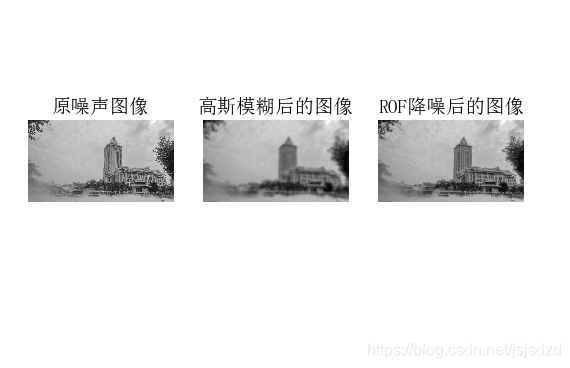
from PIL import Image
from pylab import *
from numpy import *
from numpy import random
from scipy.ndimage import filters
from scipy.misc import imsave
from PCV.tools import rof
“”" This is the de-noising example using ROF in Section 1.5. “”"
添加中文字体支持
from matplotlib.font_manager import FontProperties
font = FontProperties(fname=r"c:\windows\fonts\SimSun.ttc", size=14)
im = array(Image.open(‘G.jpg’).convert(‘L’))
U,T = rof.denoise(im,im)
G = filters.gaussian_filter(im,10)
save the result
#imsave(‘synth_original.pdf’,im)
#imsave(‘synth_rof.pdf’,U)
#imsave(‘synth_gaussian.pdf’,G)
plot
figure()
gray()
subplot(1,3,1)
imshow(im)
#axis(‘equal’)
axis(‘off’)
title(u’原噪声图像’, fontproperties=font)
subplot(1,3,2)
imshow(G)
#axis(‘equal’)
axis(‘off’)
title(u’高斯模糊后的图像’, fontproperties=font)
subplot(1,3,3)
imshow(U)
#axis(‘equal’)
axis(‘off’)
title(u’ROF降噪后的图像’, fontproperties=font)
show()
3.直方均衡化后的图像
图像均衡化作为预处理操作,在归一化图像强度时是一个很好的方式,并且通过直方图均衡化可以增加图像对比度。
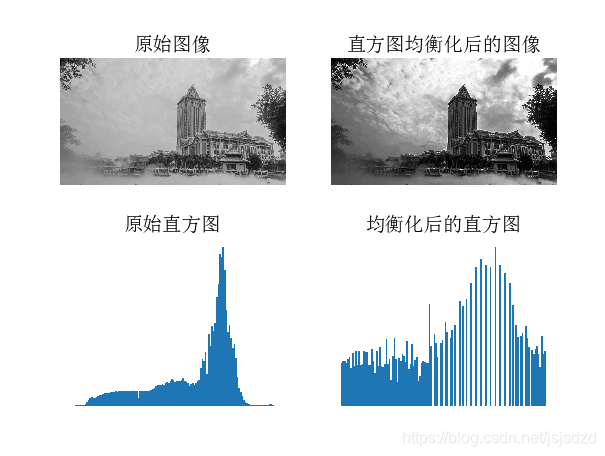
-- coding: utf-8 --
from PIL import Image
from pylab import *
from PCV.tools import imtools
添加中文字体支持
from matplotlib.font_manager import FontProperties
font = FontProperties(fname=r"c:\windows\fonts\SimSun.ttc", size=14)
im = array(Image.open(‘G.jpg’).convert(‘L’)) # 打开图像,并转成灰度图像
#im = array(Image.open(‘G.jpg’).convert(‘L’))
im2, cdf = imtools.histeq(im)
figure()
subplot(2, 2, 1)
axis(‘off’)
gray()
title(u’原始图像’, fontproperties=font)
imshow(im)
subplot(2, 2, 2)
axis(‘off’)
title(u’直方图均衡化后的图像’, fontproperties=font)
imshow(im2)
subplot(2, 2, 3)
axis(‘off’)
title(u’原始直方图’, fontproperties=font)
#hist(im.flatten(), 128, cumulative=True, normed=True)
hist(im.flatten(), 128, normed=True)
subplot(2, 2, 4)
axis(‘off’)
title(u’均衡化后的直方图’, fontproperties=font)
#hist(im2.flatten(), 128, cumulative=True, normed=True)
hist(im2.flatten(), 128, normed=True)
show()
三.总结
通过学习python计算机视觉编程中的图像处理基础,学会各种处理图像的方法,不断的调试,不断的实验才能真正的掌握其中的原理。





 扫一扫
扫一扫


 878
878

 被折叠的 条评论
为什么被折叠?
被折叠的 条评论
为什么被折叠?
 到【灌水乐园】发言





