


 本文介绍如何使用Python内置的http.server模块快速搭建一个简易Web服务器。该服务器能够响应HTTP请求并返回固定页面,显示请求信息,或者作为静态文件服务器提供文件。通过示例代码展示了不同场景下的实现方式。
运行环境 Python 3.9.5
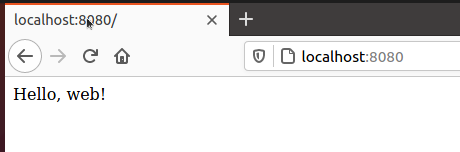
Hello, Web!
使用 python3 自带的 http.server 处理 http 请求,返回固定页面
from http.server import HTTPServer, BaseHTTPRequestHandler


class RequestHandler(BaseHTTPRequestHandler):
    '''Handle HTTP requests by returning a fixed 'page'.'''

    # Page to send back.
    Page = '''
<html>
<body>
<p>Hello, web!</p>
</body>
</html>
'''

    # Handle a GET request.
    def do_GET(self):
        self.send_response(200)
        self.send_header("Content-type", "text/html")
        self.send_header("Content-Length", str(len(self.Page)))
        self.end_headers()
        self.wfile.write(bytes(self.Page, encoding ='utf8'))


if __name__ == '__main__':
    serverAddress = ('', 8080)
    server = HTTPServer(serverAddress, RequestHandler)
    server.serve_forever()
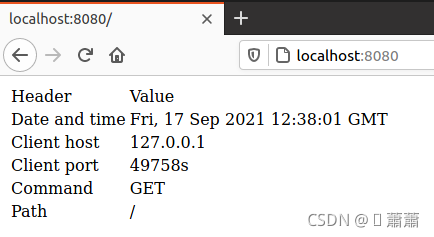
返回request信息
from http.server import HTTPServer, BaseHTTPRequestHandler

class RequestHandler(BaseHTTPRequestHandler):
    '''Respond to HTTP requests with info about the request.'''

    # Template for page to send back.
    Page = '''\
<html>
<body>
<table>
<tr>  <td>Header</td>         <td>Value</td>          </tr>
<tr>  <td>Date and time</td>  <td>{date_time}</td>    </tr>
<tr>  <td>Client host</td>    <td>{client_host}</td>  </tr>
<tr>  <td>Client port</td>    <td>{client_port}</td> </tr>
<tr>  <td>Command</td>        <td>{command}</td>      </tr>
<tr>  <td>Path</td>           <td>{path}</td>         </tr>
</table>
</body>
</html>
'''

    # Handle a request by constructing an HTML page that echoes the
    # request back to the caller.
    def do_GET(self):
        page = self.create_page()
        self.send_page(page)

    # Create an information page to send.
    def create_page(self):
        values = {
            'date_time'   : self.date_time_string(),
            'client_host' : self.client_address[0],
            'client_port' : self.client_address[1],
            'command'     : self.command,
            'path'        : self.path
        }
        page = self.Page.format(**values)
        return bytes(page, encoding='utf8')

    # Send the created page.
    def send_page(self, page):
        self.send_response(200)
        self.send_header("Content-type", "text/html")
        self.send_header("Content-Length", str(len(page)))
        self.end_headers()
        self.wfile.write(page)


if __name__ == '__main__':
    serverAddress = ('', 8080)
    server = HTTPServer(serverAddress, RequestHandler)
    server.serve_forever()
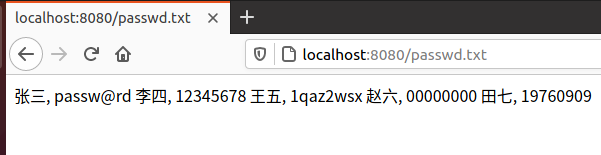
返回目录文件
import sys, os
from http.server import HTTPServer, BaseHTTPRequestHandler

class ServerException(Exception):
    '''For internal error reporting.'''
    pass


class RequestHandler(BaseHTTPRequestHandler):
    '''
    If the requested path maps to a file, that file is served.
    If anything goes wrong, an error page is constructed.
    '''

    # How to display an error.
    Error_Page = """\
        <html>
        <body>
        <h1>Error accessing {path}</h1>
        <p>{msg}</p>
        </body>
        </html>
        """

    # Classify and handle request.
    def do_GET(self):
        try:

            # Figure out what exactly is being requested.
            full_path = os.getcwd() + self.path

            # It doesn't exist...
            if not os.path.exists(full_path):
                raise ServerException("'{0}' not found".format(self.path))

            # ...it's a file...
            elif os.path.isfile(full_path):
                self.handle_file(full_path)

            # ...it's something we don't handle.
            else:
                raise ServerException("Unknown object '{0}'".format(self.path))

        # Handle errors.
        except Exception as msg:
            self.handle_error(msg)

    def handle_file(self, full_path):
        try:
            with open(full_path, 'rb') as reader:
                content = reader.read()
            self.send_content(content)
        except IOError as msg:
            msg = "'{0}' cannot be read: {1}".format(self.path, msg)
            self.handle_error(msg)

    # Handle unknown objects.
    def handle_error(self, msg):
        content = self.Error_Page.format(path=self.path, msg=msg)
        self.send_content(content, 404)

    # Send actual content.
    def send_content(self, content, status=200):
        content = bytes(content, encoding='utf8') if isinstance(content, str) else content
        self.send_response(status)
        self.send_header("Content-type", "text/html")
        self.send_header("Content-Length", str(len(content)))
        self.end_headers()
        self.wfile.write(content)


if __name__ == '__main__':
    serverAddress = ('', 8080)
    server = HTTPServer(serverAddress, RequestHandler)
    server.serve_forever()







 扫一扫
扫一扫


 2771
2771

 被折叠的 条评论
为什么被折叠?
被折叠的 条评论
为什么被折叠?
 到【灌水乐园】发言





