



2 实例化天体类CelestialBody的代码
在定义了天体类CelestialBody之后,接下来对该类进行实例化,创建恒星(太阳),行星(地球和土星)还是卫星(月球、土卫1和土卫2),代码如图6所示。
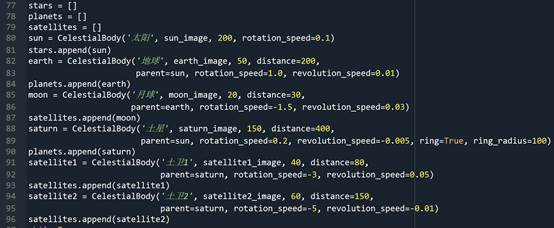
图6 实例化天体类CelestialBody的代码
其中,第77-79行代码分别定义了三个列表stars、plantes和satellites,用来管理恒星、行星和卫星。第80-96行代码分别定义太阳、地球、月球、土星、土卫1和土卫2,并将这些天体添加到相应的列表中。
注意2 在创建天体时,rotation_speed和revolution_speed参数的大小决定了旋转速度,正负决定了旋转方向(顺时针或逆时针),其他参数含义参考图2所示代码。
3 显示天体
在Pygame编程框架代码的基础上,添加以上代码,并且在while循环中通过图7所示代码显示天体。
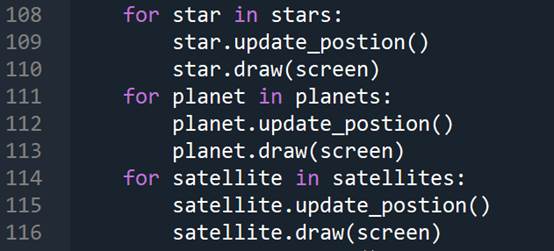
图7 显示天体的代码
其中,第108-110行代码,通过for循环遍历stars中的所有恒星,调用恒星的update_position()方法实时更新恒星位置,调用恒星的draw()方法显示恒星。第111-116行代码分别用来显示行星和卫星。
相关链接4 Pygame编程框架代码请参考《从零开始学Python游戏编程22-Pygame库2》。
4 完整代码
以上程序的完整代码如下所示。
import pygame
from pygame.locals import *
from sys import exit
import math

pygame.init()
infoObject = pygame.display.Info()
SCREEN_WIDTH = infoObject.current_w
SCREEN_HEIGHT = infoObject.current_h


class CelestialBody():
    def __init__(self, name, image, radius,
                 distance=0, parent=None, rotation_speed=0, revolution_speed=0, ring=False, ring_radius=0):
        self.name = name
        self.image = image
        self.radius = radius
        self.image = pygame.transform.smoothscale(self.image, (self.radius, self.radius))
        self.distance = distance
        self.parent = parent
        self.rotation_speed = rotation_speed
        self.revolution_speed = revolution_speed
        self.ring = ring
        self.ring_radius = ring_radius
        self.rotation_angle = 0
        self.revolution_angle = 0
        self.x = SCREEN_WIDTH//2 #x表示星球的横坐标位置,默认(如果没有父星球)为屏幕中心
        self.y = SCREEN_HEIGHT//2 #y表示星球的纵坐标位置,默认(如果没有父星球)为屏幕中心
        self.update_postion()
    def update_postion(self):
        if self.parent:#如果有父星球,说明其在公转,根据父星球位置设置公转信息
            self.revolution_angle += self.revolution_speed
            self.x = self.parent.x + self.distance*math.cos(self.revolution_angle)
            self.y = self.parent.y + self.distance*math.sin(self.revolution_angle)
        self.rotation_angle += self.rotation_speed #自转
        self.image_rotate = pygame.transform.rotate(self.image, self.rotation_angle)
    def draw(self, screen):
        if self.parent:#如果有父星球,说明其在公转,绘制公转轨道
            pygame.draw.circle(screen, 'white', (self.parent.x, self.parent.y), self.distance, 1)
        if self.ring:#绘制土星环
            pygame.draw.ellipse(screen, 'green',
                               (self.x - self.ring_radius,
                                self.y - self.ring_radius//3,
                                self.ring_radius * 2,
                                self.ring_radius * 2 // 3), 5)
        screen.blit(self.image_rotate, (self.x-self.image_rotate.get_width()//2, self.y-self.image_rotate.get_height()//2))

        text_name = text_font.render(self.name, True, 'yellow')
        screen.blit(text_name, (self.x - text_name.get_width() // 2, self.y - self.radius//2-20))


screen = pygame.display.set_mode((SCREEN_WIDTH, SCREEN_HEIGHT))
clock = pygame.time.Clock()

text_font = pygame.font.Font('1.ttf', 20)
sun_image = pygame.image.load('sun.png').convert_alpha()
earth_image = pygame.image.load('earth.png').convert_alpha()
moon_image = pygame.image.load('moon.png').convert_alpha()
saturn_image = pygame.image.load('saturn.png').convert_alpha()
satellite1_image = pygame.image.load('satellite1.png').convert_alpha()
satellite2_image = pygame.image.load('satellite2.png').convert_alpha()

stars = []
planets = []
satellites = []
sun = CelestialBody('太阳', sun_image, 200, rotation_speed=0.1)
stars.append(sun)
earth = CelestialBody('地球', earth_image, 50, distance=200, parent=sun, rotation_speed=1.0, revolution_speed=0.01)
planets.append(earth)
moon = CelestialBody('月球', moon_image, 20, distance=30, parent=earth, rotation_speed=-1.5, revolution_speed=0.03)
satellites.append(moon)
saturn = CelestialBody('土星', saturn_image, 150, distance=400, parent=sun, rotation_speed=0.2, revolution_speed=-0.005, ring=True, ring_radius=100)
planets.append(saturn)
satellite1 = CelestialBody('土卫1', satellite1_image, 40, distance=80, parent=saturn, rotation_speed=-3, revolution_speed=0.05)
satellites.append(satellite1)
satellite2 = CelestialBody('土卫2', satellite2_image, 60, distance=150, parent=saturn, rotation_speed=-5, revolution_speed=-0.01)
satellites.append(satellite2)
while True:
    for event in pygame.event.get():
        if event.type == QUIT:
            pygame.quit()
            exit()
        if event.type == KEYDOWN:
            if event.key == K_ESCAPE:
                pygame.quit()
                exit()

    screen.fill('black')
    for star in stars:
        star.update_postion()
        star.draw(screen)
    for planet in planets:
        planet.update_postion()
        planet.draw(screen)
    for satellite in satellites:
        satellite.update_postion()
        satellite.draw(screen)
    pygame.display.flip()
    clock.tick(60)





 扫一扫
扫一扫


 578
578

 被折叠的 条评论
为什么被折叠?
被折叠的 条评论
为什么被折叠?
 到【灌水乐园】发言





