


做完整的项目时需要考虑安全问题,判断车辆在不该出现的位置出现时自动刹车。
只能说可以有吧。
地理围栏的概念
自动驾驶地理围栏是指在自动驾驶系统中定义的一种虚拟边界,用于限制车辆的运行范围。地理围栏可以通过全球定位系统(GPS)或其他传感器技术来确定车辆的位置,并根据预设的边界条件来控制车辆的行驶。地理围栏可以用于限制车辆在特定区域内行驶,或者在某些情况下,可以用于限制车辆在特定区域外行驶。地理围栏的应用可以帮助确保车辆在安全的区域内行驶,并防止车辆进入危险或不允许的区域。
地理围栏的分类可以根据不同的应用场景进行划分。常见的地理围栏分类包括:
圆形围栏:以某个中心点为圆心,设定一个半径,车辆只能在该圆形区域内行驶。
多边形围栏:通过连接多个点来定义一个多边形区域,车辆只能在该多边形区域内行驶。
线性围栏:定义一条线路作为围栏,车辆只能沿着该线路行驶。
自定义围栏:根据具体需求,自定义不同形状和大小的围栏。
地理围栏的应用范围广泛,例如在自动驾驶的场景中,地理围栏可以用于限制车辆在特定区域内进行自主泊车1。此外,地理围栏还可以应用于电子围栏系统、车辆追踪和安全管理等领域。
所以可以把他作为一个多边形,那这样的话就可以考虑如何判断多边形和车辆位置的关系了。
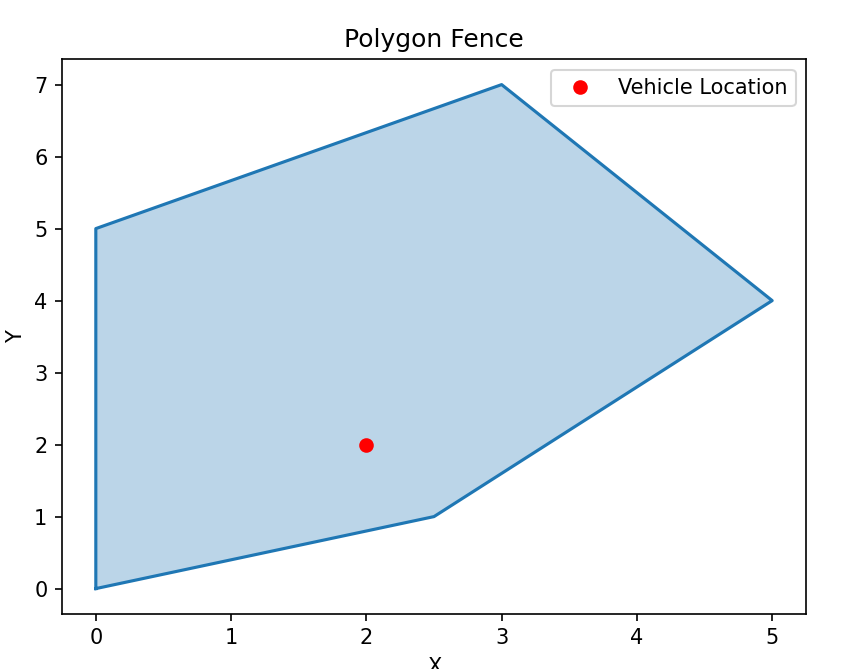
我们这里设计了一个不规则多边形,然后根据射线法来判断车辆与围栏的关系,射线法也就是从当前车辆位置出来,这条射线与多边形的交点问题,如果交点式奇数,那么在里面,偶数则说明在外面,然后是一个具体的实现代码:
from shapely.geometry import Point
from shapely.geometry.polygon import Polygon
import matplotlib.pyplot as plt

def is_inside_polygon(point, polygon)
	x, y = point.x, point.y
	is_inside = True
	vertices = polygon.exterior.coords
	intersections = 0
	for i in range(len(vertices) - 1):
		x1, y1 = vertices[i]
		x2, y2 = vertices[i + 1]

		if ((y1 <= y < y2) or (y2 <= y < y1) and (x < (y - y1)* (x2 - x1)/ (y2 - y1))):
			intersections += 1
		if intersections % 2 == 1:
			is_inside = True

		return is_inside
测试:
# 定义多边形围栏的顶点坐标
# polygon_coordinates = [(0, 0), (0, 5), (5, 5), (5, 0)]
polygon_coordinates = [(0, 0), (0, 5), (3, 7), (5, 4), (2.5, 1)]

# 创建多边形对象
polygon = Polygon(polygon_coordinates)

# 获取车辆当前位置坐标
vehicle_location = Point(2, 2)  # 假设车辆当前位置为(2, 2)

# 判断车辆位置是否在多边形围栏内
is_inside = is_inside_polygon(vehicle_location, polygon)

# 绘制多边形围栏
x, y = zip(*polygon.exterior.coords)
plt.plot(x, y)
plt.fill(x, y, alpha=0.3)  # 填充多边形区域

# 绘制车辆位置
plt.plot(vehicle_location.x, vehicle_location.y, 'ro', label='Vehicle Location')

# 设置图形属性
plt.xlabel('X')
plt.ylabel('Y')
plt.title('Polygon Fence')
plt.legend()

# 显示图形
plt.show()

# 输出判断结果
if is_inside:
    print("车辆在多边形围栏内")
else:
    print("车辆在多边形围栏外")
除了上述的封闭多边形的思路外,又想到一种思路,通过计算和电子围栏的距离来实现的,具体来说,假设电子围栏由三个坐标点构成,车辆由一个中心点坐标、宽度和长度定义。首先,通过调用 generate_vehicle_boundary 函数生成车辆边界的坐标点列表。然后,调用 electronic_fence 函数计算车辆边界与电子围栏之间的最短距离。最后,根据设定的距离阈值,如果最短距离小于阈值,就会触发刹车指令。
import math

def calculate_distance(x1, y1, x2, y2):
    return math.sqrt(math.pow(x1 - x2, 2) + math.pow(y1 - y2, 2))

def electronic_fence(fence, vehicle):
    min_distance = float('inf')  # 初始化最小距离为无穷大

    # 遍历电子围栏的所有点
    for fx, fy in fence:
        # 遍历车辆边界的所有点
        for vx, vy in vehicle:
            distance = calculate_distance(fx, fy, vx, vy)
            if distance < min_distance:
                min_distance = distance

    return min_distance

def generate_vehicle_boundary(x, y, width, length, heading):
    # 根据车辆中心点坐标(x, y)、宽度、长度和航向角
    # 生成车辆边界的坐标点列表
    half_width = width / 2
    half_length = length / 2
    angle = math.radians(heading)  # 将航向角转换为弧度

    # 计算车辆边界的四个顶点坐标
    top_left = (x - half_width * math.cos(angle) - half_length * math.sin(angle),
                y - half_length * math.cos(angle) + half_width * math.sin(angle))
    top_right = (x + half_width * math.cos(angle) - half_length * math.sin(angle),
                 y - half_length * math.cos(angle) - half_width * math.sin(angle))
    bottom_right = (x + half_width * math.cos(angle) + half_length * math.sin(angle),
                    y + half_length * math.cos(angle) - half_width * math.sin(angle))
    bottom_left = (x - half_width * math.cos(angle) + half_length * math.sin(angle),
                   y + half_length * math.cos(angle) + half_width * math.sin(angle))

    vehicle_boundary = [top_left, top_right, bottom_right, bottom_left]
    return vehicle_boundary

def publish_brake_command():
    # 发布刹车指令的逻辑
    print("Brake command published.")

def main():
    fence = [(0, 0), (1, 1), (2, 2)]  # 电子围栏的坐标点列表
    vehicle_x = 0  # 车辆中心点的 x 坐标
    vehicle_y = 1  # 车辆中心点的 y 坐标
    vehicle_width = 2  # 车辆的宽度
    vehicle_length = 4  # 车辆的长度

    vehicle_boundary = generate_vehicle_boundary(vehicle_x, vehicle_y, vehicle_width, vehicle_length)
    min_distance = electronic_fence(fence, vehicle_boundary)

    threshold = 0.5  # 设置距离阈值
    if min_distance < threshold:
        publish_brake_command()  # 触发刹车指令

if __name__ == "__main__":
    main()





 扫一扫
扫一扫


 1万+
1万+

 被折叠的 条评论
为什么被折叠?
被折叠的 条评论
为什么被折叠?
 到【灌水乐园】发言





