



物理系统与碰撞
这是
3D游戏编程的第六次作业
说明文档
本次实验完成了所有基本要求,尽量将步骤展示出。
闪光点:
附有详细类图以及详细的代码注释
作业内容
改进飞碟(Hit UFO)游戏
- 游戏内容要求:
- 按
adapter模式 设计图修改飞碟游戏 - 使它同时支持物理运动与运动学(变换)运动
- 按
改进后效果展示
-
这里只展示增加了物理运动后的效果,游戏正常运行的效果还请移步到与游戏世界交互文章里的效果展示
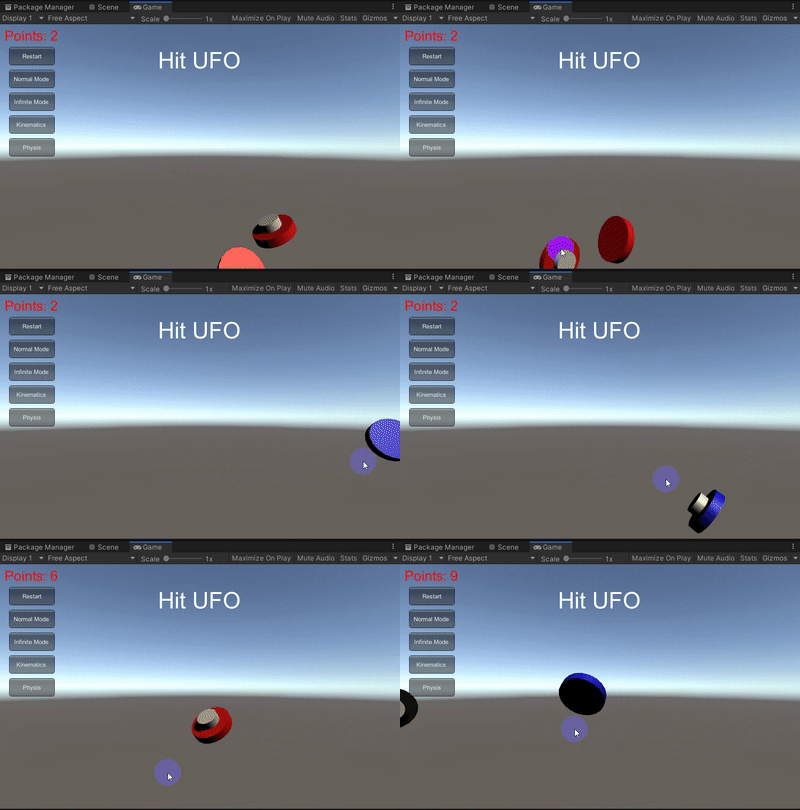
可以看到明显的碰撞效果的产生,这是因为飞碟物理运动是通过设置刚体来完成的,这与原本的运动学的运动不同,后者不包含碰撞。
改进版设计
- 改进版类图:
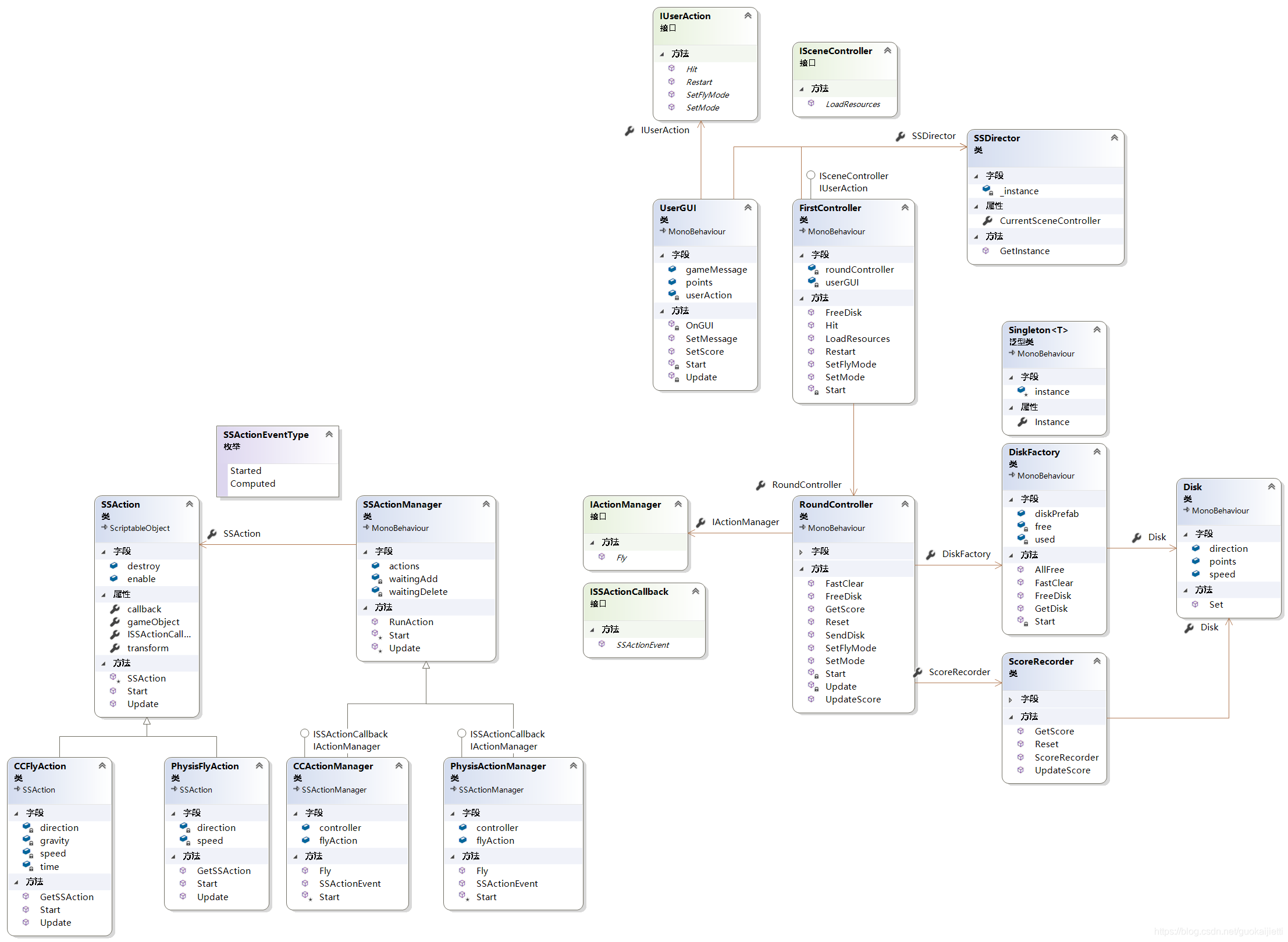
- 改进:
- 将场景控制器(
FisrtController)与回合控制器(RoundController)解耦,场景控制器只需要接管回合控制器即可,具体的记分以及飞碟生产的人物都转交给回合控制器来完成,减轻场景控制器的任务量。 - 新增记分员(
ScoreRecorder),简化场景控制器代码。 - 回合控制器和动作管理者接口(
IActionManager)交接,使得动作管理者可以动态切换为不同的具体的动作管理者,代码中对应着两种动作管理者,一种是运动学(CCActionManager),一种是动力学(PhysisActionManager)。
- 将场景控制器(
- 改进:
- 文件结构(标蓝部分为新增):
Model Controller View Action 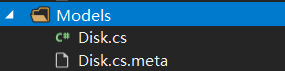
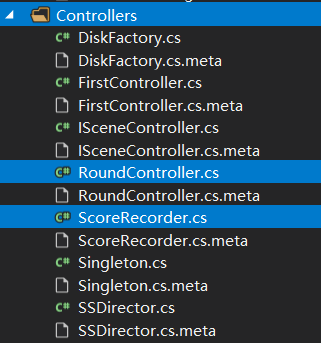
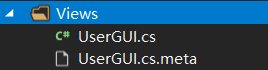
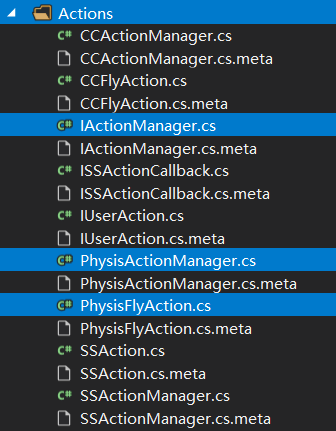
改动代码细节
在旧版的基础上,改动的部分不少,与上一次作业重复的代码我将不会列出,而是将修改的都列出,并配上详细注释。
-
预制的修改
- 为了让物体能够支持物理运动,可以给它添加刚体组件:
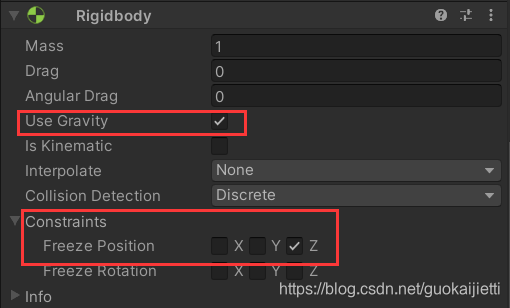
- 两处细节:
- 记得勾选上
Use Gravity选项 - 为了防止飞碟乱跑(乱跑可能会导致无法正确判断游戏是否结束),所以我们有必要在冻结飞碟的某个轴的移动,根据我游戏的设置这里冻结的是z轴,这样子就能够避免飞碟跑到屏幕后太远或者跑到摄像机后(这里的“后”指的是z轴坐标更大导致飞碟没有进入视野)
- 记得勾选上
- 为了让物体能够支持物理运动,可以给它添加刚体组件:
-
新增代码:
-
PhysisFlyAction:简单动作类,这里是依靠预制的刚体来实现飞碟的物理运动,所以可以看到代码中该动作的参数不需要重力以及时间,因为物理运动由刚体帮我们完成,我们只需要指定初始的飞行速度和方向即可。
public class PhysisFlyAction : SSAction { float speed; //水平速度 Vector3 direction; //飞行方向 //生产函数 public static PhysisFlyAction GetSSAction(float speed, Vector3 direction) { PhysisFlyAction action = ScriptableObject.CreateInstance<PhysisFlyAction>(); action.speed = speed; action.direction = direction; return action; } public override void Start() { // 设置物体运动为动力学 gameObject.GetComponent<Rigidbody>().isKinematic = false; //为物体增加水平初速度 gameObject.GetComponent<Rigidbody>().velocity = 1.5f * speed * direction; } public override void Update() { // 飞碟到达底部 if (this.transform.position.y < -5) { this.destroy = true; this.enable = false; // 进行回调 this.callback.SSActionEvent(this); } } } -
IActionManager动作管理者接口,目的是为了简化回合控制器的使用。对外提供了简单易用的接口,屏蔽内部的飞行细节,以及具体的物理运动、运动学运动的细节。
public interface IActionManager { void Fly(GameObject disk, float speed, Vector3 direction); } -
PhysisActionManager物理动作管理者,实现了动作管理者接口,其下的飞行动作实现是物理运动,也即使用了
PhysisFlyAction类。public class PhysisActionManager : SSActionManager, ISSActionCallback, IActionManager { // 飞行动作基对象 public PhysisFlyAction flyAction; // 场景控制器 public FirstController controller; // Start is called before the first frame update protected new void Start() { controller = (FirstController)SSDirector.GetInstance().CurrentSceneController; } public void Fly(GameObject disk, float speed, Vector3 direction) { flyAction = PhysisFlyAction.GetSSAction(speed, direction); RunAction(disk, flyAction, this); } //回调函数 public void SSActionEvent(SSAction source, SSActionEventType events = SSActionEventType.Computed, int intParam = 0, string strParam = null, Object objectParam = null) { //飞碟结束飞行后进行回收 controller.FreeDisk(source.gameObject); } } -
ScoreRecorder记分员,记分员根据飞碟数据来进行记分,供回合控制器使用。
public class ScoreRecorder { int score; //游戏当前分数 public ScoreRecorder() { // 初始化分数为0 score = 0; } public void UpdateScore(Disk disk) { score += disk.points; } public int GetScore() { return score; } public void Reset() { score = 0; } } -
RoundController回合控制器,回合控制器里的代码看起来很熟悉,没错,其实就是对上一节的场景控制器的抽取,抽取的部分为回合控制的代码,比如发送飞碟、调用记分员记分等等。这里具体要说明的是玩家可根据设置飞行模式来切换飞碟的动作是运动学运动还是物理运动:
public void SetFlyMode(bool isPhysis) {
	actionManager = isPhysis ? Singleton<PhysisActionManager>.Instance :
			Singleton<CCActionManager>.Instance as IActionManager;
}
完整代码:
public class RoundController : MonoBehaviour {
  // 场景控制器
  FirstController controller;
  // 动作管理者:可选运动学或动力学
  IActionManager actionManager;
  // 飞碟工厂
  DiskFactory diskFactory;
  // 记分员
  ScoreRecorder scoreRecorder;
  UserGUI userGUI;
  int[] roundDisks;           //对应轮次的飞碟数量
  bool isInfinite;            //游戏当前模式
  int round;                  //游戏当前轮次
  int sendCnt;                //当前已发送的飞碟数量
  float sendTime;             //发送时间

  void Start() {
    controller = (FirstController)SSDirector.GetInstance().CurrentSceneController;
    actionManager = Singleton<CCActionManager>.Instance;
    diskFactory = Singleton<DiskFactory>.Instance;
    scoreRecorder = new ScoreRecorder();
    userGUI = Singleton<UserGUI>.Instance;
    sendCnt = 0;
    round = 0;
    sendTime = 0;
    isInfinite = false;
    roundDisks = new int[] { 3, 5, 7, 9, 11, 13, 15 };
  }

  public void Reset() {
    sendCnt = 0;
    round = 0;
    sendTime = 0;
    scoreRecorder.Reset();
  }

  public void UpdateScore(Disk disk) {
    scoreRecorder.UpdateScore(disk);
  }

  public int GetScore() {
    return scoreRecorder.GetScore();
  }

  public void SetMode(bool isInfinite) {
    this.isInfinite = isInfinite;
  }

  public void SetFlyMode(bool isPhysis) {
    actionManager = isPhysis ? Singleton<PhysisActionManager>.Instance : Singleton<CCActionManager>.Instance as IActionManager;
  }

  public void SendDisk() {
    //从工厂生成一个飞碟
    GameObject disk = diskFactory.GetDisk(round);
    //设置飞碟的随机位置
    disk.transform.position = new Vector3(-disk.GetComponent<Disk>().direction.x * 7, UnityEngine.Random.Range(0f, 8f), 0);
    disk.SetActive(true);
    //设置飞碟的飞行动作
    actionManager.Fly(disk, disk.GetComponent<Disk>().speed, disk.GetComponent<Disk>().direction);
  }

  public void FastClear() {
    diskFactory.FastClear();
  }

  public void FreeDisk(GameObject disk) {
    diskFactory.FreeDisk(disk);
  }

void Update() {
    sendTime += Time.deltaTime;
    // 间隔1s发送飞碟
    if (sendTime >= 2) {
      sendTime = 0;
      // 每次至多发送5个飞碟
      for (int i = 0; i < 5 && sendCnt < roundDisks[round]; i++) {
        sendCnt++;
        SendDisk();
      }
      // 如果在最后一轮并且已经发送完所有该轮的所有飞碟
      if (round == roundDisks.Length - 1 && sendCnt == roundDisks[round]) {
        if (isInfinite) {
          // 如果是无限模式
          // 则重复循环
          round = 0;
          sendCnt = 0;
          userGUI.SetMessage("");
        } else {
          // 否则游戏结束,注意这里必须全部飞碟消失才是游戏结束
          if (!diskFactory.AllFree())
            return;
          userGUI.SetMessage("Game Over!");
        }
      }

      // 如果发完本轮的飞碟,更新轮次
      if (sendCnt == roundDisks[round] && round < roundDisks.Length - 1) {
        sendCnt = 0;
        round++;
      }
    }
  }
}
-
-
修改代码:
这里列出的是旧文件新增的代码:
-
UserGUI:新增了设置
message和points的对外方法,目的是使用者更好的封装这些ui组件。
另外还新增了两个切换飞碟飞行模式的按钮: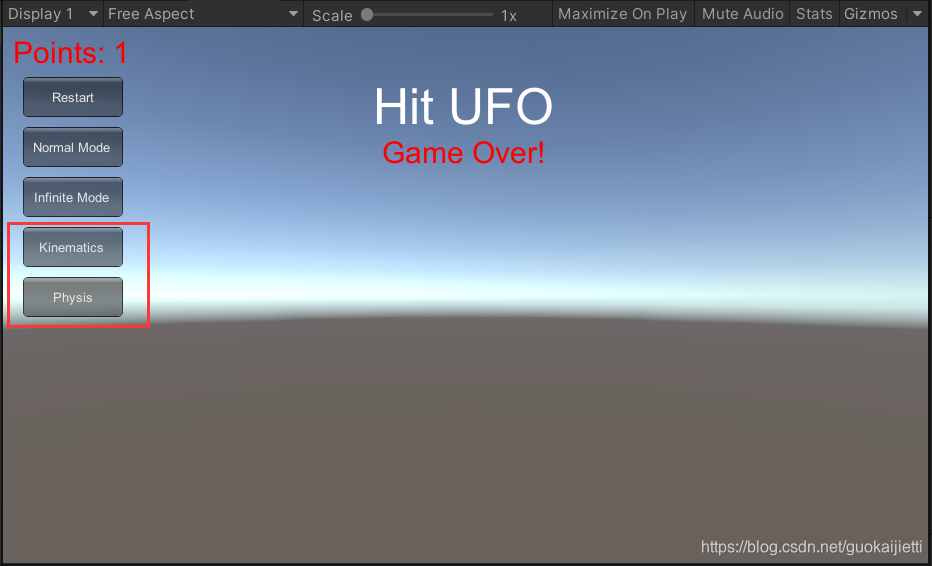
完整代码:public class UserGUI : MonoBehaviour { private IUserAction userAction; public string gameMessage; public int points; void Start() { points = 0; gameMessage = ""; userAction = SSDirector.GetInstance().CurrentSceneController as IUserAction; } public void SetMessage(string gameMessage) { this.gameMessage = gameMessage; } public void SetScore(int points) { this.points = points; } void OnGUI() { // 小号字体 GUIStyle small = new GUIStyle { padding = new RectOffset(0, 0, 0, 0), fontSize = 30, normal = { textColor = Color.red }, alignment = TextAnchor.MiddleCenter }; // 大号字体 GUIStyle big = new GUIStyle { fontSize = 50, normal = { textColor = Color.white }, alignment = TextAnchor.MiddleCenter }; GUI.Label(new Rect(Screen.width / 2 - 50, 30, 100, 100), "Hit UFO", big); GUI.Label(new Rect(20, 0, 100, 50), "Points: " + points, small); GUI.Label(new Rect(Screen.width / 2 - 100, 100, 200, 50), gameMessage, small); if (GUI.Button(new Rect(20, 50, 100, 40), "Restart")) { userAction.Restart(); } if (GUI.Button(new Rect(20, 100, 100, 40), "Normal Mode")) { userAction.SetMode(false); userAction.Restart(); } if (GUI.Button(new Rect(20, 150, 100, 40), "Infinite Mode")) { userAction.SetMode(true); userAction.Restart(); } if (GUI.Button(new Rect(20, 200, 100, 40), "Kinematics")) { userAction.SetFlyMode(false); userAction.Restart(); } if (GUI.Button(new Rect(20, 250, 100, 40), "Physis")) { userAction.SetFlyMode(true); userAction.Restart(); } } void Update() { if (Input.GetButtonDown("Fire1")) { userAction.Hit(Input.mousePosition); } } } -
FirstController场景控制器的改动很大,变得很简洁,因为飞碟、分数等动作都交由回合控制器处理。
public class FirstController : MonoBehaviour, ISceneController, IUserAction {

  // public CCActionManager actionManager;  //动作管理者
  // 不需要动作管理者,只要与roundcontroller对接即可
  RoundController roundController;       // 回合控制器
  // DiskFactory diskFactory;        // 飞碟工厂
  UserGUI userGUI;

  // Start is called before the first frame update
  void Start() {
    SSDirector.GetInstance().CurrentSceneController = this;
    gameObject.AddComponent<DiskFactory>();
    gameObject.AddComponent<CCActionManager>();
    gameObject.AddComponent<PhysisActionManager>();
    gameObject.AddComponent<RoundController>();
    gameObject.AddComponent<UserGUI>();
    LoadResources();
  }

  public void LoadResources() {
    // diskFactory = Singleton<DiskFactory>.Instance;
    roundController = Singleton<RoundController>.Instance;
    userGUI = Singleton<UserGUI>.Instance;
  }

  public void Restart() {
    userGUI.SetMessage("");
    userGUI.SetScore(0);
    // 回合初始化
    roundController.Reset();
    // 快速回收场上的飞碟
    // diskFactory.FastClear();
    roundController.FastClear();
  }

  public void Hit(Vector3 position) {

    // 获取主摄像头
    Camera ca = Camera.main;
    Ray ray = ca.ScreenPointToRay(position);

    // position是鼠标位置
    // 下面的到鼠标射线得到的碰撞物体
    RaycastHit[] hits;
    hits = Physics.RaycastAll(ray);

    for(int i = 0; i < hits.Length; i++) {
      RaycastHit hit = hits[i];
      if (hit.collider.gameObject.GetComponent<Disk>() != null) {
        // 飞碟移动到底端,从而触发飞行动作的回调。
        hit.collider.gameObject.transform.position = new Vector3(0, -7, 0);
        // 算分
        roundController.UpdateScore(hit.collider.gameObject.GetComponent<Disk>());
        // 更新显示
        userGUI.SetScore(roundController.GetScore());
      }
    }
  }

  public void SetMode(bool isInfinite) {
    roundController.SetMode(isInfinite);
  }

  public void SetFlyMode(bool isPhysis) {
    roundController.SetFlyMode(isPhysis);
  }

  public void FreeDisk(GameObject disk) {
    roundController.FreeDisk(disk);
  }
}
-
传送门
如果想要完整的代码细节,还请移步gitee仓库





 扫一扫
扫一扫


 1345
1345

 被折叠的 条评论
为什么被折叠?
被折叠的 条评论
为什么被折叠?
 到【灌水乐园】发言





