


#想要制作一个在windows下运行的镜像文件,运行后可以在windows下直接学习ROS2。过程中遇到一些问题,慢慢的都解决了,比如汉字的显示,汉字的输入,图形界面等。#
首先,需要安装Docker Desktop,个人版不需要注册也可以运行。
在个人文件夹下,创建一个dockerfile文件,注意没有后缀,用记事本打开。
输入下面的代码:
# 基础镜像
FROM ubuntu:22.04

ENV DEBIAN_FRONTEND=noninteractive

# 安装基本组件
RUN apt-get update && apt-get install -y \
fcitx fcitx-pinyin fcitx-config-gtk fcitx-frontend-all \
fcitx-module-dbus fcitx-ui-classic \
im-config language-pack-zh-hans fonts-wqy-zenhei locales \
xfce4 xfce4-goodies x11vnc xvfb \
firefox wget curl net-tools sudo git \
python3 python3-pip supervisor \
&& apt-get clean && rm -rf /var/lib/apt/lists/*

# 设置系统语言为中文
RUN locale-gen zh_CN.UTF-8 && \
update-locale LANG=zh_CN.UTF-8 && \
dpkg-reconfigure locales

# 安装中文输入法配置工具(可选)
RUN apt-get update && apt-get install -y fcitx-config-gtk

# 设置环境变量,确保 Fcitx 在启动时加载
ENV GTK_IM_MODULE=fcitx
ENV QT_IM_MODULE=fcitx
ENV XMODIFIERS="@im=fcitx"

# 创建用户
RUN useradd -m docker && echo "docker:docker" | chpasswd && adduser docker sudo

# 设置默认分辨率
ENV DISPLAY=:1
ENV RESOLUTION=1920x1080

# 下载 noVNC 和 websockify(源码),多试几次
WORKDIR /opt
RUN git clone https://github.com/novnc/noVNC /opt/noVNC \
&& git clone https://github.com/novnc/websockify /opt/websockify \
&& chmod +x /opt/websockify/run \
&& ln -s /opt/noVNC/vnc_lite.html /opt/noVNC/index.html


# 设置 VNC 密码
RUN mkdir -p /home/docker/.vnc \
&& x11vnc -storepasswd 123456 /home/docker/.vnc/passwd

# 复制 supervisord 配置文件
COPY supervisord.conf /etc/supervisor/conf.d/vnc.conf

WORKDIR /home/docker

EXPOSE 6080

CMD ["/usr/bin/supervisord", "-n"]
制作配置文件supervisord.conf,和dockerfile放在一个目录下
[program:xvfb]
command=/usr/bin/Xvfb :1 -screen 0 1280x800x24
autostart=true
autorestart=true

[program:x11vnc]
command=/usr/bin/x11vnc -display :1 -passwd 123456 -forever -shared
autostart=true
autorestart=true

[program:startxfce4]
command=/usr/bin/startxfce4
environment=DISPLAY=":1"
autostart=true
autorestart=true

[program:novnc]
command=/opt/websockify/run 0.0.0.0:6080 localhost:5900 --web=/opt/noVNC
autostart=true
autorestart=true
CMD进入命令行,进入dockerfile所在的目录,创建镜像,注意后面的.不要忘记拷贝,github.com一次连接可能不成功,需要多试几次。
docker build -t my-novnc .
创建容器并运行,-it进入命令行,-p映射端口,-v映射本地文件夹,文件夹根据实际进行替换
docker run -it -p 6080:6080 -v D:/Learning/Ubuntu:/mnt --name my-novnc-ros my-novnc
容器运行后,从网页http://localhost:6080 进入,密码123456
使用小鱼的一键安装指令安装ROS2,安装提示进行安装即可:
wget http://fishros.com/install -O fishros && . fishros
根据需要安装terminator终端和办公软件:
sudo apt install terminator libreoffice
安装VS Code,并运行
wget https://go.microsoft.com/fwlink/?LinkID=760868 -O code.deb
sudo dpkg -i code.deb
code --no-sandbox --user-data-dir "/mnt"
安装 VS Code 的插件,有些插件已经过时了,根据提示安装新的插件:
C++/Python/chinese/ROS/vscode-icon/msg language support//urdf/intellicode/markdown all in one
设置环境变量
source /opt/ros/humble/local_setup.bash
启用中文输入法
fcitx &
测试ROS安装
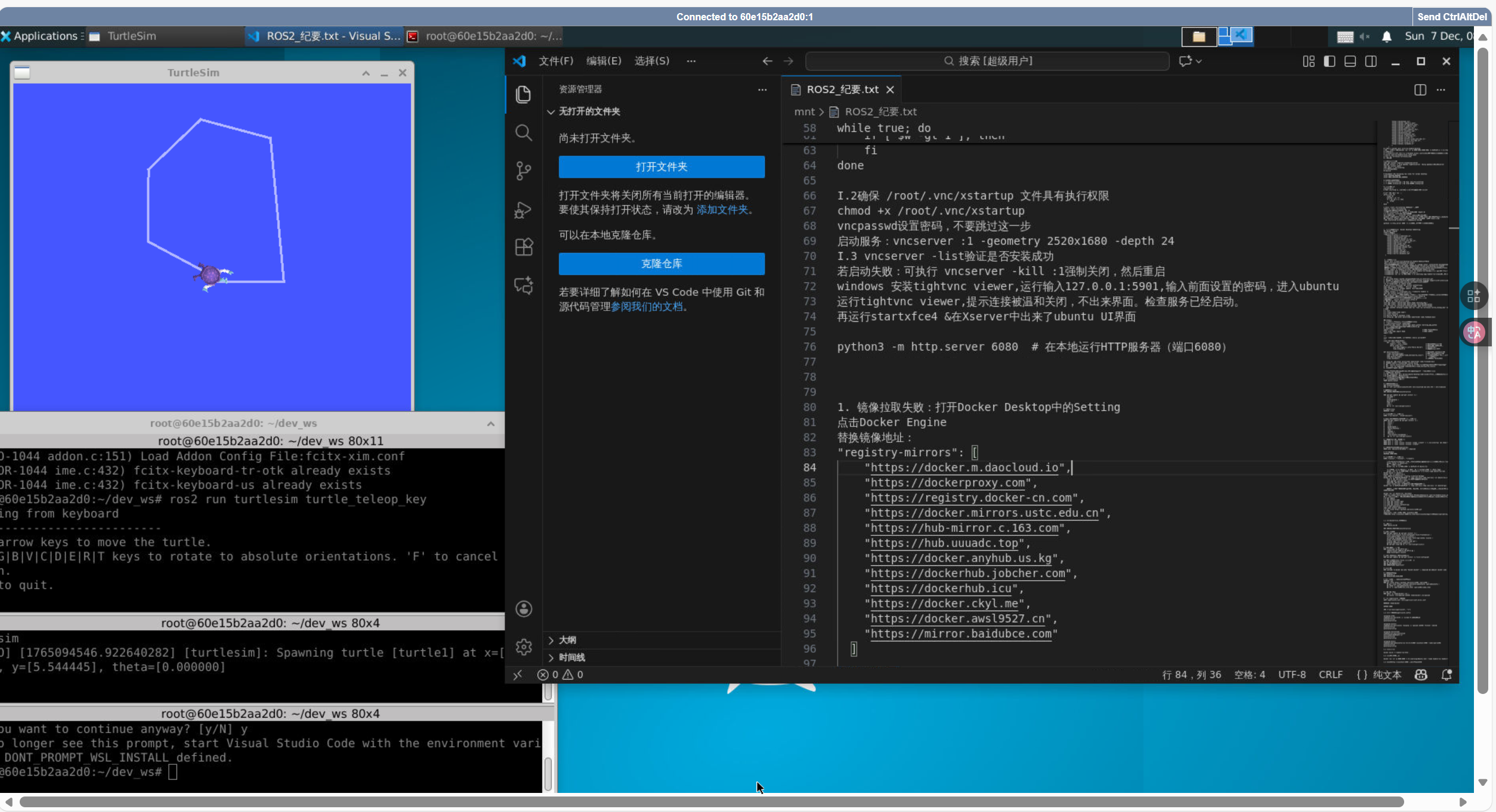
ros2 run turtlesim turtlesim_node
ros2 run turtlesim turtle_teleop_key





 扫一扫
扫一扫


 1282
1282

 被折叠的 条评论
为什么被折叠?
被折叠的 条评论
为什么被折叠?
 到【灌水乐园】发言





