


如何做私有SFT高效微调最快
1. 技术普及需求
当前大模型微调技术存在明显的知识门槛问题:
- 相关教程分散,缺乏系统性学习路径
- 理论与实践脱节,学了不会用
- 企业级应用案例稀缺,难以对接实际业务需求
2. 成本控制需求
传统微调方法的资源门槛过高:
- 全参数微调需要大量GPU资源,中小团队难以承受
- 训练周期长,试错成本高
- 缺乏针对有限资源环境的优化方案
3. 标准化需求
模型微调过程缺乏标准化流程:
-
效果评估标准不统一,结果难以比较
-
最佳实践经验分散,重复踩坑
-
缺乏从数据处理到模型部署的完整工程化流程
- 每周不定期技术公开课:涵盖最新大模型与最佳技术项目实践
- 永久免费更新机制:同步技术演进保持内容前沿性、社区收录全部公开课内容
技术破局:从"奢侈品"到"日用品"
核心突破:让RTX 4090干A100的活
这个项目要解决的核心问题很简单:
如何用2万元的消费级显卡,做出原本需要20万元专业设备才能完成的模型微调?
数据说话:
- 成本下降:从20万专业设备 → 2万消费级显卡(10倍成本优势)
- 速度提升:Unsloth框架实现3-5倍训练加速
- 内存优化:相同效果下内存占用减少60%
- 周期压缩:从3个月项目周期 → 1周快速验证
为什么现在做这件事?
时机窗口:技术成熟度与市场需求的完美交汇
-
技术突破临界点
- LoRA、QLoRA等高效微调技术趋于成熟
- Unsloth等工程化框架大幅降低实施复杂度
- 开源模型生态日益完善(Qwen、LLaMA、Mistral)
-
市场需求爆发
- 企业对模型定制化需求激增
- 中小企业急需低成本解决方案
- 技术人员渴望掌握前沿技能
-
教育空白明显
- 市面上缺乏系统性的实战教程
- 理论多、实践少,学了不会用
- 高质量案例稀缺
这个项目的"杀手锏"
不是又一个微调教程,而是一套完整的"降维打击"方案
🎯 场景驱动,非技术导向
- 反套路:不从算法原理开始,从业务需求倒推
- 真实案例:每个技术点都对应具体的商业应用场景
- 成本意识:每个决策都考虑ROI,适合中小企业实际情况
⚡ 效率优先,非完美主义
- 快速验证:1天搭建环境,3天出初步效果,1周完成项目
- 资源友好:单卡训练,消费级硬件,个人开发者也能玩转
- 工程化思维:从实验室到生产环境的无缝切换
📊 数据驱动,非主观判断
- 标准化评估:集成EvalScope,告别"感觉良好"式评判
- 效果对比:微调前后的量化对比,让改进看得见
- 成本核算:训练成本、时间成本、效果收益的完整核算
Unsloth安装部署
conda create --name unsloth python=3.11
conda init
source ~/.bashrc
conda activate unsloth
然后在虚拟环境中安装Jupyter及Jupyter Kernel:
conda install jupyterlab
conda install ipykernel
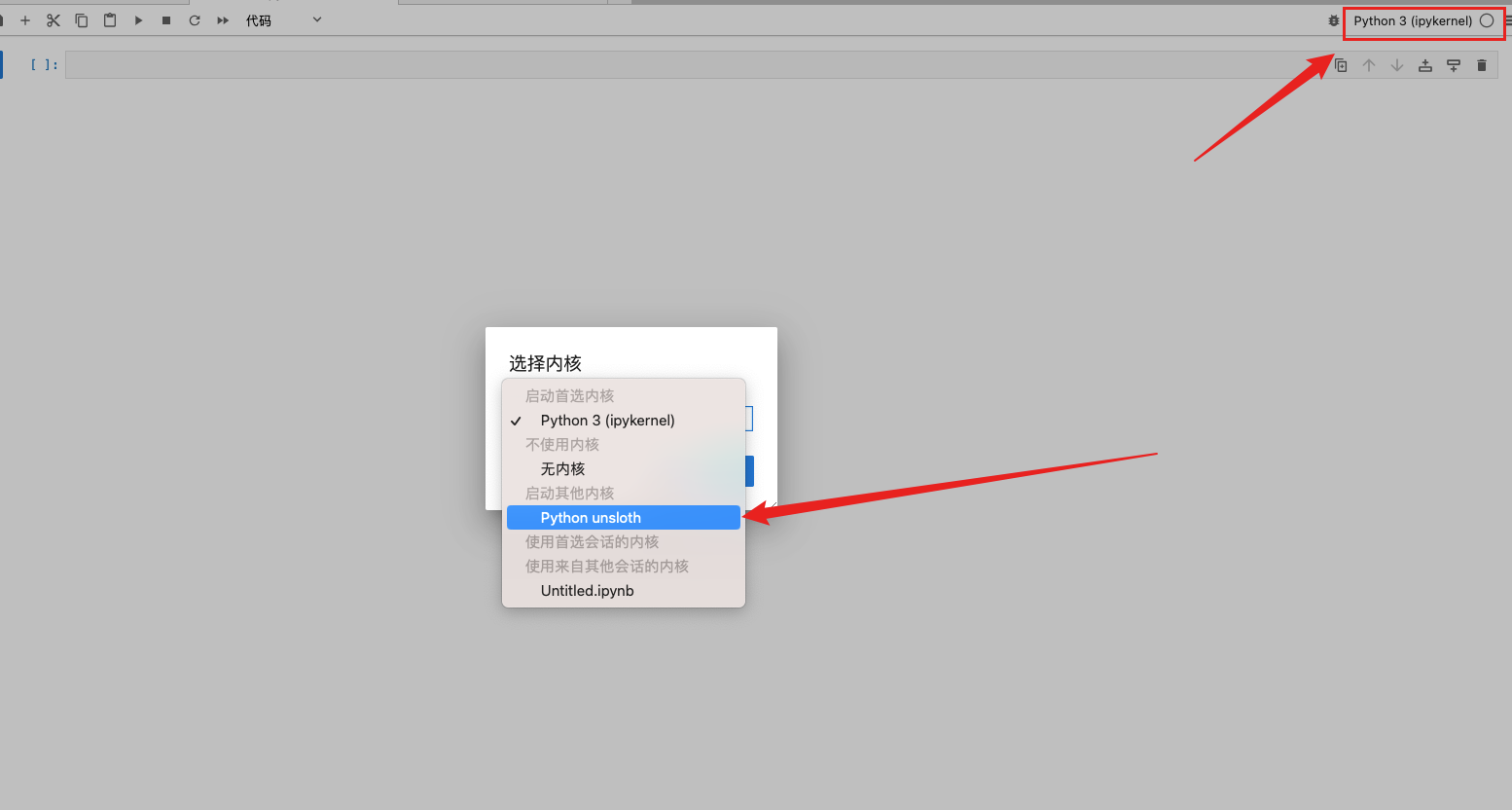
python -m ipykernel install --user --name unsloth --display-name “Python unsloth”
-
conda install jupyterlab- 作用:在当前激活的 Conda 环境中安装 JupyterLab 软件。
- 为什么需要:你想使用 JupyterLab 这个交互式开发界面。这条命令确保 JupyterLab 及其核心依赖(如 Notebook 服务器)被安装到当前环境中。
-
conda install ipykernel- 作用:在当前激活的 Conda 环境中安装
ipykernel包。 - 为什么需要:
ipykernel是 Jupyter 内核(Kernel)的核心。一个“内核”是一个负责执行代码的进程。Jupyter 界面(如 JupyterLab)本身只是一个前端,它需要与后端的内核通信来运行代码。ipykernel提供了 Python 内核。只有安装了ipykernel的环境,才能被注册为 Jupyter 的内核。
- 作用:在当前激活的 Conda 环境中安装
-
python -m ipykernel install --user --name unsloth --display-name "Python unsloth"- 作用:将当前环境的 Python 解释器注册到 Jupyter 的可用内核列表中。
--user:将内核安装到当前用户的家目录下,避免需要系统权限。--name unsloth:指定内核在内部使用的名称(通常与 Conda 环境名一致)。--display-name "Python unsloth":指定在 JupyterLab 界面上显示出来的、供用户选择的可读名称。
- 为什么需要:这是最关键的一步!仅仅用 Conda 创建环境并在其中安装包,Jupyter 是不知道这个环境存在的。 这条命令的作用是告诉 Jupyter:“嘿,我这里有一个新的 Python 环境可以用作内核,它的路径在这里,名字叫 ‘Python unsloth’,你把它加到下拉列表里吧!” 执行后,Jupyter 会在其配置目录(如
~/.local/share/jupyter/kernels/)下创建一个关于unsloth内核的配置文件,指明使用哪个 Python 解释器。
- 作用:将当前环境的 Python 解释器注册到 Jupyter 的可用内核列表中。
pip install --upgrade --force-reinstall --no-cache-dir unsloth unsloth_zoo
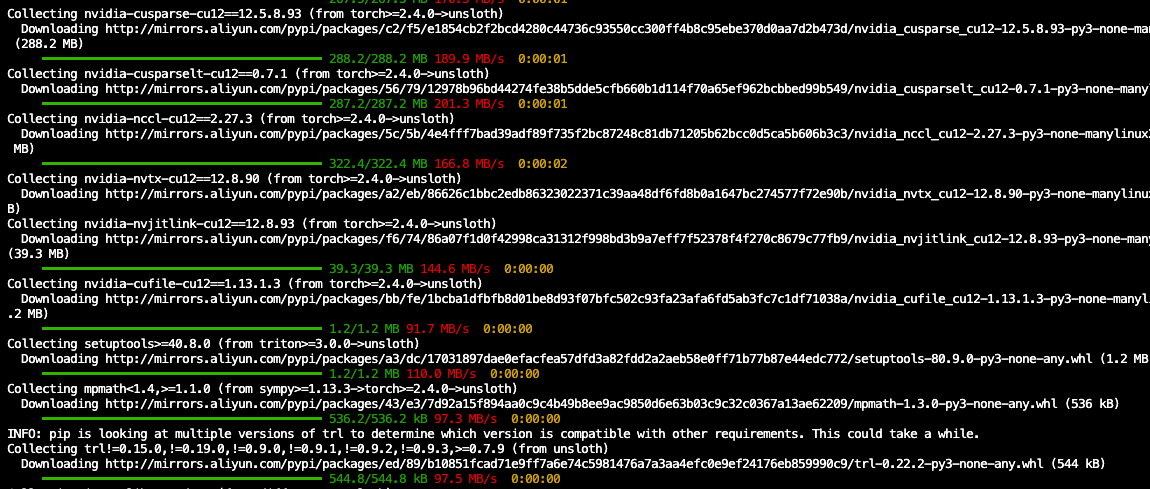
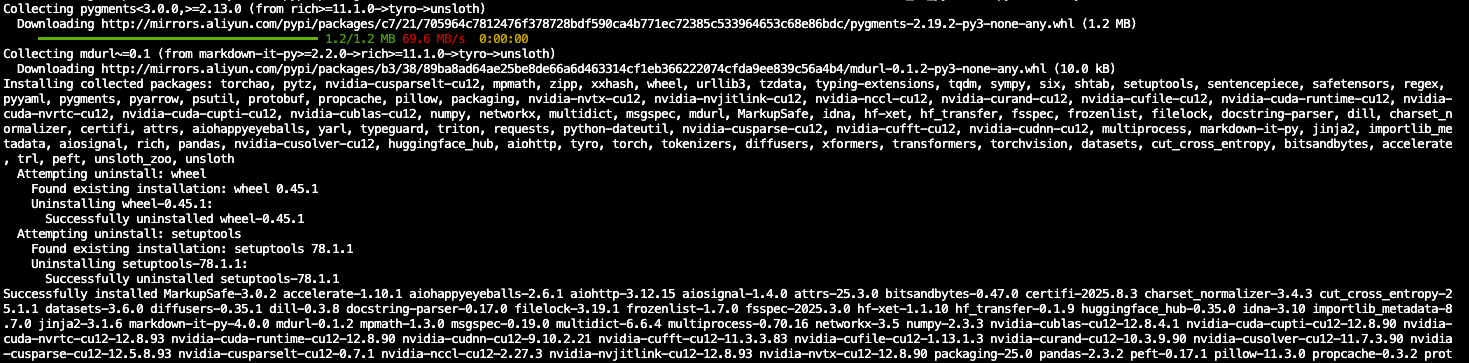
安装完成后在任意Jupyter中选择unsloth kernel,即可进入对应的虚拟环境进行代码编写:
可以输入如下代码进行测试
from unsloth import FastLanguageModel
import torch
模型链接地址 https://www.modelscope.cn/models/Qwen/Qwen3-4B-Instruct-2507

加入 赋范空间 我们提供全流程技术闭环教学体系
从环境搭建(硬件配置/GPU管理)→本地部署推理→模型优化(量化/蒸馏)→垂直领域微调,形成完整技术链路
提供20+个LLM的部署方案,解决显存不足、算力优化等真实场景痛点,提供可直接复用的工程方案
6.模型测试
在vllm中已经启动模型的情况下进行测试
from openai import OpenAI
openai_api_key = "EMPTY"
openai_api_base = "http://localhost:8000/v1"
client = OpenAI(
    api_key=openai_api_key,
    base_url=openai_api_base,
)
messages = [
{"role": "user", "content": "你好,好久不见!"}
]
response = client.chat.completions.create(
    model="/root/autodl-tmp/Qwen3-4B-Instruct-2507",
    messages=messages,
)
7.私有数据集创建
import json
import random
import time
from openai import OpenAI
from concurrent.futures import ThreadPoolExecutor

# 配置
API_KEY = "sk-0f9c12d787g87954s50f3d19b6eb78d4a7"
client = OpenAI(api_key=API_KEY, base_url="https://api.deepseek.com")

# 儿童服装专业场景(容易出微调效果的)
question_templates = {
    "专业尺码建议": [
        "我家宝宝{age}个月,{height}cm,{weight}斤,现在是{season},这件{item}选什么码合适?会不会买大了?",
        "孩子{age}岁,比同龄人{size_diff}一些,平时{brand}牌子穿{size}码,你们家这件{item}建议选什么码?",
        "双胞胎宝宝,一个{weight1}斤一个{weight2}斤,都{age}岁,这款{item}怎么选码?",
    ],

    "儿童安全专业知识": [
        "这件{item}的拉链是什么材质?会不会划伤宝宝皮肤?有没有防夹设计?",
        "宝宝{age}个月,正在长牙期,这件衣服的纽扣会不会被咬掉?安全吗?",
        "孩子有异位性皮炎,这个面料的pH值是多少?会刺激皮肤吗?",
        "这件{item}符合GB31701-2015标准吗?甲醛含量多少?",
    ],

    "儿童行为习惯匹配": [
        "我家宝宝{age}岁,特别爱在地上爬,这件{item}耐脏吗?膝盖部分会不会很快磨破?",
        "孩子{age}岁,还不会自己上厕所,这件{item}方便脱吗?松紧带会不会勒肚子?",
        "宝宝{age}个月,正在学走路,经常摔倒,这件{item}的面料厚度够保护吗?",
        "孩子特别好动,上蹿下跳的,这件{item}的接缝结实吗?会不会开线?",
    ],

    "季节性专业搭配": [
        "现在{season},温度{temp}度,孩子{age}岁,这件{item}里面需要穿什么?怎么搭配不会热?",
        "马上要{next_season}了,这件{item}能穿到什么时候?需要买大一码为明年准备吗?",
        "孩子{age}岁,{season}去{place}旅游,这套{item}搭配合适吗?需要带什么备用衣服?",
    ],

    "儿童心理与偏好": [
        "我家{gender}宝{age}岁,特别喜欢{character},不喜欢{dislike},这件{item}的设计孩子会喜欢吗?",
        "孩子{age}岁,刚上幼儿园,比较内向,这件{item}的颜色会不会太{color_type}?",
        "宝宝{age}个月,对声音很敏感,这件{item}的装饰会不会有声音?会影响睡觉吗?",
    ]
}

# 专业变量池(更具体、更专业)
variables = {
    "age": ["6个月", "10个月", "1岁", "1岁半", "2岁", "3岁", "4岁", "5岁"],
    "height": ["70", "75", "80", "85", "90", "95", "100", "105", "110"],
    "weight": ["16", "18", "20", "22", "24", "26", "28", "30", "32"],
    "season": ["春天", "夏天", "秋天", "冬天", "换季"],
    "next_season": ["夏天", "秋天", "冬天", "春天"],
    "item": ["连体衣", "分体睡衣", "外出服", "家居服", "防踢被", "爬服"],
    "size_diff": ["偏瘦", "偏胖", "偏高", "偏矮"],
    "brand": ["优衣库", "Gap", "Zara", "HM", "Carter's"],
    "size": ["80", "90", "100", "110", "120"],
    "weight1": ["20", "22", "24"],
    "weight2": ["18", "21", "23"],
    "temp": ["15-20", "20-25", "25-30", "10-15"],
    "place": ["海边", "山区", "北方", "南方", "国外"],
    "gender": ["男", "女"],
    "character": ["小猪佩奇", "汪汪队", "冰雪奇缘", "超级飞侠"],
    "dislike": ["太花哨的图案", "硬质装饰", "紧身设计"],
    "color_type": ["鲜艳", "暗淡", "成熟"]
}

def generate_question():
    category = random.choice(list(question_templates.keys()))
    template = random.choice(question_templates[category])

    question = template
    for var, values in variables.items():
        if f"{{{var}}}" in question:
            question = question.replace(f"{{{var}}}", random.choice(values))

    return question, category

def batch_generate_response(questions_batch):
    # 针对不同类别使用专业的system prompt
    system_prompts = {
        "专业尺码建议": "你是资深的儿童服装尺码专家,有10年经验。要考虑儿童生长发育特点、季节因素、品牌差异,给出精准的尺码建议和理由。",
        "儿童安全专业知识": "你是儿童用品安全专家,熟悉国标GB31701-2015,了解各种材质和工艺的安全性,要给出专业的安全评估。",
        "儿童行为习惯匹配": "你是儿童发展心理学专家,了解各年龄段儿童的行为特点和生理需求,能根据孩子习惯推荐合适的服装功能。",
        "季节性专业搭配": "你是儿童服装搭配师,精通不同季节、地区、温度下的儿童穿搭,能给出实用的搭配方案。",
        "儿童心理与偏好": "你是儿童心理专家,了解不同年龄段孩子的心理特点和审美偏好,能推荐符合儿童心理需求的服装。"
    }

    combined_prompt = "请为以下专业的儿童服装咨询问题分别给出详细专业的回答,体现你的专业知识和经验,每个回答用\"---\"分隔:\n\n"

    categories = []
    for i, (question, category) in enumerate(questions_batch, 1):
        combined_prompt += f"{i}. {question}\n"
        categories.append(category)

    # 使用第一个问题的类别作为主要专业方向
    main_category = categories[0]

    try:
        response = client.chat.completions.create(
            model="deepseek-chat",
            messages=[
                {"role": "system", "content": system_prompts[main_category]},
                {"role": "user", "content": combined_prompt}
            ],
            temperature=0.7,
            max_tokens=2000
        )

        full_response = response.choices[0].message.content.strip()
        answers = full_response.split("---")

        cleaned_answers = []
        for answer in answers:
            cleaned = answer.strip()
            if cleaned.startswith(("1.", "2.", "3.", "4.", "5.")):
                cleaned = cleaned[2:].strip()
            cleaned_answers.append(cleaned)

        return cleaned_answers[:len(questions_batch)]

    except Exception as e:
        print(f"批量API调用失败: {e}")
        return [f"抱歉,这个问题比较专业,建议您联系我们的儿童服装专家客服获得详细解答。" for _ in questions_batch]

# 其余代码保持不变...
def process_batch(batch_questions):
    answers = batch_generate_response(batch_questions)

    results = []
    for (question, category), answer in zip(batch_questions, answers):
        sample = {
            "instruction": "作为专业的儿童服装顾问,请根据儿童发育特点、安全标准、行为习惯等专业知识回答问题。",
            "input": question,
            "output": answer
        }
        results.append(sample)

    return results

# 生成数据的代码保持不变...
print("生成专业儿童服装问题中...")
all_questions = []
used_questions = set()

while len(all_questions) < 350:
    question, category = generate_question()
    if question not in used_questions:
        used_questions.add(question)
        all_questions.append((question, category))

print(f"生成了{len(all_questions)}个专业问题")

# 批量处理
print("开始批量生成专业回答...")
batch_size = 5  # 专业问题复杂,减少批次大小
all_data = []

with ThreadPoolExecutor(max_workers=2) as executor:
    futures = []
    for i in range(0, len(all_questions), batch_size):
        batch = all_questions[i:i+batch_size]
        future = executor.submit(process_batch, batch)
        futures.append(future)

    for i, future in enumerate(futures):
        try:
            batch_results = future.result(timeout=45)
            all_data.extend(batch_results)
            print(f"完成批次 {i+1}/{len(futures)}, 已生成 {len(all_data)} 条专业数据")
        except Exception as e:
            print(f"批次 {i+1} 处理失败: {e}")

        time.sleep(0.3)

print("专业数据生成完成!")

# 保存文件
random.shuffle(all_data)
train_data = all_data[:300]
test_data = all_data[300:350]

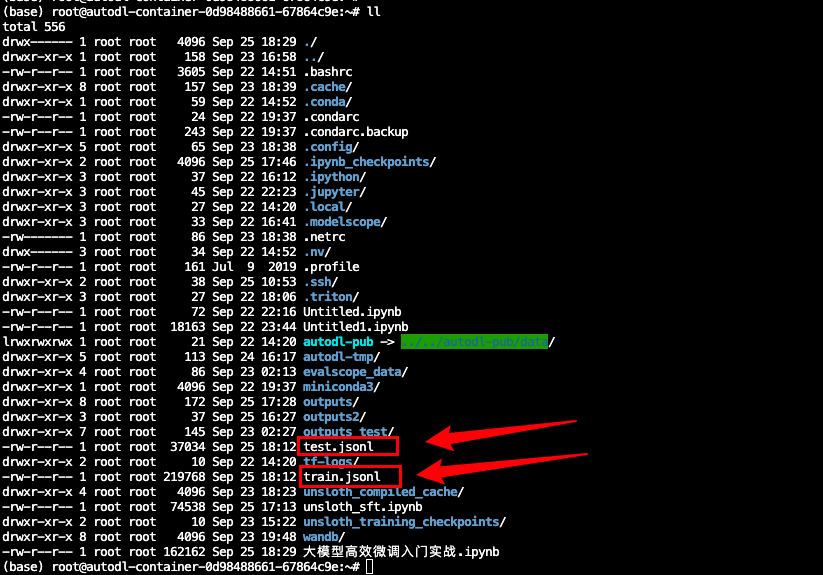
with open('train.jsonl', 'w', encoding='utf-8') as f:
    for item in train_data:
        f.write(json.dumps(item, ensure_ascii=False) + '\n')

with open('test.jsonl', 'w', encoding='utf-8') as f:
    for item in test_data:
        f.write(json.dumps(item, ensure_ascii=False) + '\n')

print(f"训练集: train.jsonl ({len(train_data)}条)")
print(f"测试集: test.jsonl ({len(test_data)}条)")

import json, sys, os

in_path = "./test.jsonl"   # /abs/path/alpaca.jsonl
out_path = "/root/evalscope_data/custom_qa/default.jsonl"  # /abs/path/openqa.jsonl
os.makedirs(os.path.dirname(out_path), exist_ok=True)

with open(in_path, 'r', encoding='utf-8') as fin, open(out_path, 'w', encoding='utf-8') as fout:
    for line in fin:
        if not line.strip():
            continue
        ex = json.loads(line)
        instr = (ex.get("instruction") or "").strip()
        inp = (ex.get("input") or "").strip()
        prompt = instr if not inp else f"{instr}\n{inp}"
        ans = (ex.get("output") or "").strip()
        if not prompt or not ans:
            continue
        fout.write(json.dumps({"question": prompt, "answer": ans}, ensure_ascii=False) + "\n")
print("done:", out_path)
done: /root/evalscope_data/custom_qa/default.jsonl

加入 赋范空间 我们提供全流程技术闭环教学体系
从环境搭建(硬件配置/GPU管理)→本地部署推理→模型优化(量化/蒸馏)→垂直领域微调,形成完整技术链路
提供20+个LLM的部署方案,解决显存不足、算力优化等真实场景痛点,提供可直接复用的工程方案
8.开始微调
import os
os.environ["WANDB_DISABLED"] = "true"
os.environ["WANDB_MODE"] = "disabled"
os.environ["CUDA_VISIBLE_DEVICES"] = "0"
不使用wandb情况下进行环境变量设置
首先进行模型导入:
from unsloth import FastLanguageModel
import torch
max_seq_length = 4096
dtype = None
load_in_4bit = True
model, tokenizer = FastLanguageModel.from_pretrained(
    model_name = "/root/autodl-tmp/Qwen3-4B-Instruct-2507",
    max_seq_length = max_seq_length,
    dtype = dtype,
    load_in_4bit = load_in_4bit,
)
此时4B模型所占显存如下:
# @title Show current memory stats
gpu_stats = torch.cuda.get_device_properties(0)
start_gpu_memory = round(torch.cuda.max_memory_reserved() / 1024 / 1024 / 1024, 3)
max_memory = round(gpu_stats.total_memory / 1024 / 1024 / 1024, 3)
print(f"GPU = {gpu_stats.name}. Max memory = {max_memory} GB.")
print(f"{start_gpu_memory} GB of memory reserved.")
然后进行问答测试:
question_1="作为专业的儿童服装顾问,请根据儿童发育特点、安全标准、行为习惯等专业知识回答问题。 孩子2岁岁,比同龄人偏高一些,平时Zara牌子穿80码,你们家这件爬服建议选什么码?"
question_2="作为专业的儿童服装顾问,请根据儿童发育特点、安全标准、行为习惯等专业知识回答问题。 宝宝10个月个月,正在学走路,经常摔倒,这件分体睡衣的面料厚度够保护吗?"
messages = [
    {"role" : "user", "content" : question_1}
]
text = tokenizer.apply_chat_template(
    messages,
    tokenize = False,
    add_generation_prompt = True, # Must add for generation
    enable_thinking = True, # Disable thinking
)

from transformers import TextStreamer
_ = model.generate(
    **tokenizer(text, return_tensors = "pt").to("cuda"),
    max_new_tokens = 20488, # Increase for longer outputs!
    temperature = 0.6, top_p = 0.95, top_k = 20, # For thinking
    streamer = TextStreamer(tokenizer, skip_prompt = True),
)
messages = [
    {"role" : "user", "content" : question_2}
]
text = tokenizer.apply_chat_template(
    messages,
    tokenize = False,
    add_generation_prompt = True, # Must add for generation
    enable_thinking = True, # Disable thinking
)

from transformers import TextStreamer
_ = model.generate(
    **tokenizer(text, return_tensors = "pt").to("cuda"),
    max_new_tokens = 20488, # Increase for longer outputs!
    temperature = 0.6, top_p = 0.95, top_k = 20, # For thinking
    streamer = TextStreamer(tokenizer, skip_prompt = True),
)
from datasets import Dataset
import json
接下来进行数据集读取与导入
def load_jsonl_dataset(file_path):
    """从JSONL文件加载数据集"""
    data = {"instruction":[],"input": [], "output": []}

    print(f"开始加载数据集: {file_path}")
    count = 0
    error_count = 0

    with open(file_path, 'r', encoding='utf-8') as f:
        for line in f:
            try:
                item = json.loads(line.strip())
                # 根据数据集结构提取字段
                input_text = item.get("input", "")
                instruction = item.get("instruction", "")
                output = item.get("output", "")

                data["input"].append(input_text)
                data["instruction"].append(instruction)
                data["output"].append(output)
                count += 1
            except Exception as e:
                print(f"解析行时出错: {e}")
                error_count += 1
                continue

    print(f"数据集加载完成: 成功加载{count}个样本, 跳过{error_count}个错误样本")
    return Dataset.from_dict(data)
data_path = "./train.jsonl"
# 加载自定义数据集
dataset = load_jsonl_dataset(data_path)


# 显示数据集信息
print(f"\n数据集统计:")
print(f"- 样本数量: {len(dataset)}")
print(f"- 字段: {dataset.column_names}")

print(dataset[0])
# 方法2:使用datasets库直接加载
from datasets import load_dataset

dataset2 = load_dataset('json', data_files='./train.jsonl', split='train')
print(f"- 样本数量: {len(dataset2)}")
print(f"- 字段: {dataset2.column_names}")
print(dataset2[0])
def formatting_prompts_func(examples):
    """根据提示模板格式化数据"""
    inputs = examples["input"]
    outputs = examples["output"]
    instruction = examples["instruction"]

    texts = []
    for  input_text, output,instruct in zip(inputs, outputs,instruction):
        texts.append([
            {"role" : "system", "content" : instruct},
            {"role" : "user",      "content" : input_text},
            {"role" : "assistant", "content" : output},
        ])

    return {"text": texts}
# 应用格式化
print("开始格式化数据集...")
reasoning_conversations = tokenizer.apply_chat_template(
    dataset.map(formatting_prompts_func, batched = True)["text"],
    tokenize = False,
)
print("数据集格式化完成")
reasoning_conversations[0]
- 进行LoRA参数注入
model = FastLanguageModel.get_peft_model(
    model,
    r = 32,           # Choose any number > 0! Suggested 8, 16, 32, 64, 128
    target_modules = ["q_proj", "k_proj", "v_proj", "o_proj",
                      "gate_proj", "up_proj", "down_proj",],
    lora_alpha = 32,  # Best to choose alpha = rank or rank*2
    lora_dropout = 0, # Supports any, but = 0 is optimized
    bias = "none",    # Supports any, but = "none" is optimized
    # [NEW] "unsloth" uses 30% less VRAM, fits 2x larger batch sizes!
    use_gradient_checkpointing = "unsloth", # True or "unsloth" for very long context
    random_state = 3407,
    use_rslora = False,   # We support rank stabilized LoRA
    loftq_config = None,  # And LoftQ
)
from datasets import Dataset

# 如果reasoning_conversations已经是字符串列表
if isinstance(reasoning_conversations, list):
    # 转换为Dataset对象
    reasoning_dataset = Dataset.from_dict({"text": reasoning_conversations})
else:
    # 如果已经是Dataset对象,直接使用
    reasoning_dataset = reasoning_conversations
from trl import SFTTrainer, SFTConfig
trainer = SFTTrainer(
    model = model,
    tokenizer = tokenizer,
    train_dataset = reasoning_dataset,
    eval_dataset = None, # Can set up evaluation!
    args = SFTConfig(
        dataset_text_field = "text",
        per_device_train_batch_size = 2,
        gradient_accumulation_steps = 4, # Use GA to mimic batch size!
        warmup_steps = 5,
        num_train_epochs = 5, # Set this for 1 full training run.
        learning_rate = 1e-5, # Reduce to 2e-5 for long training runs
        logging_steps = 1,
        optim = "adamw_8bit",
        weight_decay = 0.01,
        lr_scheduler_type = "linear",
        seed = 3407,
    ),
)
此时显存占用如下:
# @title Show current memory stats
gpu_stats = torch.cuda.get_device_properties(0)
start_gpu_memory = round(torch.cuda.max_memory_reserved() / 1024 / 1024 / 1024, 3)
max_memory = round(gpu_stats.total_memory / 1024 / 1024 / 1024, 3)
print(f"GPU = {gpu_stats.name}. Max memory = {max_memory} GB.")
print(f"{start_gpu_memory} GB of memory reserved.")
trainer_stats = trainer.train()
# @title Show final memory and time stats
used_memory = round(torch.cuda.max_memory_reserved() / 1024 / 1024 / 1024, 3)
used_memory_for_lora = round(used_memory - start_gpu_memory, 3)
used_percentage = round(used_memory / max_memory * 100, 3)
lora_percentage = round(used_memory_for_lora / max_memory * 100, 3)
print(f"{trainer_stats.metrics['train_runtime']} seconds used for training.")
print(
    f"{round(trainer_stats.metrics['train_runtime']/60, 2)} minutes used for training."
)
print(f"Peak reserved memory = {used_memory} GB.")
print(f"Peak reserved memory for training = {used_memory_for_lora} GB.")
print(f"Peak reserved memory % of max memory = {used_percentage} %.")
print(f"Peak reserved memory for training % of max memory = {lora_percentage} %.")
question_1="作为专业的儿童服装顾问,请根据儿童发育特点、安全标准、行为习惯等专业知识回答问题。 孩子2岁岁,比同龄人偏高一些,平时Zara牌子穿80码,你们家这件爬服建议选什么码?"
question_2="作为专业的儿童服装顾问,请根据儿童发育特点、安全标准、行为习惯等专业知识回答问题。 宝宝10个月个月,正在学走路,经常摔倒,这件分体睡衣的面料厚度够保护吗?"
messages = [
    {"role" : "user", "content" : question_1}
]
text = tokenizer.apply_chat_template(
    messages,
    tokenize = False,
    add_generation_prompt = True, # Must add for generation
)

from transformers import TextStreamer
_ = model.generate(
    **tokenizer(text, return_tensors = "pt").to("cuda"),
    max_new_tokens = 20488, # Increase for longer outputs!
    temperature = 0.6, top_p = 0.95, top_k = 20, # For thinking
    streamer = TextStreamer(tokenizer, skip_prompt = True),
)
messages = [
    {"role" : "user", "content" : question_2}
]
text = tokenizer.apply_chat_template(
    messages,
    tokenize = False,
    add_generation_prompt = True, # Must add for generation
)

from transformers import TextStreamer
_ = model.generate(
    **tokenizer(text, return_tensors = "pt").to("cuda"),
    max_new_tokens = 20488, # Increase for longer outputs!
    temperature = 0.6, top_p = 0.95, top_k = 20, # For thinking
    streamer = TextStreamer(tokenizer, skip_prompt = True),
)
# 选择保存路径
save_path = "/root/autodl-tmp/FT-Qwen3-4B"

# 最简单的方法:保存合并后的16bit模型
print("开始保存模型...")
model.save_pretrained_merged(
    save_path,
    tokenizer,
    save_method="merged_16bit"
)
print(f"模型已成功保存到: {save_path}")
import os
if os.path.exists(save_path):
    print(f"✅ 模型成功保存到: {save_path}")
    print(f"📁 文件列表: {os.listdir(save_path)}")
else:
    print("❌ 模型保存失败")
加入 赋范空间 领取:
全流程技术闭环教学体系
- 从环境搭建(硬件配置/GPU管理)→本地部署推理→模型优化(量化/蒸馏)→垂直领域微调,形成完整技术链路
- 提供20+个LLM的部署方案,解决显存不足、算力优化等真实场景痛点,提供可直接复用的工程方案






 扫一扫
扫一扫


 1392
1392

 被折叠的 条评论
为什么被折叠?
被折叠的 条评论
为什么被折叠?
 到【灌水乐园】发言





