



一、简介
pip 是 python 包管理工具,该工具提供了对Python 包的查找、下载、安装、卸载的功能。
我更喜欢把 pip 理解为依赖管理工具,就像
redhat、centos 的 yum (Yellowdog Updater, Modified),
Debian 、Ubuntu 的 apt (Advanced Package Tool),
yum、apt 你安装一个包它会把所有与之相关依赖包都帮你装好,不用一个一个的安装(使用源码安装过工具的同学应该都懂 ./configure && make && make install 解决依赖的坑),
但是如果使用 rpm (Red Hat Package Manager) 、dpkg(Debian PacKaGe manager) 这些包管理工具它可不会帮你安装依赖包。
注: 如果你的运行环境一直用pip 安装python包,就尽量一直用 pip, 不要一会用pip安装 一会用 conda安装,会出问题的,相信我。
看到这里或许你又要问了“conda 都可以安装、卸载python包了,为什么还要pip?”
嗯,好问题。
二、安装
安装好conda 后默认已安装好 pip , 没有安装conda的可以参考 03_conda (环境管理)
手动安装的方式这里就不推荐了。
三、配置源(方式一)
3.1 linux
pip config -v list //查看源与配置文件路径
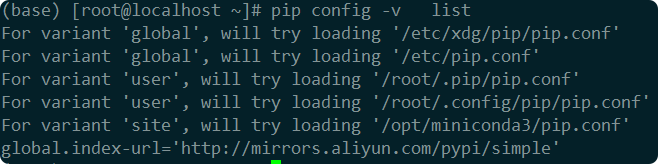
一般情况只需要编辑 global 的文件就可以了
vim /etc/pip.conf
添加以下内容
[global]
index-url=https://pypi.tuna.tsinghua.edu.cn/simple/
extra-index-url=
	http://mirrors.aliyun.com/pypi/simple/
	http://pypi.douban.com/simple
	http://pypi.mirrors.ustc.edu.cn/simple/

[install]
trusted-host=
	pypi.tuna.tsinghua.edu.cn
	mirrors.aliyun.com
	pypi.douban.com
	pypi.mirrors.ustc.edu.cn

proxy_servers:
	http: http://xxx.xxx.xxx.xxx:8080
	https: https://xxx.xxx.xxx.xxx:8080


ssl_verify: false
index-url:主要源
extra-index-url:扩展源,在index-url找不到所需要的包,会在这个扩展列表中搜索
trusted-host:信任主机,需要添加,不然会遇到很多SSL信任问题
proxy_servers : 可以添加代理服务器,如果你想用官方源的可以用代理访问
3.2 windows
pip config -v list //查看源与配置文件路径

一般情况只需要编辑 global 的文件就可以了
编辑 C:\ProgramData\pip\pip.ini
添加上面的源地址
四、配置源(方式二)
4.1 临时换源:
清华源
pip install 包名 -i https://pypi.tuna.tsinghua.edu.cn/simple
阿里源
pip install 包名 -i https://mirrors.aliyun.com/pypi/simple/
腾讯源
pip install 包名 -i http://mirrors.cloud.tencent.com/pypi/simple
豆瓣源
pip install 包名 -i http://pypi.douban.com/simple/
4.2 永久换源:
清华源
pip config set global.index-url https://pypi.tuna.tsinghua.edu.cn/simple
阿里源
pip config set global.index-url https://mirrors.aliyun.com/pypi/simple/
腾讯源
pip config set global.index-url http://mirrors.cloud.tencent.com/pypi/simple
豆瓣源
pip config set global.index-url http://pypi.douban.com/simple/
五、离线 下载/安装 库包
有时候公司或者生产环境不方便联网的,可以采取这种离线的下载后在安装的方式。
5.1 下载安装包
下载单个离线包
pip download -d save_path <package_name>
批量下载离线包
pip download -d save_path -r requirements.txt
5.2 离线安装包
安装单个离线包
pip install --no-index --find-links=save_path package_name
批量安装离线包(方式一)
pip install --no-index --find-links=save_path -r requirements.txt
批量安装离线包(方式二)
pip install --no-index --find-links=save_path $(ls /save_path/*.whl)
–no-index :禁止从 PyPI 在线查找包
5.3 生成requirements文件
查看当前Python环境的所有依赖包及版本号并导出到requirements文件
pip freeze > requirements.txt
注: requirements文件在python 的项目开发文件中一定要写。
六、问题
6.1 没有配置文件
[!error]
ERROR: Got unexpected number of arguments, expected 2. (example: “pip config set [name] [value]”)
6.2 配置文件问题
pip config set global.index-url https://pypi.tuna.tsinghua.edu.cn/simple
[!error]
ERROR: Got unexpected number of arguments, expected 2. (example: “pip config set [name] [value]”)
6.3 离线安装的包依赖太多
(vllm_0.10.1+gptoss) ubuntu@PC-STAY:/mnt/d/ai_python_pack$ pip install --no-index --find-links=./AI_p310_vLLm0.10.1 huggingface_hub==0.35.0rc0
Looking in links: ./AI_p310_vLLm0.10.1
Processing ./AI_p310_vLLm0.10.1/huggingface_hub-0.35.0rc0-py3-none-any.whl
Processing ./AI_p310_vLLm0.10.1/filelock-3.19.1-py3-none-any.whl (from huggingface_hub==0.35.0rc0)
Processing ./AI_p310_vLLm0.10.1/PyYAML-6.0.2-cp312-cp312-manylinux_2_17_x86_64.manylinux2014_x86_64.whl (from huggingface_hub==0.35.0rc0)
Processing ./AI_p310_vLLm0.10.1/tqdm-4.67.1-py3-none-any.whl (from huggingface_hub==0.35.0rc0)
INFO: pip is looking at multiple versions of huggingface-hub to determine which version is compatible with other requirements. This could take a while.
ERROR: Could not find a version that satisfies the requirement typing-extensions>=3.7.4.3 (from huggingface-hub) (from versions: 4.15.0rc1)
ERROR: No matching distribution found for typing-extensions>=3.7.4.3
依赖太多, 直接使用 pip install 直接安装所有 *.whl 文件
pip install --no-index --find-links=./AI_p310_vLLm0.10.1 $(ls ./AI_p310_vLLm0.10.1/*.whl)
七、排错常用命令
pip debug //打印pip 相关信息
pip config list //查看当前pip源
pip config -v list //查看当前pip源与配置文件路径
pip cache purge //清除pip的缓存
python -m pip install --upgrade pip //升级pip
本文/视频中引用了部分来源于网络的公开素材。若版权方认为存在侵权,请通过留言等方式联系,我将立即予以处理并深表感谢。





 扫一扫
扫一扫


 1万+
1万+

 被折叠的 条评论
为什么被折叠?
被折叠的 条评论
为什么被折叠?
 到【灌水乐园】发言





