CoAP客户端调试工具CoAP Shell

该文章已生成可运行项目,

引言

以前在物联网中我主要关注MQTT协议,最近因为工作需要,对CoAP协议也做了一些工作。今天先记录一下CoAP客户端调试工具CoAP Shell。CoAP - Shell(CoAP 命令行工具)是一个用于与基于 CoAP的设备或服务进行交互的命令行工具,它为开发者和测试人员提供了一种方便快捷的方式来测试和调试 CoAP 端点。

软件安装

CoAP Shell的官方地址是https://github.com/sanshengshui/coap-shell?tab=readme-ov-file。如果想直接获得可以运行Jar包,可以访问抓住CoAP协议的“心” - 三升水 - 博客园获得编译好的文件。

软件的使用

 下载后直接使用下面的命令行运行:

java -jar coap-shell.jar

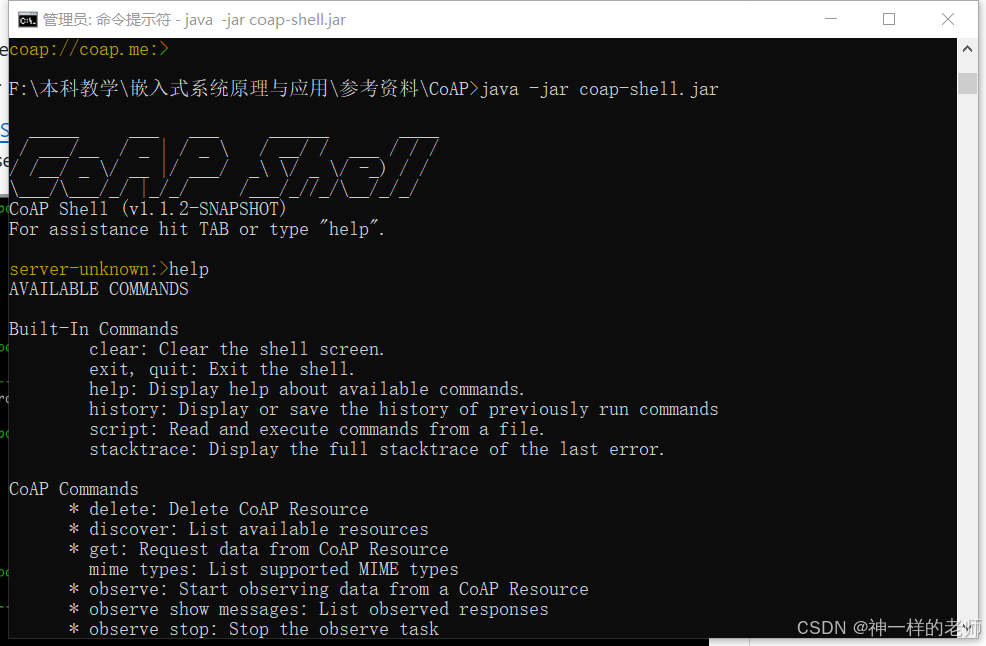
软件启动后界面如下:

 输入Help可以得到命令列表。

AVAILABLE COMMANDS

Built-In Commands
        clear: Clear the shell screen.
        exit, quit: Exit the shell.
        help: Display help about available commands.
        history: Display or save the history of previously run commands
        script: Read and execute commands from a file.
        stacktrace: Display the full stacktrace of the last error.

CoAP Commands
      * delete: Delete CoAP Resource
      * discover: List available resources
      * get: Request data from CoAP Resource
        mime types: List supported MIME types
      * observe: Start observing data from a CoAP Resource
      * observe show messages: List observed responses
      * observe stop: Stop the observe task
      * post: Create/Update data in CoAP Resource
      * put: Update data in CoAP Resource

CoAP Server Connectivity
        connect: Connect to CoAP server
      * message acknowledgement: Enables/Disables message acknowledgement
      * ping: Check CoAP resources availability
      * shutdown: Disconnect from the CoAP server

Ikea Gateway Commands
      * ikea device list: List all devices registered to the IKEA TRÅDFRI Gateway
      * ikea device name: Get or change a device name
        ikea gateway key: Generate IDENTITY and PRE_SHARED_KEY for IKEA TRÅDFRI Gateway
      * ikea turn off: switch light/outlet OFF
      * ikea turn on: switch light/outlet ON

Commands marked with (*) are currently unavailable.
Type `help <command>` to learn more.

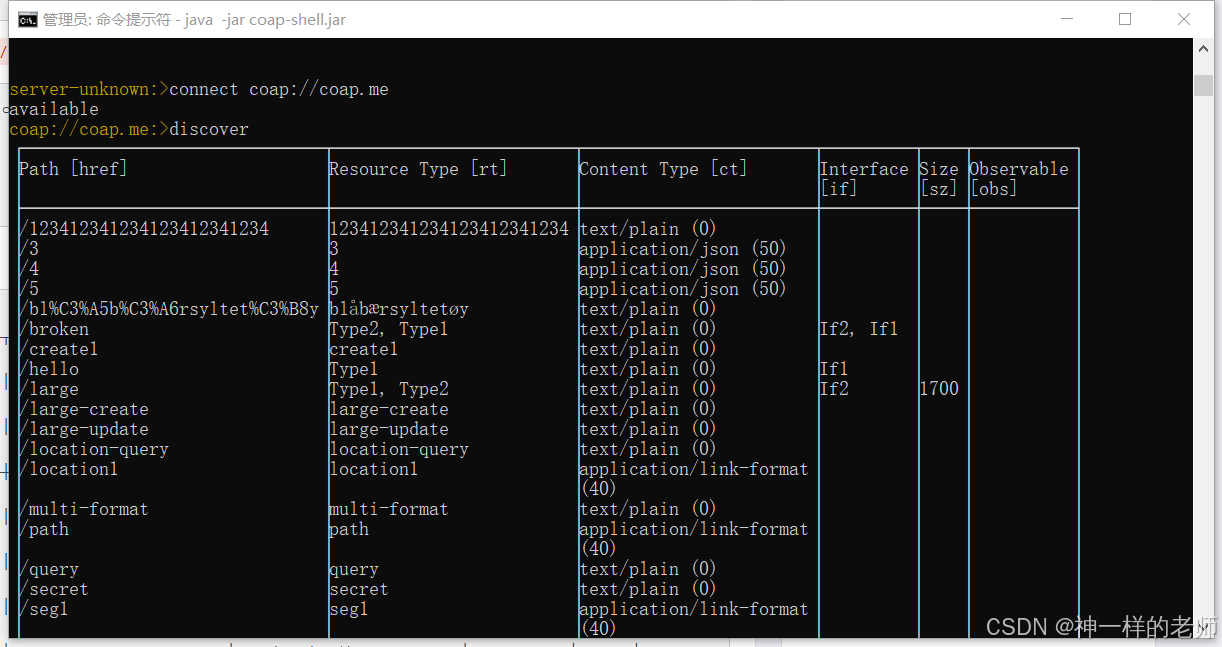
可以用coap://coap.me作为测试服务器,输入下列命令连接服务器:

connect coap://coap.me

 然后使用discover命令查询服务器上的所有资源。

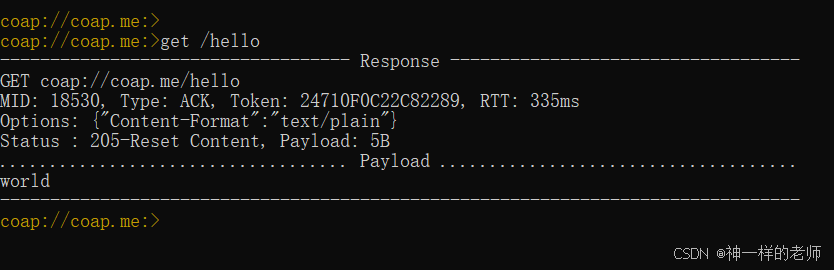
比如可以使用get /hello 命令进行GET操作。
Wireshark抓包分析

Wireshark内置了对CoAP协议的支持,我们可以使用它进行抓包分析。
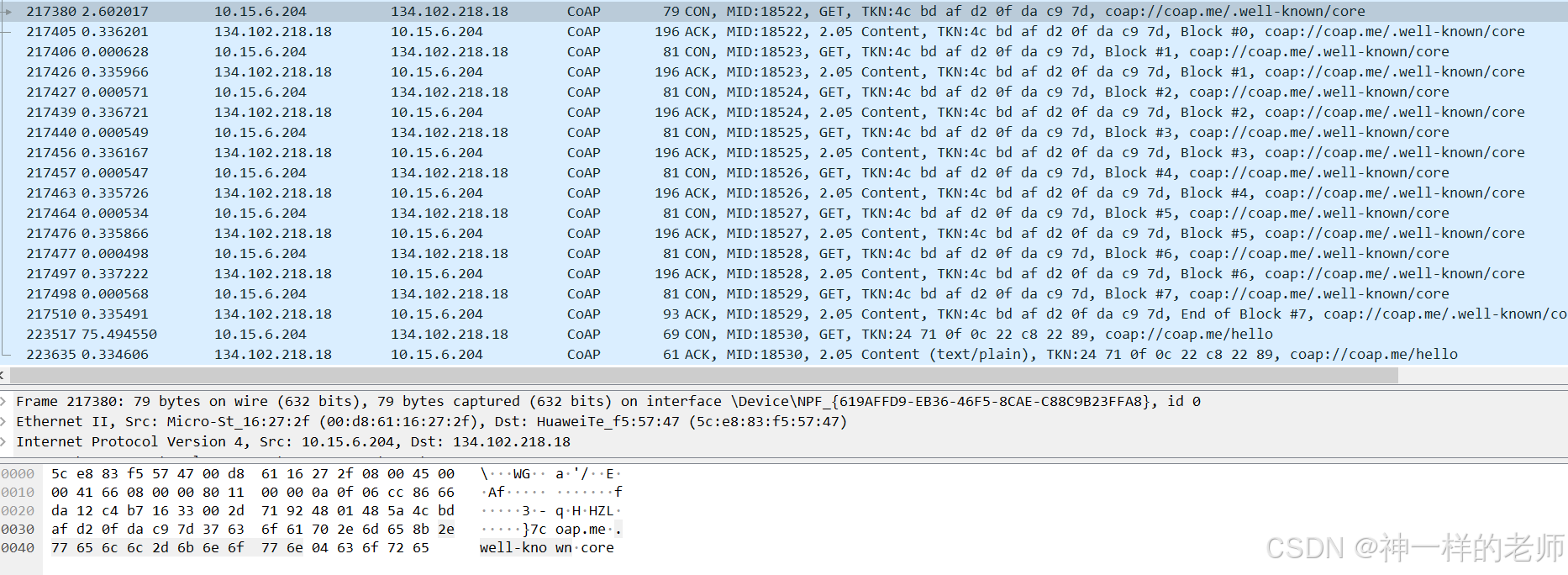
从上面的抓包可以看出,discover命令实际上是查询了CoAP协议约定的.well-known/core 资源。因为返回的数据太多了,服务器分多个包返回了全部资源。 

结语

使用CoAP-Shell工具结合Wireshark可以方便地分析CoAP的通信过程。

本文章已经生成可运行项目
package coap import ( "context" "fmt" "strings" "sync" "sync/atomic" "time" "github.com/plgd-dev/go-coap/v2/message" "github.com/plgd-dev/go-coap/v2/message/codes" "github.com/plgd-dev/go-coap/v2/udp" "github.com/plgd-dev/go-coap/v2/udp/client" ) // RealCoAPClient CoAP协议测试客户端 type RealCoAPClient struct { conn *client.ClientConn config *CoAPTestConfig mutex sync.RWMutex isClosed bool } // CoAPTestConfig CoAP测试配置 type CoAPTestConfig struct { ServerURL string Path string MessageType string Timeout time.Duration } // SecurityTestResult 安全测试结果 type SecurityTestResult struct { EncryptionSupported bool AuthSupported bool CertValidation bool SecurityScore float64 TestDuration time.Duration } // NewRealCoAPClient 创建CoAP测试客户端 func NewRealCoAPClient(config *CoAPTestConfig) *RealCoAPClient { if config.ServerURL == "" { config.ServerURL = "coap.me:5683" } if config.Path == "" { config.Path = "/test" } if config.MessageType == "" { config.MessageType = "CON" } if config.Timeout == 0 { config.Timeout = 30 * time.Second } return &RealCoAPClient{ config: config, isClosed: true, } } // Connect 连接CoAP服务器 func (c *RealCoAPClient) Connect() error { c.mutex.Lock() defer c.mutex.Unlock() if !c.isClosed { return nil } conn, err := udp.Dial(c.config.ServerURL) if err != nil { // 尝试备用服务器 conn, err = udp.Dial("coap.google.com:5683") if err != nil { return fmt.Errorf("CoAP连接失败: %v", err) } } c.conn = conn c.isClosed = false return nil } // Close 关闭连接 func (c *RealCoAPClient) Close() { c.mutex.Lock() defer c.mutex.Unlock() if c.isClosed { return } if c.conn != nil { c.conn.Close() c.conn = nil } c.isClosed = true } // TestRequestLatency 测试CoAP请求延迟 func (c *RealCoAPClient) TestRequestLatency(ctx context.Context, count int) ([]time.Duration, error) { if err := c.Connect(); err != nil { return nil, err } latencies := make([]time.Duration, 0, count) for i := 0; i < count; i++ { select { case <-ctx.Done(): return latencies, ctx.Err() default: } start := time.Now() // 创建请求 req := c.createRequest(ctx) if req == nil { return latencies, fmt.Errorf("创建CoAP请求失败") } resp, err := c.conn.Do(req) latency := time.Since(start) if err != nil { return latencies, fmt.Errorf("CoAP请求失败: %v", err) } if resp.Code() != codes.Content { return latencies, fmt.Errorf("CoAP响应错误: %v", resp.Code()) } latencies = append(latencies, latency) // 控制测试频率 if i < count-1 { time.Sleep(50 * time.Millisecond) } } return latencies, nil } // createRequest 创建CoAP请求 func (c *RealCoAPClient) createRequest(ctx context.Context) *udp.Message { msg := udp.Message{ Context: ctx, Code: codes.GET, Type: c.getMessageType(), } // 设置请求路径 path, err := message.NewPath(c.config.Path) if err == nil { msg.SetPath(path) } return &msg } // getMessageType 获取CoAP消息类型 func (c *RealCoAPClient) getMessageType() message.Type { switch c.config.MessageType { case "NON": return message.NonConfirmable case "ACK": return message.Acknowledgement case "RST": return message.Reset default: return message.Confirmable // 默认确认消息 } } // TestRequestThroughput 测试CoAP请求吞吐量 func (c *RealCoAPClient) TestRequestThroughput(ctx context.Context, duration time.Duration) (int, int, error) { if err := c.Connect(); err != nil { return 0, 0, err } var ( successCount int64 totalCount int64 wg sync.WaitGroup done = make(chan struct{}) ) workerCount := 2 for i := 0; i < workerCount; i++ { wg.Add(1) go func(workerID int) { defer wg.Done() ticker := time.NewTicker(20 * time.Millisecond) defer ticker.Stop() for { select { case <-ticker.C: atomic.AddInt64(&totalCount, 1) req := c.createRequest(ctx) if req == nil { continue } resp, err := c.conn.Do(req) if err == nil && resp.Code() == codes.Content { atomic.AddInt64(&successCount, 1) } case <-done: return case <-ctx.Done(): return } } }(i) } select { case <-time.After(duration): close(done) case <-ctx.Done(): close(done) return 0, 0, ctx.Err() } wg.Wait() return int(atomic.LoadInt64(&successCount)), int(atomic.LoadInt64(&totalCount)), nil } // TestSecurity 测试CoAP安全性 func (c *RealCoAPClient) TestSecurity(ctx context.Context) *SecurityTestResult { startTime := time.Now() result := &SecurityTestResult{ EncryptionSupported: false, AuthSupported: false, CertValidation: false, SecurityScore: 0.1, TestDuration: time.Since(startTime), } // 检查是否使用CoAPS if strings.Contains(c.config.ServerURL, "coaps://") { result.EncryptionSupported = true result.SecurityScore = 0.7 } return result } 请订正这段代码的语法错误
最新发布
10-11
评论
添加红包

请填写红包祝福语或标题

红包个数最小为10个

红包金额最低5元

当前余额3.43前往充值 >
需支付:10.00
成就一亿技术人!
领取后你会自动成为博主和红包主的粉丝 规则
hope_wisdom
发出的红包

打赏作者

神一样的老师

你的鼓励将是我创作的最大动力

¥1 ¥2 ¥4 ¥6 ¥10 ¥20
扫码支付:¥1
获取中
扫码支付

您的余额不足,请更换扫码支付或充值

打赏作者

实付
使用余额支付
点击重新获取
扫码支付
钱包余额 0

抵扣说明:

1.余额是钱包充值的虚拟货币,按照1:1的比例进行支付金额的抵扣。
2.余额无法直接购买下载,可以购买VIP、付费专栏及课程。

余额充值