



向 豆包 提问:请把这个 p5.js 脚本翻译为 python 脚本,用 pygame 实现画圆圈。要像 p5.js 一样有画布留痕的效果。
编写 test_pygame_circle.py 如下
# -*- coding: utf-8 -*-
""" 模仿 p5.js 画圆圈,有画布留痕的效果 """
import math
import pygame

# 初始化 Pygame
pygame.init()

# 设置窗口尺寸
width, height = 400, 400
screen = pygame.display.set_mode((width, height))
pygame.display.set_caption("Circle Drawing")

# 初始化计数器和绘制标志
count = 0
is_drawing = True

# 创建一个 Clock 对象用于控制帧率
clock = pygame.time.Clock()

# 主循环
running = True
while running:
    for event in pygame.event.get():
        if event.type == pygame.QUIT:
            running = False
        elif event.type == pygame.MOUSEBUTTONDOWN:
            # 鼠标点击时,切换绘制状态
            is_drawing = not is_drawing

    if is_drawing:
        # 计算圆形的位置
        x = int(math.sin(count) *100 + 200)
        y = int(math.cos(count) *100 + 200)
        # 绘制空心圆形,设置宽度为 2 来表示边框宽度
        pygame.draw.circle(screen, (255, 255, 255), (x, y), 25, width=2)
        count += 0.1

    # 更新显示
    pygame.display.flip()

    # 控制帧率为 60 FPS
    clock.tick(60)

# 退出 Pygame
pygame.quit()
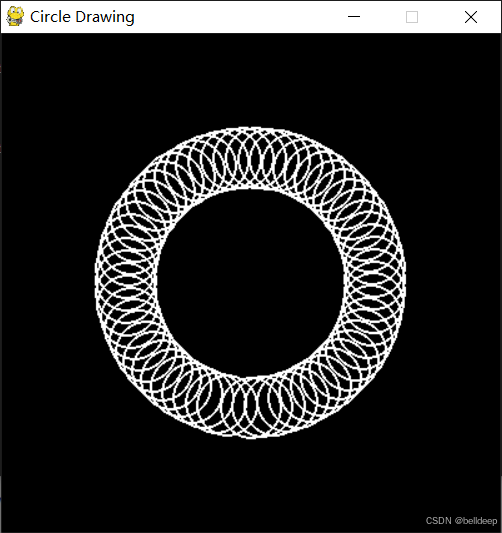
运行 python test_pygame_circle.py
自己可以调节帧率为 30 FPS,请尝试。





 扫一扫
扫一扫


 1225
1225

 被折叠的 条评论
为什么被折叠?
被折叠的 条评论
为什么被折叠?
 到【灌水乐园】发言





