 屏蔽全屏按钮与视频播放器进度显示优化





 本文详细介绍了如何在JCVideoPlayerStandard中屏蔽全屏按钮,并增加了自动检测功能,显示视频的倒计时及当前时间/总时间。通过修改Java代码,实现了视频播放器的定制化需求。
一、屏蔽全屏按钮

找到JCVideoPlayerStandard.java文件中的代码:
private void fixAudio() {
        if (SrcType.equalsIgnoreCase("Audio")) {
            //如果是音频,始终显示coverImageView
            //thumbImageView.setVisibility(View.VISIBLE);
            coverImageView.setVisibility(View.VISIBLE);
            bottomProgressBar.setVisibility(View.VISIBLE);
            fullscreenButton.setVisibility(View.INVISIBLE);
        }
    }
改为:fullscreenButton.setVisibility(View.GONE);
二、自动检测,增加倒计时,当前时间/总时间
1、找到JCVideoPlayerStandard.java文件中的代码:
@Override
    protected void setProgressAndTime(int progress, int secProgress, int currentTime, int totalTime) {
        super.setProgressAndTime(progress, secProgress, currentTime, totalTime);
        if (progress != 0)
            bottomProgressBar.setProgress(progress);
        if (secProgress != 0)
            bottomProgressBar.setSecondaryProgress(secProgress);

    }
修改为:
@Override
    protected void setProgressAndTime(int progress, int secProgress, int currentTime, int totalTime) {
        super.setProgressAndTime(progress, secProgress, currentTime, totalTime);
        if (progress != 0)
            bottomProgressBar.setProgress(progress);
        if (secProgress != 0)
            bottomProgressBar.setSecondaryProgress(secProgress);
        //zheng 2019.05.13 进度栏

        // <editor-fold defaultstate="collapsed" desc="自动调整播放工具栏,没有进度条:00:01/06:00,没有进度条也没有当前时间显示倒计时 05:59">
        if (progressBar.getVisibility() != View.VISIBLE) {//没有进度条
            ((LinearLayout) bottomContainer).setGravity(Gravity.END | Gravity.CENTER_VERTICAL);
            progressBar.setVisibility(View.GONE);
            totalTimeTextView.setText(" / " + JCUtils.stringForTime(totalTime));
            if (currentTimeTextView.getVisibility() != View.VISIBLE) {//没有当前播放进度
                totalTimeTextView.setText(JCUtils.stringForTime(totalTime - currentTime));
            }
        }
        // </editor-fold>
    }
1、找到JCVideoPlayerStandard.java文件中的代码:
 @Override
    protected void resetProgressAndTime() {
        super.resetProgressAndTime();
        bottomProgressBar.setProgress(0);
        bottomProgressBar.setSecondaryProgress(0);


    }
修改为:
 @Override
    protected void resetProgressAndTime() {
        super.resetProgressAndTime();
        bottomProgressBar.setProgress(0);
        bottomProgressBar.setSecondaryProgress(0);


        // <editor-fold defaultstate="collapsed" desc="自动调整播放工具栏,没有进度条:00:01/06:00,没有进度条也没有当前时间显示倒计时 05:59">
        if (progressBar.getVisibility() != View.VISIBLE) {//没有进度条
            ((LinearLayout) bottomContainer).setGravity(Gravity.END | Gravity.CENTER_VERTICAL);
            progressBar.setVisibility(View.GONE);
            int currentTime = getCurrentPositionWhenPlaying();
            int totalTime = getDuration();
            totalTimeTextView.setText(" / " + JCUtils.stringForTime(totalTime));
            if (currentTimeTextView.getVisibility() != View.VISIBLE) {//没有当前播放进度
                totalTimeTextView.setText(JCUtils.stringForTime(totalTime - currentTime));
            }
        }
        // </editor-fold>
    }
如果调用时只设置了隐藏了 progressBar:
mJcAudioPlayerStandard.progressBar.setVisibility(View.INVISIBLE);
显示效果如下图:“00:02/06:20” 当前时间/总时间
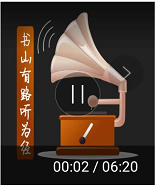
如果调用时设置了隐藏了 progressBar,同时隐藏了currentTimeTextView:
mJcAudioPlayerStandard.progressBar.setVisibility(View.INVISIBLE);
mJcAudioPlayerStandard.currentTimeTextView.setVisibility(View.INVISIBLE);
显示效果如下:“06:18”为时间倒计时。






 扫一扫
扫一扫


 被折叠的 条评论
为什么被折叠?
被折叠的 条评论
为什么被折叠?
 到【灌水乐园】发言





