


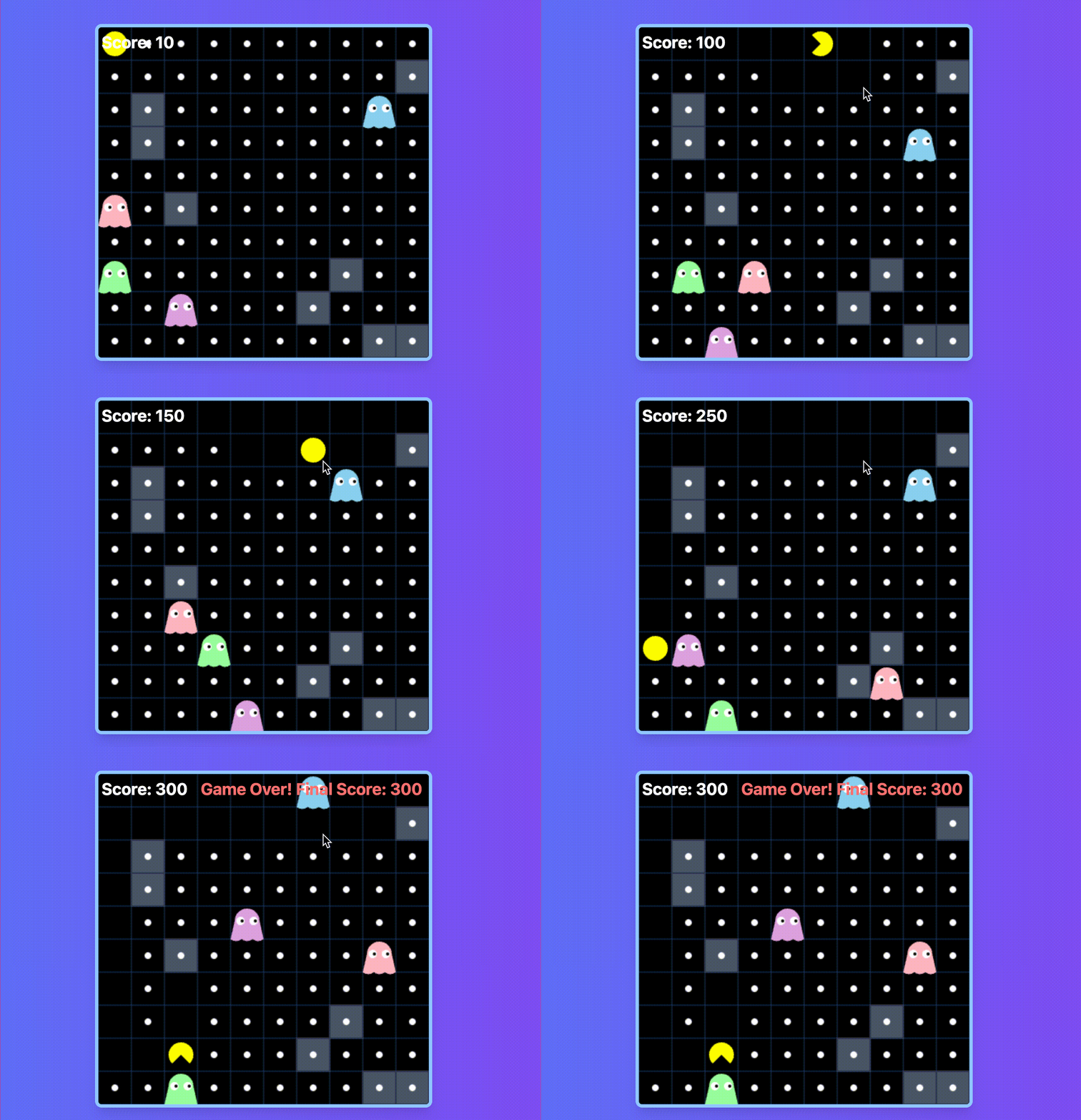
🎉 经典游戏的魅力,永不褪色!希望你能通过这篇文章,重新体验到吃豆人的乐趣!
还不快点赞!!!
目录
背景介绍
吃豆人(Pac-Man)是一款经典的街机游戏,自1980年推出以来,一直是游戏界的标志性作品。玩家控制一个黄色的小圆点,在迷宫中移动,吃掉所有的豆子,同时躲避追逐的幽灵。当玩家触碰到幽灵时,游戏结束。这款游戏不仅考验玩家的反应能力,还考验策略和规划能力。
在本项目中,我们将使用 TypeScript、React 和 HTML5 Canvas 来实现一个简化版的吃豆人游戏。通过这个项目,你将了解到如何结合现代前端技术来实现经典游戏的复刻,并掌握游戏开发中的一些核心技术。
技术要点
实现吃豆人游戏需要掌握以下关键技术,它们共同构成了实现这一经典游戏的基础。
1. TypeScript 语言特点及优势
TypeScript 是 JavaScript 的超集,提供了类型系统和面向对象编程的支持。它在实现吃豆人游戏中的主要优势包括:
-
类型安全:通过类型注解减少运行时错误,提升代码的可维护性。
-
面向对象编程:支持类和接口,便于将游戏对象(如吃豆人、幽灵、豆子等)封装为独立的模块。
-
工具友好:与现代开发工具(如 VS Code)集成良好,提供智能提示和代码检查功能。
2. HTML5 Canvas 2D 绘图 API
HTML5 Canvas 提供了强大的 2D 绘图能力,是实现游戏画面的核心工具。关键特性包括:
-
绘图上下文:通过
getContext('2d')获取绘图上下文,支持绘制图形、文本和图像。 -
图形绘制:使用
arc、fillRect等方法绘制圆形豆子、矩形障碍物和吃豆人。 -
透明度和渐变:通过
fillStyle和globalAlpha控制颜色透明度,实现爆炸效果的渐变。
3. React 状态管理与组件化
虽然游戏的核心逻辑主要依赖 Canvas 和 TypeScript,但 React 提供了组件化开发的优势:
-
状态管理:通过
useState和useEffect管理游戏状态,避免不必要的重新渲染。 -
事件处理:通过 React 的事件系统(如键盘事件)增强交互性,允许玩家通过键盘控制吃豆人移动。
-
组件化:将游戏的不同部分(如游戏画布、爆炸效果等)拆分为独立的组件,提升代码的可读性和可维护性。
4. 游戏逻辑与碰撞检测
游戏的核心逻辑包括:
-
移动逻辑:控制吃豆人和幽灵的移动。
-
碰撞检测:检测吃豆人是否吃到豆子,以及是否与幽灵碰撞。
-
游戏结束条件:当吃豆人与幽灵碰撞时,游戏结束。
5. 动画与帧循环
动画效果的实现依赖于高效的帧循环,核心技术包括:
-
requestAnimationFrame:浏览器提供的 API,用于实现平滑的动画效果。它会自动根据屏幕刷新率调整帧率,确保动画的流畅性。 -
帧循环逻辑:在每一帧中更新游戏状态、清除画布并重新绘制,实现动态效果。
完整代码
以下是实现吃豆人游戏的完整代码:
index.tsx(游戏主逻辑,核心)
import React, { useState, useEffect, useCallback } from 'react';
import { GameCanvas } from './components/GameCanvas';
import { ExplosionEffect } from './components/ExplosionEffect';
import { GameState, Position, Ghost, Dot, Obstacle } from './types';

const CELL_SIZE = 40;
const GAME_SPEED = 150;
const GHOST_COLORS = ['#FFB6C1', '#87CEEB', '#98FB98', '#DDA0DD'];
const GRID_COLS = 10;
const GRID_ROWS = 10;

// 初始化豆子
const initializeDots = (): Dot[] => {
  const dots: Dot[] = [];
  for (let x = 0; x < GRID_COLS; x++) {
    for (let y = 0; y < GRID_ROWS; y++) {
      dots.push({
        position: { x: x * CELL_SIZE, y: y * CELL_SIZE },
        eaten: false
      });
    }
  }
  return dots;
};

// 初始化障碍物
const initializeObstacles = (): Obstacle[] => {
  const obstacles: Obstacle[] = [];
  const numObstacles = 8; // 障碍物数量

  for (let i = 0; i < numObstacles; i++) {
    let position;
    do {
      position = {
        x: Math.floor(Math.random() * GRID_COLS) * CELL_SIZE,
        y: Math.floor(Math.random() * GRID_ROWS) * CELL_SIZE
      };
    } while (
      // 确保障碍物不会出现在起始位置和其他障碍物位置
      (position.x === 0 && position.y === 0) ||
      obstacles.some(obs =>
        obs.position.x === position.x &&
        obs.position.y === position.y
      )
    );

    obstacles.push({ position });
  }
  return obstacles;
};

// 检查是否与障碍物碰撞
const checkObstacleCollision = (position: Position, obstacles: Obstacle[]): boolean => {
  return obstacles.some(obstacle =>
    obstacle.position.x === position.x &&
    obstacle.position.y === position.y
  );
};

export const PacmanGame: React.FC = () => {
  const [gameState, setGameState] = useState<GameState>({
    pacman: {
      position: { x: 0, y: 0 },
      direction: 'right',
      mouthOpen: true
    },
    ghosts: GHOST_COLORS.map((color, index) => {
      // 将怪物放在地图右下角区域
      const row = Math.floor(GRID_ROWS * 0.7) + index % 2; // 从70%的位置开始
      const col = Math.floor(GRID_COLS * 0.7) + Math.floor(index / 2); // 从70%的位置开始
      return {
        position: {
          x: Math.min(col, GRID_COLS - 1) * CELL_SIZE,
          y: Math.min(row, GRID_ROWS - 1) * CELL_SIZE
        },
        color,
        direction: 'right'
      };
    }),
    dots: initializeDots(),
    obstacles: initializeObstacles(),
    gameOver: false,
    score: 0
  });

  const [showExplosion, setShowExplosion] = useState(false);
  const [explosionPosition, setExplosionPosition] = useState<Position>({ x: 0, y: 0 });

  const moveGhosts = useCallback(() => {
    setGameState(prev => ({
      ...prev,
      ghosts: prev.ghosts.map(ghost => {
        const newPosition = { ...ghost.position };
        const step = CELL_SIZE;

        let attempts = 0;
        let validMove = false;

        while (!validMove && attempts < 4) {
          const directions: ('right' | 'left' | 'up' | 'down')[] = ['right', 'left', 'up', 'down'];
          ghost.direction = directions[Math.floor(Math.random() * 4)];

          const testPosition = { ...ghost.position };
          switch (ghost.direction) {
            case 'right':
              testPosition.x += step;
              break;
            case 'left':
              testPosition.x -= step;
              break;
            case 'down':
              testPosition.y += step;
              break;
            case 'up':
              testPosition.y -= step;
              break;
          }

          if (
            testPosition.x >= 0 &&
            testPosition.x < GRID_COLS * CELL_SIZE &&
            testPosition.y >= 0 &&
            testPosition.y < GRID_ROWS * CELL_SIZE &&
            !checkObstacleCollision(testPosition, prev.obstacles)
          ) {
            validMove = true;
            newPosition.x = testPosition.x;
            newPosition.y = testPosition.y;
          }

          attempts++;
        }

        return { ...ghost, position: newPosition };
      })
    }));
  }, []);

  const checkCollision = useCallback(() => {
    const pacman = gameState.pacman;
    gameState.ghosts.forEach(ghost => {
      const dx = ghost.position.x - pacman.position.x;
      const dy = ghost.position.y - pacman.position.y;
      const distance = Math.sqrt(dx * dx + dy * dy);

      if (distance < 20) {
        setExplosionPosition(pacman.position);
        setShowExplosion(true);
        setTimeout(() => setShowExplosion(false), 500);
        setGameState(prev => ({ ...prev, gameOver: true }));
      }
    });
  }, [gameState]);

  useEffect(() => {
    const handleKeyPress = (e: KeyboardEvent) => {
      if (gameState.gameOver) return;

      setGameState(prev => {
        const newPosition = { ...prev.pacman.position };
        let newDirection = prev.pacman.direction;
        const step = CELL_SIZE;

        // 计算新位置但不立即应用
        let testPosition = { ...newPosition };
        switch (e.key) {
          case 'ArrowRight':
            testPosition.x = Math.min(newPosition.x + step, (GRID_COLS - 1) * CELL_SIZE);
            newDirection = 'right';
            break;
          case 'ArrowLeft':
            testPosition.x = Math.max(newPosition.x - step, 0);
            newDirection = 'left';
            break;
          case 'ArrowUp':
            testPosition.y = Math.max(newPosition.y - step, 0);
            newDirection = 'up';
            break;
          case 'ArrowDown':
            testPosition.y = Math.min(newPosition.y + step, (GRID_ROWS - 1) * CELL_SIZE);
            newDirection = 'down';
            break;
        }

        // 检查新位置是否与障碍物碰撞
        if (checkObstacleCollision(testPosition, prev.obstacles)) {
          testPosition = newPosition;
        }

        // 更新位置后立即检查豆子收集情况
        let updatedDots = [...prev.dots];
        let scoreIncrement = 0;

        updatedDots = updatedDots.map(dot => {
          if (!dot.eaten &&
              dot.position.x === testPosition.x &&
              dot.position.y === testPosition.y) {
            scoreIncrement += 10;
            return { ...dot, eaten: true };
          }
          return dot;
        });

        return {
          ...prev,
          pacman: {
            ...prev.pacman,
            position: testPosition,
            direction: newDirection,
            mouthOpen: !prev.pacman.mouthOpen
          },
          dots: updatedDots,
          score: prev.score + scoreIncrement
        };
      });
    };

    window.addEventListener('keydown', handleKeyPress);
    return () => window.removeEventListener('keydown', handleKeyPress);
  }, [gameState.gameOver]);

  useEffect(() => {
    if (gameState.gameOver) return;

    const gameLoop = setInterval(() => {
      moveGhosts();
      checkCollision();
    }, GAME_SPEED);

    return () => clearInterval(gameLoop);
  }, [moveGhosts, checkCollision, gameState.gameOver]);

  return (
    <div className="relative">
      <div className="absolute top-0 left-0 text-white text-xl font-bold m-2 flex items-center gap-4">
        <span>Score: {gameState.score}</span>
        {gameState.gameOver && (
          <span className="text-red-400">
            Game Over! Final Score: {gameState.score}
          </span>
        )}
      </div>
      <GameCanvas gameState={gameState} />
      {showExplosion && <ExplosionEffect position={explosionPosition} />}
    </div>
  );
};

export default PacmanGame;
App.tsx(应用入口)
import React from 'react';
import { PacmanGame } from './index';

const App: React.FC = () => {
  return (
    <div className="flex items-center justify-center min-h-screen bg-gradient-to-r from-blue-500 to-purple-600">
      <PacmanGame />
    </div>
  );
};

export default App;
GameCanvas.tsx(游戏画布背景组件,基于 Canvas)
import React, { useRef, useEffect } from 'react';
import { Position, GameState } from '../types';

const CELL_SIZE = 40;
const PACMAN_SIZE = 30;
const GHOST_SIZE = 30;
const GRID_COLS = 10;
const GRID_ROWS = 10;

const drawDot = (ctx: CanvasRenderingContext2D, position: Position) => {
  ctx.beginPath();
  ctx.arc(
    position.x + CELL_SIZE / 2,
    position.y + CELL_SIZE / 2,
    4,
    0,
    Math.PI * 2
  );
  ctx.fillStyle = '#FFFFFF';
  ctx.fill();
  ctx.closePath();
};

const drawObstacle = (ctx: CanvasRenderingContext2D, position: Position) => {
  ctx.fillStyle = '#4A5568';
  ctx.fillRect(position.x, position.y, CELL_SIZE, CELL_SIZE);

  // 添加立体感
  ctx.strokeStyle = '#2D3748';
  ctx.lineWidth = 2;
  ctx.strokeRect(position.x, position.y, CELL_SIZE, CELL_SIZE);
};

const drawPacman = (ctx: CanvasRenderingContext2D, position: Position, direction: string, mouthOpen: boolean) => {
  ctx.save();
  ctx.translate(position.x + CELL_SIZE / 2, position.y + CELL_SIZE / 2);

  let rotation = 0;
  switch(direction) {
    case 'right': rotation = 0; break;
    case 'down': rotation = Math.PI / 2; break;
    case 'left': rotation = Math.PI; break;
    case 'up': rotation = -Math.PI / 2; break;
  }

  ctx.rotate(rotation);

  ctx.beginPath(); // 添加这行,开始一个新的路径
  const mouthAngle = mouthOpen ? Math.PI / 4 : 0;
  ctx.arc(0, 0, PACMAN_SIZE / 2, mouthAngle, 2 * Math.PI - mouthAngle);
  ctx.lineTo(0, 0);
  ctx.closePath();
  ctx.fillStyle = '#FFFF00';
  ctx.fill();

  ctx.restore();
};

const drawGhost = (ctx: CanvasRenderingContext2D, ghost: Position, color: string) => {
  // 绘制身体
  ctx.beginPath();
  ctx.fillStyle = color;

  // 身体上半部分(圆形)
  ctx.arc(
    ghost.x + CELL_SIZE / 2,
    ghost.y + CELL_SIZE / 2 - 2,
    GHOST_SIZE / 2,
    Math.PI,
    0,
    false
  );

  // 身体下半部分(波浪形)
  ctx.lineTo(ghost.x + CELL_SIZE, ghost.y + CELL_SIZE);
  for (let i = 0; i < 3; i++) {
    const curve = 5;
    const spacing = CELL_SIZE / 3;
    ctx.quadraticCurveTo(
      ghost.x + CELL_SIZE - spacing * i - spacing / 2,
      ghost.y + CELL_SIZE + curve,
      ghost.x + CELL_SIZE - spacing * (i + 1),
      ghost.y + CELL_SIZE
    );
  }
  ctx.closePath();
  ctx.fill();

  // 绘制眼睛
  const eyeOffset = 8;
  const pupilOffset = 2;

  // 白色眼球
  ctx.fillStyle = 'white';
  ctx.beginPath();
  ctx.arc(ghost.x + CELL_SIZE / 2 - eyeOffset, ghost.y + CELL_SIZE / 2 - 2, 5, 0, Math.PI * 2);
  ctx.arc(ghost.x + CELL_SIZE / 2 + eyeOffset, ghost.y + CELL_SIZE / 2 - 2, 5, 0, Math.PI * 2);
  ctx.fill();

  // 黑色瞳孔
  ctx.fillStyle = 'black';
  ctx.beginPath();
  ctx.arc(ghost.x + CELL_SIZE / 2 - eyeOffset + pupilOffset, ghost.y + CELL_SIZE / 2 - 2, 2, 0, Math.PI * 2);
  ctx.arc(ghost.x + CELL_SIZE / 2 + eyeOffset + pupilOffset, ghost.y + CELL_SIZE / 2 - 2, 2, 0, Math.PI * 2);
  ctx.fill();
};

export const GameCanvas: React.FC<{ gameState: GameState }> = ({ gameState }) => {
  const canvasRef = useRef<HTMLCanvasElement>(null);

  const drawGrid = (ctx: CanvasRenderingContext2D) => {
    ctx.strokeStyle = '#1a365d';
    ctx.lineWidth = 1;

    for (let x = 0; x <= GRID_COLS; x++) {
      ctx.beginPath();
      ctx.moveTo(x * CELL_SIZE, 0);
      ctx.lineTo(x * CELL_SIZE, GRID_ROWS * CELL_SIZE);
      ctx.stroke();
    }

    for (let y = 0; y <= GRID_ROWS; y++) {
      ctx.beginPath();
      ctx.moveTo(0, y * CELL_SIZE);
      ctx.lineTo(GRID_COLS * CELL_SIZE, y * CELL_SIZE);
      ctx.stroke();
    }
  };

  useEffect(() => {
    const canvas = canvasRef.current;
    if (!canvas) return;

    const ctx = canvas.getContext('2d');
    if (!ctx) return;

    ctx.clearRect(0, 0, canvas.width, canvas.height);
    drawGrid(ctx);

    // 绘制障碍物
    gameState.obstacles?.forEach(obstacle => {
      drawObstacle(ctx, obstacle.position);
    });

    gameState.dots.forEach(dot => {
      if (!dot.eaten) {
        drawDot(ctx, dot.position);
      }
    });

    drawPacman(
      ctx,
      gameState.pacman.position,
      gameState.pacman.direction,
      gameState.pacman.mouthOpen
    );

    gameState.ghosts.forEach(ghost => {
      drawGhost(ctx, ghost.position, ghost.color);
    });
  }, [gameState]);

  return (
    <canvas
      ref={canvasRef}
      width={CELL_SIZE * GRID_COLS}
      height={CELL_SIZE * GRID_ROWS}
      className="border-4 border-blue-300 rounded-lg shadow-lg bg-black"
    />
  );
};
ExplosionEffect.tsx(爆炸效果组件)
import React from 'react';
import { motion } from 'framer-motion';

interface ExplosionEffectProps {
  position: { x: number; y: number };
}

export const ExplosionEffect: React.FC<ExplosionEffectProps> = ({ position }) => {
  return (
    <motion.div
      className="absolute pointer-events-none"
      style={
   {
    left: position.x, top: position.y }}
      initial={
   {
    scale: 0, opacity: 1 }}
      animate={
   {

        scale: [1, 2],
        opacity: [1, 0],
      }}
      transition={
   {
    duration: 0.5 }}
    >
      <div className="w-8 h-8 bg-yellow-400 rounded-full" />
    </motion.div>
  );
};
types.ts(接口定义文件)
export interface Position {
  x: number;
  y: number;
}

export interface Ghost {
  position: Position;
  color: string;
  direction: 'right' | 'left' | 'up' | 'down';
}

export interface Dot {
  position: Position;
  eaten: boolean;
}

export interface Obstacle {
  position: Position;
}

export interface GameState {
  pacman: {
    position: Position;
    direction: 'right' | 'left' | 'up' | 'down';
    mouthOpen: boolean;
  };
  ghosts: Ghost[];
  dots: Dot[];
  obstacles: Obstacle[];
  gameOver: boolean;
  score: number;
}
源码下载
您可以通过以下链接访问和下载完整的代码: 源码压缩包链接
代码分析
以下是对代码实现的详细解析,帮助理解吃豆人游戏的核心逻辑和实现方式。
1. 程序初始化与显示设置
在 React 组件中,我们使用 useEffect 钩子来初始化程序,并设置游戏的初始状态。同时,我们通过 initializeDots 和 initializeObstacles 函数初始化游戏中的豆子和障碍物。
const initializeDots = (): Dot[] => {
  const dots: Dot[] = [];
  for (let x = 0; x < GRID_COLS; x++) {
    for (let y = 0; y < GRID_ROWS; y++) {
      dots.push({
        position: { x: x * CELL_SIZE, y: y * CELL_SIZE },
        eaten: false
      });
    }
  }
  return dots;
};

const initializeObstacles = (): Obstacle[] => {
  const obstacles: Obstacle[] = [];
  const numObstacles = 8; // 障碍物数量

  for (let i = 0; i < numObstacles; i++) {
    let position;
    do {
      position = {
        x: Math.floor(Math.random() * GRID_COLS) * CELL_SIZE,
        y: Math.floor(Math.random() * GRID_ROWS) * CELL_SIZE
      };
    } while (
      // 确保障碍物不会出现在起始位置和其他障碍物位置
      (position.x === 0 && position.y === 0) ||
      obstacles.some(obs =>
        obs.position.x === position.x &&
        obs.position.y === position.y
      )
    );

    obstacles.push({ position });
  }
  return obstacles;
};
2. 游戏画布的绘制
游戏画布的绘制逻辑在 GameCanvas 组件中实现。通过 Canvas 的 2D 绘图 API,我们绘制了游戏的网格、豆子、障碍物、吃豆人和幽灵。
const drawDot = (ctx: CanvasRenderingContext2D, position: Position) => {
  ctx.beginPath();
  ctx.arc(
    position.x + CELL_SIZE / 2,
    position.y + CELL_SIZE / 2,
    4,
    0,
    Math.PI * 2
  );
  ctx.fillStyle = '#FFFFFF';
  ctx.fill();
  ctx.closePath();
};
3. 吃豆人和幽灵的移动逻辑
吃豆人的移动逻辑通过键盘事件处理函数实现。玩家按下方向键时,吃豆人的位置会根据方向更新。同时,我们还检查了吃豆人是否与障碍物碰撞。
const handleKeyPress = (e: KeyboardEvent) => {
  if (gameState.gameOver) return;

  setGameState(prev => {
    const newPosition = { ...prev.pacman.position };
    let newDirection = prev.pacman.direction;
    const step = CELL_SIZE;

    // 计算新位置但不立即应用
    let testPosition = { ...newPosition };
    switch (e.key) {
      case 'ArrowRight':
        testPosition.x = Math.min(newPosition.x + step, (GRID_COLS - 1) * CELL_SIZE);
        newDirection = 'right';
        break;
      case 'ArrowLeft':
        testPosition.x = Math.max(newPosition.x - step, 0);
        newDirection = 'left';
        break;
      case 'ArrowUp':
        testPosition.y = Math.max(newPosition.y - step, 0);
        newDirection = 'up';
        break;
      case 'ArrowDown':
        testPosition.y = Math.min(newPosition.y + step, (GRID_ROWS - 1) * CELL_SIZE);
        newDirection = 'down';
        break;
    }

    // 检查新位置是否与障碍物碰撞
    if (checkObstacleCollision(testPosition, prev.obstacles)) {
      testPosition = newPosition;
    }

    // 更新位置后立即检查豆子收集情况
    let updatedDots = [...prev.dots];
    let scoreIncrement = 0;

    updatedDots = updatedDots.map(dot => {
      if (!dot.eaten &&
          dot.position.x === testPosition.x &&
          dot.position.y === testPosition.y) {
        scoreIncrement += 10;
        return { ...dot, eaten: true };
      }
      return dot;
    });

    return {
      ...prev,
      pacman: {
        ...prev.pacman,
        position: testPosition,
        direction: newDirection,
        mouthOpen: !prev.pacman.mouthOpen
      },
      dots: updatedDots,
      score: prev.score + scoreIncrement
    };
  });
};
幽灵的移动逻辑通过随机选择方向实现。每次移动时,幽灵会尝试向一个随机方向移动,如果该方向可行,则更新位置。
const moveGhosts = useCallback(() => {
  setGameState(prev => ({
    ...prev,
    ghosts: prev.ghosts.map(ghost => {
      const newPosition = { ...ghost.position };
      const step = CELL_SIZE;

      let attempts = 0;
      let validMove = false;

      while (!validMove && attempts < 4) {
        const directions: ('right' | 'left' | 'up' | 'down')[] = ['right', 'left', 'up', 'down'];
        ghost.direction = directions[Math.floor(Math.random() * 4)];

        const testPosition = { ...ghost.position };
        switch (ghost.direction) {
          case 'right':
            testPosition.x += step;
            break;
          case 'left':
            testPosition.x -= step;
            break;
          case 'down':
            testPosition.y += step;
            break;
          case 'up':
            testPosition.y -= step;
            break;
        }

        if (
          testPosition.x >= 0 &&
          testPosition.x < GRID_COLS * CELL_SIZE &&
          testPosition.y >= 0 &&
          testPosition.y < GRID_ROWS * CELL_SIZE &&
          !checkObstacleCollision(testPosition, prev.obstacles)
        ) {
          validMove = true;
          newPosition.x = testPosition.x;
          newPosition.y = testPosition.y;
        }

        attempts++;
      }

      return { ...ghost, position: newPosition };
    })
  }));
}, []);
4. 碰撞检测与游戏结束条件
游戏的核心逻辑之一是碰撞检测。我们需要检测吃豆人是否与幽灵碰撞,以及是否吃到豆子。如果吃豆人与幽灵碰撞,游戏结束。
const checkCollision = useCallback(() => {
  const pacman = gameState.pacman;
  gameState.ghosts.forEach(ghost => {
    const dx = ghost.position.x - pacman.position.x;
    const dy = ghost.position.y - pacman.position.y;
    const distance = Math.sqrt(dx * dx + dy * dy);

    if (distance < 20) {
      setExplosionPosition(pacman.position);
      setShowExplosion(true);
      setTimeout(() => setShowExplosion(false), 500);
      setGameState(prev => ({ ...prev, gameOver: true }));
    }
  });
}, [gameState]);
5. 爆炸效果的实现
爆炸效果通过 ExplosionEffect 组件实现。当吃豆人与幽灵碰撞时,会在碰撞位置显示一个爆炸动画。
export const ExplosionEffect: React.FC<ExplosionEffectProps> = ({ position }) => {
  return (
    <motion.div
      className="absolute pointer-events-none"
      style={
   {
    left: position.x, top: position.y }}
      initial={
   {
    scale: 0, opacity: 1 }}
      animate={
   {

        scale: [1, 2],
        opacity: [1, 0],
      }}
      transition={
   {
    duration: 0.5 }}
    >
      <div className="w-8 h-8 bg-yellow-400 rounded-full" />
    </motion.div>
  );
};
6. 总结
通过 React 和 TypeScript,我们实现了一个经典的吃豆人游戏。核心逻辑包括:
-
使用 Canvas 绘制游戏界面。
-
通过键盘事件控制吃豆人移动。
-
实现幽灵的随机移动逻辑。
-
检测碰撞并处理游戏结束条件。
-
添加爆炸效果增强视觉体验。
这种实现方式不仅展示了 TypeScript 的类型安全性和代码结构化优势,还通过 React 的组件化开发提升了代码的可维护性。
注意事项
-
TypeScript版本兼容性问题:使用npm版本管理工具,。
-
浏览器兼容性问题:HTML5 Canvas 在现代浏览器中支持良好,但仍需注意兼容性问题。
写在后面
感谢您的阅读!如果你在实现过程中有任何问题或建议,欢迎随时反馈。开发这个吃豆人游戏的过程充满了乐趣,希望你也能享受其中。如果你喜欢这个项目,不妨分享到你的项目中!
版权声明
本文遵循 Creative Commons Attribution-ShareAlike 4.0 International License 协议。你可以自由使用和修改代码,但需注明原作者和出处。
参考资料
-
HTML5 Canvas 文档
-
TypeScript 官方文档
-
React 官方文档

 308


 扫一扫


 被折叠的 条评论
为什么被折叠?
 到【灌水乐园】发言


