





 这篇博客通过UE4官方实例详细讲解如何使用C++实现基础的第一人称视角旋转及左右前后移动。首先,创建C++ Character类,并在项目设置中配置输入管理。接着,介绍Character.h和Character.cpp的代码实现,最后阐述Gamemode.h和Gamemode.cpp的角色设置。
1.创建C++类(人物--->Character类)
2.项目设置里设置好输入
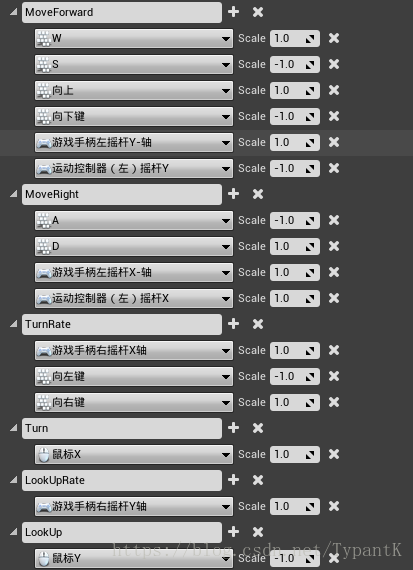
3.
Character.h
/** Base turn rate, in deg/sec. Other scaling may affect final turn rate. */
UPROPERTY(VisibleAnywhere, BlueprintReadOnly, Category=Camera)
float BaseTurnRate;

/** Base look up/down rate, in deg/sec. Other scaling may affect final rate. */
UPROPERTY(VisibleAnywhere, BlueprintReadOnly, Category=Camera)
float BaseLookUpRate;
protected:
// APawn interface
virtual void SetupPlayerInputComponent(UInputComponent* InputComponent) override; //设置、绑定输入的函数
// End of APawn interface
#include "Components/InputComponent.h"
#include "GameFramework/InputSettings.h"
void ALearnOfficialFPCharacter::SetupPlayerInputComponent(class UInputComponent* PlayerInputComponent)
{
	// set up gameplay key bindings
	check(PlayerInputComponent);


	// Bind movement events
	PlayerInputComponent->BindAxis("MoveForward", this, &ALearnOfficialFPCharacter::MoveForward);
	PlayerInputComponent->BindAxis("MoveRight", this, &ALearnOfficialFPCharacter::MoveRight);

	// We have 2 versions of the rotation bindings to handle different kinds of devices differently
	// "turn" handles devices that provide an absolute delta, such as a mouse.
	// "turnrate" is for devices that we choose to treat as a rate of change, such as an analog joystick(遥控杆)
	PlayerInputComponent->BindAxis("Turn", this, &APawn::AddControllerYawInput);
	PlayerInputComponent->BindAxis("TurnRate", this, &ALearnOfficialFPCharacter::TurnAtRate);
	PlayerInputComponent->BindAxis("LookUp", this, &APawn::AddControllerPitchInput);
	PlayerInputComponent->BindAxis("LookUpRate", this, &ALearnOfficialFPCharacter::LookUpAtRate);
}
Character.cpp
ALearnOfficialFPCharacter::ALearnOfficialFPCharacter()
{
	// Set size for collision capsule
	GetCapsuleComponent()->InitCapsuleSize(55.f, 96.0f);

	// set our turn rates for input
	BaseTurnRate = 45.f;
	BaseLookUpRate = 45.f;
}
----------------------------------------------------------------------------------------------------------------
----------------------------------------------------------------------------------------------------------------
----------------------------------------------------------------------------------------------------------------
Gamemode.h
public:
ALearnOfficialFPGameMode();
};
Gamemode.cpp
#include "UObject/ConstructorHelpers.h"

ALearnOfficialFPGameMode::ALearnOfficialFPGameMode()
	: Super()
{
	// set default pawn class to our Blueprinted character
	static ConstructorHelpers::FClassFinder<APawn> PlayerPawnClassFinder(TEXT("/Game/FirstPersonCPP/Blueprints/FirstPersonCharacter"));
	DefaultPawnClass = PlayerPawnClassFinder.Class;

	// use our custom HUD class
	HUDClass = ALearnOfficialFPHUD::StaticClass();
}





 扫一扫
扫一扫


 2444
2444

 被折叠的 条评论
为什么被折叠?
被折叠的 条评论
为什么被折叠?
 到【灌水乐园】发言





