


 本文详细解析了OpenCV中setTo()函数的工作原理,包括如何使用掩膜矩阵(mask)来选择性地更改图像矩阵的值。通过实例演示了在不同掩膜条件下,setTo()函数如何影响矩阵元素。
首先介绍setTo()函数
Opencv3.3中给出的库函数中是这样介绍setTo()函数的:
第一个参数可以将给定矩阵的值转变为特定的value值;
第二个参数就是mask掩膜矩阵,可分为添加mask和不添加mask这两种情况,其中,给定矩阵和掩膜矩阵的尺寸大小要相同。
下面,通过实例来具体说明mask的用法。
一.添加mask的效果
首先,通过创造初始矩阵和3个不同的掩膜矩阵,来分析添加掩膜的作用:
Mat src,mask1,mask2,mask3,dst1,dst2,dst3;

/*创建初始矩阵*/
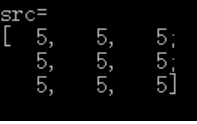
src=Mat(3,3,CV_8UC1,Scalar(5));
cout<<"src="<<endl<<src<<endl<<endl;
/*创建3个掩膜矩阵*/
mask1=Mat(3,3,CV_8UC1,Scalar(0));
mask2=(Mat_<uchar>(3,3)<<1,0,0,2,0,7,1,1,3);
mask3=Mat::ones(3,3,CV_8UC1);

cout<<"mask1="<<endl<<mask1<<endl<<endl;
cout<<"mask2="<<endl<<mask2<<endl<<endl;
cout<<"mask3="<<endl<<mask3<<endl<<endl;

创建的3个掩膜矩阵分别为全零矩阵,个别元素为零的矩阵和元素全为非零的矩阵。
下面通过利用setTo()函数转变初始矩阵各元素的值,设value的值为100:
/*加上mask参数*/
dst1=src.setTo(100,mask1);
cout<<"dst1="<<endl<<dst1<<endl<<endl;
dst2=src.setTo(100,mask2);
cout<<"dst2="<<endl<<dst2<<endl<<endl;
dst3=src.setTo(100,mask3);
cout<<"dst3="<<endl<<dst3<<endl<<endl;
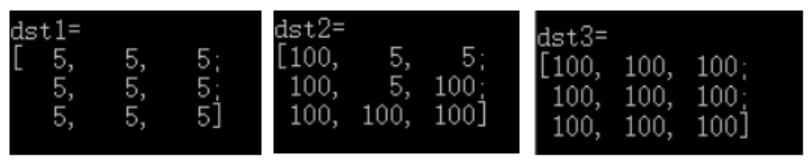
比较转变后的矩阵和掩膜矩阵,可以轻松的发现:在掩膜矩阵中,有0元素时,该位置上对应的元矩阵元素的值不会发生改变;而不为0的位置上,原矩阵的值全部变为了设定的value(100)。所以,我给掩膜的定义为:通过在矩阵各位置设定0来掩盖给定矩阵对应元素的值,使之不发生改变。
二.不添加mask的效果
分别对全零和全为非零的矩阵进行setTo()函数转变。
/*不加mask参数*/
mask1.setTo(100);
cout<<"mask1ed ="<<endl<<mask1<<endl<<endl;
mask3.setTo(100);
cout<<"mask3ed ="<<endl<<mask3<<endl<<endl;
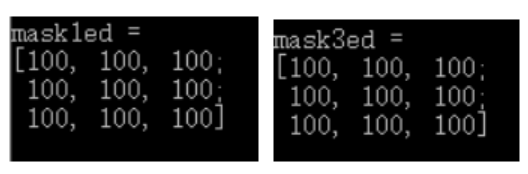
可以发现,当没有掩膜mask的时候,不论给定矩阵的个元素值是否为零,经过setTo()变换后,矩阵个元素的值都变成了value(100)。
实例源代码如下:
#include “opencv2/highgui/highgui.hpp”
#include “opencv2/imgproc/imgproc.hpp”
#include
#include <stdio.h>
using namespace std;
using namespace cv;
int main()
{
Mat src,mask1,mask2,mask3,dst1,dst2,dst3;
/*创建初始矩阵*/
src=Mat(3,3,CV_8UC1,Scalar(5));
cout<<"src="<<endl<<src<<endl<<endl;

/*创建3个掩膜矩阵*/
mask1=Mat(3,3,CV_8UC1,Scalar(0));
mask2=(Mat_<uchar>(3,3)<<1,0,0,2,0,7,1,1,3);
mask3=Mat::ones(3,3,CV_8UC1);

cout<<"mask1="<<endl<<mask1<<endl<<endl;
cout<<"mask2="<<endl<<mask2<<endl<<endl;
cout<<"mask3="<<endl<<mask3<<endl<<endl;

/*加上mask参数*/
dst1=src.setTo(100,mask1);
cout<<"dst1="<<endl<<dst1<<endl<<endl;
dst2=src.setTo(100,mask2);
cout<<"dst2="<<endl<<dst2<<endl<<endl;
dst3=src.setTo(100,mask3);
cout<<"dst3="<<endl<<dst3<<endl<<endl;

cout<<"src="<<endl<<src<<endl<<endl;     //此时的src经过上次setTO变换,已经不是原来的src了

/*不加mask参数*/
mask1.setTo(100);
cout<<"mask1ed ="<<endl<<mask1<<endl<<endl;
mask3.setTo(100);
cout<<"mask3ed ="<<endl<<mask3<<endl<<endl;

//waitKey(0);
return 0;
}





 扫一扫
扫一扫


 1196
1196

 被折叠的 条评论
为什么被折叠?
被折叠的 条评论
为什么被折叠?
 到【灌水乐园】发言





