


元胞自动机(Cellular Automaton),复数为Cellular Automata,简称CA,也有人译为细胞自动机、点格自动机、分子自动机或单元自动机)。是一时间和空间都离散的动力系统。散布在规则格网 (Lattice Grid)中的每一元胞(Cell)取有限的离散状态,遵循同样的作用规则,依据确定的局部规则作同步更新。大量元胞通过简单的相互作用而构成精态系统的演化。由冯诺依曼在20世纪50年代发明。
其特点是时间、空间、状态都离散,每个变量只取有限多个状态,且其状态改变的规则在时间和空间上都是局部的。
将所有元胞自动机的动力学行为归纳为四大类(Wolfram. S.,1986):
⑴平稳型:自任何初始状态开始,经过一定时间运行后,元胞空间趋于一个空间平稳的构形,这里空间平稳即指每一个元胞处于固定状态。不随时间变化而变化。
⑵周期型:经过一定时间运行后,元胞空间趋于一系列简单的固定结构(Stable Patterns)或周期结构(Perlodical Patterns)。由于这些结构可看作是一种 滤波器(Filter),故可应用到 图像处理的研究中。
⑶混沌型:自任何初始状态开始,经过一定时间运行后,元胞自动机表现出混沌的非周期行为,所生成的结构的统计特征不再变止,通常表现为分形 分维特征。
⑷复杂型:出现复杂的局部结构,或者说是局部的混沌,其中有些会不断地传播。
上述分类,又可以分别描述为( 谭跃进,1996; 谢惠民,1994;李才伟、1997);
⑴均匀状态,即点态 吸引子,或称不动点;
⑵简单的周期结构,即周期性吸引子,或称周期轨;
⑶混沌的非周期性模式,即混沌吸引子;
⑷这第四类行为可以与 生命系统等复杂系统中的 自组织现象相比拟,但在 连续系统中没有相对应的模式。但从研究元胞自动机的角度讲,最具研究价值的具有第四类行为的元胞自动机,因为这类元胞自动机被认为具有"突现计算"(Emergent Computation)功能,研究表明,可以用作广义计算机(Universal Computer)以 仿真任意复杂的计算过程。另外,此类元胞自动机在发展过程中还表现出很强的不可逆(lrreversibility)特征,而且,这种元胞自动机在若干有限循环后,有可能会 "死"掉,即所有元胞的状态变为零。
function varargout = ES(varargin)

% ES MATLAB code for ES.fig

% ES, by itself, creates a new ES or raises the existing

% singleton*.

%

% H = ES returns the handle to a new ES or the handle to

% the existing singleton*.

%

% ES('CALLBACK',hObject,eventData,handles,...) calls the local

% function named CALLBACK in ES.M with the given input arguments.

%

% ES('Property','Value',...) creates a new ES or raises the

% existing singleton*. Starting from the left, property value pairs are

% applied to the GUI before ES_OpeningFcn gets called. An

% unrecognized property name or invalid value makes property application

% stop. All inputs are passed to ES_OpeningFcn via varargin.

%

% *See GUI Options on GUIDE's Tools menu. Choose "GUI allows only one

% instance to run (singleton)".

%

% See also: GUIDE, GUIDATA, GUIHANDLES


% Edit the above text to modify the response to help ES


% Last Modified by GUIDE v2.5 24-Nov-2014 16:51:08


% Begin initialization code - DO NOT EDIT

gui_Singleton = 1;

gui_State = struct('gui_Name', mfilename, ...

'gui_Singleton', gui_Singleton, ...

'gui_OpeningFcn', @ES_OpeningFcn, ...

'gui_OutputFcn', @ES_OutputFcn, ...

'gui_LayoutFcn', [] , ...

'gui_Callback', []);

if nargin && ischar(varargin{1})

gui_State.gui_Callback = str2func(varargin{1});

end


if nargout

[varargout{1:nargout}] = gui_mainfcn(gui_State, varargin{:});

else

gui_mainfcn(gui_State, varargin{:});

end

% End initialization code - DO NOT EDIT


% --- Executes just before ES is made visible.

function ES_OpeningFcn(hObject, eventdata, handles, varargin)

% This function has no output args, see OutputFcn.

% hObject handle to figure

% eventdata reserved - to be defined in a future version of MATLAB

% handles structure with handles and user data (see GUIDATA)

% varargin command line arguments to ES (see VARARGIN)


% Choose default command line output for ES

handles.output = hObject;

handles.Img = 0;

handles.ParentImg = 0;

handles.OffspringImg = 0;

handles.Parent = cell(1, 8);

handles.Parent{1} = zeros(1, 3); % Birth

handles.Parent{2} = zeros(1, 3); % Level

handles.Parent{3} = zeros(1, 3); % number of Pattern Pos

handles.Parent{4} = cell(1, 3); % PosH

handles.Parent{5} = cell(1, 3); % PosW

handles.Parent{6} = zeros(1, 3); % Cell Generation

handles.Parent{7} = cell(1, 3); % Pattern

handles.Offspring = cell(1, 8);

handles.Offspring{1} = zeros(1, 3); % Birth

handles.Offspring{2} = zeros(1, 3); % Level

handles.Offspring{3} = zeros(1, 3); % number of Pattern Pos

handles.Offspring{4} = cell(1, 3); % PosH

handles.Offspring{5} = cell(1, 3); % PosW

handles.Offspring{6} = zeros(1, 3); % Cell Generation

handles.Offspring{7} = cell(1, 3); % Pattern

handles.Boundary = cell(1, 7); % Birth, Level, # of CellBlocks, MinCAG, MaxCAG, Image Size

handles.GenerationCount = 0;

if exist('iES', 'dir') ~= 7

mkdir('iES');

end

% Update handles structure

guidata(hObject, handles);


% UIWAIT makes ES wait for user response (see UIRESUME)

% uiwait(handles.figure1);


% --- Outputs from this function are returned to the command line.

function varargout = ES_OutputFcn(hObject, eventdata, handles)

% varargout cell array for returning output args (see VARARGOUT);

% hObject handle to figure

% eventdata reserved - to be defined in a future version of MATLAB

% handles structure with handles and user data (see GUIDATA)


% Get default command line output from handles structure

varargout{1} = handles.output;


function BirthVal_Callback(hObject, eventdata, handles)

% hObject handle to BirthVal (see GCBO)

% eventdata reserved - to be defined in a future version of MATLAB

% handles structure with handles and user data (see GUIDATA)


% Hints: get(hObject,'String') returns contents of BirthVal as text

% str2double(get(hObject,'String')) returns contents of BirthVal as a double


% --- Executes during object creation, after setting all properties.

function BirthVal_CreateFcn(hObject, eventdata, handles)

% hObject handle to BirthVal (see GCBO)

% eventdata reserved - to be defined in a future version of MATLAB

% handles empty - handles not created until after all CreateFcns called


% Hint: edit controls usually have a white background on Windows.

% See ISPC and COMPUTER.

if ispc && isequal(get(hObject,'BackgroundColor'), get(0,'defaultUicontrolBackgroundColor'))

set(hObject,'BackgroundColor','white');

end


function LevelVal_Callback(hObject, eventdata, handles)

% hObject handle to LevelVal (see GCBO)

% eventdata reserved - to be defined in a future version of MATLAB

% handles structure with handles and user data (see GUIDATA)


% Hints: get(hObject,'String') returns contents of LevelVal as text

% str2double(get(hObject,'String')) returns contents of LevelVal as a double


% --- Executes during object creation, after setting all properties.

function LevelVal_CreateFcn(hObject, eventdata, handles)

% hObject handle to LevelVal (see GCBO)

% eventdata reserved - to be defined in a future version of MATLAB

% handles empty - handles not created until after all CreateFcns called


% Hint: edit controls usually have a white background on Windows.

% See ISPC and COMPUTER.

if ispc && isequal(get(hObject,'BackgroundColor'), get(0,'defaultUicontrolBackgroundColor'))

set(hObject,'BackgroundColor','white');

end


function CellBlocksVal_Callback(hObject, eventdata, handles)

% hObject handle to CellBlocksVal (see GCBO)

% eventdata reserved - to be defined in a future version of MATLAB

% handles structure with handles and user data (see GUIDATA)


% Hints: get(hObject,'String') returns contents of CellBlocksVal as text

% str2double(get(hObject,'String')) returns contents of CellBlocksVal as a double


% --- Executes during object creation, after setting all properties.

function CellBlocksVal_CreateFcn(hObject, eventdata, handles)

% hObject handle to CellBlocksVal (see GCBO)

% eventdata reserved - to be defined in a future version of MATLAB

% handles empty - handles not created until after all CreateFcns called


% Hint: edit controls usually have a white background on Windows.

% See ISPC and COMPUTER.

if ispc && isequal(get(hObject,'BackgroundColor'), get(0,'defaultUicontrolBackgroundColor'))

set(hObject,'BackgroundColor','white');

end


function MinCAGVal_Callback(hObject, eventdata, handles)

% hObject handle to MinCAGVal (see GCBO)

% eventdata reserved - to be defined in a future version of MATLAB

% handles structure with handles and user data (see GUIDATA)


% Hints: get(hObject,'String') returns contents of MinCAGVal as text

% str2double(get(hObject,'String')) returns contents of MinCAGVal as a double


% --- Executes during object creation, after setting all properties.

function MinCAGVal_CreateFcn(hObject, eventdata, handles)

% hObject handle to MinCAGVal (see GCBO)

% eventdata reserved - to be defined in a future version of MATLAB

% handles empty - handles not created until after all CreateFcns called


% Hint: edit controls usually have a white background on Windows.

% See ISPC and COMPUTER.

if ispc && isequal(get(hObject,'BackgroundColor'), get(0,'defaultUicontrolBackgroundColor'))

set(hObject,'BackgroundColor','white');

end


function MaxCAGVal_Callback(hObject, eventdata, handles)

% hObject handle to MaxCAGVal (see GCBO)

% eventdata reserved - to be defined in a future version of MATLAB

% handles structure with handles and user data (see GUIDATA)


% Hints: get(hObject,'String') returns contents of MaxCAGVal as text

% str2double(get(hObject,'String')) returns contents of MaxCAGVal as a double


% --- Executes during object creation, after setting all properties.

function MaxCAGVal_CreateFcn(hObject, eventdata, handles)

% hObject handle to MaxCAGVal (see GCBO)

% eventdata reserved - to be defined in a future version of MATLAB

% handles empty - handles not created until after all CreateFcns called


% Hint: edit controls usually have a white background on Windows.

% See ISPC and COMPUTER.

if ispc && isequal(get(hObject,'BackgroundColor'), get(0,'defaultUicontrolBackgroundColor'))

set(hObject,'BackgroundColor','white');

end


% --- Executes on button press in ImgRead.

function ImgRead_Callback(hObject, eventdata, handles)

% hObject handle to ImgRead (see GCBO)

% eventdata reserved - to be defined in a future version of MATLAB

% handles structure with handles and user data (see GUIDATA)

% [filename, user_canceled] = imgetfile;

% if user_canceled

% return;

% end

filename = 'lenna.png';

Img = imread(filename);

handles.Img = Img;

axes(handles.Original);

image(double(handles.Img)/255);

guidata(hObject, handles);


% --- Executes on button press in Sellambda.

function Sellambda_Callback(hObject, eventdata, handles)

% hObject handle to Sellambda (see GCBO)

% eventdata reserved - to be defined in a future version of MATLAB

% handles structure with handles and user data (see GUIDATA)

imwrite(handles.ParentImg, ['iEA/G', num2str(handles.GenerationCount), '.jpg']);

[handles.Offspring, cc] = Mutation(handles.Parent, handles.Boundary);

guidata(hObject, handles);

offspring = handles.ParentImg;

[offspring(:, :, cc), ta, tb, tc, td, te] = GUILogicRule(handles.Img, cc, handles.Offspring{1}(cc), handles.Offspring{2}(cc), handles.Offspring{3}(cc), handles.Offspring{6}(cc), 1, handles.Offspring{4}{cc}, handles.Offspring{5}{cc}, handles.Offspring{7}{cc});

axes(handles.mu);

image(offspring);

handles.GenerationCount = handles.GenerationCount +1;

handles.OffspringImg = offspring;

guidata(hObject, handles);

set(handles.Generation, 'string', strcat('Generation: ', num2str(handles.GenerationCount)));


% --- Executes on button press in Selmu.

function Selmu_Callback(hObject, eventdata, handles)

% hObject handle to Selmu (see GCBO)

% eventdata reserved - to be defined in a future version of MATLAB

% handles structure with handles and user data (see GUIDATA)

imwrite(handles.OffspringImg, ['iEA/G', num2str(handles.GenerationCount), '.jpg']);

[handles.Parent, cc] = Mutation(handles.Offspring, handles.Boundary);

guidata(hObject, handles);

Parent = handles.OffspringImg;

[Parent(:, :, cc), ta, tb, tc, td, te] = GUILogicRule(handles.Img, cc, handles.Parent{1}(cc), handles.Parent{2}(cc), handles.Parent{3}(cc), handles.Parent{6}(cc), 1, handles.Parent{4}{cc}, handles.Parent{5}{cc}, handles.Parent{7}{cc});

axes(handles.lambda);

image(Parent);

handles.GenerationCount = handles.GenerationCount +1;

handles.ParentImg = Parent;

guidata(hObject, handles);

set(handles.Generation, 'string', strcat('Generation: ', num2str(handles.GenerationCount)));


% --- Executes on button press in Start.

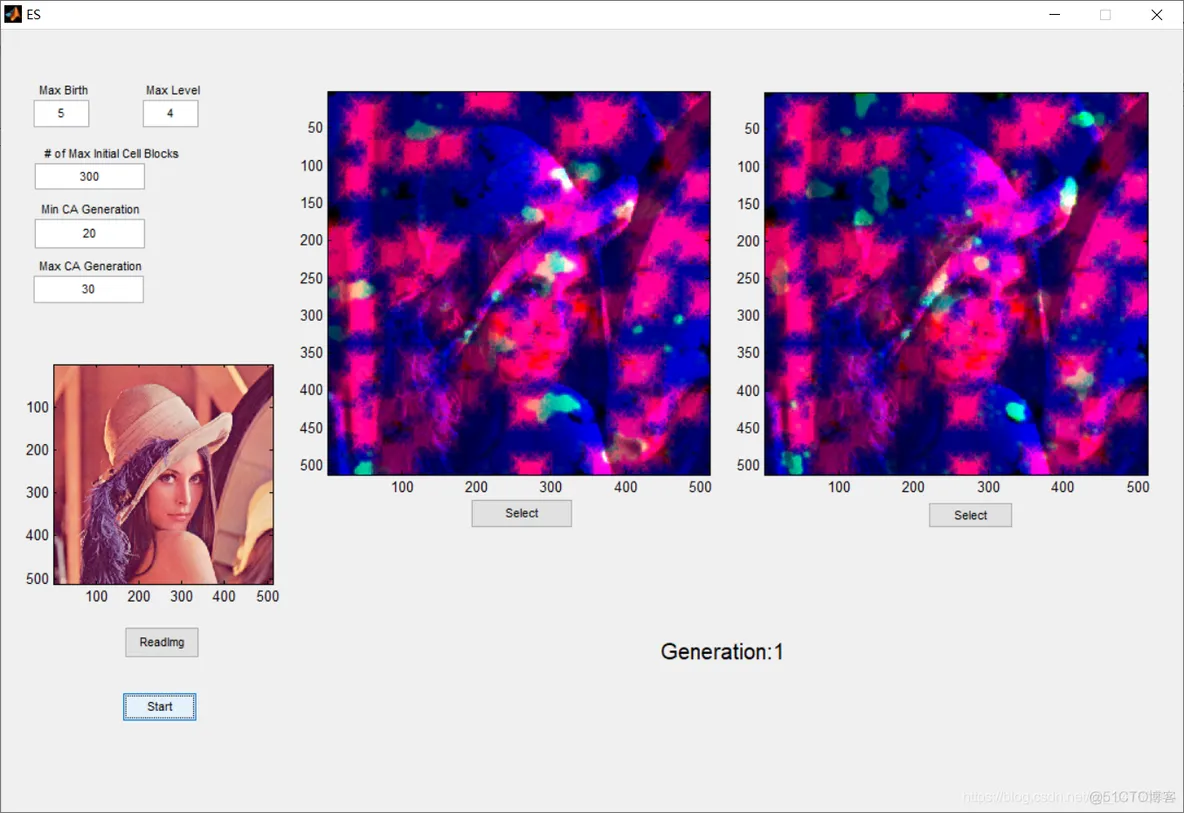
function Start_Callback(hObject, eventdata, handles)

% hObject handle to Start (see GCBO)

% eventdata reserved - to be defined in a future version of MATLAB

% handles structure with handles and user data (see GUIDATA)

handles.GenerationCount = 1;

Parent = zeros(size(handles.Img));

Sz = size(handles.Img);

Birth = str2double(get(handles.BirthVal, 'string'));

Level = str2double(get(handles.LevelVal, 'string'));

NumCellBlocks = str2double(get(handles.CellBlocksVal, 'string'));

MinCAG = str2double(get(handles.MinCAGVal, 'string'));

MaxCAG = str2double(get(handles.MaxCAGVal, 'string'));

for cc=1:3

CellGen = randi([MinCAG, MaxCAG]);

PosH = randi([1, Sz(1)], 1, NumCellBlocks);

PosW = randi([1, Sz(2)], 1, NumCellBlocks);

[Parent(:, :, cc), handles.Parent{6}(cc), handles.Parent{1}(cc), handles.Parent{2}(cc), handles.Parent{3}(cc), handles.Parent{7}{cc}] = GUILogicRule(handles.Img, cc, Birth, Level, NumCellBlocks, CellGen, 0, PosH, PosW, 0);

handles.Parent{4}{cc} = PosH;

handles.Parent{5}{cc} = PosW;

guidata(hObject, handles);

end

handles.Boundary{1} = Birth;

handles.Boundary{2} = Level;

handles.Boundary{3} = NumCellBlocks;

handles.Boundary{4} = MinCAG;

handles.Boundary{5} = MaxCAG;

handles.Boundary{6} = Sz(1);

handles.Boundary{7} = Sz(2);

guidata(hObject, handles);

handles.Offspring = Mutation(handles.Parent, handles.Boundary);

guidata(hObject, handles);

offspring = zeros(Sz);

for cc=1:3

[offspring(:, :, cc), ta, tb, tc, td, te] = GUILogicRule(handles.Img, cc, handles.Offspring{1}(cc), handles.Offspring{2}(cc), handles.Offspring{3}(cc), handles.Offspring{6}(cc), 1, handles.Offspring{4}{cc}, handles.Offspring{5}{cc}, handles.Offspring{7}{cc});

end

handles.ParentImg = Parent;

handles.OffspringImg = offspring;

guidata(hObject, handles);

axes(handles.lambda);

image(Parent);

axes(handles.mu);

image(offspring);

set(handles.Generation, 'string', strcat('Generation: ', num2str(handles.GenerationCount)));- 1.
- 2.
- 3.
- 4.
- 5.
- 6.
- 7.
- 8.
- 9.
- 10.
- 11.
- 12.
- 13.
- 14.
- 15.
- 16.
- 17.
- 18.
- 19.
- 20.
- 21.
- 22.
- 23.
- 24.
- 25.
- 26.
- 27.
- 28.
- 29.
- 30.
- 31.
- 32.
- 33.
- 34.
- 35.
- 36.
- 37.
- 38.
- 39.
- 40.
- 41.
- 42.
- 43.
- 44.
- 45.
- 46.
- 47.
- 48.
- 49.
- 50.
- 51.
- 52.
- 53.
- 54.
- 55.
- 56.
- 57.
- 58.
- 59.
- 60.
- 61.
- 62.
- 63.
- 64.
- 65.
- 66.
- 67.
- 68.
- 69.
- 70.
- 71.
- 72.
- 73.
- 74.
- 75.
- 76.
- 77.
- 78.
- 79.
- 80.
- 81.
- 82.
- 83.
- 84.
- 85.
- 86.
- 87.
- 88.
- 89.
- 90.
- 91.
- 92.
- 93.
- 94.
- 95.
- 96.
- 97.
- 98.
- 99.
- 100.
- 101.
- 102.
- 103.
- 104.
- 105.
- 106.
- 107.
- 108.
- 109.
- 110.
- 111.
- 112.
- 113.
- 114.
- 115.
- 116.
- 117.
- 118.
- 119.
- 120.
- 121.
- 122.
- 123.
- 124.
- 125.
- 126.
- 127.
- 128.
- 129.
- 130.
- 131.
- 132.
- 133.
- 134.
- 135.
- 136.
- 137.
- 138.
- 139.
- 140.
- 141.
- 142.
- 143.
- 144.
- 145.
- 146.
- 147.
- 148.
- 149.
- 150.
- 151.
- 152.
- 153.
- 154.
- 155.
- 156.
- 157.
- 158.
- 159.
- 160.
- 161.
- 162.
- 163.
- 164.
- 165.
- 166.
- 167.
- 168.
- 169.
- 170.
- 171.
- 172.
- 173.
- 174.
- 175.
- 176.
- 177.
- 178.
- 179.
- 180.
- 181.
- 182.
- 183.
- 184.
- 185.
- 186.
- 187.
- 188.
- 189.
- 190.
- 191.
- 192.
- 193.
- 194.
- 195.
- 196.
- 197.
- 198.
- 199.
- 200.
- 201.
- 202.
- 203.
- 204.
- 205.
- 206.
- 207.
- 208.
- 209.
- 210.
- 211.
- 212.
- 213.
- 214.
- 215.
- 216.
- 217.
- 218.
- 219.
- 220.
- 221.
- 222.
- 223.
- 224.
- 225.
- 226.
- 227.
- 228.
- 229.
- 230.
- 231.
- 232.
- 233.
- 234.
- 235.
- 236.
- 237.
- 238.
- 239.
- 240.
- 241.
- 242.
- 243.
- 244.
- 245.
- 246.
- 247.
- 248.
- 249.
- 250.
- 251.
- 252.
- 253.
- 254.
- 255.
- 256.
- 257.
- 258.
- 259.
- 260.
- 261.
- 262.
- 263.
- 264.
- 265.
- 266.
- 267.
- 268.
- 269.
- 270.
- 271.
- 272.
- 273.
- 274.
- 275.
- 276.
- 277.
- 278.
- 279.
- 280.
- 281.
- 282.
- 283.
- 284.
- 285.
- 286.
- 287.
- 288.
- 289.
- 290.
- 291.
- 292.
- 293.
- 294.
- 295.
- 296.
- 297.
- 298.
- 299.
- 300.
- 301.
- 302.
- 303.
- 304.
- 305.
- 306.
- 307.
- 308.
- 309.
- 310.
- 311.
- 312.
- 313.
- 314.
- 315.
- 316.
- 317.
- 318.
- 319.
- 320.
- 321.
- 322.
- 323.
- 324.
- 325.
- 326.
- 327.
- 328.
- 329.
- 330.
- 331.
- 332.
- 333.
- 334.
- 335.
- 336.
- 337.
- 338.
- 339.
- 340.
- 341.
- 342.
- 343.
- 344.
- 345.
- 346.
- 347.
- 348.
- 349.
- 350.
- 351.
- 352.
- 353.
- 354.
- 355.
- 356.
- 357.
- 358.
- 359.
- 360.
- 361.
- 362.
- 363.
- 364.
- 365.
- 366.
- 367.
- 368.
- 369.
- 370.
- 371.
- 372.
- 373.
- 374.
- 375.
- 376.
- 377.
- 378.
- 379.
- 380.
- 381.
- 382.
- 383.
- 384.
- 385.
- 386.
- 387.
- 388.
- 389.
- 390.
- 391.
- 392.
- 393.
- 394.
- 395.
- 396.
- 397.
- 398.
- 399.
- 400.
- 401.
- 402.
- 403.
- 404.
- 405.
- 406.
- 407.
- 408.
- 409.
- 410.
- 411.
- 412.
- 413.
- 414.
- 415.
- 416.
- 417.
- 418.
- 419.
- 420.
- 421.
- 422.
- 423.
- 424.
- 425.
- 426.
- 427.
- 428.
- 429.
- 430.
- 431.
- 432.
- 433.
- 434.
- 435.
- 436.
- 437.
- 438.
- 439.
- 440.
- 441.
- 442.
- 443.
- 444.
- 445.
- 446.
- 447.
- 448.
- 449.
- 450.
- 451.
- 452.
- 453.
- 454.
- 455.
- 456.
- 457.
- 458.
- 459.
- 460.
- 461.
- 462.
- 463.
- 464.
- 465.
- 466.
- 467.
- 468.
- 469.
- 470.
- 471.
- 472.
- 473.
- 474.
- 475.
- 476.
- 477.
- 478.
- 479.
- 480.
- 481.
- 482.
- 483.
- 484.
- 485.
- 486.
- 487.
- 488.
- 489.
- 490.
- 491.
- 492.
- 493.
- 494.
- 495.
- 496.
- 497.
- 498.
- 499.
- 500.
- 501.
- 502.
- 503.
- 504.
- 505.
- 506.
- 507.
- 508.
- 509.
- 510.
- 511.
- 512.
- 513.
- 514.
- 515.
- 516.
- 517.
- 518.
- 519.
- 520.
- 521.
- 522.
- 523.
- 524.
- 525.
- 526.
- 527.
- 528.
- 529.
- 530.
- 531.
- 532.
- 533.
- 534.
- 535.
- 536.
- 537.
- 538.
- 539.
- 540.
- 541.
- 542.
- 543.
- 544.
- 545.
- 546.
- 547.
- 548.
- 549.
- 550.
- 551.
- 552.
- 553.
- 554.
- 555.
- 556.
- 557.
- 558.
- 559.
- 560.
- 561.
- 562.
- 563.
- 564.
- 565.





 扫一扫
扫一扫


 885
885

 被折叠的 条评论
为什么被折叠?
被折叠的 条评论
为什么被折叠?
 到【灌水乐园】发言





