


首先需要在项目中安装好Addressable插件,具体配置过程就不赘述了,我们直入主题。
在AddressableGroup中,可以给不同的资源配置Label,我们可以利用这一特性。将不同的语种分在不同的包内,同时给它打上对应的LanguageLabel。
基础设置
资源分类
首先文件夹分好,前期的资源分类与管理非常重要,否则后期维护起来就是灾难
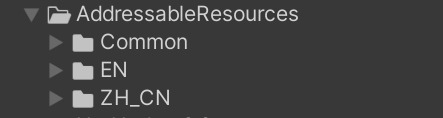
我将通用资源,放在Common文件下,里面可能有预制件之类的一些通用熟资源。
然后按照不同语言,创建了对应的文件夹,里面会包含一些Data,Audio,UI等。
先以中文和英文为例子。
资源分包
在AddressableGroup中,为每个语种创建它对应的资源包Packed Assets
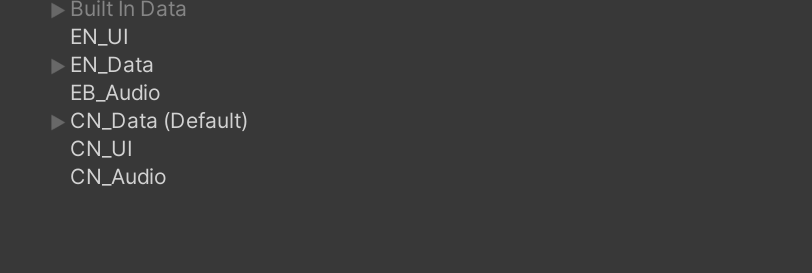
我把资源按照不同的类型进行了分包,当然你也可以把它们放在同一个包内,但是后面项目大的时候,维护会很难受。
Labels管理
设置不同的语种Label

Label分配
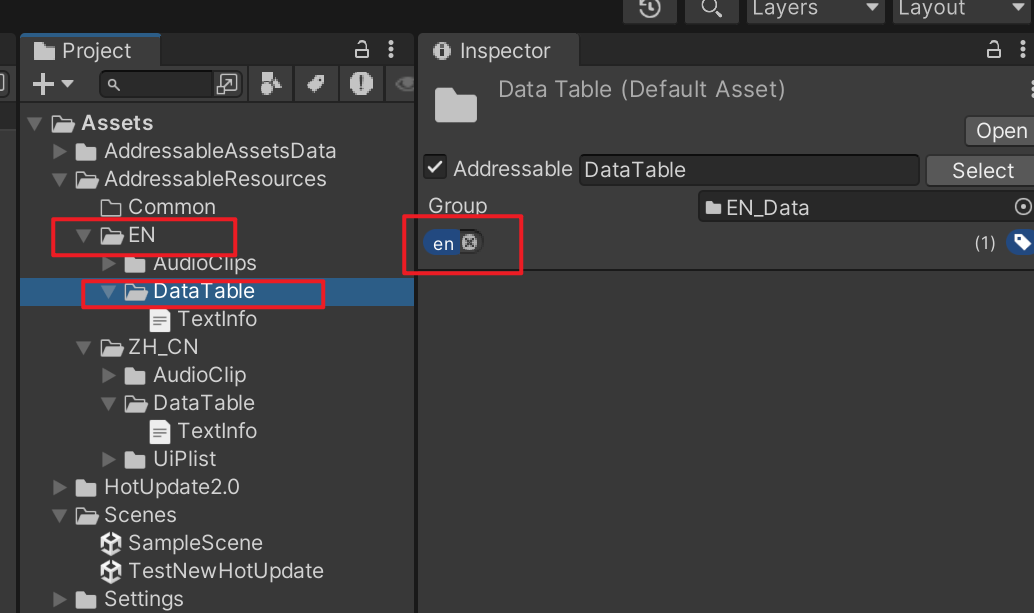
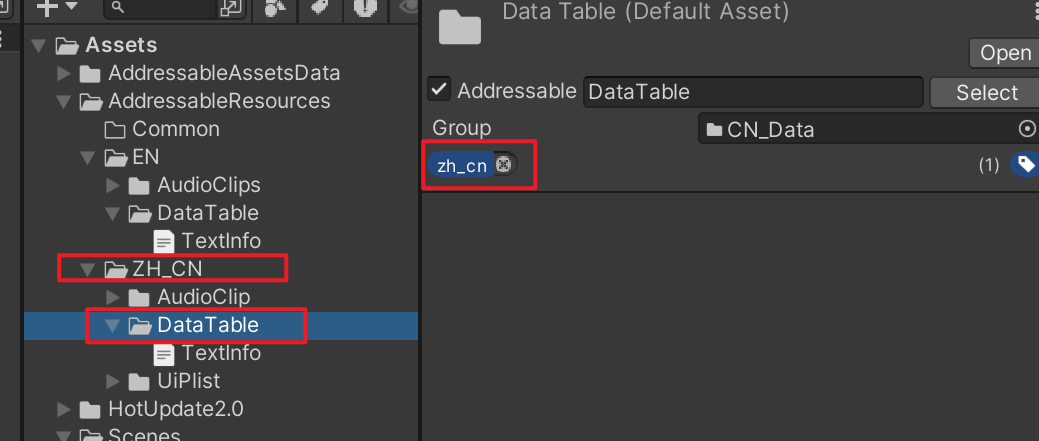
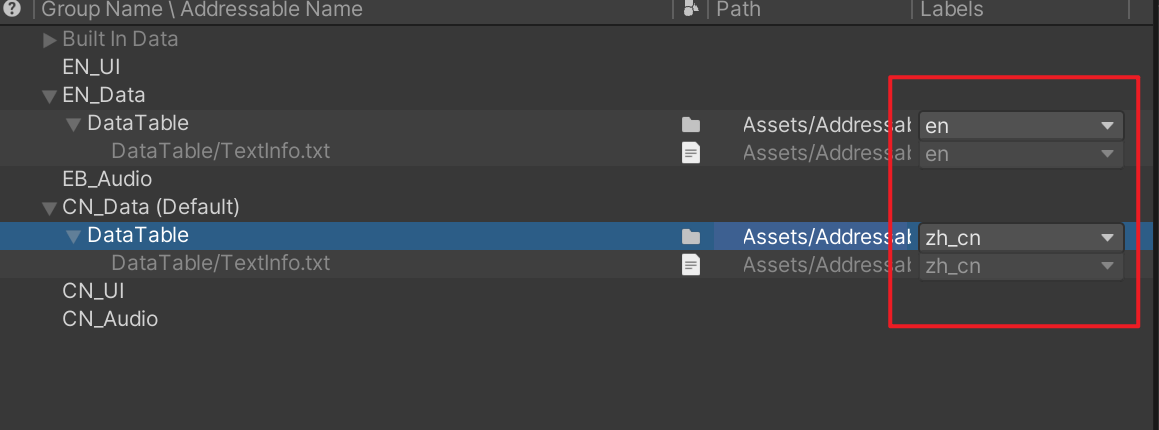
到这里,就把基本资源分包分配好了,我直接把文件夹拖进去的。后面文件夹内新增了文件也会自动入包。
下载资源
基础资源下载
在进行远程资源下载的时候,一般把通用资源和默认的语种资源进行下载就好。
public enum LanguageType
{
    简体中文,
    繁體中文,
    English,
    Русский, //俄语
}
 public IEnumerator CheckCatalogAndDownloadAll(LanguageType lang)
    {
        // 1. Catalog检查
        var handle = Addressables.CheckForCatalogUpdates(false);
        yield return handle;
        var catalogs = handle.Status == AsyncOperationStatus.Succeeded ? handle.Result : null;
        Addressables.Release(handle);

        if (catalogs != null && catalogs.Count > 0)
        {
            var updateHandle = Addressables.UpdateCatalogs(catalogs, false);
            yield return updateHandle;
            Addressables.Release(updateHandle);
        }

        // 2. 下载通用包和目标语言包(**只下载需要的label**)
        string commonLabel = "Common";
        string langLabel = GetLanguageLabel(lang);//根据LanguageType,返回对应的label字符串,需要自行配置

        yield return DownloadLabel(commonLabel);
        yield return DownloadLabel(langLabel);
    }
      /// <summary>
    /// 下载单个Label资源(自动去重)
    /// </summary>
    public IEnumerator DownloadLabel(string label)
    {
        if (string.IsNullOrEmpty(label) || _downloadedLabels.Contains(label)) yield break;

        Debug.Log($"开始下载Label: {label}");
        var sizeHandle = Addressables.GetDownloadSizeAsync(label);
        yield return sizeHandle;
        long size = sizeHandle.Result;

        if (size == 0)
        {
            _downloadedLabels.Add(label);
            Debug.Log($"Label: {label} 已全部存在,无需下载");
            yield break;
        }

        var downloadHandle = Addressables.DownloadDependenciesAsync(label, true);
        while (!downloadHandle.IsDone)
        {
            DownloadProgress = downloadHandle.PercentComplete;
            yield return null;
        }

        if (downloadHandle.Status == AsyncOperationStatus.Succeeded)
        {
            Debug.Log($"Label: {label} 下载成功");
            _downloadedLabels.Add(label);
        }
        else
        {
            Debug.LogError($"Label: {label} 下载失败!");
        }
        Addressables.Release(downloadHandle);
    }
切换语种
切换语种时,再次执行下载资源的逻辑,将对应的语种下载到本地
 /// <summary>
    /// 切换语言包:卸载当前语言包、下载新语言包
    /// </summary>
    public void SetLanguage(LanguageType lang)
    {
        string newLangLabel = GetLanguageLabel(lang);
        if (string.IsNullOrEmpty(newLangLabel))
        {
            Debug.LogError($"无此语言Label:{lang}");
            return;
        }

        if (_currentLanguageLabel == newLangLabel)
        {
            Debug.Log($"当前已是目标语言:{lang}");
            return;
        }

        // 卸载旧语言包
        if (!string.IsNullOrEmpty(_currentLanguageLabel))
        {
            UnloadLanguageResources(_currentLanguageLabel);
        }

        // 下载并切换新语言包
        StartCoroutine(DownloadLabelAndSwitch(newLangLabel, lang));
    }

    private IEnumerator DownloadLabelAndSwitch(string langLabel, LanguageType lang)
    {
        yield return DownloadLabel(langLabel);
        _currentLanguage = lang;
        _currentLanguageLabel = langLabel;
        SaveLastLanguage(lang);
        Debug.Log($"已切换到语言:{lang},标签:{langLabel}");
    }

    /// <summary>
    /// 卸载指定label的语言包资源
    /// </summary>
    public void UnloadLanguageResources(string langLabel)
    {
        Debug.Log($"卸载语言包:{langLabel}");
        Addressables.ClearDependencyCacheAsync(langLabel);
    }
资源加载
资源的简单加载
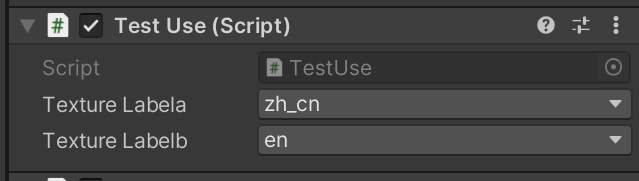
通过使用不同的Label,加载对应Label中的资源,前提是资源要已经下载到了本地。
   public AssetLabelReference textureLabela;
    public AssetLabelReference textureLabelb;
    void Update()
    {
        if (Input.GetKeyDown(KeyCode.A))
        {
            Addressables.LoadAssetsAsync<TextAsset>(textureLabela, textAsset =>
            {
                Debug.Log(textAsset.text);
            });
        }

        if (Input.GetKeyDown(KeyCode.B))
        {
            Addressables.LoadAssetsAsync<TextAsset>(textureLabelb, textAsset =>
            {
                Debug.Log(textAsset.text);
            });
        }
    }

设计隐患
不过目前只是把资源全部加载了出来,并不是指定的某个资源。
  Addressables.LoadAssetsAsync<TextAsset>("DataTable/TextInfo.txt", textAsset =>
            {
                Debug.Log(textAsset.text);
            });
如果使用文件名的方式,因为之前的设置,导致所有的资源都会被加载。并且资源在本地的情况,我们不能反复的去删除下载它,所有要从Key的阶段开始,保证每个资源的独一性。
编辑器扩展工具(一键命名)
通过编辑器工具,一键将所有的资源都加上前缀,保证了每个资源独一的key
#if UNITY_EDITOR
using UnityEditor;
using UnityEditor.AddressableAssets;
using UnityEditor.AddressableAssets.Settings;
using UnityEngine;
using System.Collections.Generic;

/// <summary>
/// 一键批量为多语言分组资源加上语言前缀
/// </summary>
public class AddressablesLanguagePrefixTool
{
    [MenuItem("Tools/Addressables/批量加多语言前缀")]
    public static void AddLanguagePrefixToKeys()
    {
        var settings = AddressableAssetSettingsDefaultObject.Settings;
        if (settings == null)
        {
            Debug.LogError("找不到 AddressableAssetSettings");
            return;
        }

        // 建议都用大写KEY,和分组命名保持一致
        var langPrefixMap = new Dictionary<string, string>
        {
            { "CN", "zh-cn_" },
            { "EN",    "en_" }
            // 按实际项目增加
        };

        int changeCount = 0;
        var allKeys = new HashSet<string>();

        // 提示用户先关闭 Addressables Groups 面板
        if (EditorUtility.DisplayDialog("操作提示",
            "请确保已关闭 Addressables Groups 窗口!\n否则可能报错。\n是否继续?", "继续", "取消") == false)
        {
            return;
        }

        foreach (var group in settings.groups)
        {
            if (group == null || group.entries == null) continue;
            if (group.Name == "Built In Data") continue;

            foreach (var pair in langPrefixMap)
            {
                if (group.Name.ToUpper().Contains(pair.Key))
                {
                    foreach (var entry in group.entries)
                    {
                        string newKey = pair.Value + entry.address;
                        if (!entry.address.StartsWith(pair.Value))
                        {
                            if (allKeys.Contains(newKey))
                            {
                                Debug.LogError($"Key冲突: {newKey} 已存在于其它Group,请检查资源命名!");
                                continue;
                            }
                            string oldKey = entry.address;
                            entry.SetAddress(newKey);
                            allKeys.Add(newKey);
                            changeCount++;
                            Debug.Log($"[{group.Name}] {oldKey} -> {entry.address}");
                        }
                    }
                    EditorUtility.SetDirty(group);
                    break; // 一个group只会匹配一个语言
                }
            }
        }

        // 延迟保存与刷新,避免IMGUI报错
        EditorApplication.delayCall += () =>
        {
            settings.SetDirty(AddressableAssetSettings.ModificationEvent.EntryMoved, null, true);
            AssetDatabase.SaveAssets();
            EditorUtility.DisplayDialog("完成", $"已为所有多语言Group资源批量加前缀\n总修改数量: {changeCount}", "OK");
        };
    }
}
#endif
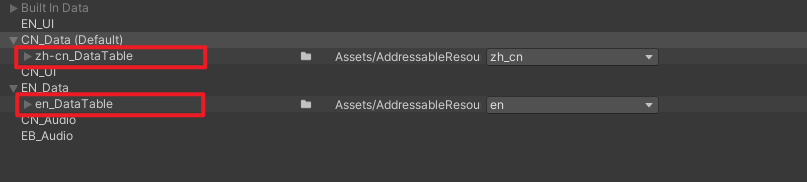
再次去加载资源的时候,就可以通过独一的key加载对应的语种,而我们只需要讲这些固定的前缀写在配置脚本的常量中,根据当前切换的不同语种环境,去加载对应的前缀,就可以做到资源的自由切换。
重新加载资源
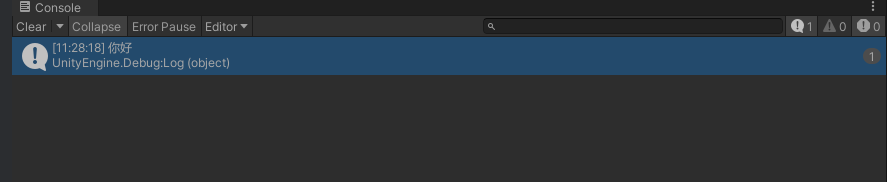
 if (Input.GetKeyDown(KeyCode.A))
        {
            Addressables.LoadAssetsAsync<TextAsset>("zh-cn_DataTable/TextInfo.txt", textAsset =>
            {
                Debug.Log(textAsset.text);
            });
        }






 扫一扫
扫一扫


 2644
2644

 被折叠的 条评论
为什么被折叠?
被折叠的 条评论
为什么被折叠?
 到【灌水乐园】发言





