






cproving Sword behavior (扔剑状态),准备阶段 ;类恶魔城Demo学习(记录)
优化点:设置好剑的角度(让箭尖在前面),看起来更好
先设置好剑的动画的初始z轴(120),再设置后续跟随速度。
public void Update()
{
    //世界空间变换的红色轴
    transform.right = rb.velocity;
}
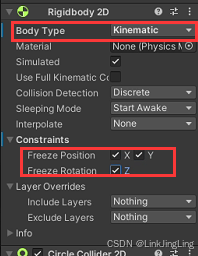
功能:让剑撞到敌人或地触发效果(不旋转和没碰撞)
实现:rb中设置“运动学”(Kinematic)模式和冻结xyz轴。
“运动学”(Kinematic)模式:此时物体不受物理引擎的力或碰撞影响(如重力、碰撞冲击等)
    public void OnTriggerEnter2D(Collider2D collision)
    {
        //碰到触发点后就设定不能转了
        canRotate = false;
        cd.enabled = false;// 碰撞取消

        rb.isKinematic = true; //设置成Kinematic,冻结
        rb.constraints = RigidbodyConstraints2D.FreezeAll;

        transform.parent = collision.transform; //将当前物体的父物体设置为与碰撞物体相同的父物体
    }
实现:1只能有一个剑扔出去,2剑回收功能
思路:1用一个bool记录是否已经生成剑,已生成就不能create剑。2用Vector的MoveTowards来让剑移向玩家,靠近玩家一定距离直接破坏掉剑
1:
//playerGroundState
public override void Update()
{
    //按住右键进入投掷瞄准,且场上只能有一把
    if (Input.GetKeyDown(KeyCode.Mouse1) &&  IsNotSword())
    StateMachine.ChangeState(player.aimSword);
}
        StateMachine.ChangeState(player.aimSword);
private bool IsNotSword()
{
    if(player.skill.sword.newSword == null)
    {
        return true;
    }
    player.skill.sword.newSword.GetComponent<Sword_Skill_Controller>().ReTruningSword();
    return false;
}
//SwordSkill
    public void ClearTheThrowSword()
    {
        Destroy(newSword);
    }

//sword_Skill_Controller.cs
public void Update()
{
    if (isReturningSword)
    {
        transform.position = Vector2.MoveTowards(
        transform.position, player.transform.position, swordRerurningSpeed * Time.deltaTime);

        if (Vector2.Distance(transform.position, player.transform.position) < 2)
            sword.ClearTheThrowSword();
    }
}
    public void ReTruningSword()
    {
        rb.isKinematic = false;
        transform.parent = null;
        isReturningSword =true;
    }
//playerGround:
public override void Update()
{
    base.Update();

    //开始瞄准
    if (Input.GetKeyDown(KeyCode.Mouse1) && IsNotSword())
        StateMachine.ChangeState(player.swordAim);
}
    public bool IsNotSword()
    {
        if (player.skill.sword.newSword == null)
            return true;
        player.skill.sword.newSwordScript.ReTruningSword();
        return false;
    }
sword_Skill_Controller.cs的完整代码:
using System.Collections;
using System.Collections.Generic;
using UnityEngine;

public class Sword_Skill_Controller : MonoBehaviour
{
    private Rigidbody2D rb;
    private Animator anim;
    private CircleCollider2D cd;

    private Player player;
    private SwordSkill sword;

    [SerializeField] private float swordRerurningSpeed =12f;
    private bool isCanRotateSword = true;
    private bool isReturningSword = false;

    private void Awake()
    {
        rb = GetComponent<Rigidbody2D>();
        anim = GetComponent<Animator>();
        cd = GetComponent<CircleCollider2D>();
    }

    private void Start()
    {
        player = PlayerManager.instance.player;
        sword = SkillManager.instance.sword;
    }

    public void Update()
    {
        if(isCanRotateSword)
            transform.right = rb.velocity;//世界空间变换的红色轴
        if (isReturningSword)
        {
            transform.position = Vector2.MoveTowards(
            transform.position, player.transform.position, swordRerurningSpeed * Time.deltaTime);

            if (Vector2.Distance(transform.position, player.transform.position) < 2)
                //sword.CreatSword(); 写错,bug,哈哈
                sword.ClearTheThrowSword();    //破坏掉剑
        }
    }

    public void SetupSword(Vector2 _dir,float _gravityScale) //发射方向,重力大小
    {
        rb.velocity = _dir;
        rb.gravityScale = _gravityScale;
    }

    public void ReTruningSword()
    {
        rb.isKinematic = false;
        transform.parent = null;
        isReturningSword =true;
    }
    public void AnimationTriger()
    {

    }

    public void OnTriggerEnter2D(Collider2D collision)
    {
        //碰到触发点后就设定不能转了
        isReturningSword = false;
        cd.enabled = false;// 碰撞取消

        rb.isKinematic = true; //设置成Kinematic,冻结
        rb.constraints = RigidbodyConstraints2D.FreezeAll;

        transform.parent = collision.transform; //将当前物体的父物体设置为与碰撞物体相同的父物体
    }


    #region Even

    #endregion
}





 扫一扫
扫一扫


 1036
1036

 被折叠的 条评论
为什么被折叠?
被折叠的 条评论
为什么被折叠?
 到【灌水乐园】发言





