


目录
十二、Unity发布PC版exe安装包(不是生成exe和Data文件夹)
一、asset序列化:
[CreateAssetMenu(fileName ="ABConfig",menuName ="CreateABConfig",order =0)]
public class ABConfig : ScriptableObject {

    public List<string> m_AllPrefabsPath=new List<string>();
    public List<FileDirABName> m_AllFileDirAB = new List<FileDirABName>();

    [System.Serializable]
    public struct FileDirABName
    {
        public string ABName;
        public string Path;
    }
}
二、打包AB包:
   [MenuItem("Tools/1.打包AB包",false,1)]
    public static void BuildAB()
    {
        //EditorUserBuildSettings.activeBuildTarget检测运行所在平台
        //将AB打包在StreamingAssets文件夹下,注意先创建该文件夹
        BuildPipeline.BuildAssetBundles(Application.streamingAssetsPath, BuildAssetBundleOptions.ChunkBasedCompression,EditorUserBuildSettings.activeBuildTarget);
       AssetDatabase.Refresh(); //编辑器的刷新
    }
三、编辑器查找和进度显示:
  //查找到所有prefabs,转换成GUIID数组。
        string[] allPrefabsGUIDArr = AssetDatabase.FindAssets("t:Prefab", abConfig.m_AllPrefabsPath.ToArray());
        for (int i = 0; i < allPrefabsGUIDArr.Length; i++)
        {
            string path = AssetDatabase.GUIDToAssetPath(allPrefabsGUIDArr[i]);
            Debug.Log(path);
            EditorUtility.DisplayProgressBar("查找prefabs", "path:" + path, i * 1.0f / allPrefabsGUIDArr.Length);
        }
        EditorUtility.ClearProgressBar();
四、代码设置AB包名:
  static void SetABName(string name,string path)
    {
        AssetImporter assetImporter = AssetImporter.GetAtPath(path);
        if (assetImporter==null)
        {
            Debug.LogError("不存在此路径的文件:" + path);
        }
        else
        {
            assetImporter.assetBundleName = name;
        }
    }
五、代码清除Ab包名:
     string[] oldABNameArr = AssetDatabase.GetAllAssetBundleNames();
        for (int i = 0; i < oldABNameArr.Length; i++)
        {
            AssetDatabase.RemoveAssetBundleName(oldABNameArr[i],true);//是否强制清除
            EditorUtility.DisplayProgressBar("清除AB包名", "Name:" + oldABNameArr[i], i * 1.0f / allPrefabsGUIDArr.Length);

        }

        EditorUtility.ClearProgressBar();
六、简易单例
public class Singleton<T> where T:new()
{
    private static T m_instance;
    public static T Instance
    {
        get
        {
            if (m_instance==null)
            {
                m_instance = new T();
            }
            return m_instance;
        }
    }
}
public class MonoSingleton<T> : MonoBehaviour where T : MonoSingleton<T>
{
private static T instance;
public static T Instance
{
get
{
if (instance == null)
{
instance = FindObjectOfType<T>();
if (instance == null)
{
//创建脚本立即执行Awake
instance = new GameObject("Singleton Of " + typeof(T)).AddComponent<T>();
}
else
{
instance.Init();
}
}
return instance;
}
}
private void Awake()
{
if (instance == null)
{
instance = this as T;
Init();
}
}
protected virtual void Init()
{
}
}七、移动端判断是否点在UGUI组件上
UGUI 提供了一个检测是否点击在UI上的方法 EventSystem.current.IsPointerOverGameObject(); 在EventSystem的标准输入Standalone Input Model下是正常的,但是在Touch Input Module输入模式下不正常(编辑器中正常,Android端不正常)
 public static bool IsPointerOverGameObject()
    {
        PointerEventData eventData = new PointerEventData(UnityEngine.EventSystems.EventSystem.current);
        eventData.pressPosition = Input.mousePosition;
        eventData.position = Input.mousePosition;

        List<RaycastResult> list = new List<RaycastResult>();
        UnityEngine.EventSystems.EventSystem.current.RaycastAll(eventData, list);
        return list.Count > 0;
    }
或者
#if UNITY_EDITOR
        if (EventSystem.current.IsPointerOverGameObject())
        {

        }
#elif UNITY_IOS || UNITY_ANDROID
        if (Input.touchCount>0&& EventSystem.current.IsPointerOverGameObject(Input.GetTouch(0).fingerId))
        {

        }
#endif
八、默认unity 脚本模板修改
默认模板地址:D:\Program Files\Unity2017.3.1f\Editor\Data\Resources\ScriptTemplates\81-C# Script-NewBehaviourScript.cs
/****************************************************
    文件:#SCRIPTNAME#.cs
	作者:Edision
    邮箱: 424054763@qq.com
    日期:#CreateTime#
	功能:Nothing
*****************************************************/

using UnityEngine;

public class #SCRIPTNAME# : MonoBehaviour
{

}
把下边脚本放到Plugins/Editor文件夹下
/****************************************************
    文件:ScriptsInfoRecoder.cs
	作者:Edision
    邮箱: 424054763@qq.com
    日期:#CreateTime#
	功能:Nothing
*****************************************************/

using System;
using System.IO;

public class ScriptsInfoRecoder : UnityEditor.AssetModificationProcessor
{
    private static void OnWillCreateAsset(string path)
    {
        path = path.Replace(".meta", "");
        if (path.EndsWith(".cs"))
        {
            string str = File.ReadAllText(path);
            str = str.Replace("#CreateAuthor#", Environment.UserName).Replace(
                              "#CreateTime#", string.Concat(DateTime.Now.Year, "/", DateTime.Now.Month, "/",
                                DateTime.Now.Day, " ", DateTime.Now.Hour, ":", DateTime.Now.Minute, ":", DateTime.Now.Second));
            File.WriteAllText(path, str);
        }
    }
}
创建一个Test脚本:
/****************************************************
    文件:Test.cs
	作者:Edision
    邮箱: 424054763@qq.com
    日期:2019/6/21 10:8:58
	功能:Nothing
*****************************************************/

using UnityEngine;

public class Test : MonoBehaviour
{

}
九、射线
 private void Update()
    {
        if (Input.GetMouseButtonDown(0))
        {
            Ray ray = Camera.main.ScreenPointToRay(Input.mousePosition);

            /*射线检测单个*/
            //RaycastHit hitInfo;
            //if (Physics.Raycast(ray, out hitInfo, 1 << 8))
            //{
            //    if (hitInfo.collider != null)
            //    {
            //        Debug.Log(hitInfo.point);
            //    }
            //}

            /*射线检测多个*/
            //RaycastHit[] hitInfoArr = Physics.RaycastAll(ray, 1000, 1 << 8);
            //Debug.Log(hitInfoArr.Length);

            Collider[] colliderArr = Physics.OverlapSphere(player.transform.position, 3, 1 << 8);

            foreach (var item in colliderArr)
            {
                Debug.Log(item.name);
            }
        }
    }
十、值类型和引用类型最基本的区别
        //值类型改变的是值
        int a = 10;
        int b = a;
        a = 20;
        Debug.Log(a);//a=20
        Debug.Log(b);//,b=10

        //引用类型改变的是地址
        TestData testData1 = new TestData();
        testData1.ID = 1001;
        TestData testData2 = testData1;
        testData2.ID = 1002;
        Debug.Log(testData1.ID);//打印1002
        Debug.Log(testData2.ID);//打印1002

        //string特殊的引用类型,不会改变引用,其实是新创建而已,相当于又new了一次
        string str1 = "str1";
        string str2 = str1;
        str2 = "str2";
        Debug.Log(str1);//打印"str1"
        Debug.Log(str2);//打印"str2"
十一、粘包和拆包 解决
using System;
using System.Collections.Generic;
using System.IO;

    /// <summary>
    /// 关于编码的工具类
    /// </summary>
    public static class EncodeTool
    {
        #region  粘包拆包问题,封装一个有规定的数据包
        /// <summary>
        /// 构造消息体  消息头+消息尾
        /// </summary>
        /// <param name="value">具体的消息</param>
        /// <returns></returns>
        public static byte[] EncodePacket(byte[] value)
        {
            //内存流对象
            using (MemoryStream ms = new MemoryStream())
            {
                using (BinaryWriter bw = new BinaryWriter(ms))
                {
                    //先写入数据长度,再写入数据
                    bw.Write(value.Length);
                    bw.Write(value);
                    byte[] byteArr = new byte[(int)ms.Length];
                    //复制字节数组,内存中转移效率极高
                    Buffer.BlockCopy(ms.GetBuffer(), 0, byteArr, 0, (int)ms.Length);
                    return byteArr;
                }
            }
        }

        /// <summary>
        /// 解析消息体:从缓存里取出一个一个完整的数据包
        /// </summary>
        /// <returns></returns>
        public static byte[] DecodePacket(ref List<byte> dataCache)
        {
            //四个字节构成一个int长度,小于4,就不能构成一个完整的消息体
            if (dataCache.Count < 4)
            {
                throw new Exception("数据长度不足4,不能构成一个消息体");
            }

            //内存流对象
            using (MemoryStream ms = new MemoryStream(dataCache.ToArray()))
            {
                using (BinaryReader br = new BinaryReader(ms))
                {
                    //先写入数据长度,再写入数据
                    int len = br.ReadInt32();
                    int dataRemainLength = (int)(ms.Length - ms.Position);
                    if (len > dataRemainLength)
                    {
                        throw new Exception("数据长度不够包头的约定长度,不能构成一个完整的消息");
                    }
                    byte[] data = br.ReadBytes(len);

                    //更新数据缓存
                    dataCache.Clear();
                    dataCache.AddRange(br.ReadBytes(dataRemainLength));

                    return data;
                }
            }

        }
        #endregion


    }
十二、Unity发布PC版exe安装包(不是生成exe和Data文件夹)
当项目开发完成以后,对于我们的开发人员来说,最后一步就是去打包,其中Unity打包出来的PC项目是两个文件,一个.exe文件,一个Data文件夹。如果想运行,必须两个一块才能正常运行。
Window提供了可以对这个生成安装程序的方法,但下面要给大家介绍的是一个非常快捷方便的办法。使用RAR的自解压。
如何使用winrar命令压缩文件夹,都可以在“WinRAR帮助文件”中找到。
public static void GenerateWinExe(BuildTarget target, string pathToBuiltProject)
    {
        if (target != BuildTarget.StandaloneWindows)
        {
            return;
        }
        var rootFolder = Path.GetDirectoryName(pathToBuiltProject);
        var fileName = Path.GetFileNameWithoutExtension(pathToBuiltProject);
        var configFilePath = string.Format("{0}/{1}_sfx.txt", SFXConfigFolder, fileName);
        var buildAsExe = File.Exists(configFilePath);
        var exePath = Path.GetDirectoryName(rootFolder) + "/" + Path.GetFileName(rootFolder) + (buildAsExe ? ".exe" : ".rar");
        FileUtil.DeleteFileOrDirectory(exePath);
        var argList = ProcessHelper.CreateArgumentsContainer();
        var regKeyPath = @"SOFTWARE\Microsoft\Windows\CurrentVersion\App Paths\WinRAR.exe";
        string winrarPath = null;
        try
        {
            var regKey = Registry.LocalMachine.OpenSubKey(regKeyPath);
            winrarPath = regKey.GetValue("").ToString();
            regKey.Close();
        }
        catch (Exception e)
        {
        }
        if (string.IsNullOrEmpty(winrarPath))
        {
            winrarPath = "WinRAR.exe";
        }
        argList.Add(winrarPath);
        argList.Add("a");
        argList.Add("-r");
        argList.Add("-ep1");
        if (buildAsExe)
        {
            argList.Add("-sfx");
            argList.Add("-iicon" + string.Format("{0}/{1}.ico ", SFXConfigFolder, fileName));
            argList.Add("-scuc");
            argList.Add("-z" + configFilePath);
        }
        argList.Add(exePath);
        argList.Add(rootFolder + "/*.*");
        var p = ProcessHelper.Start(ProcessHelper.CreateStartInfo());
        ProcessHelper.WriteLine(p, ProcessHelper.CreateArguments(argList));
        p.WaitForExit();
        Debug.Log(p.StandardOutput.ReadToEnd());
    }
1.通过注册表获取WinRAR的安装路径,如果没获取到,有可能安装的绿色版,可以在path里面配置路径,然后直接使用winrar.exe
2.添加自解压模块
3.添加图标Path=默认安装路径
SavePath
Setup=游戏名.exe
Shortcut=D, 游戏名.exe, , , 快捷方式名,
1.设置默认安装路径
2.记录安装路径,下次安装会直接找到这个路径
3.自解压之后自动运行游戏
4.在桌面创建快捷方式
图标得使用“转ICO.exe”之类的软件制作,否则不会在不同分辨率之下,有对应的图标。
十三、C#自带线程池刷新
    private void Test()
    {
        System.Timers.Timer temp_Timer = new System.Timers.Timer(1000d);
        temp_Timer.AutoReset=true;
        temp_Timer.Elapsed += (object sender, System.Timers.ElapsedEventArgs e) =>
        {

            Debug.Log("***测试当前C#循环***");
        };
        temp_Timer.Start();

        //temp_Timer.Stop();
    }
十四、根据名称递归查找子物体
   private Transform FindChildInTransform(Transform parent, string child)
    {
        Transform childTF = parent.Find(child);
        if (childTF != null)
        {
            return childTF;
        }
        for (int i = 0; i < parent.childCount; i++)
        {
            childTF = FindChildInTransform(parent.GetChild(i), child);
        }
        return null;
    }
十五、动画控制
using System;
using UnityEngine;

namespace LastZero
{
    /// <summary>
    /// 动画控制
    /// </summary>
    public static class AnimatorController
	{
        /// <summary>
        /// 播放动画
        /// </summary>
        /// <param name="animator">animator</param>
        /// <param name="aniName">动画名</param>
        /// <param name="callback">回调</param>
        /// <returns>时长</returns>
        public static float Play(this Animator animator, string aniName, Action callback = null)
        {
            if (!animator.TryGetClip(aniName))
            {
                Debug.LogError("未找到该动画!");
                return 0;
            }

            float lengh = animator.GetLengthByName(aniName);

            if (callback == null)
                return lengh;

            CoroutinesController.DelayDo(() =>
            {
                callback?.Invoke();
            }, lengh);

            return lengh;
        }

        /// <summary>
        /// 获取动画时长
        /// </summary>
        /// <param name="animator">animator</param>
        /// <param name="name">名字</param>
        /// <returns>时长</returns>
        public static float GetLengthByName(this Animator animator, string name)
        {
            float length = 0;
            AnimationClip[] clips = animator.runtimeAnimatorController.animationClips;
            foreach (AnimationClip clip in clips)
            {
                if (clip.name.Equals(name))
                {
                    length = clip.length;
                    break;
                }
            }
            return length;
        }

        /// <summary>
        /// Try--获取Clip
        /// </summary>
        /// <param name="animator">animator</param>
        /// <param name="name">名字</param>
        /// <returns></returns>
        private static bool TryGetClip(this Animator animator, string name)
        {
            AnimationClip[] clips = animator.runtimeAnimatorController.animationClips;
            foreach (AnimationClip clip in clips)
            {
                if (clip.name.Equals(name))
                {
                    return true;
                }
            }
            return false;
        }
    }
}
十六、上标下标
上标:
数字:⁰ ¹ ² ³ ⁴ ⁵ ⁶ ⁷ ⁸ ⁹
符号:⁺ ⁻ ⁼ ⁽ ⁾ ˙ ˂ ˃ *
字母:ᵃ ᵇ ᶜ ᵈ ᵉ ᵍ ʰ ⁱ ʲ ᵏ ˡ ᵐ ⁿ ᵒ ᵖ ᵒ⃒ ʳ ˢ ᵗ ᵘ ᵛ ʷ ˣ ʸ ᙆ ᴬ ᴮ ᒼ ᴰ ᴱ ᴳ ᴴ ᴵ ᴶ ᴷ ᴸ ᴹ ᴺ ᴼ ᴾ ᴼ̴ ᴿ ˢ ᵀ ᵁ ᵂ ˣ ᵞ ᙆ
中文:㆒㆓㆔㆕㆖㆗㆘㆙㆚㆛㆜㆝㆞㆟
其他:ꝰ ˀ ˁ ˤ ꟸ ꭜ ʱ ꭝ ꭞ ʴ ʵ ʶ ꭟ ˠ ꟹ ᴭ ᴯ ᴲ ᴻ ᴽ ᵄ ᵅ ᵆ ᵊ ᵋ ᵌ ᵑ ᵓ ᵚ ᵝ ᵞ ᵟ ᵠ ᵡ ᵎ ᵔ ᵕ ᵙ ᵜ ᶛ ᶜ ᶝ ᶞ ᶟ ᶡ ᶣ ᶤ ᶥ ᶦ ᶧ ᶨ ᶩ ᶪ ᶫ ᶬ ᶭ ᶮ ᶯ ᶰ ᶱ ᶲ ᶳ ᶴ ᶵ ᶶ ᶷ ᶸ ᶹ ᶺ ᶼ ᶽ ᶾ ᶿ ꚜ ꚝ ჼ ᒃ ᕻ ᑦ ᒄ ᕪ ᑋ ᑊ ᔿ ᐢ ᣕ ᐤ ᣖ ᣴ ᣗ ᔆ ᙚ ᐡ ᘁ ᐜ ᕽ ᙆ ᙇ ᒼ ᣳ ᒢ ᒻ ᔿ ᐤ ᣖ ᣵ ᙚ ᐪ ᓑ ᘁ ᐜ ᕽ ᙆ ᙇ
下标:
数字:₀ ₁ ₂ ₃ ₄ ₅ ₆ ₇ ₈ ₉
符号:₊ ₋ ₌ ₍ ₎
字母:ₐ ₔ ₑ ₕ ᵢ ⱼ ₖ ₗ ₘ ₙ ₒ ₚ ᵣ ₛ ₜ ᵤ ᵥ ₓ ᙮ ᵤ ᵩ ᵦ ₗ ˪ ៳ ៷ ₒ ᵨ ₛ ៴ ᵤ ᵪ ᵧ
十七、VR 重置空间位置和朝向
using System.Collections;
using System.Collections.Generic;
using UnityEngine;
using UnityEngine.XR;
public class VRTest : MonoBehaviour
{
    // Start is called before the first frame update
    void Start()
    {
        XRDevice.SetTrackingSpaceType(TrackingSpaceType.Stationary);
        InputTracking.Recenter();
    }
}
十八、模型展示
using UnityEngine;
using System.Collections;

public class FollowPlayer : MonoBehaviour
{

    public float scrollSpeed = 1;//相机视野缩放系数
    public float distance;//相机到目标的距离
    public float rotateSpeed = 2;//相机视野旋转系数

    private Transform player;//跟随的目标
    private Vector3 offsetPosition;//位置偏移
    private bool isRotating = false;//用来判断是否正在旋转

    // Use this for initialization
    void Start()
    {
        player = GameObject.FindGameObjectWithTag("Player").transform;//获取跟随目标
        transform.LookAt(player.position);//使相机朝向目标
        offsetPosition = transform.position - player.position;//获得相机与目标的位置的偏移量
    }

    // Update is called once per frame
    void Update()
    {
        transform.position = offsetPosition + player.position;//实现相机跟随
        //处理视野的旋转
        RotateView();
        //处理视野的拉近拉远效果
        ScrollView();
    }

    void ScrollView()
    {
        distance = offsetPosition.magnitude;//得到偏移向量的长度
        distance += Input.GetAxis("Mouse ScrollWheel") * scrollSpeed;//获取鼠标中键*相机视野缩放系数
        distance = Mathf.Clamp(distance, 2.5f, 15);//限定距离最小及最大值
        offsetPosition = offsetPosition.normalized * distance;//更新位置偏移
    }

    void RotateView()
    {
        //      Input.GetAxis ("Mouse X");//得到鼠标在水平方向的滑动
        //      Input.GetAxis ("Mouse Y");//得到鼠标在垂直方向的滑动
        if (Input.GetMouseButton(1))
        {
            isRotating = true;
        }

        if (Input.GetMouseButtonUp(1))
        {
            isRotating = false;
        }

        if (isRotating)
        {
            Vector3 originalPos = transform.position;//保存相机当前的位置
            Quaternion originalRotation = transform.rotation;//保存相机当前的旋转
            transform.RotateAround(player.position, player.up, rotateSpeed * Input.GetAxis("Mouse X"));//沿目标y轴在水平方向旋转
            transform.RotateAround(player.position, transform.right, -rotateSpeed * Input.GetAxis("Mouse Y"));//沿自身x轴在竖直方向旋转
            float x = transform.eulerAngles.x;//获得x轴的角度
            if (x < 10 || x > 60)
            {//限制x轴的旋转在10到80之间
                transform.position = originalPos;
                transform.rotation = originalRotation;
            }
        }

        offsetPosition = transform.position - player.position;//更新位置偏移量
    }
}
using System.Collections;
using System.Collections.Generic;
using DG.Tweening;
using UnityEngine;
using UnityEngine.EventSystems;

public class MouseOrbitController : MonoBehaviour
{
    /// <summary>
    /// 摄像机
    /// </summary>
    private Transform trans_Camera;

    /// <summary>
    /// 相机缩放系数
    /// </summary>
    private float scrollSpeed = 0.8f;

    /// <summary>
    /// 旋转速度
    /// </summary>
    private float rotateSpeed = 120;

    /// <summary>
    /// 与目标距离
    /// </summary>
    private float distance = 0;

    /// <summary>
    /// 目标点
    /// </summary>
    private Transform trans_Target;

    /// <summary>
    /// 位置偏移
    /// </summary>
    private Vector3 offsetPos;

    /// <summary>
    /// 位置偏移
    /// </summary>
    private bool isRotate = false;

    /// <summary>
    /// 相机位置
    /// </summary>
    private Vector3 curtCameraPos;

    /// <summary>
    /// 相机旋转
    /// </summary>
    private Quaternion curtCameraQua;

    /// <summary>
    /// 控制相机的开关
    /// </summary>
    private bool canCtr = true;

    /// <summary>
    /// 控制相机的开关
    /// </summary>
    private bool canScrollView = true;

    /// <summary>
    /// DG  聚焦移动
    /// </summary>
    private Tweener tween_Move;

    /// <summary>
    /// DG  聚焦移动
    /// </summary>
    private Tweener tween_Rotate;

    /// <summary>
    /// 最小限制距离
    /// </summary>
    private float minDis = 0.2f;

    /// <summary>
    /// 最大限制距离
    /// </summary>
    private float maxDis = 2f;

    private Vector3 focusPos;
    private Quaternion focusQua;

    void Awake()
    {
        trans_Camera = this.transform;
        trans_Camera.position = new Vector3(0, 0.5f, -0.5f);
        trans_Camera.rotation = Quaternion.Euler(new Vector3(25f, 0, 0));

        curtCameraPos = trans_Camera.position;
        curtCameraQua = trans_Camera.rotation;

        focusPos = curtCameraPos;
        focusQua = curtCameraQua;
    }

    void Start()
    {
        SetTrans_Target();
    }

    public void SetTrans_Target(Transform trans = null)
    {
        if (trans == null)
        {
            trans_Target = GameObject.Find("MouseOrbitAnchor").transform;
        }
        else
        {
            trans_Target = trans;
        }

        trans_Camera.LookAt(trans_Target);
        offsetPos = trans_Camera.position - trans_Target.position;
    }

    void Update()
    {
        RotateView();

        ScrollView();

        CameraMove();

        if (Input.GetKeyDown(KeyCode.Space))
        {
            Focus(focusPos, focusQua);
        }
    }

    /// <summary>
    /// 中键移动相机
    /// </summary>
    private void CameraMove()
    {
        if (Input.GetMouseButton(2))
        {
            //相机位置的偏移量(Vector3类型,实现原理是:向量的加法)
            Vector3 moveDir = (Input.GetAxis("Mouse X") * -trans_Camera.right + Input.GetAxis("Mouse Y") * -trans_Camera.up);
            trans_Camera.position += moveDir * Time.deltaTime;
            curtCameraPos = trans_Camera.position;
            offsetPos = trans_Camera.position - trans_Target.position;
        }
    }

    /// <summary>
    /// 旋转
    /// </summary>
    private void RotateView()
    {
        if (EventSystem.current.IsPointerOverGameObject())
        {
            if (Input.GetMouseButton(1) || Input.GetMouseButton(0))
            {
                canCtr = false;
            }
            if (Input.GetMouseButtonUp(1) || Input.GetMouseButtonUp(0))
            {
                canCtr = true;
            }
        }
        else
        {
            if (Input.GetMouseButtonUp(1) || Input.GetMouseButtonUp(0))
            {
                canCtr = true;
            }
        }

        if (!canCtr)
        {
            return;
        }

        if (Input.GetMouseButton(1) || Input.GetMouseButton(0))
        {
            isRotate = true;
        }
        if (Input.GetMouseButtonUp(1) || Input.GetMouseButtonUp(0))
        {
            isRotate = false;
        }

        if (isRotate)
        {
            curtCameraPos = trans_Camera.position;
            curtCameraQua = trans_Camera.rotation;

            trans_Camera.RotateAround(trans_Target.position, trans_Target.up, rotateSpeed * Time.deltaTime * Input.GetAxis("Mouse X"));
            trans_Camera.RotateAround(trans_Target.position, transform.right, -rotateSpeed * Time.deltaTime * Input.GetAxis("Mouse Y"));

            offsetPos = trans_Camera.position - trans_Target.position;
        }
    }

    /// <summary>
    /// 拉近拉远
    /// </summary>
    private void ScrollView()
    {
        if (Input.GetAxis("Mouse ScrollWheel") != 0f)
        {
            if (EventSystem.current.IsPointerOverGameObject())
            {
                return;
            }
            if (!canScrollView)
            {
                return;
            }

            distance = offsetPos.magnitude;
            distance -= Input.GetAxis("Mouse ScrollWheel") * scrollSpeed;
            distance = Mathf.Clamp(distance, minDis, maxDis);
            offsetPos = offsetPos.normalized * distance;

            trans_Camera.position = trans_Target.position + offsetPos;
        }
    }

    /// <summary>
    /// 聚焦
    /// </summary>
    /// <param name="curtCameraPoint"></param>
    private void Focus(Transform curtCameraPoint)
    {
        if (curtCameraPoint != null)
        {
            canScrollView = false;
            tween_Move.Kill();
            tween_Rotate.Kill();

            tween_Move = trans_Camera.DOLocalMove(curtCameraPoint.position, 0.618f).SetEase(Ease.OutCirc);
            tween_Rotate = trans_Camera.DOLocalRotateQuaternion(Quaternion.Euler(curtCameraPoint.eulerAngles), 0.618f).SetEase(Ease.InOutQuad);

            tween_Move.OnComplete(() =>
            {
                offsetPos = trans_Camera.position - trans_Target.position;
                canScrollView = true;
            });
        }
    }

    /// <summary>
    /// 聚焦
    /// </summary>
    /// <param name="curtCameraPoint"></param>
    private void Focus(Vector3 pos, Quaternion qua)
    {
        canScrollView = false;
        tween_Move.Kill();
        tween_Rotate.Kill();

        tween_Move = trans_Camera.DOLocalMove(pos, 0.618f).SetEase(Ease.OutCirc);
        tween_Rotate = trans_Camera.DOLocalRotateQuaternion(qua, 0.618f).SetEase(Ease.InOutQuad);

        tween_Move.OnComplete(() =>
        {
            offsetPos = trans_Camera.position - trans_Target.position;
            canScrollView = true;
        });

    }
}
19、Unity手动备份、还原SqlServer数据库
using MySql.Data.MySqlClient;
using System.Collections;
using System.Collections.Generic;
using UnityEngine;

public class Test : MonoBehaviour
{

    // Update is called once per frame
    void Update()
    {
        if (Input.GetKeyDown(KeyCode.Alpha0))
        {
            BackupDB();
        }

        if (Input.GetKeyDown(KeyCode.Alpha1))
        {
            RecoveryDB();
        }
    }

    /// <summary>
    /// 备份数据库
    /// </summary>
    public void BackupDB()
    {
        string constring = "server=localhost;user=root;pwd=;database=test;";
        string file =Application.dataPath+ "/backup.sql";
        using (MySqlConnection conn = new MySqlConnection(constring))
        {
            using (MySqlCommand cmd = new MySqlCommand())
            {
                using (MySqlBackup mb = new MySqlBackup(cmd))
                {
                    try
                    {
                        cmd.Connection = conn;
                        conn.Open();
                        Debug.Log(conn.State);
                        mb.ExportToFile(file);
                        conn.Close();
                    }
                    catch (System.Exception e)
                    {

                        Debug.LogError(e.Message);
                    }
                }
            }
        }
    }

    /// <summary>
    /// 还原数据
    /// </summary>
    public void RecoveryDB()
    {
        string constring = "server=localhost;user=root;pwd=;database=test;";
        string file = Application.dataPath + "/backup.sql";
        using (MySqlConnection conn = new MySqlConnection(constring))
        {
            using (MySqlCommand cmd = new MySqlCommand())
            {
                using (MySqlBackup mb = new MySqlBackup(cmd))
                {
                    cmd.Connection = conn;
                    conn.Open();
                    mb.ImportFromFile(file);
                    conn.Close();
                }
            }
        }
    }
}
这里要提醒一下:MySqlBackup.dll是依赖于MySql.Data.dll的 所以引用MySqlBackup.dll的同时也要引用MySql.Data.dll
20、Hook 键盘事件
using UnityEngine;
using System.Collections;
using System.Collections.Generic;
using System;
using System.Diagnostics;
using System.Runtime.InteropServices;

class InterceptKeys : MonoBehaviour
{
    private const int WH_KEYBOARD_LL = 13;
    private const int WM_KEYDOWN = 0x0100;
    private static LowLevelKeyboardProc _proc = HookCallback;
    private static IntPtr _hookID = IntPtr.Zero;
    void Start()
    {
        _hookID = SetHook(_proc);
    }

    void OnApplicationQuit()
    {
        UnhookWindowsHookEx(_hookID);
    }

    private static IntPtr SetHook(LowLevelKeyboardProc proc)
    {
        using (Process curProcess = Process.GetCurrentProcess())
        using (ProcessModule curModule = curProcess.MainModule)
        {
            return SetWindowsHookEx(WH_KEYBOARD_LL, proc,GetModuleHandle(curModule.ModuleName), 0);
        }
    }

    private delegate IntPtr LowLevelKeyboardProc(int nCode, IntPtr wParam, IntPtr lParam);

    private static IntPtr HookCallback(int nCode, IntPtr wParam, IntPtr lParam)
    {
        if (nCode >= 0 && wParam == (IntPtr)WM_KEYDOWN)
        {
            int vkCode = Marshal.ReadInt32(lParam);
            UnityEngine.Debug.Log("Keydown:"+vkCode);
        }
        return CallNextHookEx(_hookID, nCode, wParam, lParam);
    }

    [DllImport("user32.dll", CharSet = CharSet.Auto, SetLastError = true)]
    private static extern IntPtr SetWindowsHookEx(int idHook,
        LowLevelKeyboardProc lpfn, IntPtr hMod, uint dwThreadId);

    [DllImport("user32.dll", CharSet = CharSet.Auto, SetLastError = true)]
    [return: MarshalAs(UnmanagedType.Bool)]
    private static extern bool UnhookWindowsHookEx(IntPtr hhk);

    [DllImport("user32.dll", CharSet = CharSet.Auto, SetLastError = true)]
    private static extern IntPtr CallNextHookEx(IntPtr hhk, int nCode,IntPtr wParam, IntPtr lParam);

    [DllImport("kernel32.dll", CharSet = CharSet.Auto, SetLastError = true)]
    private static extern IntPtr GetModuleHandle(string lpModuleName);
}
21、Unity方便查看日志的插件Reporter
将开源的项目clone下来解压,拷贝Reporter到项目的第三方库。
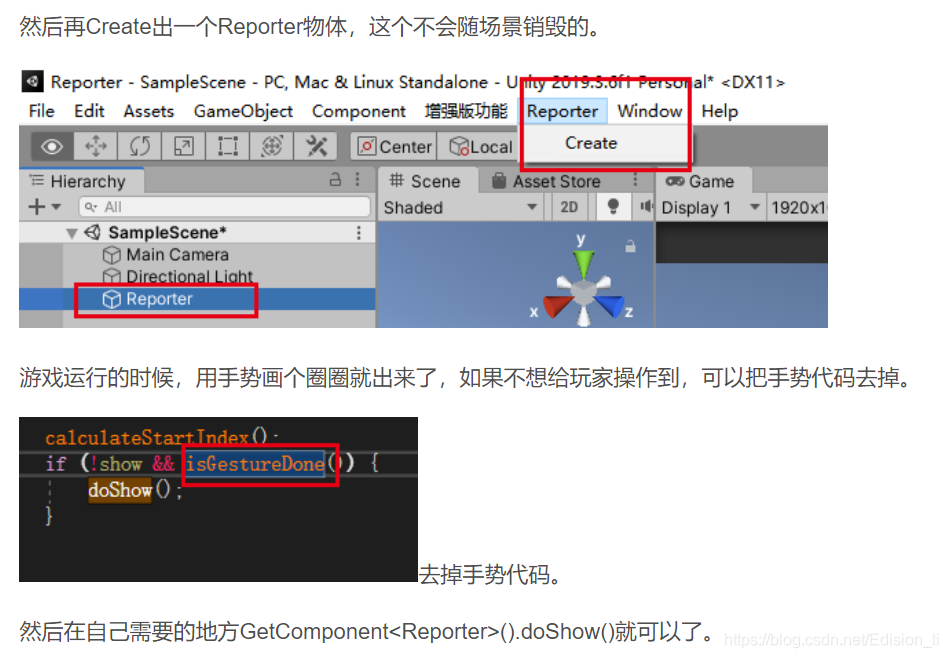
22、数据的序列化
    [Serializable]
    public abstract class Msg { }
using System;
using System.Collections.Generic;
using System.IO;
using System.Runtime.Serialization;
using System.Runtime.Serialization.Formatters.Binary;
using System.Text;
using System.Threading;
/// <summary>
/// 序列化
/// </summary>
/// <returns></returns>
public static byte[] Serialize<T>(T msg) where T : Msg
{
using (MemoryStream ms = new MemoryStream())
{
try
{
BinaryFormatter bf = new BinaryFormatter();
bf.Serialize(ms, msg);
ms.Seek(0, SeekOrigin.Begin);
return ms.ToArray();
}
catch (SerializationException e)
{
Error("Failed to serialize.Reason:{0}", e.Message);
throw;
}
}
}
/// <summary>
/// 反序列化
/// </summary>
/// <returns></returns>
public static T Deserialize<T>(byte[] bytes) where T : Msg
{
using (MemoryStream ms = new MemoryStream(bytes))
{
try
{
BinaryFormatter bf = new BinaryFormatter();
T msg = (T)bf.Deserialize(ms);
return msg;
}
catch (SerializationException e)
{
Error("Failed to serialize.Reason:{0}", e.Message);
throw;
}
}
}23、数据的压缩与解压
       /// <summary>
        /// 数据压缩
        /// </summary>
        public static byte[] Compress(byte[] input)
        {
            using (MemoryStream outMS = new MemoryStream())
            {
                using (GZipStream gzs = new GZipStream(outMS, CompressionMode.Compress, true))
                {
                    gzs.Write(input, 0, input.Length);
                    gzs.Close();
                    return outMS.ToArray();
                }
            }
        }

        /// <summary>
        /// 数据解压缩
        /// </summary>
        public static byte[] DeCompress(byte[] input)
        {
            using (MemoryStream inputMS = new MemoryStream(input))
            {
                using (MemoryStream outMS = new MemoryStream())
                {
                    using (GZipStream gzs = new GZipStream(inputMS, CompressionMode.Decompress))
                    {
                        byte[] bytes = new byte[1024];
                        int len = 0;
                        while ((len=gzs.Read(bytes,0,bytes.Length))>0)
                        {
                            outMS.Write(bytes, 0, len);
                        }
                        gzs.Close();
                        return outMS.ToArray();
                    }
                }
            }
        }
24、C# String 前面不足位数补零的方法
比如 定义一个整型

int i = 5;

要把这个 i 转换成 0005,拼接到字符串中,可以使用方法

string s = i.ToString().PadLeft(4,'0');  //第一个参数是位数,第二个是位数不足时,补充的字符;

定义:

PadLeft(int totalWidth, char paddingChar) //在字符串左边用 paddingChar 补足 totalWidth 长度
PadRight(int totalWidth, char paddingChar) //在字符串右边用 paddingChar 补足 totalWidth 长度
注意第二个参数为 char 类型,所以用单引号,也可以用 Convert.ToChar(string value) 把字符串转换成 char 类型。如果字符串长度大于 1,则使用 str.ToCharArray()[index]。
查看其他人博客还有类似
  1> i.ToString("D5");

  2> i.ToString("0000")); //转换成4位

等方法,没有测试过。请用之前试试可行否;
25、FPS显示
using UnityEngine;
using UnityEngine.UI;

public class FPSManager : MonoBehaviour
{

    public Text fpsText;
    float deltaTime;

    public int targetFps = 30;

    [Tooltip("ignore targetFPS when vSyncCount > 0")]
    public int vSyncCount = 0;

    float UpdateTextTimer = 0f;
    float UpdateTextThreshold = 0.2f;
    void Update()
    {
#if !UNITY_WEBGL || UNITY_EDITOR
        if (QualitySettings.vSyncCount != vSyncCount) QualitySettings.vSyncCount = vSyncCount;
        if (Application.targetFrameRate != targetFps) Application.targetFrameRate = targetFps;
#endif

        if (fpsText == null) return;

        deltaTime += (Time.deltaTime - deltaTime) * 0.1f;
        //if (Time.frameCount % 5 == 0)
        //{
        //    float fps = 1.0f / deltaTime;
        //    fpsText.text = "FPS: " + Mathf.Ceil(fps).ToString();
        //}

        UpdateTextTimer += Time.deltaTime;
        if (UpdateTextTimer > UpdateTextThreshold)
        {
            UpdateTextTimer = 0f;
            float fps = 1.0f / deltaTime;
            fpsText.text = "FPS: " + Mathf.Ceil(fps).ToString();
        }
    }

    public void Action_SetFPS(int _fps)
    {
        targetFps = _fps;
    }
}
26、unity 编辑器导出obj文件,运行也可
using UnityEngine;
using UnityEditor;
using System.Collections;
using System.Collections.Generic;
using System.IO;
using System.Text;
using System;

struct ObjMaterial
{
    public string name;
    public string textureName;
}

public class EditorObjExporter : ScriptableObject
{
    private static int vertexOffset = 0;
    private static int normalOffset = 0;
    private static int uvOffset = 0;


    //User should probably be able to change this. It is currently left as an excercise for
    //the reader.
    private static string targetFolder = "ExportedObj";


    private static string MeshToString(MeshFilter mf, Dictionary<string, ObjMaterial> materialList)
    {
        Mesh m = mf.sharedMesh;
        Material[] mats = mf.GetComponent<Renderer>() .sharedMaterials;

        StringBuilder sb = new StringBuilder();

        sb.Append("g ").Append(mf.name).Append("\n");
        foreach (Vector3 lv in m.vertices)
        {
            Vector3 wv = mf.transform.TransformPoint(lv);

            //This is sort of ugly - inverting x-component since we're in
            //a different coordinate system than "everyone" is "used to".
            sb.Append(string.Format("v {0} {1} {2}\n", -wv.x, wv.y, wv.z));
        }
        sb.Append("\n");

        foreach (Vector3 lv in m.normals)
        {
            Vector3 wv = mf.transform.TransformDirection(lv);

            sb.Append(string.Format("vn {0} {1} {2}\n", -wv.x, wv.y, wv.z));
        }
        sb.Append("\n");

        foreach (Vector3 v in m.uv)
        {
            sb.Append(string.Format("vt {0} {1}\n", v.x, v.y));
        }

        for (int material = 0; material < m.subMeshCount; material++)
        {
            sb.Append("\n");
            sb.Append("usemtl ").Append(mats[material].name).Append("\n");
            sb.Append("usemap ").Append(mats[material].name).Append("\n");

            //See if this material is already in the materiallist.
            try
            {
                ObjMaterial objMaterial = new ObjMaterial();

                objMaterial.name = mats[material].name;

                if (mats[material].mainTexture)
                    objMaterial.textureName = EditorUtility.GetAssetPath(mats[material].mainTexture);
                else
                    objMaterial.textureName = null;

                materialList.Add(objMaterial.name, objMaterial);
            }
            catch (ArgumentException)
            {
                //Already in the dictionary
            }


            int[] triangles = m.GetTriangles(material);
            for (int i = 0; i < triangles.Length; i += 3)
            {
                //Because we inverted the x-component, we also needed to alter the triangle winding.
                sb.Append(string.Format("f {1}/{1}/{1} {0}/{0}/{0} {2}/{2}/{2}\n",
                    triangles[i] + 1 + vertexOffset, triangles[i + 1] + 1 + normalOffset, triangles[i + 2] + 1 + uvOffset));
            }
        }

        vertexOffset += m.vertices.Length;
        normalOffset += m.normals.Length;
        uvOffset += m.uv.Length;

        return sb.ToString();
    }

    private static void Clear()
    {
        vertexOffset = 0;
        normalOffset = 0;
        uvOffset = 0;
    }

    private static Dictionary<string, ObjMaterial> PrepareFileWrite()
    {
        Clear();

        return new Dictionary<string, ObjMaterial>();
    }

    private static void MaterialsToFile(Dictionary<string, ObjMaterial> materialList, string folder, string filename)
    {
        using (StreamWriter sw = new StreamWriter(folder + "/" + filename + ".mtl"))
        {
            foreach (KeyValuePair<string, ObjMaterial> kvp in materialList)
            {
                sw.Write("\n");
                sw.Write("newmtl {0}\n", kvp.Key);
                sw.Write("Ka  0.6 0.6 0.6\n");
                sw.Write("Kd  0.6 0.6 0.6\n");
                sw.Write("Ks  0.9 0.9 0.9\n");
                sw.Write("d  1.0\n");
                sw.Write("Ns  0.0\n");
                sw.Write("illum 2\n");

                if (kvp.Value.textureName != null)
                {
                    string destinationFile = kvp.Value.textureName;


                    int stripIndex = destinationFile.LastIndexOf('/');//FIXME: Should be Path.PathSeparator;

                    if (stripIndex >= 0)
                        destinationFile = destinationFile.Substring(stripIndex + 1).Trim();


                    string relativeFile = destinationFile;

                    destinationFile = folder + "/" + destinationFile;

                    Debug.Log("Copying texture from " + kvp.Value.textureName + " to " + destinationFile);

                    try
                    {
                        //Copy the source file
                        File.Copy(kvp.Value.textureName, destinationFile);
                    }
                    catch
                    {

                    }


                    sw.Write("map_Kd {0}", relativeFile);
                }

                sw.Write("\n\n\n");
            }
        }
    }

    private static void MeshToFile(MeshFilter mf, string folder, string filename)
    {
        Dictionary<string, ObjMaterial> materialList = PrepareFileWrite();

        using (StreamWriter sw = new StreamWriter(folder + "/" + filename + ".obj"))
        {
            sw.Write("mtllib ./" + filename + ".mtl\n");

            sw.Write(MeshToString(mf, materialList));
        }

        MaterialsToFile(materialList, folder, filename);
    }

    private static void MeshesToFile(MeshFilter[] mf, string folder, string filename)
    {
        Dictionary<string, ObjMaterial> materialList = PrepareFileWrite();

        using (StreamWriter sw = new StreamWriter(folder + "/" + filename + ".obj"))
        {
            sw.Write("mtllib ./" + filename + ".mtl\n");

            for (int i = 0; i < mf.Length; i++)
            {
                sw.Write(MeshToString(mf[i], materialList));
            }
        }

        MaterialsToFile(materialList, folder, filename);
    }

    private static bool CreateTargetFolder()
    {
        try
        {
            System.IO.Directory.CreateDirectory(targetFolder);
        }
        catch
        {
            EditorUtility.DisplayDialog("Error!", "Failed to create target folder!", "");
            return false;
        }

        return true;
    }

    [MenuItem("Custom/Export/Export all MeshFilters in selection to separate OBJs")]
    static void ExportSelectionToSeparate()
    {
        if (!CreateTargetFolder())
            return;

        Transform[] selection = Selection.GetTransforms(SelectionMode.Editable | SelectionMode.ExcludePrefab);

        if (selection.Length == 0)
        {
            EditorUtility.DisplayDialog("No source object selected!", "Please select one or more target objects", "");
            return;
        }

        int exportedObjects = 0;

        for (int i = 0; i < selection.Length; i++)
        {
            Component[] meshfilter = selection[i].GetComponentsInChildren(typeof(MeshFilter));

            for (int m = 0; m < meshfilter.Length; m++)
            {
                exportedObjects++;
                MeshToFile((MeshFilter)meshfilter[m], targetFolder, selection[i].name + "_" + i + "_" + m);
            }
        }

        if (exportedObjects > 0)
            EditorUtility.DisplayDialog("Objects exported", "Exported " + exportedObjects + " objects", "");
        else
            EditorUtility.DisplayDialog("Objects not exported", "Make sure at least some of your selected objects have mesh filters!", "");
    }

    [MenuItem("Custom/Export/Export whole selection to single OBJ")]
    static void ExportWholeSelectionToSingle()
    {
        if (!CreateTargetFolder())
            return;


        Transform[] selection = Selection.GetTransforms(SelectionMode.Editable | SelectionMode.ExcludePrefab);

        if (selection.Length == 0)
        {
            EditorUtility.DisplayDialog("No source object selected!", "Please select one or more target objects", "");
            return;
        }

        int exportedObjects = 0;

        ArrayList mfList = new ArrayList();

        for (int i = 0; i < selection.Length; i++)
        {
            Component[] meshfilter = selection[i].GetComponentsInChildren(typeof(MeshFilter));

            for (int m = 0; m < meshfilter.Length; m++)
            {
                exportedObjects++;
                mfList.Add(meshfilter[m]);
            }
        }

        if (exportedObjects > 0)
        {
            MeshFilter[] mf = new MeshFilter[mfList.Count];

            for (int i = 0; i < mfList.Count; i++)
            {
                mf[i] = (MeshFilter)mfList[i];
            }

            string filename = EditorApplication.currentScene + "_" + exportedObjects;

            int stripIndex = filename.LastIndexOf('/');//FIXME: Should be Path.PathSeparator

            if (stripIndex >= 0)
                filename = filename.Substring(stripIndex + 1).Trim();

            MeshesToFile(mf, targetFolder, filename);


            EditorUtility.DisplayDialog("Objects exported", "Exported " + exportedObjects + " objects to " + filename, "");
        }
        else
            EditorUtility.DisplayDialog("Objects not exported", "Make sure at least some of your selected objects have mesh filters!", "");
    }


    [MenuItem("Custom/Export/Export each selected to single OBJ")]
    static void ExportEachSelectionToSingle()
    {
        if (!CreateTargetFolder())
            return;

        Transform[] selection = Selection.GetTransforms(SelectionMode.Editable | SelectionMode.ExcludePrefab);

        if (selection.Length == 0)
        {
            EditorUtility.DisplayDialog("No source object selected!", "Please select one or more target objects", "");
            return;
        }

        int exportedObjects = 0;


        for (int i = 0; i < selection.Length; i++)
        {
            Component[] meshfilter = selection[i].GetComponentsInChildren(typeof(MeshFilter));

            MeshFilter[] mf = new MeshFilter[meshfilter.Length];

            for (int m = 0; m < meshfilter.Length; m++)
            {
                exportedObjects++;
                mf[m] = (MeshFilter)meshfilter[m];
            }

            MeshesToFile(mf, targetFolder, selection[i].name + "_" + i);
        }

        if (exportedObjects > 0)
        {
            EditorUtility.DisplayDialog("Objects exported", "Exported " + exportedObjects + " objects", "");
        }
        else
            EditorUtility.DisplayDialog("Objects not exported", "Make sure at least some of your selected objects have mesh filters!", "");
    }

}
放到Editor文件夹下,保存后在根目录ExportedObj文件夹下,一般使用第二个[MenuItem("Custom/Export/Export each selected to single OBJ")]
27、求大约数
  public static bool Approximately(double a, double b)
        {
            return Math.Abs(b - a) <  Math.Max(1E-06 * Math.Max(Math.Abs(a), Math.Abs(b)), double.Epsilon * 8);
        }
28、字符串截取
string[] contentLineArr = fileContent.Split(new string[] { "\r\n" }, StringSplitOptions.None);29、按行读取
    using (StringReader sr = new StringReader(fileContent))
            {
                string lineContent;
                while ((lineContent = sr.ReadLine()) != null)
                {

                }
                //sr.Dispose();
                //sr.Close();
            }
30、编辑器播放与暂停
    [MenuItem("MyTools/CustomKeys/播放 _F3")]
    static void EditorPlayCommand()
    {
        EditorApplication.isPlaying = !EditorApplication.isPlaying;
    }

    [MenuItem("MyTools/CustomKeys/暂停 _F4")]
    static void EditorPauseCommand()
    {
        EditorApplication.isPaused = !EditorApplication.isPaused;
    }
31、秒转H:M:S
    public static string SecondsToHMS(float seconds)
    {
        TimeSpan time = TimeSpan.FromSeconds(seconds);


        string str = string.Format("{0:D2}:{1:D2}:{2:D2}", time.Hours, time.Minutes, time.Seconds);

        return str;
    }
32、按时间lerp
    public AnimationCurve curve;
    public float time = 1;

    /// <summary>
    /// 按时间插值
    /// </summary>
    /// <param name="targetTrans"></param>
    /// <returns></returns>
    public IEnumerator MoveToTargetPos(Transform targetTrans)
    {
        Debug.Log(Time.time);
        for (float i = 0; i <= 1; i += (Time.deltaTime / time))
        {
            float y = curve.Evaluate(i);
            transform.position = Vector3.Lerp(transform.position, targetTrans.position, y);
            yield return null;
        }
        Debug.Log(Time.time);
    }
33、路径点移动
    private IEnumerator MoveToTargetPos(List<Vector3> pathPoints)
    {
        for (int i = 0; i < pathPoints.Count; i++)
        {
            trans_Cube.LookAt(pathPoints[i]);

            while (Vector3.Distance(trans_Cube.position, pathPoints[i]) > 0.02f)
            {
                trans_Cube.position = Vector3.MoveTowards(trans_Cube.position, pathPoints[i], moveSpeed * Time.deltaTime);
                yield return new WaitForFixedUpdate();
            }
        }
    }
34、UI元素看向摄像机所需的旋转角度,但只应用Y轴旋转
    void LateUpdate()
    {
        if (mainCamera != null)
        {
            // 计算UI元素看向摄像机所需的旋转角度,但只应用Y轴旋转
            Vector3 rotationAngle = transform.eulerAngles;
            rotationAngle.y = Mathf.Atan2(mainCamera.transform.position.x - transform.position.x,
                                          mainCamera.transform.position.z - transform.position.z) * Mathf.Rad2Deg;
            rotationAngle.y += 180;
            transform.eulerAngles = rotationAngle;
        }
    }
end
 1万+


 扫一扫


 被折叠的 条评论
为什么被折叠?
 到【灌水乐园】发言


