


Created: March 9, 2023 8:39 PM
Last Edited Time: April 21, 2023 5:24 PM
Created By: Bren-Yi
前言
在ROS操作系统开发应用程序时,我们常常需要调试代码,验证程序的正确性。但是在用rosrun或者roslaunch启动节点后,若程序运行过程中发生错误而导致发生出错停止工作,这时候终端并不会输出具体的信息指出在何处发生了错误,具体错误的原因又是什么。往往仅仅是core dump 或者segmentation fault 等等一类的模糊提示。因此,为了方便快速找出错误,高效解决代码运行问题,本文介绍借助VScode 编辑器结合ROS/ROS2 extensions 完成ros工程的代码编译、调试等一系列开发工作。
Prerequisite
1.VScode: 已经安装近年任一版本的VScode代码编辑器,安装地址:https://code.visualstudio.com/
2.安装好任一版本的 ros系统或者ros2系统
环境配置
本文主要关注如何配置vscode,方便编译ros工作包以及调试ros工作节点。主要步骤包括创建并修改vscode三个配置文件以及安装ros插件。
安装ROS1 或 ROS2 插件
打开终端terminal,cd索引进入到ros工作空间,在工作空间路径下输入
code .
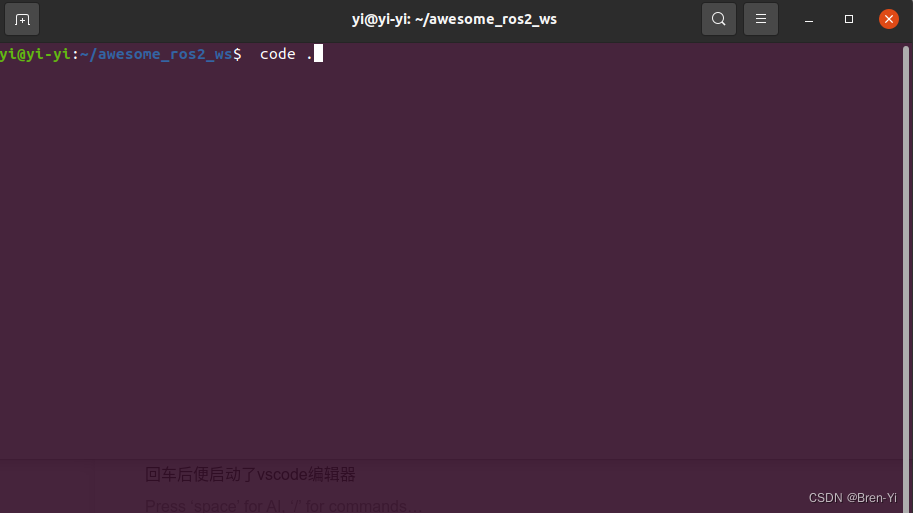
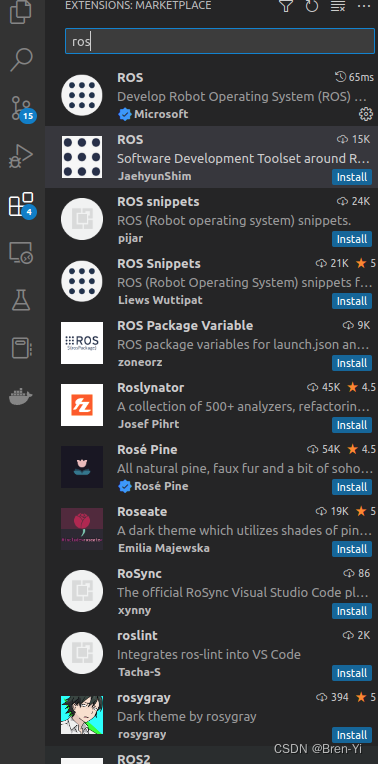
回车后便启动了vscode编辑器, 而后在左侧工具栏中找到extensions 图标, 输入搜索ROS 或者ROS2 extension,点击install button安装。
文件配置
我们需要修改在.vscode文件夹下的四个文件(没有就在文件夹下创建对应的文件): settings.json 、 tasks.json 、 launch.json、 c_cpp_properties.json
其中, setting.json 主要是对VS Code进行配置的文件,如修改编辑器页面风格、代码格式、字体颜色大小等的编辑设置。
c_cpp_properties.json 主要是设置include头文件索引路径,以便后续编译、实现代码函数的智能搜索跳转
tasks.json 在这主要是构建对源代码文件执行的操作任务, 如编译构建、测试工作空间中的代码等
launch.json则是对工作节点实现调试配置。
ROS工作文件配置
c_cpp_properties.json
{


    "configurations": [
        {


            "name": "ROS",
            "intelliSenseMode": "gcc-x64",
            "compilerPath": "/usr/bin/g++",
            "cStandard": "c11",
            "cppStandard": "c++14",
            "compileCommands": "${workspaceFolder}/build/compile_commands.json",
            "configurationProvider": "b2.catkin_tools"
        }
    ],
    "version": 4
}
tasks.json
{


	"version": "2.0.0",
	"tasks": [
		{


			"type": "catkin_make",
			"args": [
				"--directory",
				"${workspaceFolder}",
				"-DCMAKE_BUILD_TYPE=RelWithDebInfo"
			],
			"problemMatcher": [
				"$catkin-gcc"
			],
			"group": "build",
			"label": "catkin_make: build"
		}
	],

}
配置好这个文件后, 按快捷键(Ctrl+Alt+B)可对工作空间的所有工作包进行编译
launch.json
{


    // Use IntelliSense to learn about possible attributes.
    // Hover to view descriptions of existing attributes.
    // For more information, visit: https://go.microsoft.com/fwlink/?linkid=830387
    "version": "0.2.0",
    "configurations": [

        {


            "name": "ROS: Launch",
            "request": "launch",
            "target": "${workspaceFolder}/src/your_ros_package_directory_name/launch/your_launch_name.launch",  //填写roslaun文件路径即可
            "type": "ros",
            // "preLaunchTask": "roscore_test",
            // "postDebugTask": "killroscore"
        }

    ]
}
(ps:若提示出现其他啥错误,请删除中文注释。)
这里主要是启动一个工作包的launch文件,这样可以同时调试launc
 最低0.47元/天 解锁文章






 扫一扫
扫一扫


 4361
4361

 被折叠的 条评论
为什么被折叠?
被折叠的 条评论
为什么被折叠?
 到【灌水乐园】发言





