


1 aclgraph是什么?
PyTorch框架默认采用Eager模式,单算子下发后立即执行,每个算子都需要从Host侧Python API->Host侧C++层算子下发->Device侧算子kernel执行,在Device侧每次kernel执行之前都需要等待Host侧的下发逻辑完成。因此当单个算子计算量过小或者Host性能不佳时,很容易产生Device空闲时间,即每个kernel执行完后都需要一段时间来等待下一个kernel下发完成。
为了优化Host调度性能,CUDA提供了图模式方案,称为CUDA Graph,一种Device调度策略,即省略算子的Host调度过程,具体参见官网Accelerating PyTorch with CUDA Graphs。
类似地,NPU也提供了图模式方案,称为aclgraph,通过TorchAir提供的backend config配置Device调度模式。
2 aclgraph如何使用
首先,从昇腾aclgraph官网中介绍得知,
该功能通过torchair.get_npu_backend中compiler_config配置,示例如下:
import torch_npu, torchair
config = torchair.CompilerConfig()
# 设置图下沉执行模式
config.mode = "reduce-overhead"
npu_backend = torchair.get_npu_backend(compiler_config=config)
opt_model = torch.compile(model, backend=npu_backend)
可以看出来,aclgraph的功能与torchair是结合在一起使用的。
mode的设置如下:
| 参数名 | 参数说明 |
|---|---|
| mode | 设置图下沉执行模式,字符串类型。 |
max-autotune(缺省值):表示Ascend IR Graph下沉模式,其具备了一定的图融合和下沉执行能力,但要求所有算子都注册到Ascend IR计算图,reduce-overhead:表示aclgraph下沉模式,主要是单算子kernel的下沉执行,暂不具备算子融合能力,不需要算子注册到Ascend IR计算图。当PyTorch模型存在Host侧调度问题时,建议开启此模式。
3 函数调用栈
由于torchair的中注释少,Ascend社区上对项目的实现介绍也少。所以,能参考的资料,是真的很少(PS:建议后续给torchair项目做贡献的的同学多给点注释,方便外部开发者快速的阅读和理解代码)。因此,本次小编只能从代码的一层层的剥开去理解整体的逻辑。
从上述的例子着手,看下get_npu_backend中是如何将aclgraph的功能上使能的。
3.1 torchair代码库
torchair是开源的项目,地址参见:https://gitee.com/ascend/torchair
git clone https://gitee.com/ascend/torchair.git
本文从get_npu_backend作为入口函数,
def get_npu_backend(*, compiler_config: CompilerConfig = None, custom_decompositions: Dict = {

   }):
    if compiler_config is None:
        compiler_config = CompilerConfig()

    decompositions = get_npu_default_decompositions()
    decompositions.update(custom_decompositions)

    add_npu_patch(decompositions, compiler_config)

    return functools.partial(_npu_backend, compiler_config=compiler_config, decompositions=decompositions) // 作用在此
了解get_npu_default_decompositions前,需要对torch.compile有个简单的了解,
在 torch.compile 的上下文中,decompose 是一个重要的概念,它通常指的是将复杂的算子(或操作)分解为一系列较为简单、基础的操作。这个过程是编译优化的一部分,旨在使模型更易于优化和加速。
get_npu_default_decompositions作用就是添加npu上的算子分解,当前注册的是对allgather的算子的替换.
torch.ops.npu_define.allgather.default -> allgather_decomposition
decompositions.update(custom_decompositions)
也是同样的道理。custom_decompositions是可以自定义的。
传入的参数compiler_config作用在functools.partial函数,该函数是python的系统函数,是偏函数的概念。
functools.partial(_npu_backend, compiler_config=compiler_config, decompositions=decompositions)
该函数执行返回一个新的函数:
形式是:调用_npu_backend函数,传入参数是compiler_config和decompositions,其的参数采用默认参数。
特别注意gm:torch.fx.GraphModule参数,如果对torch.compile不熟悉可能该概念比较生疏,先贴出其大概解释如下:
torch.fx.GraphModule是 PyTorch 的 FX 变换工具中的一个核心类。FX 是 PyTorch 提供的一个用于模型变换和分析的高级工具集,它允许用户对 PyTorch 模型执行图级别的操作,如插入、删除或修改计算图中的节点。
GraphModule 对象实际上是一个特殊的 PyTorch 模块,它由两部分组成:一个表示计算图的Graph和一个模块层次结构(module hierarchy)。这个计算图是原始模型的图形化表示,其中节点代表运算(比如卷积或ReLU),边代表数据流(即张量)。通过这种表示方法,FX 允许你以编程方式查询和修改模型的行为。
创建一个 GraphModule 通常涉及以下步骤:1. 使用torch.fx.symbolic_trace或其他方法从一个现有的 PyTorch 模块生成一个Graph。2. 将这个Graph和一个包含模型架构信息的Module结合起来,形成一个GraphModule。
由于 GraphModule 实质上也是一个 PyTorch 模块,它可以像普通的 PyTorch 模块一样被调用、保存或加载,并且可以作为更大模型的一部分使用。此外,由于其内部维护了一个计算图,它还支持进一步的分析和变换,这使得它成为实现高级功能(如量化、剪枝等)的理想选择。
该参数的生成处在torch.compile阶段,请先记住这个参数的大概意义。
3.2 torchair构图函数调用栈
由上分析可知,_npu_backend是分析的重点,先给出函数的调用栈,如下:
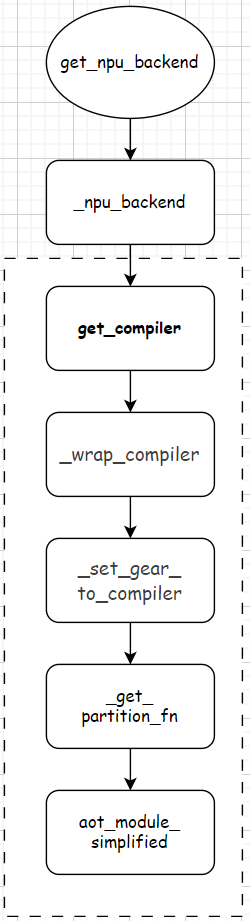
调用的函数如上图的虚线方框中所示。主要还是关注涉及到compiler_config的部分。
def _npu_backend(gm: torch.fx.GraphModule, example_inputs: List[torch.Tensor],
compiler_config: CompilerConfig = None, decompositions: Dict = {
}):
if compiler_config is None:
compiler_config = CompilerConfig()
compiler = get_compiler(compiler_config)
input_dim_gears = dict()
for i, t in enumerate(example_inputs):
dim_gears = get_dim_gears(t)
if dim_gears is not None:
input_dim_gears[i - len(example_inputs)] = dim_gears
fw_compiler, inference_compiler, joint_compiler = _wrap_compiler(compiler, compiler_config)
fw_compiler = _set_gear_to_compiler(fw_compiler, compiler_config, input_dim_gears)
inference_compiler = _set_gear_to_compiler(inference_compiler, compiler_config, input_dim_gears)
partition_fn = _get_partition_fn(compiler_config)
if compiler_config.experimental_config.aot_config_enable_joint_graph:
output_loss_index = int(compiler_config.experimental_config.aot_config_output_loss_index.value)
return aot_module_simplified_joint 最低0.47元/天 解锁文章






 扫一扫
扫一扫


 2452
2452

 被折叠的 条评论
为什么被折叠?
被折叠的 条评论
为什么被折叠?
 到【灌水乐园】发言





