


 本文档介绍了基于JZ2440开发板的按键驱动程序的编写,包括驱动代码的配置、读取及测试驱动的实现。通过配置GPIO引脚为输入,读取按键状态并将其传递给用户空间,同时提供了测试驱动的代码,用于检测按键驱动的功能。整个流程涵盖了从驱动注册到设备文件操作的全过程。
前言
基于JZ2440开发板一、思维导图
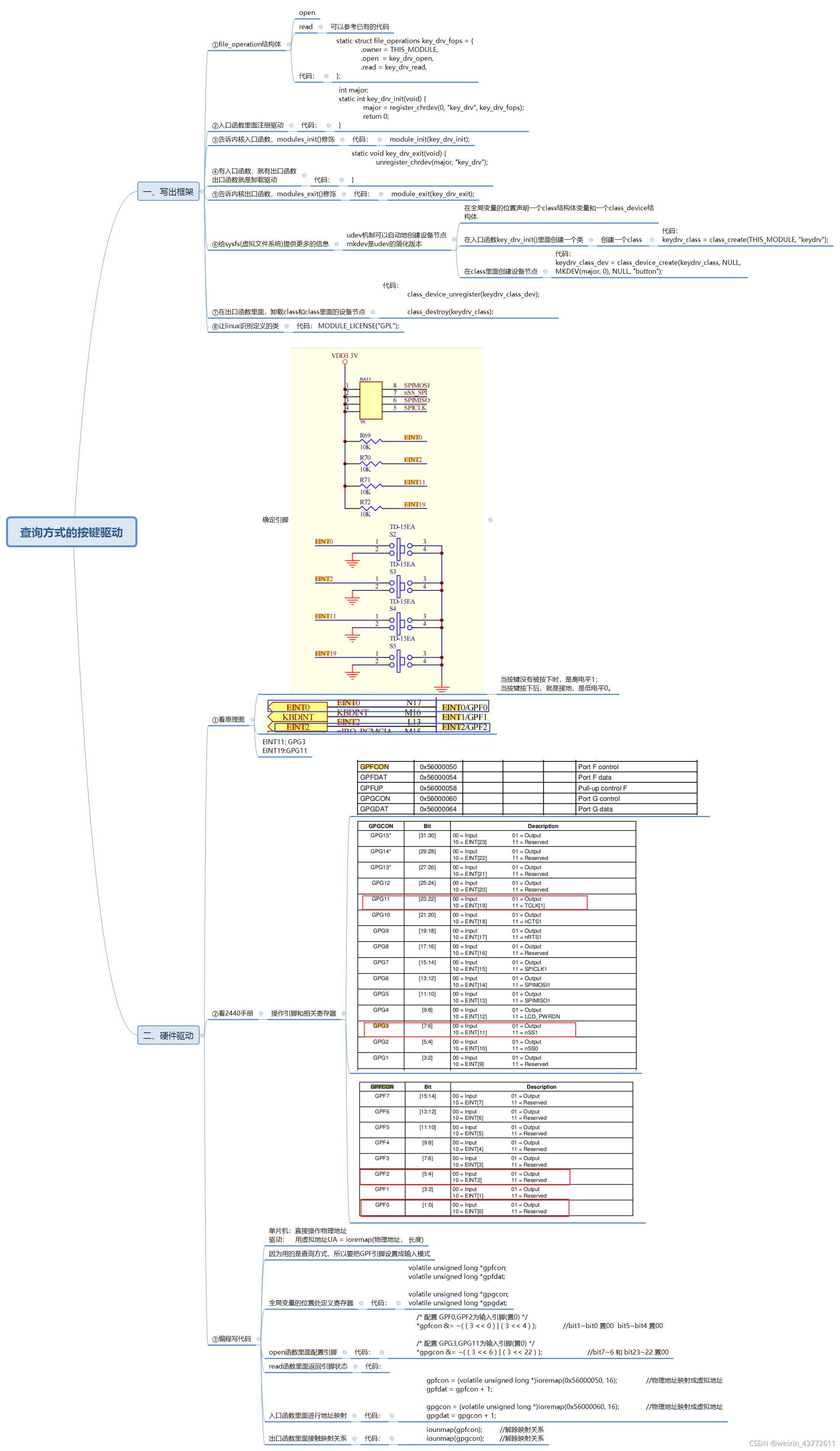
二、代码
1.按键驱动代码
代码如下(key_drv.c):
#include <linux/module.h>
#include <linux/kernel.h>
#include <linux/fs.h>
#include <linux/init.h>
#include <linux/delay.h>
#include <asm/uaccess.h>
#include <asm/irq.h>
#include <asm/io.h>
#include <asm/arch/regs-gpio.h>
#include <asm/hardware.h>

static struct class *keydrv_class;
static struct class_device	*keydrv_class_dev;

volatile unsigned long *gpfcon;
volatile unsigned long *gpfdat;

volatile unsigned long *gpgcon;
volatile unsigned long *gpgdat;
static int key_drv_open(struct inode* inode, struct file *file){
	/* 配置 GPF0,GPF2为输入引脚(置0) */
	*gpfcon &= ~( ( 3 << 0 ) | ( 3 << 4 ) );		//bit1~bit0 置00  bit5~bit4 置00

	/* 配置 GPG3,GPG11为输入引脚(置0) */
	*gpgcon &= ~( ( 3 << 6 ) | ( 3 << 22 ) );		//bit7~6 和 bit23~22 置00

	return 0;
}

static ssize_t key_drv_read(struct file *file, char __user *buf, size_t size, loff_t *ppos) {

	/*  返回4个引脚的电平  */
	unsigned char key_vals[4];
	int regval;

	if(size != sizeof( key_vals ) ) {
		return -EINVAL;
	}
/*
	//读 GPF0和GPF2的引脚
	regval = *gpfdat;
	if( ( regval & ( 1 << 0 ))  == 1 ) {	//如果regval的bit0等于1的话,key_val[0] = 1;
		key_vals[0] = 1;
	}else {
		key_vals[0] = 0;
	}

	if( ( regval & ( 1 << 2 ) ) == 1 ) {
		key_vals[1] = 1;
	}else {
		key_vals[1] = 0;
	}

	//读 GPG3和GPG11的引脚
	regval = *gpgdat;
	if( ( regval & ( 1 << 3 ) ) == 1 ) {	//如果regval的bit3等于1的话,key_val[2] = 1;
		key_vals[2] = 1;
	}else {
		key_vals[2] = 0;
	}

	if( ( regval & ( 1 << 11 ) ) == 1 ) {
		key_vals[3] = 1;
	}else {
		key_vals[3] = 0;
	}
*/


	regval = *gpfdat;
	key_vals[0] = (regval & (1<<0)) ? 1 : 0;
	key_vals[1] = (regval & (1<<2)) ? 1 : 0;


	regval = *gpgdat;
	key_vals[2] = (regval & (1<<3)) ? 1 : 0;
	key_vals[3] = (regval & (1<<11)) ? 1 : 0;

	//unsigned long copy_to_user(void __user *to, const void *from, unsigned long n)
	copy_to_user( buf, key_vals, sizeof( key_vals ) );
	return sizeof( key_vals );


}


static struct file_operations key_drv_fops = {
	.owner = THIS_MODULE,
	.open  = key_drv_open,
	.read = key_drv_read,
};

int major;
static int key_drv_init(void) {
	major = register_chrdev(0, "key_drv", &key_drv_fops);	//注册驱动程序,告诉内核

	keydrv_class = class_create(THIS_MODULE, "key_drv");

	keydrv_class_dev = class_device_create(keydrv_class, NULL, MKDEV(major, 0), NULL, "buttons"); /* /dev/buttons */

	gpfcon = (volatile unsigned long *)ioremap(0x56000050, 16);		//物理地址映射成虚拟地址
	gpfdat = gpfcon + 1;

	gpgcon = (volatile unsigned long *)ioremap(0x56000060, 16);		//物理地址映射成虚拟地址
	gpgdat = gpgcon + 1;

	return 0;
}

static void key_drv_exit(void) {
	unregister_chrdev(major, "key_drv");	//卸载驱动

	class_device_unregister(keydrv_class_dev);

	class_destroy(keydrv_class);

	iounmap(gpfcon);	//解除映射关系
	iounmap(gpgcon);	//解除映射关系

}

module_init(key_drv_init);
module_exit(key_drv_exit);

MODULE_LICENSE("GPL");		//让linux识别定义的类
2.测试驱动
代码如下(keydrvtest.c):
#include <sys/types.h>
#include <sys/stat.h>
#include <fcntl.h>
#include <stdio.h>

/* keydrvtest
  */
int main(int argc, char **argv)
{
	int fd, cnt = 0;
	unsigned char key_vals[4];

	fd = open("/dev/buttons", O_RDWR);
	if (fd < 0) {
		printf("can't open!\n");
	}

	while(1) {
		read(fd, key_vals, sizeof( key_vals ) );
		if( !key_vals[0] || !key_vals[1] || !key_vals[2] || !key_vals[3] ) {
			printf("%04d key pressed: %d %d %d %d\n", cnt++, key_vals[0], key_vals[1], key_vals[2], key_vals[3]);
		}
	}
	return 0;
}
3.Makefile
代码如下:
KERN_DIR = /home/book/work/system/linux-2.6.22.6

all:
	make -C $(KERN_DIR) M=`pwd` modules

clean:
	make -C $(KERN_DIR) M=`pwd` modules clean
	rm -rf modules.order

obj-m	+= key_drv.o
KERN_DIR是内核的路径





 扫一扫
扫一扫


 1172
1172

 被折叠的 条评论
为什么被折叠?
被折叠的 条评论
为什么被折叠?
 到【灌水乐园】发言





