
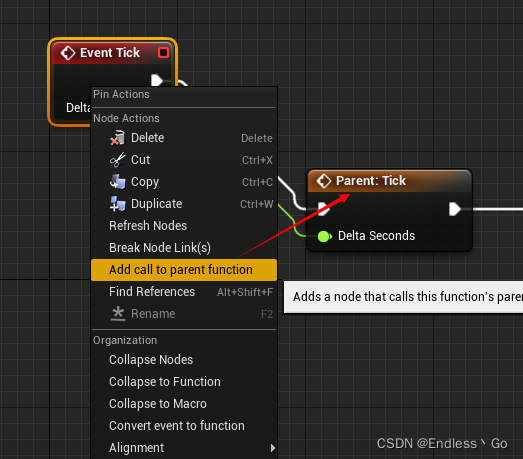
蓝图调用Parent方法:Add call to parent function

本文介绍如何在蓝图中调用父类(Super)的方法。通过简单的步骤,如右键选择'Add call to parent function',可以轻松实现这一功能。

蓝图节点,调用Parent方法(也即Super):右键Add call to parent function
class unreal.BlueprintEditorLibrary(outer: Object | None = None, name: Name | str = 'None') Bases: BlueprintFunctionLibrary Blueprint Editor Library C++ Source: Module: BlueprintEditorLibrary File: BlueprintEditorLibrary.h classmethod add_function_graph(blueprint, func_name='NewFunction') → EdGraph Adds a function to the given blueprint Parameters: blueprint (Blueprint) – The blueprint to add the function to func_name (str) – Name of the function to add Returns: UEdGraph* Return type: EdGraph classmethod compile_blueprint(blueprint) → None Compiles the given blueprint. Parameters: blueprint (Blueprint) – Blueprint to compile classmethod find_event_graph(blueprint) → EdGraph Finds the event graph of the given blueprint. Null if it doesn’t have one. This will only return the primary event graph of the blueprint (the graph named “EventGraph”). Parameters: blueprint (Blueprint) – Blueprint to search for the event graph on Returns: UEdGraph* Event graph of the blueprint if it has one, null if it doesn’t have one Return type: EdGraph classmethod find_graph(blueprint, graph_name) → EdGraph Finds the graph with the given name on the blueprint. Null if it doesn’t have one. Parameters: blueprint (Blueprint) – Blueprint to search graph_name (Name) – The name of the graph to search for Returns: UEdGraph* Pointer to the graph with the given name, null if not found Return type: EdGraph classmethod generated_class(blueprint_obj) Gets the class generated when this blueprint is compiled Parameters: blueprint_obj (Blueprint) – The blueprint object Returns: UClass* The generated class Return type: type(Class) classmethod get_blueprint_asset(object) → Blueprint Casts the provided Object to a Blueprint - the root asset type of a blueprint asset. Note that the blueprint asset itself is editor only and not present in cooked assets. Parameters: object (Object) – The object we need to get the UBlueprint from Returns: UBlueprint* The blueprint type of the given object, nullptr if the object is not a blueprint. Return type: Blueprint classmethod refresh_all_open_blueprint_editors() → None Refresh any open blueprint editors classmethod refresh_open_editors_for_blueprint(bp) → None Attempt to refresh any open blueprint editors for the given asset Parameters: bp (Blueprint) – classmethod remove_function_graph(blueprint, func_name) → None Deletes the function of the given name on this blueprint. Does NOT replace function call sites. Parameters: blueprint (Blueprint) – The blueprint to remove the function from func_name (Name) – The name of the function to remove classmethod remove_graph(blueprint, graph) → None Removes the given graph from the blueprint if possible Parameters: blueprint (Blueprint) – The blueprint the graph will be removed from graph (EdGraph) – The graph to remove classmethod remove_unused_nodes(blueprint) → None Remove any nodes in this blueprint that have no connections made to them. Parameters: blueprint (Blueprint) – The blueprint to remove the nodes from classmethod remove_unused_variables(blueprint) → int32 Deletes any unused blueprint created variables the given blueprint. An Unused variable is any BP variable that is not referenced in any blueprint graphs Parameters: blueprint (Blueprint) – Blueprint that you would like to remove variables from Returns: Number of variables removed Return type: int32 classmethod rename_graph(graph, new_name_str='NewGraph') → None Attempts to rename the given graph with a new name Parameters: graph (EdGraph) – The graph to rename new_name_str (str) – The new name of the graph classmethod reparent_blueprint(blueprint, new_parent_class) → None Attempts to reparent the given blueprint to the new chosen parent class. Parameters: blueprint (Blueprint) – Blueprint that you would like to reparent new_parent_class (type(Class)) – The new parent class to use classmethod replace_variable_references(blueprint, old_var_name, new_var_name) → None Replace any references of variables with the OldVarName to references of those with the NewVarName if possible Parameters: blueprint (Blueprint) – Blueprint to replace the variable references on old_var_name (Name) – The variable you want replaced new_var_name (Name) – The new variable that will be used in the old one’s place classmethod set_blueprint_variable_expose_on_spawn(blueprint, variable_name, expose_on_spawn) → None Sets “Expose On Spawn” to true/false on a Blueprint variable Parameters: blueprint (Blueprint) – The blueprint object variable_name (Name) – The variable name expose_on_spawn (bool) – Set to true to expose on spawn classmethod set_blueprint_variable_expose_to_cinematics(blueprint, variable_name, expose_to_cinematics) → None Sets “Expose To Cinematics” to true/false on a Blueprint variable Parameters: blueprint (Blueprint) – The blueprint object variable_name (Name) – The variable name expose_to_cinematics (bool) – Set to true to expose to cinematics classmethod set_blueprint_variable_instance_editable(blueprint, variable_name, instance_editable) → None Sets “Instance Editable” to true/false on a Blueprint variable Parameters: blueprint (Blueprint) – The blueprint object variable_name (Name) – The variable name instance_editable (bool) – Toggle InstanceEditable classmethod upgrade_operator_nodes(blueprint) → None Replace any old operator nodes (float + float, vector + float, int + vector, etc) with the newer Promotable Operator version of the node. Preserve any connections the original node had to the newer version of the node. Parameters: blueprint (Blueprint) – Blueprint to upgrade 参考一下,然后重写一下UE怎么统计当前蓝图有多少节点
最新发布
11-18
评论
添加红包

请填写红包祝福语或标题

红包个数最小为10个

红包金额最低5元

当前余额3.43前往充值 >
需支付:10.00
成就一亿技术人!
领取后你会自动成为博主和红包主的粉丝 规则
hope_wisdom
发出的红包
实付
使用余额支付
点击重新获取
扫码支付
钱包余额 0

抵扣说明:

1.余额是钱包充值的虚拟货币,按照1:1的比例进行支付金额的抵扣。
2.余额无法直接购买下载,可以购买VIP、付费专栏及课程。

余额充值



