



往期文章回顾:
Dify内置DeepResearch深度体验,抽丝剥茧带大家瞧瞧它的真实水准
Dify 实现DeepResearch工作流拆解并再看升级版Dify能否搭建出Manus?
深度解析:Dify能否复刻Deep Research与Manus?三大工具深度对比
普通打工人变身研究员还有多远?——2025年AI深度研究工具生死竞速,谁将主宰你的未来?
在之前的文章中,我们介绍了Dify内置DeepResearch工作流,并对它进行了深度解析和效果体验。最近在研究如何对它进行优化(如集成本地信源、提升整体效果)时,发现其实在Dify官方博客里面,有文章进行了专门介绍,如下:
(https://dify.ai/blog/deepresearch-building-a-research-automation-app-with-dify)

Are you tired of repeatedly searching for information across multiple sources, then spending extra time compiling and summarizing your findings? You're not alone. Many individuals and teams face the challenge of sifting through various web pages or internal documents for a comprehensive overview of a topic. Fortunately, Dify, a low-code, open-source platform for LLM application development, solves this problem by automating workflows for multi-step searches and efficient summarization, requiring only minimal coding. 您是否厌倦了在多个来源中反复搜索信息,然后花费额外的时间整理和总结您的发现?您并不孤单。许多个人和团队面临着筛选各种网页或内部文档以全面了解一个主题的挑战。幸运的是,Dify 是一个用于LLM应用程序开发的低代码、开源平台,通过自动化多步骤搜索和高效总结的工作流程来解决这个问题,只需要最少的编码。
In this article, we'll create "DeepResearch," a tool that orchestrates searches, generates keywords, and summarizes results into a unified report. By following these steps, you'll understand how Dify streamlines information gathering, letting you focus on insights instead of repetitive tasks. 在这篇文章中,我们将创建“DeepResearch”,一个协调搜索、生成关键词并将结果总结为统一报告的工具。通过遵循这些步骤,您将了解 Dify 如何简化信息收集,让您专注于洞察而非重复性任务。
Prerequisites 前提条件
Before proceeding, please ensure you have the following: 在继续之前,请确保您具备以下条件:
- Dify Account: You can register for an online account or, alternatively, deploy Dify on-premise for internal organizational use. Dify 账户:您可以在网上注册账户,或者选择在本地部署 Dify 以供内部组织使用。
- LLM API Key: DeepResearch uses Large Language Models (LLMs) for generating search queries and summaries. You'll need an API key from a provider (like OpenAI, Google, Anthropic), or deploy open-source models locally using tools like Ollama and integrate them with Dify. This article uses the DeepSeek API. LLM API Key:DeepResearch 使用大型语言模型(LLMs)生成搜索查询和摘要。您需要从提供商(如 OpenAI、Google、Anthropic)获取 API 密钥,或者使用 Ollama 等工具在本地部署开源模型,并将其与 Dify 集成。本文使用 DeepSeek API。To get a DeepSeek API key, visit the DeepSeek API Open Platform or use a third-party model platform. 要获取 DeepSeek API 密钥,请访问 DeepSeek API 开放平台或使用第三方模型平台。See also: Dify x DeepSeek: Deploy a Private AI Assistant & Build a Local DeepSeek R1 + Web Search App参见:Dify x DeepSeek:部署私人 AI 助手并构建本地 DeepSeek R1 + 网络搜索应用
- External Search Tool or API: To search the web, you'll need a search provider API key. This article uses the Tavily Search API. Obtain a Tavily API key from Tavily. While this article assumes a search API, Dify also supports other data retrieval methods. 外部搜索工具或 API:要搜索网络,您需要一个搜索提供商 API 密钥。本文使用 Tavily 搜索 API。从 Tavily 获取 Tavily API 密钥。虽然本文假设了搜索 API,但 Dify 也支持其他数据检索方法。
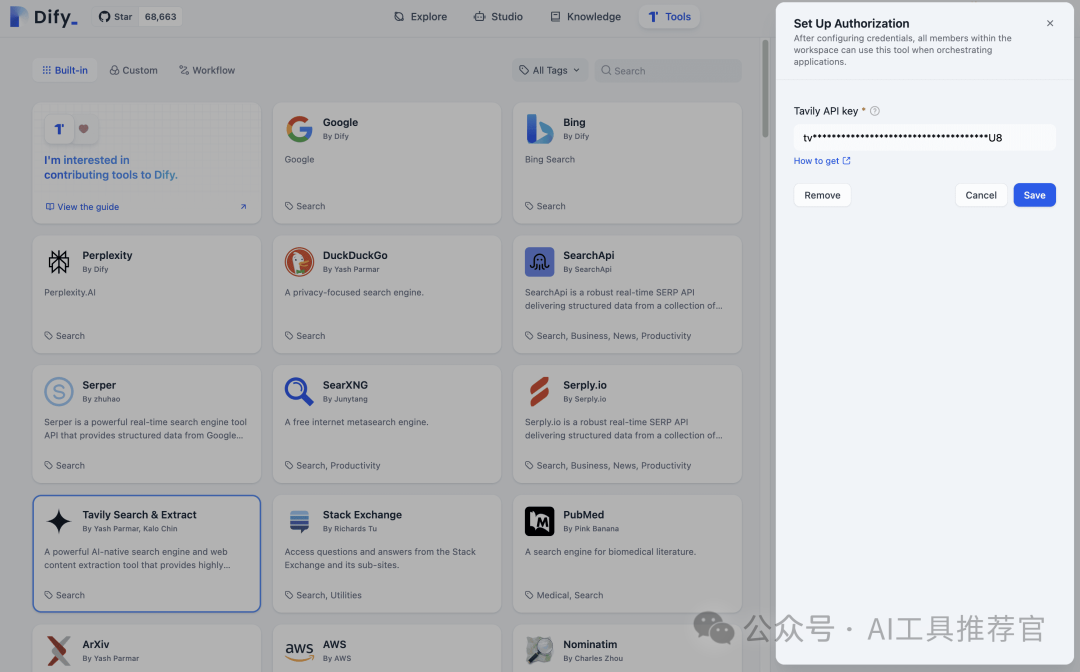
Feel free to adjust these prerequisites based on your desired scope and data sources. 根据您所需的范围和数据源,自由调整这些先决条件。
Creating a Workflow from Template 从模板创建工作流程
- Navigate to Explore: In the Dify dashboard, click "Explore." 导航至探索:在 Dify 仪表板中,点击“探索。”
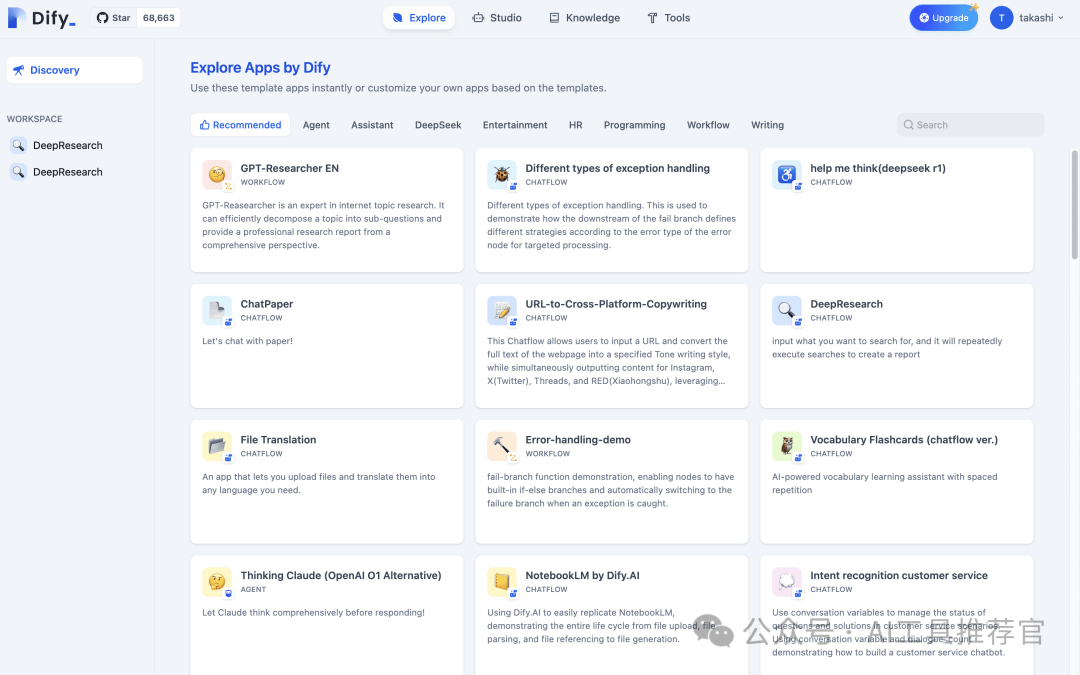
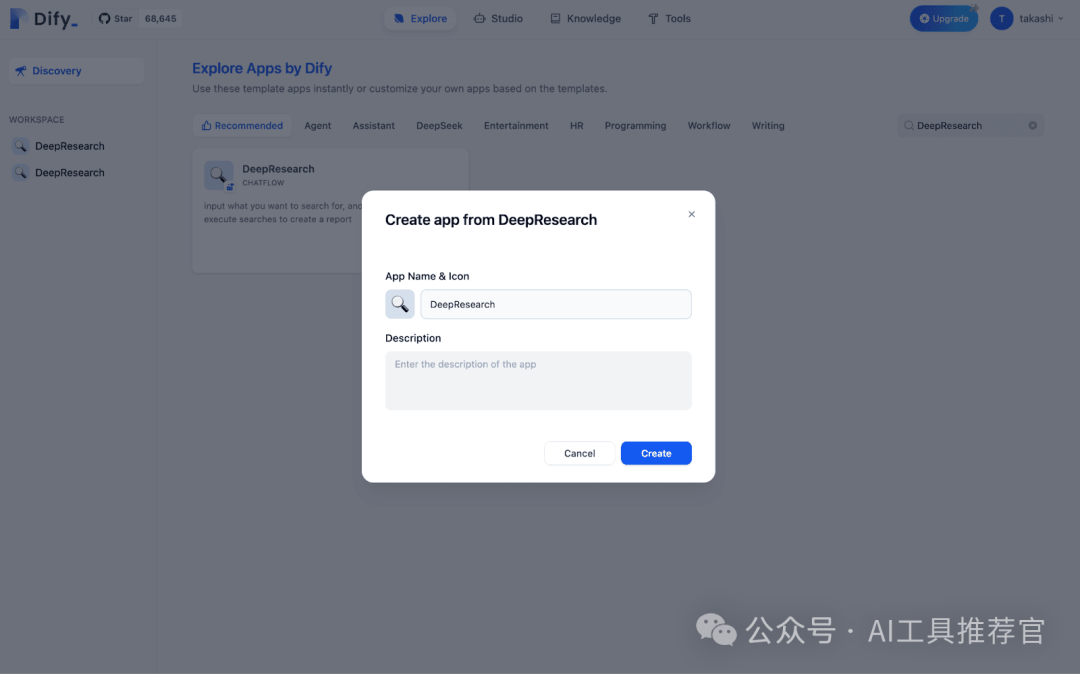
- Choose "DeepResearch" Template: In "Explore," search for and click on the "DeepResearch" template. 选择“DeepResearch”模板:在“探索”中搜索并点击“DeepResearch”模板。
- Name Your Application: The default name is "DeepResearch," but you can customize it. 命名您的应用程序:默认名称为“DeepResearch”,但您可以自定义。
Building the Multi-Search Workflow 构建多搜索工作流程
1. Previewing the Application 1. 预览应用程序
Click "Preview" to try the application. You'll be prompted for a topic and depth. 点击“预览”尝试应用程序。您将被提示输入 topic 和 depth 。
- topic (Text): The subject you want to investigate. 主题(文本):您想要调查的主题。
- depth (Number): Number of search rounds. 深度(数字):搜索轮数。
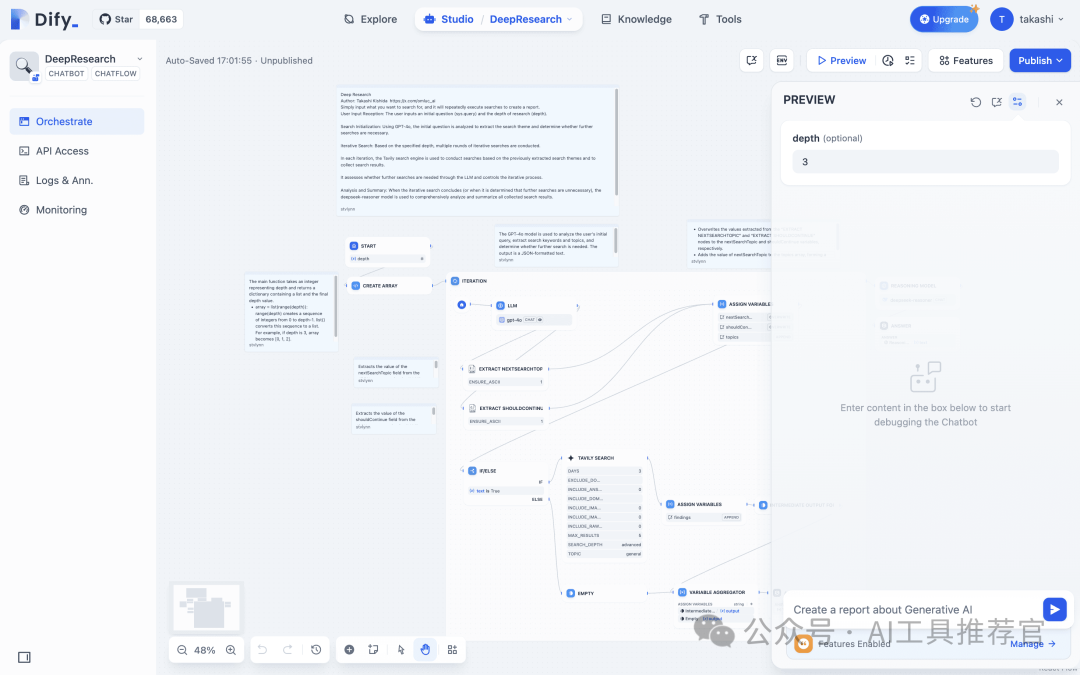
By providing these inputs, we give our workflow the flexibility to handle various research contexts. 通过提供这些输入,我们使我们的工作流程具有处理各种研究背景的灵活性。
2. Mechanism for Repeating the Search Steps 2. 重复搜索步骤的机制
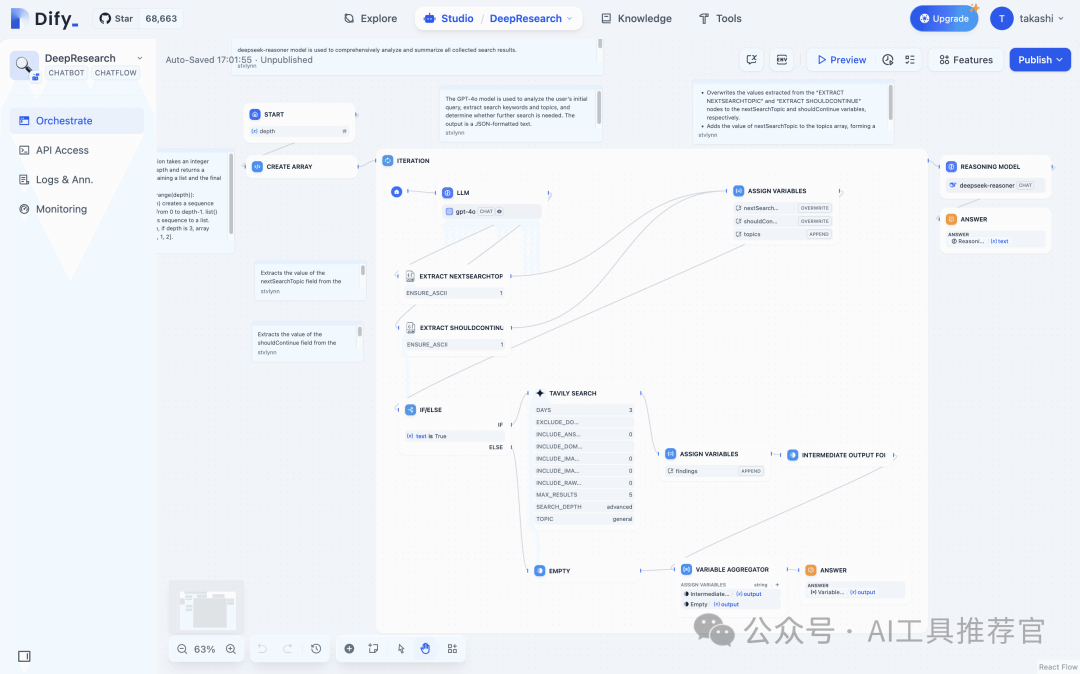
To avoid manually duplicating each search step, weʼll place an Iteration node in the workflow. This node processes each element in an array, effectively looping through your search sequence. 为了避免手动重复每个搜索步骤,我们将在工作流程中放置一个迭代节点。此节点处理数组中的每个元素,有效地遍历您的搜索序列。
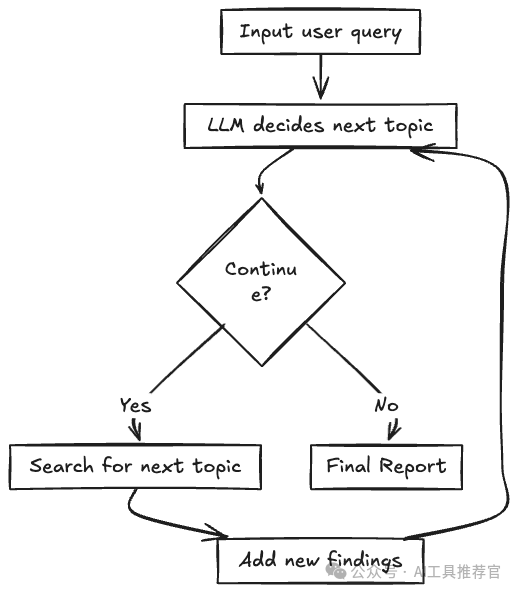
The Iteration node will initiate the next search round at the conclusion of each iteration or terminate the process if it determines that sufficient information has been gathered. 迭代节点将在每次迭代结束时启动下一轮搜索,或者如果它确定已收集到足够的信息,则终止进程。
3. Explaining the Key Nodes 3. 解释关键节点
Common nodes that we may consider placing within the Iteration container: 我们可能考虑放置在迭代容器内的常见节点:
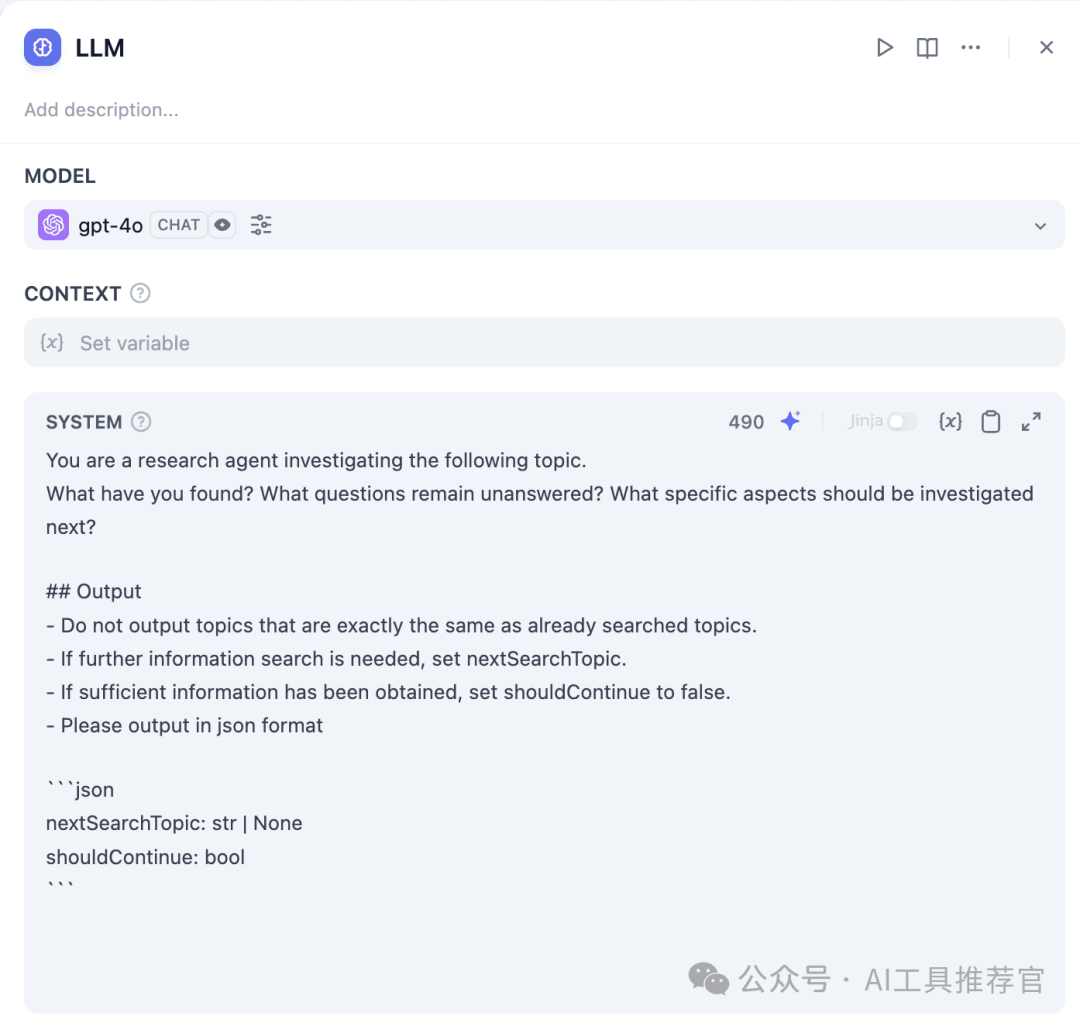
a) LLM Node a) LLM 节点
- Purpose: The AI suggests or refines subsequent search keywords or determines if the search process should conclude. 目的:AI 建议或细化后续搜索关键词,或确定搜索过程是否结束。
- Prompt Tip: Consider using a prompt such as, “Based on the current findings and the user’s topic, suggest the next angle to explore. If further searches are unnecessary, set
shouldContinueto false.” 提示技巧:考虑使用如下提示,“根据当前发现和用户主题,建议下一个探索角度。如果无需进一步搜索,将shouldContinue设置为 false。”
b) Search/Extraction Node b) 搜索/提取节点
- Purpose: Executes a web search or queries an external API using the “next topic” from the LLM node. 目的:使用LLM节点的“下一个主题”执行网络搜索或查询外部 API。
- Implementation: Configure the node by inputting your search keyword variable. 实现:通过输入您的搜索关键词变量来配置节点。
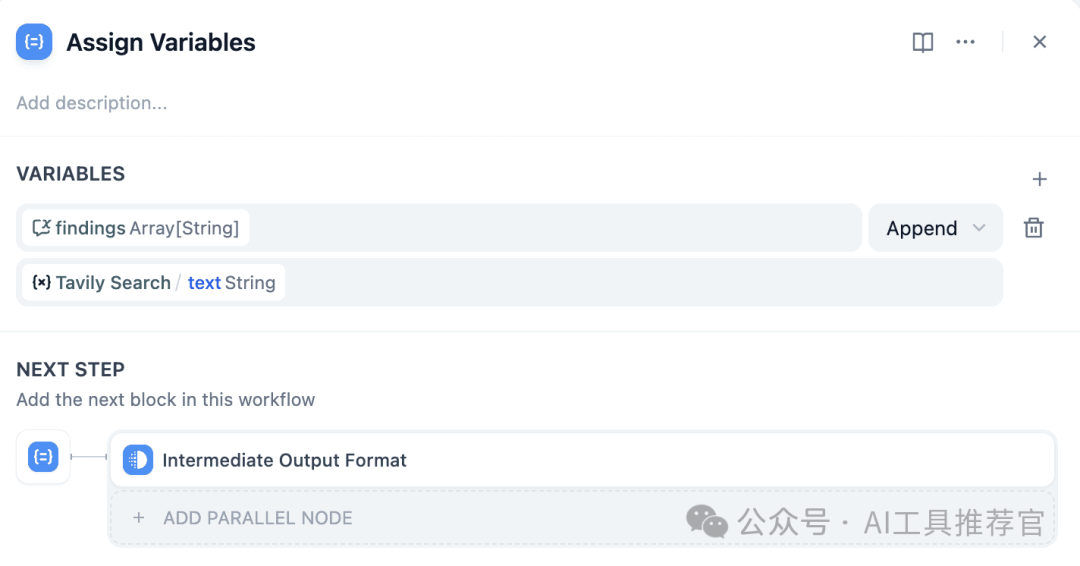
c) Assigner Node (Variable Update) c) 分配节点(变量更新)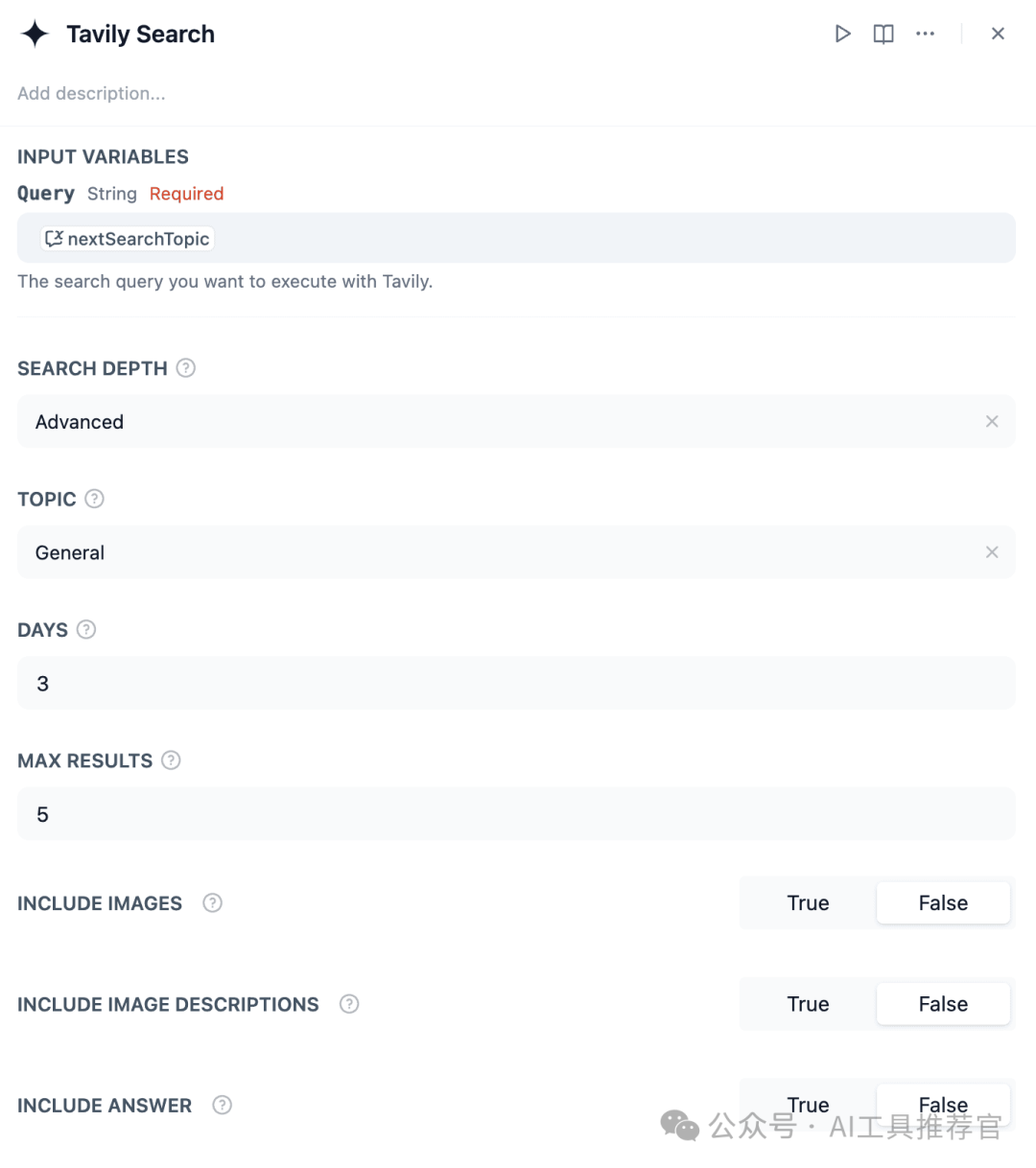
- Purpose: Combines each new set of results into a cumulative list (
findings) or updates the conversation state. 目的:将每一组新结果合并到一个累积列表(findings)或更新会话状态。
- Key Setting: Select “append” when adding new data to avoid overwriting previous results. 关键设置:添加新数据时选择“追加”,以避免覆盖之前的结果。
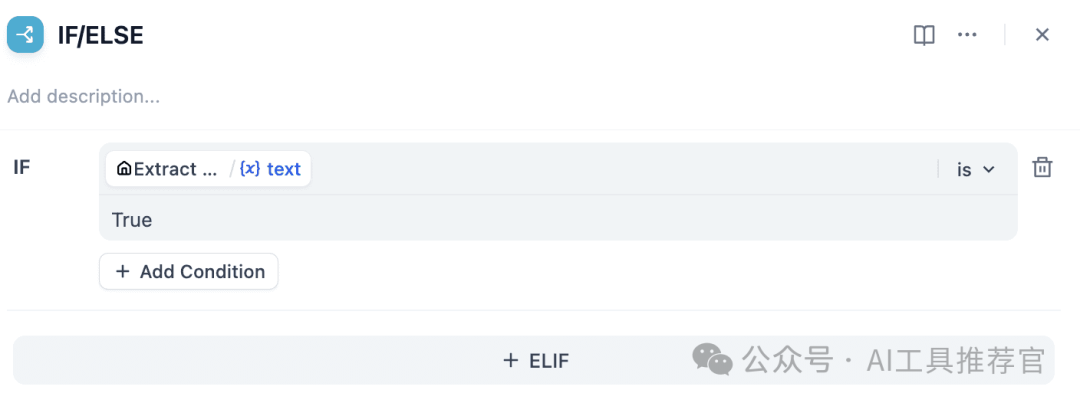
d) IF-ELSE Node d) 如果-否则节点
- Purpose: Evaluates a
shouldContinueboolean or a similar flag to decide whether to proceed with another iteration or exit the loop. 目的:评估一个shouldContinue布尔值或类似的标志,以决定是否进行另一次迭代或退出循环。
e) Final LLM Node e) 最终 LLM 节点
- Purpose: Summarizes or synthesizes the complete
findingsarray to produce a cohesive narrative or a bullet-point summary. 目的:总结或综合完整的findings数组,以产生一个连贯的叙述或要点摘要。
- Prompt Tip: A system prompt like, “Combine all search insights into a concise technical overview. Format as Markdown,” can be effective. 提示技巧:像“将所有搜索洞察整合成一个简洁的技术概述。格式为 Markdown”这样的系统提示很有效。
f) Answer Node f) 答案节点
- Purpose: Delivers the final output from the LLM back to the user. 目的:将LLM的最终输出返回给用户。
- This node represents the concluding “response” step of your application. 此节点代表您应用程序的结论性“响应”步骤。
These nodes, connected correctly, form the basis for repeated searching and data collection. With these nodes connected, users input a topic and depth to receive a thorough summary from multiple searches. The workflow visually demonstrates the looping process until sufficient data is collected or stopped. 这些节点连接正确后,构成了重复搜索和数据收集的基础。连接这些节点后,用户输入主题和深度,即可从多次搜索中获取详尽的总结。工作流程直观地展示了循环过程,直到收集到足够的数据或停止。
Future Possibilities 未来可能性
Building "DeepResearch" is just the beginning. Dify's low-code environment supports many add-ons and variations: 构建“DeepResearch”只是开始。Dify 的低代码环境支持许多附加组件和变体:
- Custom Reporting: Generate tailored reports based on the gathered data, allowing for deeper insights and strategic decision-making. 定制报告:根据收集到的数据生成定制报告,以便进行更深入的洞察和战略决策。
- Link Internal Data: Connect your companyʼs proprietary knowledge base, making the search process even more comprehensive for internal use. 链接内部数据:连接您公司的专有知识库,使搜索过程对内部使用更加全面。
- Integration with Other Tools: Automate notifications via Slack. The Dify ecosystem makes it straightforward to extend. 与其他工具的集成:通过 Slack 自动化通知。Dify 生态系统使得扩展变得简单。
By incorporating these enhancements, you can elevate DeepResearch into a comprehensive, end-to-end system for information gathering and consolidation. This can all be achieved without delving into the intricacies of traditional coding or complex infrastructure. 通过引入这些增强功能,您可以提升 DeepResearch 成为一个全面的信息收集和整合的端到端系统。这一切都可以在不深入研究传统编码或复杂基础设施的复杂性下实现。
This tutorial aimed to demonstrate how to automate and streamline in-depth research tasks using Dify. By leveraging Dify's capabilities, you can significantly reduce the time and effort spent on manual research while easily adapting your multi-search workflow to various topics, APIs, or data sources. We encourage you to experiment with Dify and discover how quickly you can build an iterative research solution tailored to your specific needs. 本教程旨在演示如何使用 Dify 自动化和简化深入研究的任务。通过利用 Dify 的功能,您可以显著减少手动研究的时间和精力,同时轻松地将您的多搜索工作流程适应各种主题、API 或数据源。我们鼓励您尝试使用 Dify,并发现您能多快构建一个针对您特定需求的迭代研究解决方案。
结语
我会继续深入探索Dify DeepResearch,包括对它的补充、完善、优化,如扩充信源(本地文献、开源Firecrawl、百度和bing等)、工作流优化,Dify Agent,Dify工作流自动优化等 相关内容,欢迎持续关注。






 扫一扫
扫一扫


 1595
1595

 被折叠的 条评论
为什么被折叠?
被折叠的 条评论
为什么被折叠?
 到【灌水乐园】发言





