


 本文详细介绍了如何接入Facebook小游戏SDK,包括SDK初始化、设置加载进度、开始游戏、获取登录信息、设置和获取排行榜、内购流程、分享功能、激励广告的预加载和显示等关键步骤。此外,还提到了小游戏的发布流程,如商务平台认证、广告和游戏审核等注意事项。
@[TOC]facebook小游戏SDK接入介绍
备注
- 目前小游戏只支持公司
- 需要验证商务平台
- 有内购的需要提交内购英文版流程
- 广告支持IOS和安卓 不支持web
- 支付不支持IOS
发布流程
- 群内提交银行卡认证
- 商务平台认证
- 广告审核
- 提交游戏审核
SDK初始化
FBInstant.initializeAsync().then(function() {
	// 初始化
});
设置加载进度
FBInstant.setLoadingProgress(progress);
//progress进度值
开始游戏
FBInstant.startGameAsync().then(function() {
	//只能在初始化后调用
});
获取登录签名
FBInstant.player.getSignedPlayerInfoAsync().then(function (result) {
	// 这里result能获取到包含facebook_id的签名
});
获取用户运行的平台
FBInstant.getPlatform() //这个能得到IOS...三个平台
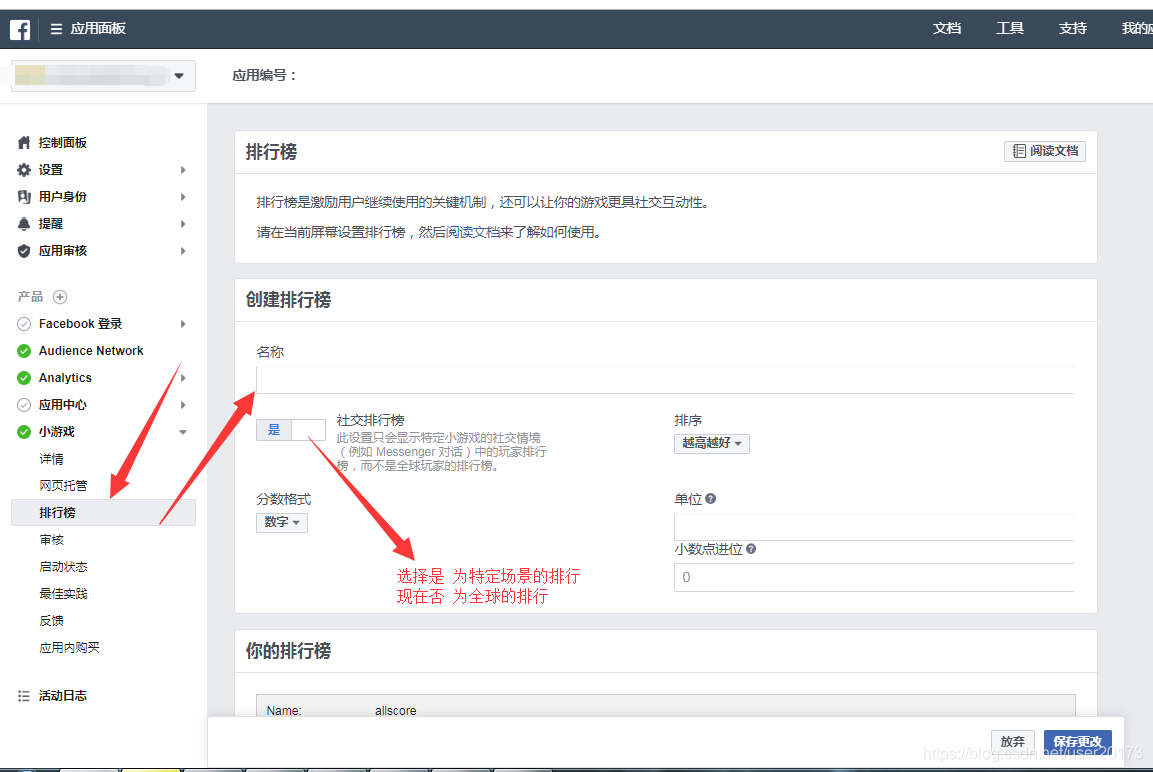
设置排行榜
FBInstant.getLeaderboardAsync('allscore').then(function(leaderboard){
	return leaderboard.setScoreAsync(1000);
}).then(function(){
	console.log('Score saved')
}).catch(function(err){
	console.log(err);
});
allscore //后台设置的排行榜名称
获取排行榜
FBInstant.getLeaderboardAsync('allscore').then(function(leaderboard){
	return leaderboard.getEntriesAsync(10, 0);
}).then(function(entries){
	for (var i = 0; i < entries.length; i++) {
	  	console.log(entries[i].getRank() + '. ' + entries[i].getPlayer().getName() + ': ' +entries[i].getScore());
	}
}).catch(function(err){
	console.log(err);
});
allscore //后台设置的排行榜名称
内购–判断环境
FBInstant.payments.onReady(function () {
	// 进入这里证明当前环境支持支付
});
内购–获取后台配置的商品
FBInstant.payments.getCatalogAsync().then(function (menu) {
	//menu 商品列表
});
内购–获取没有发放的清单
FBInstant.payments.getPurchasesAsync().then(function (purchases) {
	console.log(purchases);
	//处理未发放的订单
}).catch(function(error){
	console.log(error);
});
内购–购买并发放物品
FBInstant.payments.purchaseAsync({
	  productID: gid,	//商品ID 后台设置
	  developerPayload: null,
}).then(function (purchase) {
	//发放物品
	FBInstant.payments.consumePurchaseAsync(purchase.purchaseToken).then(function () {
		//成功请求后台发放物品
	}).catch(function(error) {
	   console.log(error);
	});
}).catch(function(error) {
	 console.log(error);
});
分享
FBInstant.context.chooseAsync().then(function() {
	FBInstant.updateAsync({
		action: "CUSTOM",
		template: "top_score",
		cta: "Race " + FBInstant.player.getName(),
		image: 'BASE64',
		text: {
			default: "I Challenge You To A Race!"
		},
		data: {
			myReplayData: "..."
		},
		strategy: "LAST",
		notification: "NO_PUSH"
	}).then(function() {});
});
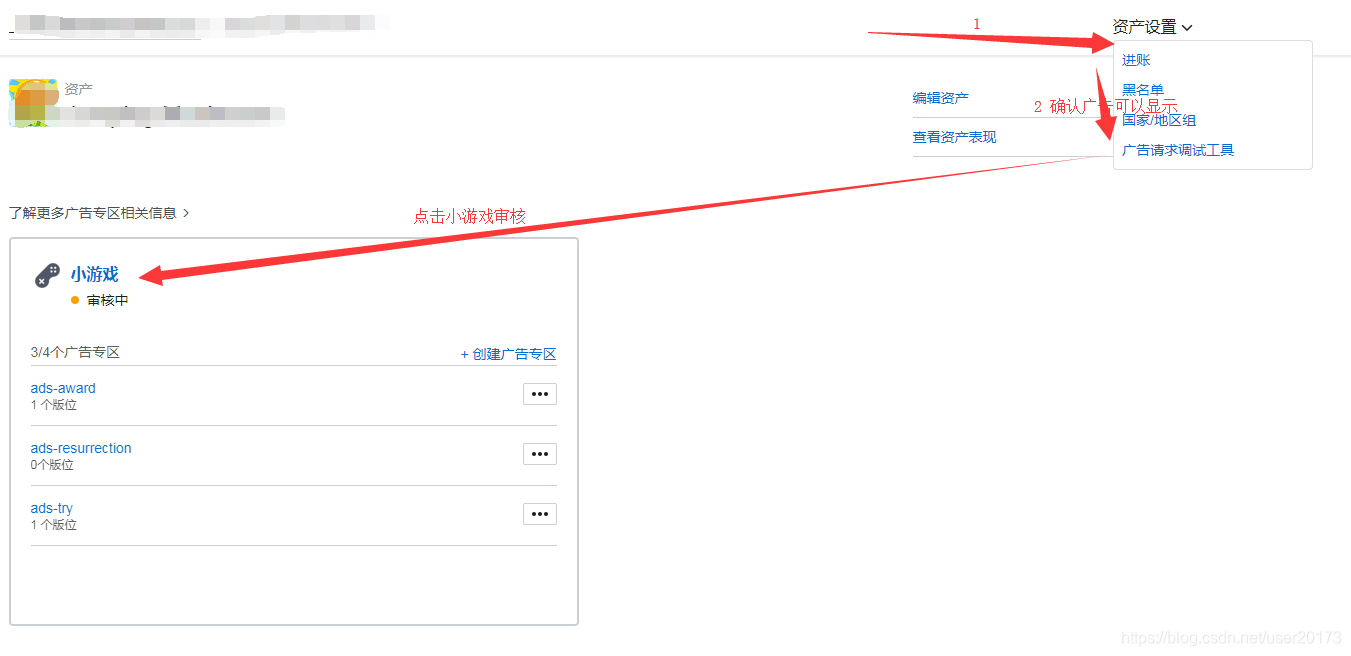
激励广告审核
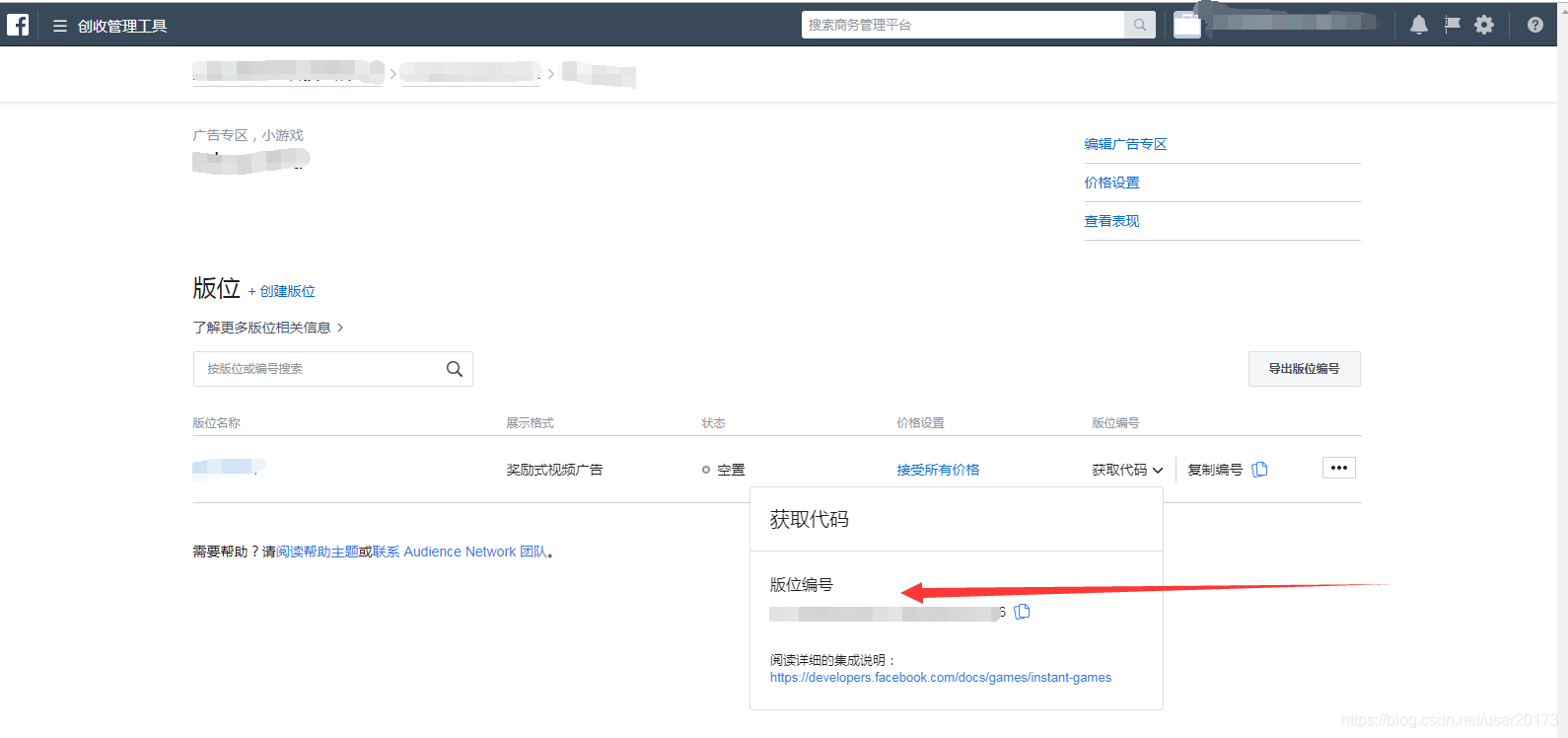
激励广告–预加载
var videos=[];
var videoload=function ()
{
	// 预加载3个
	var preloadedRewardedVideo=null;
	FBInstant.getRewardedVideoAsync(
		  'xxxxxxxxxx', // Your Ad Placement Id
	).then(function(rewarded) {
	  	preloadedRewardedVideo = rewarded;
	 	return preloadedRewardedVideo.loadAsync();
	}).then(function(){
	  	videos.push(preloadedRewardedVideo);
	}).catch(function(err){
		console.log(err);
	});
}
for(var i=1;i<=3;i++)
{
	videoload();
}
激励广告–显示
var isShow=false;
function show()
{
	videoload();
	if(isShow){
		return ;
	}
	var preloadedRewardedVideo=videos.pop();
	if(!preloadedRewardedVideo){
		return ;
	}
	isShow=true;
	preloadedRewardedVideo.showAsync().then(function() {
		// 播放成功
		isShow=false;
	}).catch(function(e) {
		isShow=false;
		console.log(e);
	});
}





 扫一扫
扫一扫


 293
293

 被折叠的 条评论
为什么被折叠?
被折叠的 条评论
为什么被折叠?
 到【灌水乐园】发言





