


最近在看 Unity 官方的 AssetBundle(以下简称 AB )的教程,也照着做了一遍,不过做出来的 AssetBundleManager 的 API 设计得有些不太习惯。目前想到了一个可行的解决方案。AB 相关的内容有点多,所以为了良好的阅读体验,就把教程分为几个小文章,一次写一个点。
1. AssetBundle设置:
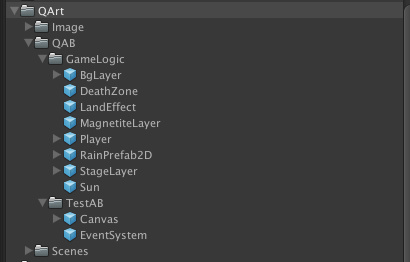
首先要确定一个专门打资源包用的目录,我的框架定的目录是 QArt/QAB,并存放了一些 Prefab 资源,如下所示。 然后选定 TestAB 目录,将 Inspector 窗口的设置为如下图所示:
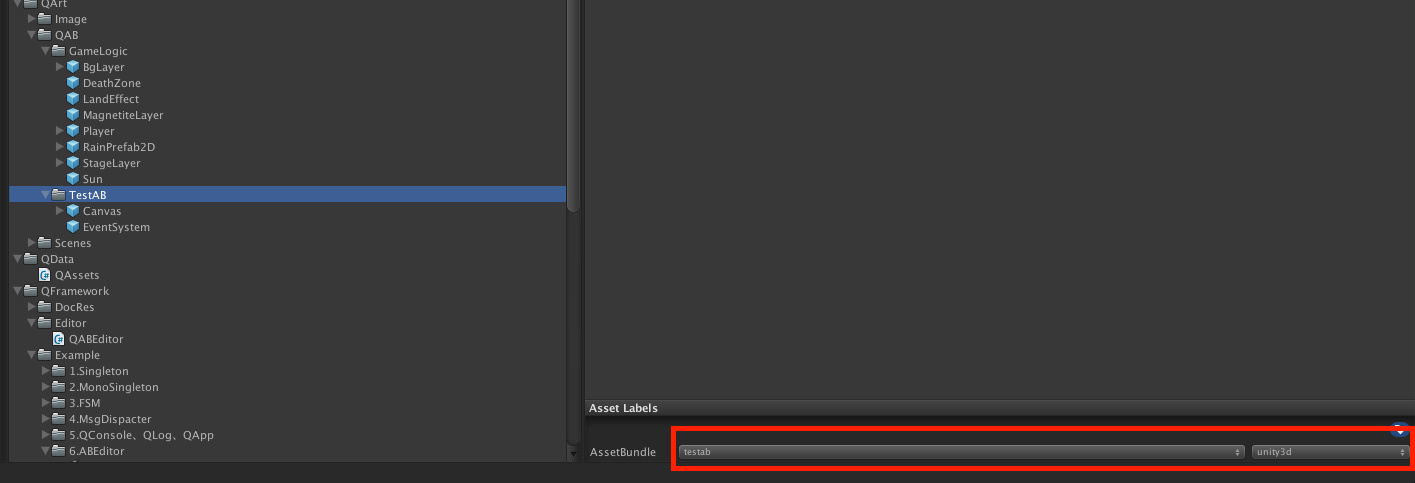
一级名字为 testab,二级扩展名为 unity3d。 这样 AB 就设置好了。
2. 制作编辑器工具。
这里打包的核心 API 只有一个,就是
     BuildPipeline
     .
     BuildAssetBundles
     (
     outPath
     ,

     0
     ,
      EditorUserBuildSettings
     .
     activeBuildTarget
     )
     ;
贴上编辑器工具代码:
     using

     UnityEditor
     ;


     using

     System
     .
     Collections
     ;


     using

     UnityEngine
     ;


     using

     System
     .
     IO
     ;


     using

     System
     .
     Collections
     .
     Generic
     ;


     namespace

     QFramework
     .
     Editor

     {


     public

     class

     QABEditor


     {


     [
     MenuItem
     (
     "QFramework/AB/Build"
     )
     ]


     public

     static

     void

     BuildAssetBundle
     (
     )


     {


     // AB包输出路径


     string
      outPath
     =
      Application
     .
     streamingAssetsPath
     +

     "/QAB"
     ;


     // 检查路径是否存在

            CheckDirAndCreate
     (
     outPath
     )
     ;


            BuildPipeline
     .
     BuildAssetBundles
     (
     outPath
     ,

     0
     ,
      EditorUserBuildSettings
     .
     activeBuildTarget
     )
     ;


     // 刚创建的文件夹和目录能马上在 Project 视窗中出现

            AssetDatabase
     .
     Refresh
     (
     )
     ;


     }


     /// <summary>


     /// 判断路径是否存在,不存在则创建


     /// </summary>


     public

     static

     void

     CheckDirAndCreate
     (
     string
      dirPath
     )


     {


     if

     (
     !
     Directory
     .
     Exists
     (
     dirPath
     )
     )

     {

                Directory
     .
     CreateDirectory
     (
     dirPath
     )
     ;


     }


     }


     }


     }
这个脚本要放在 Editor 目录下!!!
这个脚本要放在 Editor 目录下!!!
这个脚本要放在 Editor 目录下!!!
使用方法:
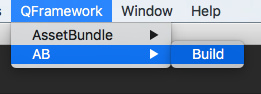
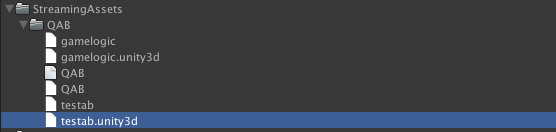
点击QFramework/AB/Build 之后,生成的AB包如下所示: AB包就打好了,接下来开始测试AB包的使用。
3.测试:
代码很简单,如下所示,一些常识性的问题就不介绍了。
     using

     UnityEngine
     ;


     using

     System
     .
     Collections
     ;


     using

     System
     .
     IO
     ;


     namespace

     QFramework
     .
     Example

     {


     public

     class

     TestABEditor

     :

     MonoBehaviour

     {


     // Use this for initialization


     IEnumerator
      Start
     (
     )

     {


     WWW
      www
     =

     new

     WWW

     (
     "file:///"

     +
      Application
     .
     streamingAssetsPath
     +
      Path
     .
     DirectorySeparatorChar
     +

     "QAssetBundle"

     +
      Path
     .
     DirectorySeparatorChar
     +

     "testab.unity3d"
     )
     ;


     yield

     return
      www
     ;


     if

     (
     string
     .
     IsNullOrEmpty
     (
     www
     .
     error
     )
     )

     {


     var
      go
     =
      www
     .
     assetBundle
     .
     LoadAsset
     <
     GameObject
     >

     (
     "Canvas"
     )
     ;


                Instantiate
     (
     go
     )
     ;


     }


     else

     {

                Debug
     .
     LogError
     (
     www
     .
     error
     )
     ;


     }


     }


     // Update is called once per frame


     void
      Update
     (
     )

     {


     }


     }


     }
运行结果:
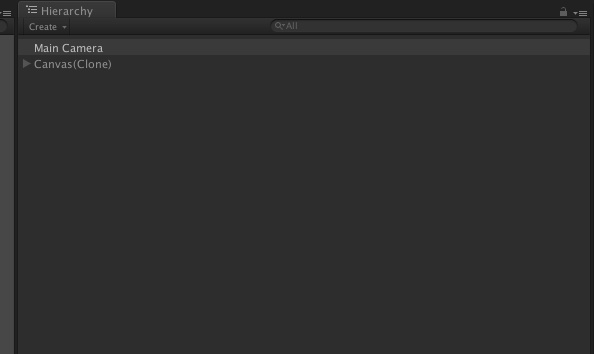
最初版的打包工具就做好了,接下来到了吐槽的时刻了。
4.存在的问题:
-
不支持多平台,只能打当前 PlayerSettings 所设置的平台的 AB 包,有点麻烦。
-
需要手动设置 AB 包的名字和扩展名,这个问题完全可以交给代码实现。
-
看不到整个工程究竟有哪些设置了AB 包的名字,哪些没设置,有些无关的资源误操作设置了AB 包名,要排查这种资源要花些时间。
-
测试的代码中暴露的字符串太多了,其中包括 AB 包名,AB 包路径,要加载的资源名字,这些都可以集中管理或者生成代码。
-
欢迎补充
这些问题在此后的文章中一步一步解决,希望大家多给些建议。
欢迎讨论!
转载请注明地址:凉鞋的笔记:
liangxiegame.com
更多内容
-
QFramework 地址: https://github.com/liangxiegame/QFramework
-
QQ 交流群: 623597263
-
Unity 进阶小班 :
-
主要训练内容:
-
框架搭建训练(第一年)
-
跟着案例学 Shader(第一年)
-
副业的孵化(第二年、第三年)
-
权益、授课形式等具体详情请查看 《小班产品手册》 :https://liangxiegame.com/master/intro
-
关注公众号:liangxiegame 获取第一时间更新通知及更多的免费内容。






 扫一扫
扫一扫


 3096
3096

 被折叠的 条评论
为什么被折叠?
被折叠的 条评论
为什么被折叠?
 到【灌水乐园】发言





