


上篇文章中实现了基本的打包功能,在这篇我们来解决不同平台打 AB 包的问题。
本篇文章的核心 api 还是:
     BuildPipeline

     .

     BuildAssetBundles

     (

     outPath

     ,


     0

     ,

      EditorUserBuildSettings

     .

     activeBuildTarget

     )

     ;
在第三个参数中,只要传入不同平台 BuildTarget 就可以了。目前只考虑 Android 和 iOS 平台。
区分 iOS、Android 平台
很简单,只要在上篇文章的 QABEditor 类中将原来的 BuildAssetBundle 方法分为 BuildAssetBundleiOS 和BuildAssetBundleAndroid 即可。代码如下所示。
     public


     class


     QABEditor


     {


     [

     MenuItem

     (

     "QFramework/AB/Build iOS"

     )

     ]


     public


     static


     void


     BuildABiOS

     (

     )


     {


     string

      outputPath

     =

      QPath

     .

     ABBuildOutPutDir

     (

     RuntimePlatform

     .

     IPhonePlayer

     )

     ;


        QIO

     .

     CreateDirIfNotExists

     (

     outputPath

     )

     ;


        QABBuilder

     .

     BuildAssetBundles

     (

     BuildTarget

     .

     iOS

     )

     ;


        AssetDatabase

     .

     Refresh

     (

     )

     ;


     }


     [

     MenuItem

     (

     "QFramework/AB/Build Android"

     )

     ]


     public


     static


     void


     BuildABAndroid

     (

     )


     {


     string

      outputPath

     =

      QPath

     .

     ABBuildOutPutDir

     (

     RuntimePlatform

     .

     Android

     )

     ;


        QIO

     .

     CreateDirIfNotExists

     (

     outputPath

     )

     ;


        QABBuilder

     .

     BuildAssetBundles

     (

     BuildTarget

     .

     Android

     )

     ;


        AssetDatabase

     .

     Refresh

     (

     )

     ;


     }


     }
大家觉得代码中有几个类有些陌生。下面我来一一介绍下。
QPath.ABBuildOutPutDir(build target)
QPath 这个类在我的框架中是用来指定固定的路径用的,因为路径的代码全是字符串,不能让字符串暴露在各处都是,这样会影响代码的可读性。统一管理起来比较方便修改。ABBuildOutPutDir 这个 API 的实现如下所示,就不多说了。
     /// <summary>


     /// 所有的路径常量都在这里


     /// </summary>


     public


     class


     QPath


     {


     /// <summary>


     /// 资源输出的路径


     /// </summary>


     public


     static


     string


     ABBuildOutPutDir

     (

     RuntimePlatform

      platform

     )


     {


     string

      retDirPath

     =


     null

     ;


     switch


     (

     platform

     )


     {


     case

      RuntimePlatform

     .

     Android

     :


                retDirPath

     =

      Application

     .

     streamingAssetsPath

     +


     "/QAB/Android"

     ;


     break

     ;


     case

      RuntimePlatform

     .

     IPhonePlayer

     :


                retDirPath

     =

      Application

     .

     streamingAssetsPath

     +


     "/QAB/iOS"

     ;


     break

     ;


     case

      RuntimePlatform

     .

     WindowsPlayer

     :


     case

      RuntimePlatform

     .

     WindowsEditor

     :


                retDirPath

     =

      Application

     .

     streamingAssetsPath

     +


     "/QAB/Windows"

     ;


     break

     ;


     case

      RuntimePlatform

     .

     OSXPlayer

     :


     case

      RuntimePlatform

     .

     OSXEditor

     :


                retDirPath

     =

      Application

     .

     streamingAssetsPath

     +


     "/QAB/OSX"

     ;


     break

     ;


     }


     return

      retDirPath

     ;


     }


     /// <summary>


     /// 打包之前的源资源文件


     /// </summary>


     public


     static


     string

      SrcABDir


     {


     get


     {


     return

      Application

     .

     dataPath

     +


     "/QArt/QAB"

     ;


     }


     }


     }


     }
QIO.CreateDirIfNotExists (outputPath)
QIO 这个类是用来封装 C# 的 System.IO 和一些文件操作相关的 API。CreateDirIfNotExists 这个命名非常的傻瓜,会点英文就应该可以理解了。下面贴出实现代码,
     using


     UnityEngine

     ;


     using


     System

     .

     Collections

     ;


     using


     System

     .

     IO

     ;


     /// <summary>


     /// 各种文件的读写复制操作,主要是对System.IO的一些封装


     /// </summary>


     namespace


     QFramework


     {


     public


     class


     QIO


     {


     /// <summary>


     /// 创建新的文件夹,如果存在则不创建


     /// </summary>


     public


     static


     void


     CreateDirIfNotExists

     (

     string

      dirFullPath

     )


     {


     if


     (

     !

     Directory

     .

     Exists

     (

     dirFullPath

     )

     )


     {


                Directory

     .

     CreateDirectory

     (

     dirFullPath

     )

     ;


     }


     }


     }


     }
QABBuilder
QABBuilder 只是封装了本文的核心 API
     BuildPipeline

     .

     BuildAssetBundles

     (

     outPath

     ,


     0

     ,

      EditorUserBuildSettings

     .

     activeBuildTarget

     )

     ;
封装的原因是打 AB 包成功后,要对 AB 包进行一些处理,比如计算包尺寸,计算哈希或者 md5 值。主要是为了以后的热更新做准备的。看下 QABBuilder 核心实现.
     public


     class


     QABBuilder


     {


     public


     static


     string

      overloadedDevelopmentServerURL

     =


     ""

     ;


     public


     static


     void


     BuildAssetBundles

     (

     BuildTarget

      buildTarget

     )


     {


     string

      outputPath

     =

      Path

     .

     Combine

     (

     QPlatform

     .

     ABundlesOutputPath

     ,

       QPlatform

     .

     GetPlatformName

     (

     )

     )

     ;


     if


     (

     Directory

     .

     Exists

     (

     outputPath

     )

     )


     {


                Directory

     .

     Delete

     (

     outputPath

     ,

     true

     )

     ;


     }


            Directory

     .

     CreateDirectory

     (

     outputPath

     )

     ;


            BuildPipeline

     .

     BuildAssetBundles

     (

     outputPath

     ,

     BuildAssetBundleOptions

     .

     None

     ,

     buildTarget

     )

     ;


            GenerateVersionConfig

     (

     outputPath

     )

     ;


     if

     (

     Directory

     .

     Exists

     (

     Application

     .

     streamingAssetsPath

     +

     "/QAB"

     )

     )

     {


                Directory

     .

     Delete

     (

     Application

     .

     streamingAssetsPath

     +

     "/QAB"

     ,

     true

     )

     ;


     }


            Directory

     .

     CreateDirectory

     (

     Application

     .

     streamingAssetsPath

     +

     "/QAB"

     )

     ;


            FileUtil

     .

     ReplaceDirectory

     (

     QPlatform

     .

     ABundlesOutputPath

     ,

     Application

     .

     streamingAssetsPath

     +

     "/QAB"

     )

     ;


            AssetDatabase

     .

     Refresh

     (

     )

     ;


     }


     }


     }
使用方式
按这里 结果看这里(创建了iOS文件夹) 介绍完毕,睡觉了!
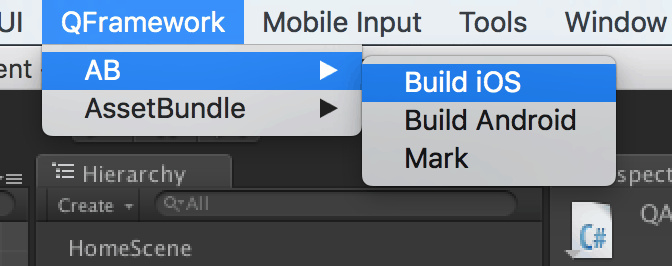
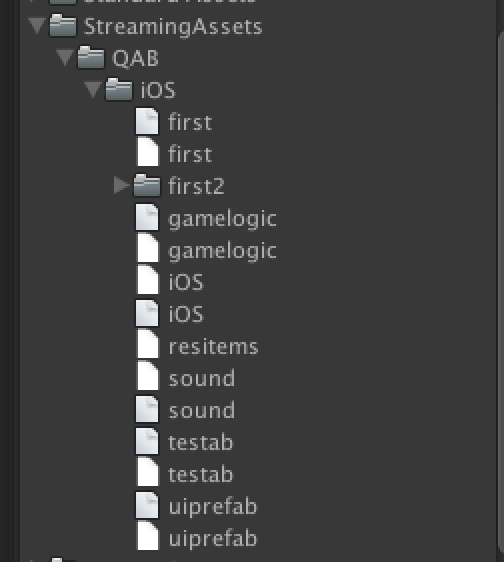
欢迎讨论!
转载请注明地址:凉鞋的笔记:
liangxiegame.com
更多内容
-
QFramework 地址: https://github.com/liangxiegame/QFramework
-
QQ 交流群: 623597263
-
Unity 进阶小班 :
-
主要训练内容:
-
框架搭建训练(第一年)
-
跟着案例学 Shader(第一年)
-
副业的孵化(第二年、第三年)
-
权益、授课形式等具体详情请查看 《小班产品手册》 :https://liangxiegame.com/master/intro
-
关注公众号:liangxiegame 获取第一时间更新通知及更多的免费内容。






 扫一扫
扫一扫


 被折叠的 条评论
为什么被折叠?
被折叠的 条评论
为什么被折叠?
 到【灌水乐园】发言





