


 本文详细介绍如何使用Unity结合XLua实现游戏资源的热更新,包括环境配置、资源打包、下载及执行lua脚本流程,最终实现在游戏运行时动态替换功能。
前言
     Unity版本:Version
     2018.4
     .2
这里首先需要我们掌握了XLua的基本知识,具体教程文档可以去
GitHub - XLua
看看。
大概思路:标记需要热更的资源,打包构建AssetBundle资源(包括lua脚本),上传到服务器,客户端通过服务器下载读取AssetBundle资源,执行lua脚本即可。
这里的测试
Demo
运行时 点击
鼠标左键
原本应该是创建的
Cube
,通过
热更新
成功后,应该是创建一个
红色的Sphere
。
实践
一. Xlua及其HotFix的环境配置
-
到 GitHub - XLua 下载最新版本的xlua工程,解压并复制该文件中的 Tools文件夹 到 工程根目录 下 , Assets 下的 Plugins、XLua文件夹 到 工程对应的Assets 下
-
打开HotFix的宏。在Unity菜单栏找到<font color="red">File -> Build Setting -> Player Setting ->Scriptsing Define Symbols</font> ,在里面输入宏 <font color="red">HOTFIX_ENABLE</font>,按ENTER后,Unity后台会编译一下。编译过后会在编译器XLua下面多一个<font color="red">“Hotfix Inject in Editor”(XLua -> Hotfix Inject in Editor)</font>。
二. 创建一个打包AssetBundle资源的脚本并放在Editor文件夹下
BuildAssetBundles.cs
脚本如下:
     using

     System
     .
     Net
     ;


     using

     UnityEditor
     ;


     using

     System
     .
     IO
     ;


     using

     System
     ;


     //-----------------------------【构建AssetBundles资源包】-----------------------------


     public

     class

     BuildAssetBundles


     {


     // 菜单选项目录


     [
     MenuItem
     (
     "Assets/Build AssetBundles"
     )
     ]


     static

     public

     void

     BuildAllAssetBundles
     (
     )


     {


     // 创建文件目录


     string
      dir
     =

     "AssetBundles"
     ;


     if

     (
     !
     Directory
     .
     Exists
     (
     dir
     )
     )


     {

            Directory
     .
     CreateDirectory
     (
     dir
     )
     ;


     }


     // 构建


     // 参数1:路径


     // 参数2:压缩算法,none 默认


     // 参数3:设备参数,ios,Android,windows等等

        BuildPipeline
     .
     BuildAssetBundles
     (
     dir
     ,
      BuildAssetBundleOptions
     .
     None
     ,
      BuildTarget
     .
     StandaloneWindows64
     )
     ;

        UnityEngine
     .
     Debug
     .
     Log
     (
     "AssetBundle资源打包完成!"
     )
     ;


     }


     }
此时可以在 编辑器菜单栏中看到 <font color="red">Asset -> Build AssetBundles</font> 按钮。
三. 创建Demo场景及其资源脚本
首先创建一个基本的UI界面,有一个Button、Slider 和 Text 就行,用来显示热更新进度。
例如:
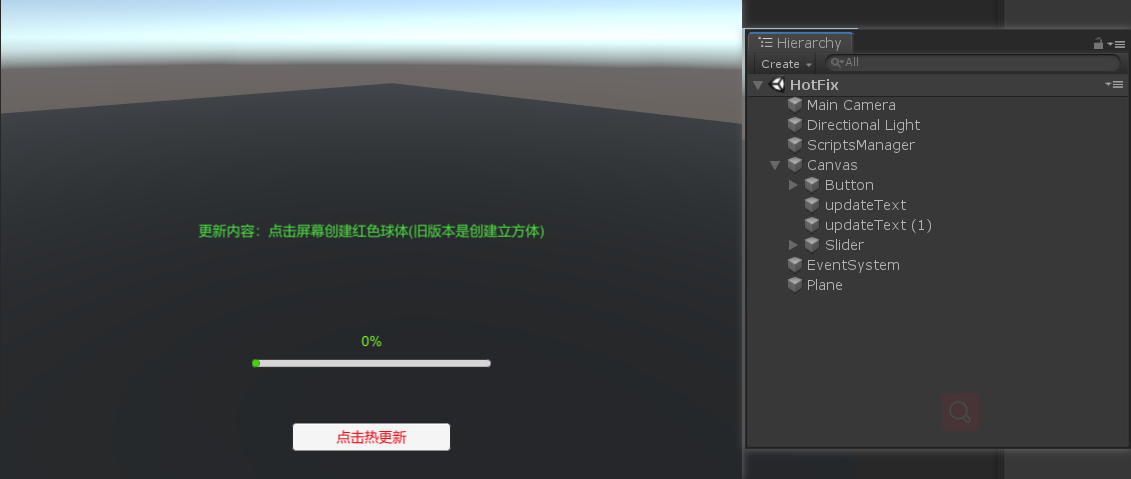
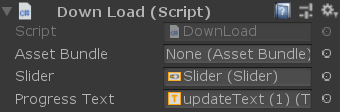
然后创建 GameScript.cs 和 DownLoad.cs 脚本,并且挂载到场景空物体上,分别拖拽Slider 和 Text 到DownLoad脚本的公共属性,把 StartDownLoad方法绑定到Button组件的点击事件:
GameScript.cs :
     using

     UnityEngine
     ;


     using

     UnityEngine
     .
     EventSystems
     ;


     using

     XLua
     ;


     //-----------------------------【游戏脚本】-----------------------------


     [
     Hotfix
     ]


     public

     class

     GameScript

     :

     MonoBehaviour


     {


     public

     int
      num1
     =

     100
     ;


     private

     int
      num2
     =

     200
     ;


     void

     Update
     (
     )


     {


     // 鼠标左键点击


     if

     (
     Input
     .
     GetMouseButtonDown
     (
     0
     )
     )


     {


     if

     (
     EventSystem
     .
     current
     .
     IsPointerOverGameObject
     (
     )
     )


     {

                Debug
     .
     Log
     (
     "点击到UGUI的UI界面"
     )
     ;


     }


     else


     {


     //创建 cube  (后面会通过热更 lua脚本替换掉这里,使之生成Sphere)


     GameObject
      cubeGo
     =
      Resources
     .
     Load
     (
     "Cube"
     )

     as

     GameObject
     ;


     // 在鼠标点击的地方实例cube


     Ray
      ray
     =
      Camera
     .
     main
     .
     ScreenPointToRay
     (
     Input
     .
     mousePosition
     )
     ;


     RaycastHit
      hit
     ;


     if

     (
     Physics
     .
     Raycast
     (
     ray
     ,

     out
      hit
     )
     )

     {

                    Debug
     .
     Log
     (
     hit
     .
     point
     )
     ;


     GameObject
      cube
     =
      GameObject
     .
     Instantiate
     (
     cubeGo
     ,
      hit
     .
     point
     +

     new

     Vector3
     (
     0
     ,
     1
     ,
     0
     )
     ,
      transform
     .
     rotation
     )
     as

     GameObject
     ;


     }


     }


     }


     }


     //射线 - 用于xlua调用 避免重载问题


     public

     static

     bool

     RayFunction
     (
     Ray
      ray
     ,

     out

     RaycastHit
      hit
     )


     {


     return
      Physics
     .
     Raycast
     (
     ray
     ,

     out
      hit
     )
     ;


     }


     }
这里需要注意的地方:
我们必须在需要热更新的类打上 <font color="red">[Hotfix] </font>标签,这里很关键,我们后续会通过lua替换掉 GameScript 里的Update方法。
DownLoad.cs :
     using

     System
     ;


     using

     System
     .
     Collections
     ;


     using

     System
     .
     Collections
     .
     Generic
     ;


     using

     UnityEngine
     ;


     using

     System
     .
     IO
     ;


     using

     UnityEngine
     .
     Networking
     ;


     using

     XLua
     ;


     using

     UnityEngine
     .
     UI
     ;


     //-----------------------------【下载资源】-----------------------------


     public

     class

     DownLoad

     :

     MonoBehaviour


     {


     // private string path = @"file://E:\WorkSpaces\Unity\XLuaFix\AssetBundles\newobj.u3d";


     // private string verPath = @"http://localhost/AssetBundles/version.txt";


     private

     string
      path
     =

     @"http://localhost/AssetBundles/newobj.u3d"
     ;


     public

     AssetBundle
      assetBundle
     ;


     // 开始下载更新


     public

     void

     StartDownLoad
     (
     )


     {

        Debug
     .
     Log
     (
     "开始下载更新!"
     )
     ;


     // 启动协程


     StartCoroutine
     (
     GetAssetBundle
     (
     ExcuteHotFix
     )
     )
     ;


     }


     //-----------------------------【从服务器下载热更资源】-----------------------------


     public

     Slider
      slider
     ;


     public

     Text
      progressText
     ;
     //进度显示


     IEnumerator

     GetAssetBundle
     (
     Action
      callBack
     )


     {


     UnityWebRequest
      www
     =
      UnityWebRequestAssetBundle
     .
     GetAssetBundle
     (
     path
     )
     ;

        www
     .
     SendWebRequest
     (
     )
     ;


     while

     (
     !
     www
     .
     isDone
     )


     {

            Debug
     .
     Log
     (
     www
     .
     downloadProgress
     )
     ;

            slider
     .
     value

     =
      www
     .
     downloadProgress
     ;
     //下载进度

            progressText
     .
     text
     =
      Math
     .
     Floor
     (
     www
     .
     downloadProgress
     *

     100
     )

     +

     "%"
     ;


     yield

     return

     1
     ;


     }


     // 下载完成


     if

     (
     www
     .
     isDone
     )


     {

            progressText
     .
     text
     =

     100

     +

     "%"
     ;

            slider
     .
     value

     =

     1
     ;


     // 隐藏UI(等待1s)


     yield

     return

     new

     WaitForSeconds
     (
     1
     )
     ;

            GameObject
     .
     Find
     (
     "Canvas"
     )
     .
     SetActive
     (
     false
     )
     ;


     }


     if

     (
     www
     .
     isNetworkError
     ||
      www
     .
     isHttpError
     )


     {

            Debug
     .
     Log
     (
     "DownLoad Err: "

     +
      www
     .
     error
     )
     ;


     }


     else


     {

            assetBundle
     =
      DownloadHandlerAssetBundle
     .
     GetContent
     (
     www
     )
     ;


     TextAsset
      hot
     =
      assetBundle
     .
     LoadAsset
     <
     TextAsset
     >
     (
     "luaScript.lua.txt"
     )
     ;


     string
      newPath
     =
      Application
     .
     persistentDataPath
     +

     @"/luaScript.lua.txt"
     ;


     if

     (
     !
     File
     .
     Exists
     (
     newPath
     )
     )


     {


     // Create后如果不主动释放资源就会被占用,下次打开会报错,所以一定要加上 .Dispose()

                File
     .
     Create
     (
     newPath
     )
     .
     Dispose
     (
     )
     ;


     }


     // 写入文件

            File
     .
     WriteAllText
     (
     newPath
     ,
      hot
     .
     text
     )
     ;


            Debug
     .
     Log
     (
     "下载资源成功!new Path : "

     +
      newPath
     )
     ;


     // 下载成功后 读取执行lua脚本


     callBack
     (
     )
     ;


     }


     }


     //-----------------------------【执行热更脚本】-----------------------------


     public

     void

     ExcuteHotFix
     (
     )


     {

        Debug
     .
     Log
     (
     "开始执行热更脚本 luaScript"
     )
     ;


     LuaEnv
      luaenv
     =

     new

     LuaEnv
     (
     )
     ;

        luaenv
     .
     AddLoader
     (
     MyLoader
     )
     ;

        luaenv
     .
     DoString
     (
     "require 'luaScript'"
     )
     ;


     }


     // 自定义Loader


     public

     byte
     [
     ]

     MyLoader
     (
     ref

     string
      filePath
     )


     {


     // 读取下载的脚本资源


     string
      newPath
     =
      Application
     .
     persistentDataPath
     +

     @"/"

     +
      filePath
     +

     ".lua.txt"
     ;

        Debug
     .
     Log
     (
     "执行脚本路径:"

     +
      newPath
     )
     ;


     string
      txtString
     =
      File
     .
     ReadAllText
     (
     newPath
     )
     ;


     return
      System
     .
     Text
     .
     Encoding
     .
     UTF8
     .
     GetBytes
     (
     txtString
     )
     ;


     }


     }
这里的DownLoad脚本主要是用来下载服务器上的资源,包括贴图,模型,预制体,lua脚本等,然后执行lua脚本替换掉原本的功能。
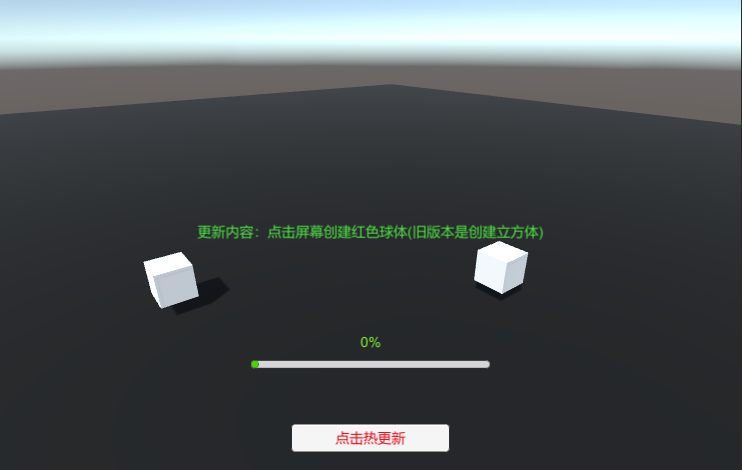
然后继续 创建 一个 Cube 和 红色的Sphere 预制体,放在Resources文件夹下。
此时运行游戏,点击鼠标左键会创建一个Cube。 后面我们通过热更新的方式,去修改该方法,使之点击创建Sphere!
四. 创建lua补丁脚本和打包AssetBundles资源
创建一个lua脚本,命名为
luaScript.lua.txt
主要这里是以
.txt
为后缀
代码如下:
     print
     (
     "Version: 1.5"
     )


xlua
     .
     private_accessible
     (
     CS
     .
     GameScript
     )


     local
      unity
     =
      CS
     .
     UnityEngine


     --
     [
     [

xlua
     .
     hotfix
     (
     class
     ,

     [
     method_name
     ]
     ,
      fix
     )

 描述 : 注入lua补丁

     class
      : C#类,两种表示方法,CS
     .
     Namespace
     .
     TypeName或者字符串方式
     "Namespace.TypeName"
     ,字符串格式和C#的Type
     .
     GetType要求一致,如果是内嵌类型(Nested Type)是非Public类型的话,只能用字符串方式表示
     "Namespace.TypeName+NestedTypeName"
     ;
 method_name : 方法名,可选;
 fix : 如果传了method_name,fix将会是一个function,否则通过table提供一组函数。table的组织按key是method_name,
     value
     是function的方式。

     --
     ]
     ]


     --
      替换掉 GameScript 的 Update 方法

xlua
     .
     hotfix
     (
     CS
     .
     GameScript
     ,
     "Update"
     ,


     function
     (
     self
     )


     if
      unity
     .
     Input
     .
     GetMouseButtonDown
     (
     0
     )
      then

     local
      go
     =
      unity
     .
     GameObject
     .
     Find
     (
     "ScriptsManager"
     )


     --
      获取assetBundle资源

     local
      ab
     =
      go
     :
     GetComponent
     (
     "DownLoad"
     )
     .
     assetBundle

     --
      读取创建 Sphere

     local
      SphereGo
     =
      ab
     :
     LoadAsset
     (
     "Sphere"
     )


     --
      在鼠标点击的位置实例Sphere

     local
      ray
     =
      unity
     .
     Camera
     .
     main
     :
     ScreenPointToRay
     (
     unity
     .
     Input
     .
     mousePosition
     )


     local
      flag
     ,
     hit
     =
      CS
     .
     GameScript
     .
     RayFunction
     (
     ray
     )


     if
      flag
     then


     print
     (
     hit
     .
     transform
     .
     name
     )


     local
      sphere
     =
      unity
     .
     GameObject
     .
     Instantiate
     (
     SphereGo
     )

                sphere
     .
     transform
     .
     localPosition
     =
      hit
     .
     point
     +
      unity
     .
     Vector3
     (
     0
     ,
     1
     ,
     0
     )

            end


     end

    end

     )
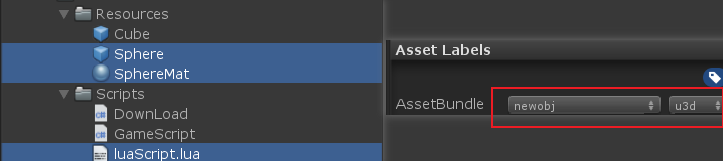
在打包之前我们先把需要热更新的资源标记 AssetBundle,如下图,标记Sphere和lua脚本 :
最后, 点击 Asset -> Build AssetBundles 按钮打包,打包成功后 我们可以在项目根目录 发现
AssetBundles
文件夹, 里面的就是我们打包出来的AssetBundle资源,最终会传到服务器上
五. 启动本地测试服务器
我们在本地快速搭建一个服务器,这里可以到我的
github
下载 webServer文件夹下的
NetBox2.exe
程序,点击运行即可快速启动一个本地服务器。(当然也可以用其他的,如Nginx、Apache等,只有能下载资源就行)
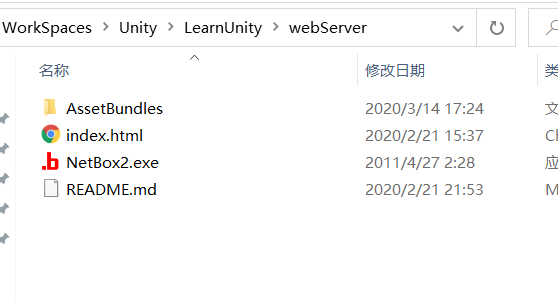
<font color="red">然后把我们刚才打包好的AssetBundles资源文件夹复制到 NetBox2.exe 同级目录下,点击 NetBox2.exe 运行即可启动服务器,此时我们就可以通过远程下载该资源。</font>
目录结构如下:
六. 最后,运行测试Demo
在测试前我们先删掉Resources文件夹下面的Sphere预制体和luaScript.lua脚本!
一切准备就绪后...
该demo在widows上测试如下:
-
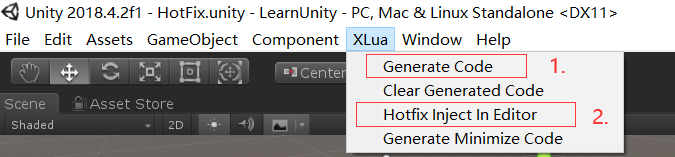
点击 <font color="red">XLua -> Generate Code </font>按钮 生成lua代码
-
点击 <font color="red">XLua -> hotfix Inject In Editor </font>按钮 注入xlua hotfix补丁
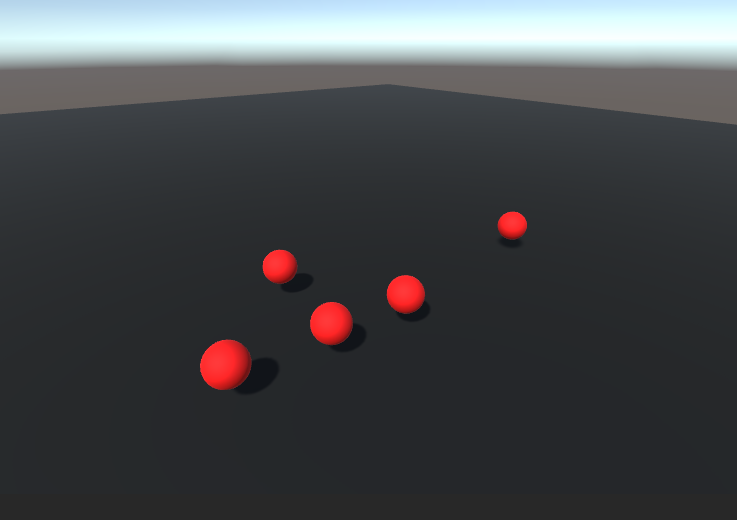
-
点击运行测试。
如果最终生成的是Sphere 则说明热更新成功
最后
该Demo已经上传到我的
GitHub
上,欢迎Star,谢谢!
总结:
在开发的过程中我们就需要在有可能会出现bug或者需要热更新的地方打上HotFix标签。 标记需要热更的资源,打包构建AssetBundle资源(包括贴图,预制体,模型,lua脚本等),上传到服务器,客户端通过服务器下载读取AssetBundle资源,执行lua脚本替换原有功能即可。





 扫一扫
扫一扫


 804
804

 被折叠的 条评论
为什么被折叠?
被折叠的 条评论
为什么被折叠?
 到【灌水乐园】发言





