贪婪三角投影法
#include <iostream>
#include <pcl/point_types.h>
#include <pcl/io/pcd_io.h>
#include <pcl/io/ply_io.h>
#include <pcl/filters/voxel_grid.h>
#include <pcl/filters/radius_outlier_removal.h>
#include <pcl/filters/statistical_outlier_removal.h>
#include <pcl/surface/mls.h>
#include <pcl/kdtree/kdtree_flann.h>
#include <pcl/features/normal_3d.h>
#include <pcl/surface/gp3.h>
int main(int argc, char** argv)
{
pcl::PointCloud<pcl::PointXYZ>::Ptr cloud(new pcl::PointCloud<pcl::PointXYZ>);
pcl::io::loadPCDFile("bunny.pcd", *cloud);
pcl::PointCloud<pcl::PointXYZ>::Ptr cloud_filtered(new pcl::PointCloud<pcl::PointXYZ>);
pcl::StatisticalOutlierRemoval<pcl::PointXYZ> statisOutlierRemoval;
statisOutlierRemoval.setInputCloud(cloud);
statisOutlierRemoval.setMeanK(10);
statisOutlierRemoval.setStddevMulThresh(3.0);
statisOutlierRemoval.filter(*cloud_filtered);
pcl::io::savePCDFile("cloud_filtered.pcd", *cloud_filtered);
pcl::search::KdTree<pcl::PointXYZ>::Ptr treeSampling(new pcl::search::KdTree<pcl::PointXYZ>);
pcl::PointCloud<pcl::PointXYZ>::Ptr cloud_mls(new pcl::PointCloud<pcl::PointXYZ>);
pcl::MovingLeastSquares<pcl::PointXYZ, pcl::PointXYZ> mls;
mls.setComputeNormals(true);
mls.setInputCloud(cloud_filtered);
mls.setPolynomialOrder(2);
mls.setSearchMethod(treeSampling);
mls.setSearchRadius(0.01f);
mls.process(*cloud_mls);
pcl::io::savePCDFile("cloud_mls.pcd", *cloud_mls);
pcl::NormalEstimation<pcl::PointXYZ, pcl::Normal> n;
pcl::PointCloud<pcl::Normal>::Ptr normals(new pcl::PointCloud<pcl::Normal>);
pcl::search::KdTree<pcl::PointXYZ>::Ptr tree(new pcl::search::KdTree<pcl::PointXYZ>);
tree->setInputCloud(cloud_mls);
n.setInputCloud(cloud_mls);
n.setSearchMethod(tree);
n.setKSearch(10);
n.compute(*normals);
pcl::PointCloud<pcl::PointNormal>::Ptr cloud_with_normals(new pcl::PointCloud<pcl::PointNormal>);
pcl::concatenateFields(*cloud_mls, *normals, *cloud_with_normals);
pcl::search::KdTree<pcl::PointNormal>::Ptr tree2(new pcl::search::KdTree<pcl::PointNormal>);
tree2->setInputCloud(cloud_with_normals);
pcl::GreedyProjectionTriangulation<pcl::PointNormal> gp3;
pcl::PolygonMesh triangles;
gp3.setSearchRadius(0.01f);
gp3.setMu(3);
gp3.setMaximumNearestNeighbors(100);
gp3.setMinimumAngle(0);
gp3.setMaximumAngle(M_PI);
gp3.setMaximumSurfaceAngle(M_PI);
gp3.setNormalConsistency(false);
gp3.setInputCloud(cloud_with_normals);
gp3.setSearchMethod(tree2);
gp3.reconstruct(triangles);
pcl::io::savePLYFile("bunny.ply", triangles);
return 0;
}
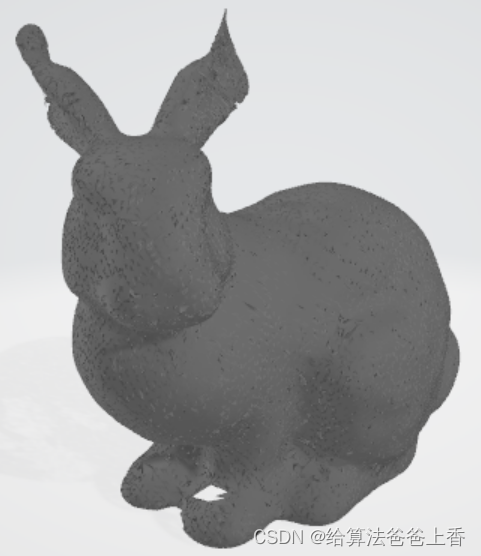
移动立方体法
#include <iostream>
#include <pcl/point_types.h>
#include <pcl/io/pcd_io.h>
#include <pcl/io/ply_io.h>
#include <pcl/kdtree/kdtree_flann.h>
#include <pcl/features/normal_3d.h>
#include <pcl/surface/marching_cubes_hoppe.h>
#include <pcl/surface/marching_cubes_rbf.h>
int main(int argc, char** argv)
{
pcl::PointCloud<pcl::PointXYZ>::Ptr cloud(new pcl::PointCloud<pcl::PointXYZ>);
pcl::io::loadPCDFile("bunny.pcd", *cloud);
pcl::NormalEstimation<pcl::PointXYZ, pcl::Normal> n;
pcl::PointCloud<pcl::Normal>::Ptr normals(new pcl::PointCloud<pcl::Normal>);
pcl::search::KdTree<pcl::PointXYZ>::Ptr tree(new pcl::search::KdTree<pcl::PointXYZ>);
tree->setInputCloud(cloud);
n.setInputCloud(cloud);
n.setSearchMethod(tree);
n.setKSearch(10);
n.compute(*normals);
pcl::PointCloud<pcl::PointNormal>::Ptr cloud_with_normals(new pcl::PointCloud<pcl::PointNormal>);
pcl::concatenateFields(*cloud, *normals, *cloud_with_normals);
pcl::MarchingCubes<pcl::PointNormal>* mc = new pcl::MarchingCubesHoppe<pcl::PointNormal>();
pcl::search::KdTree<pcl::PointNormal>::Ptr tree2(new pcl::search::KdTree<pcl::PointNormal>);
tree2->setInputCloud(cloud_with_normals);
mc->setInputCloud(cloud_with_normals);
mc->setIsoLevel(0.001f);
mc->setGridResolution(100, 100, 100);
mc->setPercentageExtendGrid(0.001f);
pcl::PolygonMesh mesh;
mc->reconstruct(mesh);
pcl::io::savePLYFile("bunny.ply", mesh);
return 0;
}
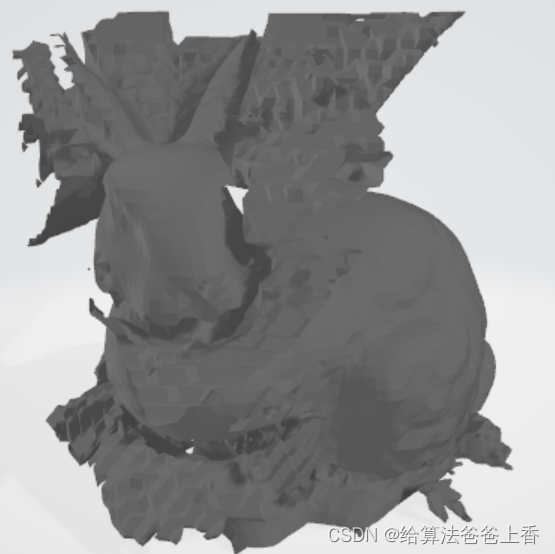
泊松重建
#include <iostream>
#include <string>
#include <pcl/point_types.h>
#include <pcl/io/pcd_io.h>
#include <pcl/io/ply_io.h>
#include <pcl/kdtree/kdtree_flann.h>
#include <pcl/features/normal_3d_omp.h>
#include <pcl/features/normal_3d.h>
#include <pcl/surface/gp3.h>
#include <pcl/surface/poisson.h>
#include <pcl/visualization/pcl_visualizer.h>
int main(int argc, char** argv)
{
pcl::PointCloud <pcl::PointXYZ> ::Ptr cloud(new pcl::PointCloud<pcl::PointXYZ>);
pcl::io::loadPCDFile("bunny.pcd", *cloud);
pcl::NormalEstimation<pcl::PointXYZ, pcl::Normal> n;
pcl::PointCloud<pcl::Normal>::Ptr normals(new pcl::PointCloud<pcl::Normal>);
pcl::search::KdTree<pcl::PointXYZ>::Ptr tree(new pcl::search::KdTree<pcl::PointXYZ>);
tree->setInputCloud(cloud);
n.setInputCloud(cloud);
n.setSearchMethod(tree);
n.setKSearch(10);
n.compute(*normals);
pcl::PointCloud<pcl::PointNormal>::Ptr cloud_with_normals(new pcl::PointCloud<pcl::PointNormal>);
pcl::concatenateFields(*cloud, *normals, *cloud_with_normals);
pcl::search::KdTree<pcl::PointNormal>::Ptr tree2(new pcl::search::KdTree<pcl::PointNormal>);
tree2->setInputCloud(cloud_with_normals);
pcl::Poisson<pcl::PointNormal> pn;
pn.setConfidence(true);
pn.setDegree(2);
pn.setDepth(8);
pn.setIsoDivide(8);
pn.setManifold(true);
pn.setOutputPolygons(true);
pn.setSamplesPerNode(1.0f);
pn.setScale(1.0f);
pn.setSolverDivide(8);
pn.setSearchMethod(tree2);
pn.setInputCloud(cloud_with_normals);
pcl::PolygonMesh mesh;
pn.performReconstruction(mesh);
pcl::io::savePLYFile("bunny.ply", mesh);
return 0;
}
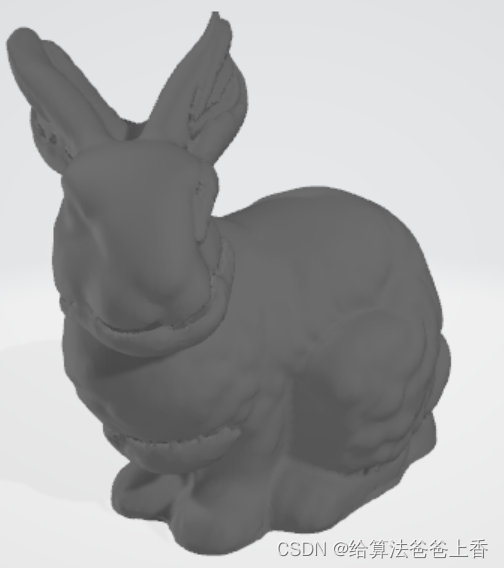








 扫一扫
扫一扫


 375
375

 被折叠的 条评论
为什么被折叠?
被折叠的 条评论
为什么被折叠?
 到【灌水乐园】发言





