


LightRAG 由入门到精通
作者:王珂
邮箱:49186456@qq.com
文章目录
简介
github 项目
https://github.com/HKUDS/LightRAG
英文
https://github.com/HKUDS/LightRAG/blob/main/README.md
中文
https://github.com/HKUDS/LightRAG/blob/main/README-zh.md
LightRAG 是由香港大学研究团队开发的一种检索增强生成(Retrieval-Augmented Generation, RAG)系统。结合图结构索引和双层检索机制,大大提高了大模型语言在信息检索方面的准确性和效率。
LightRAG 能够很好的捕捉实体之间的关系,能够处理具体和抽象查询。
LightRAG 通过增量更新算法及时整合新数据,而无需重建整个知识库。
LightRAG架构
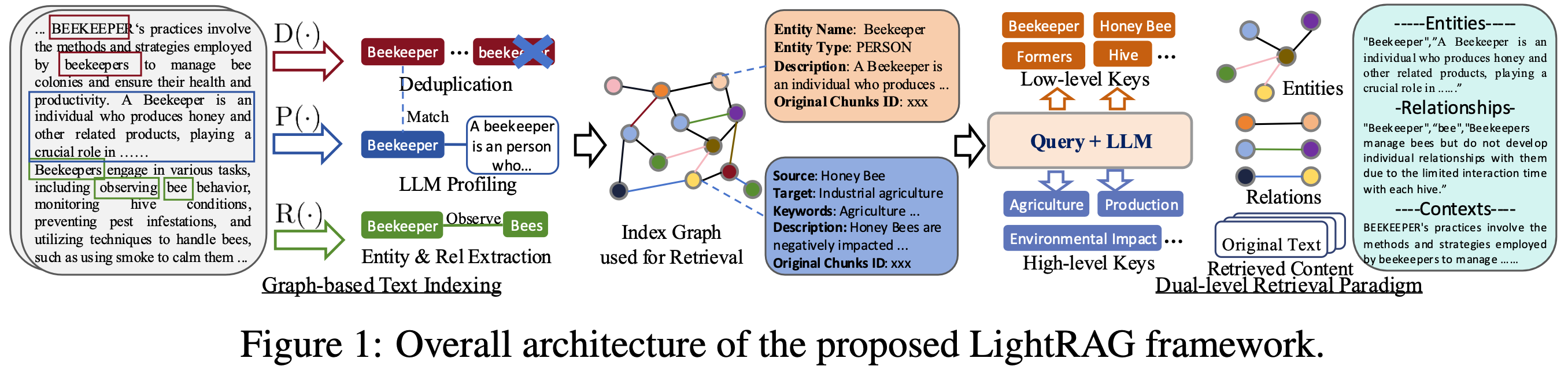
LightRAG 索引流程
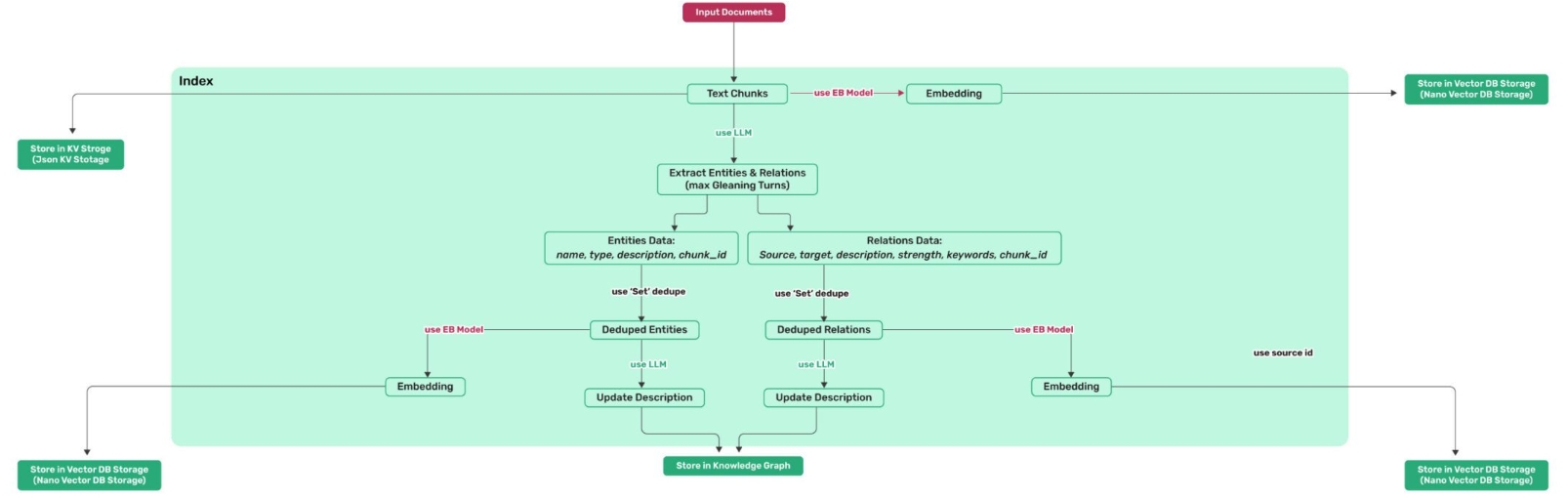
LightRAG 检索和查询流程
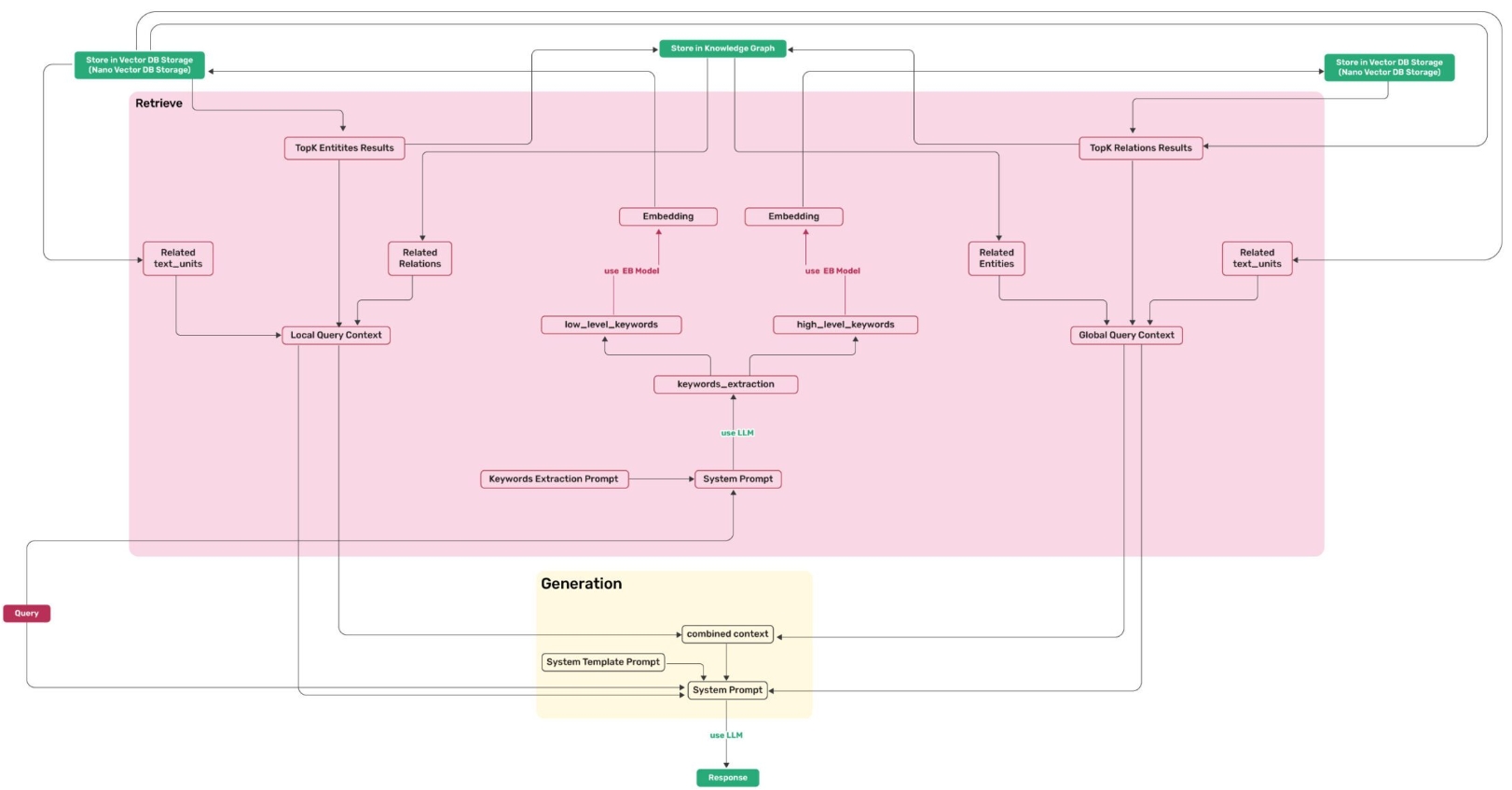
环境准备
文档中需要用到大语言模型和向量模型,我们分别采用 DeepSeek 官网的 deepseek-chat 和 阿里百炼平台的 text-embedding-v3。如果没有请在如下地址申请 api-key,因为使用 token 需要付费,我们充值¥5 即可做实验。
大语言模型:deepseek-v3,api-key 申请地址:
https://platform.deepseek.com/api_keys
阿里百炼平台 api-key 申请地址:
https://bailian.console.aliyun.com/?spm=5176.29677750.nav-v2-dropdown-menu-0.d_main_1_0.6514154a4FlHkA&tab=model&scm=20140722.M_10773066._.V_1#/api-key
一、LightRAG Server
英文 README:
https://github.com/HKUDS/LightRAG/blob/main/lightrag/api/README.md
中文 README-zh
https://github.com/HKUDS/LightRAG/blob/main/lightrag/api/README-zh.md
1.1 安装 LightRAG Server
-
从 PyPI 安装
pip install "lightrag-hku[api]"因为国内网络限制,直接下载不下来,实际测试可以通过如下镜像下载
pip install -i https://mirrors.aliyun.com/pypi/simple "lightrag-hku[api]"示例项目:lightrag-server-pypi
-
从源码安装
git clone https://github.com/HKUDS/LightRAG.git
cd LightRAG
# create a Python virtual enviroment if neccesary
# Install in editable mode with API support
pip install -e ".[api]"
示例项目:lightrag-server-source
-
使用 Docker Compose 加载 LightRAG Server
git clone https://github.com/HKUDS/LightRAG.git
cd LightRAG
cp env.example .env
# modify LLM and Embedding settings in .env
docker compose up
1.2 LightRAG Server 和 WebUI
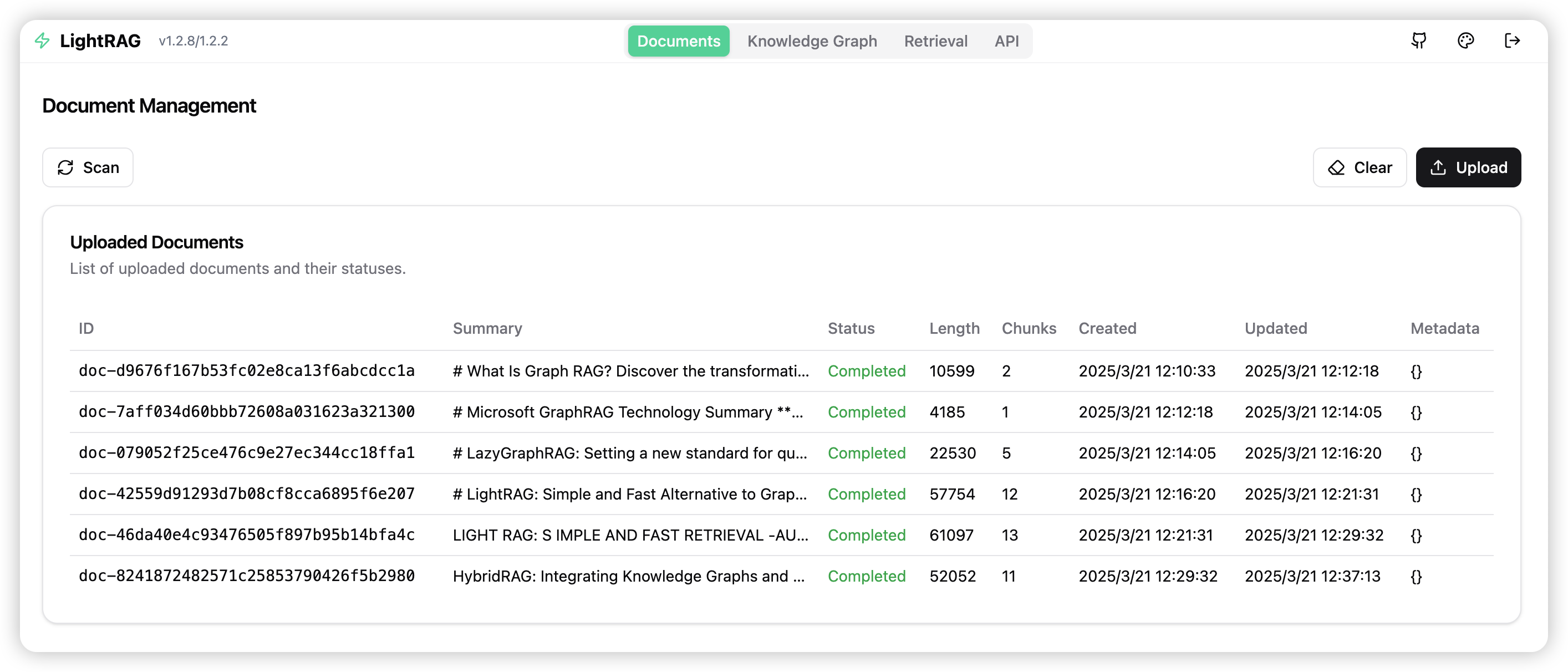
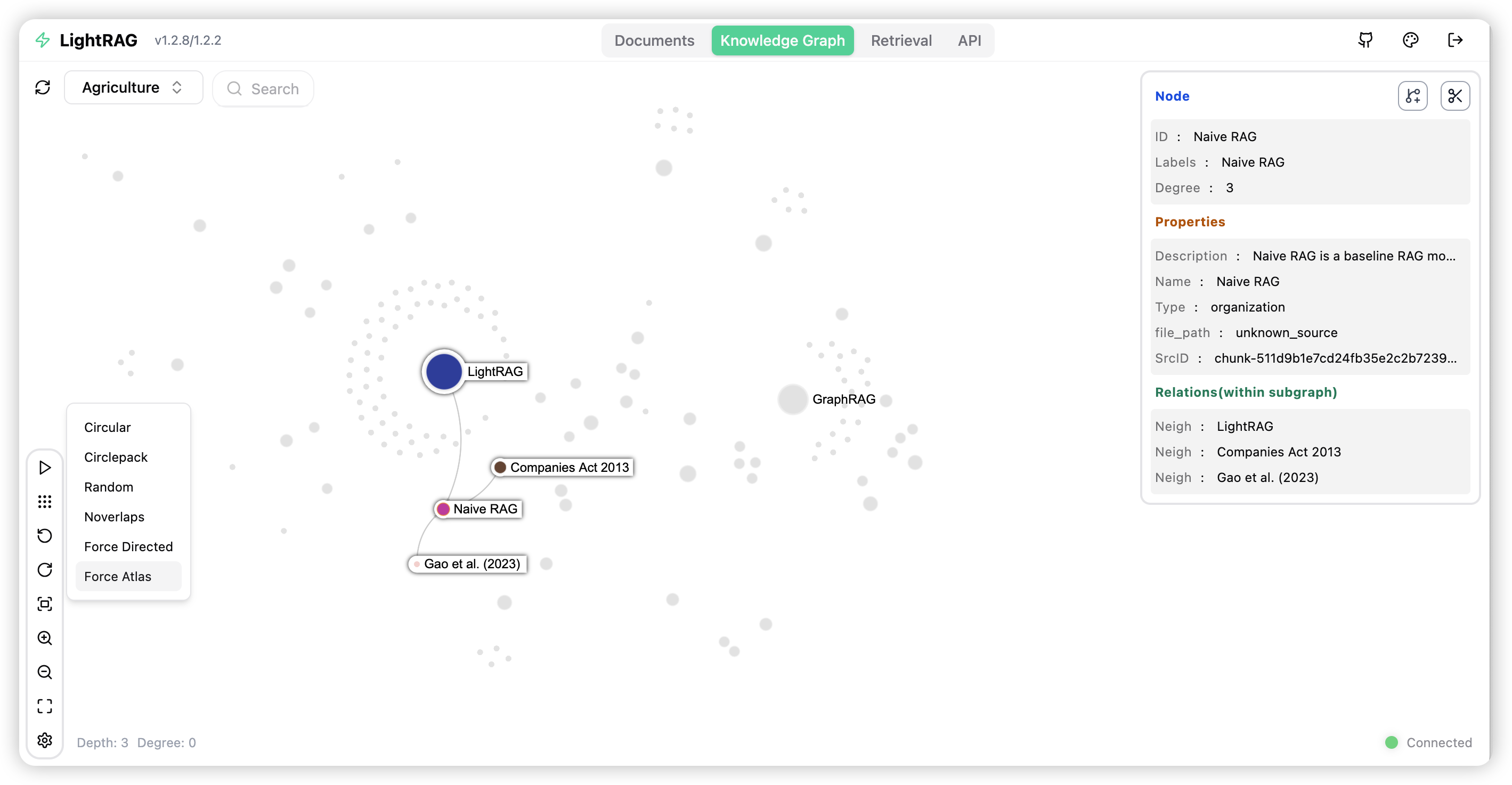
LightRAG Server 被设计为提供 Web UI 和 API 的支持。使用 Web UI 更便于创建文档索引、知识图谱研究和简单的 RAG 查询索引。LightRAG Server 还提供了和 Ollama 兼容的接口,目的是将 LightRAG 模拟为一个 Ollama 的聊天模型,像 Open WebUI,很方便的访问 LightRAG。
文档管理
知识图谱
检索

1.2.1 配置 LightRAG Server
LightRAG 需要同时集成大语言模型(LLM)和嵌入模型(Embedding Model)来执行文档索引和查询操作。在初始化部署 LightRAG server 之前,需要分别对大语言模型和嵌入模型进行配置。LightRAG 为 LLM/Embedding 的后端绑定变量。
- ollama
- lollms
- openai or openai compatible
- azure_openai
推荐使用环境变量来配置 LightRAG Server。在项目的根目录下有一个配置环境变量示例的文件 env.example,把它复制到启动目录并重命名为.env,对 LLM 和 Embedding Model 的参数进行修改。一个很重要的点是当每次 LightRAG Server 启动时会从 .env 加载环境变量到系统环境变量。由于LightRAG Server 优先使用系统环境变量的设置,因此如果在通过命令行启动了 LightRAG Server 之后,你修改了 .env 文件,则需要执行 source .env 来使新配置生效。
LLM 和 Embedding 通用设置示例
-
OpenAI LLM + OpenAI Embedding:
### OpenAI alike example LLM_BINDING=openai LLM_MODEL=deepseek-chat LLM_BINDING_HOST=https://api.deepseek.com LLM_BINDING_API_KEY=<修改为你的API Key> ### Embedding Configuration (Use valid host. For local services installed with docker, you can use host.docker.internal) EMBEDDING_MODEL=text-embedding-v3 EMBEDDING_DIM=1024 EMBEDDING_BINDING_API_KEY=<修改为你的API Key> ### OpenAI alike example EMBEDDING_BINDING=openai EMBEDDING_BINDING_HOST=https://dashscope.aliyuncs.com/compatible-mode/v1 -
OpenAI LLM + Ollama Embedding:
LLM_BINDING=openai LLM_MODEL=gpt-4o LLM_BINDING_HOST=https://api.openai.com/v1 LLM_BINDING_API_KEY=your_api_key ### Max tokens sent to LLM (less than model context size) MAX_TOKENS=32768 EMBEDDING_BINDING=ollama EMBEDDING_BINDING_HOST=http://localhost:11434 EMBEDDING_MODEL=bge-m3:latest EMBEDDING_DIM=1024 # EMBEDDING_BINDING_API_KEY=your_api_key -
Ollama LLM + Ollama Embedding:
LLM_BINDING=ollama
LLM_MODEL=mistral-nemo:latest
LLM_BINDING_HOST=http://localhost:11434
# LLM_BINDING_API_KEY=your_api_key
### Max tokens sent to LLM (based on your Ollama Server capacity)
MAX_TOKENS=8192

EMBEDDING_BINDING=ollama
EMBEDDING_BINDING_HOST=http://localhost:11434
EMBEDDING_MODEL=bge-m3:latest
EMBEDDING_DIM=1024
# EMBEDDING_BINDING_API_KEY=your_api_key
1.2.2 启动 LightRAG Server
LightRAG Server 支持两种操作模式
-
简单且高效的 Uvicorn 模式
lightrag-server首次启动有一个警告,提示需要安装 wcwidth
Warning: ‘wcwidth’ library not found. Progress bar display accuracy for wide characters (like emojis) may be reduced. Install with ‘pip install wcwidth’
pip install wcwidth安装之后再次启动,启动日志:
2025-05-19 18:43:17 - pipmaster.package_manager - INFO - Targeting pip associated with Python: D:\work\PycharmProject\lightrag-server-pypi\venv\Scripts\python.exe | Command base: D:\wo
rk\PycharmProject\lightrag-server-pypi\venv\Scripts\python.exe -m pipLightRAG log file: D:\work\PycharmProject\lightrag-server-pypi\lightrag.log
WARNING:root:In uvicorn mode, workers parameter was set to 2. Forcing workers=1
╔══════════════════════════════════════════════════════════════╗
║                  🚀 LightRAG Server v1.3.7/0170              ║
║          Fast, Lightweight RAG Server Implementation         ║
╚══════════════════════════════════════════════════════════════╝
📡 Server Configuration:
├─ Host: 0.0.0.0
├─ Port: 9621
├─ Workers: 1
├─ CORS Origins: *
├─ SSL Enabled: False
├─ Ollama Emulating Model: lightrag:latest
├─ Log Level: INFO
├─ Verbose Debug: False
├─ History Turns: 3
├─ API Key: Not Set
└─ JWT Auth: Disabled📂 Directory Configuration:
├─ Working Directory: D:\work\PycharmProject\lightrag-server-pypi\rag_storage
└─ Input Directory: D:\work\PycharmProject\lightrag-server-pypi\inputs🤖 LLM Configuration:
├─ Binding: openai
├─ Host: https://api.deepseek.com
├─ Model: deepseek-chat
├─ Temperature: 0.5
├─ Max Async for LLM: 4
├─ Max Tokens: 32768
├─ Timeout: 150
├─ LLM Cache Enabled: True
└─ LLM Cache for Extraction Enabled: True📊 Embedding Configuration:
├─ Binding: openai
├─ Host: https://dashscope.aliyuncs.com/compatible-mode/v1
├─ Model: text-embedding-v3
└─ Dimensions: 1024⚙️ RAG Configuration:
├─ Summary Language: Chinese
├─ Max Parallel Insert: 2
├─ Max Embed Tokens: 8192
├─ Chunk Size: 1200
├─ Chunk Overlap Size: 100
├─ Cosine Threshold: 0.2
├─ Top-K: 60
├─ Max Token Summary: 500
└─ Force LLM Summary on Merge: 6💾 Storage Configuration:
├─ KV Storage: JsonKVStorage
├─ Vector Storage: NanoVectorDBStorage
├─ Graph Storage: NetworkXStorage
└─ Document Status Storage: JsonDocStatusStorage✨ Server starting up…
🌐 Server Access Information:
├─ WebUI (local): http://localhost:9621
├─ Remote Access: http://:9621
├─ API Documentation (local): http://localhost:9621/docs
└─ Alternative Documentation (local): http://localhost:9621/redoc📝 Note:
Since the server is running on 0.0.0.0:
- Use ‘localhost’ or ‘127.0.0.1’ for local access
- Use your machine’s IP address for remote access
- To find your IP address:
• Windows: Run ‘ipconfig’ in terminal
• Linux/Mac: Run ‘ifconfig’ or ‘ip addr’ in terminalINFO: Process 19620 Shared-Data created for Single Process
INFO: Loaded graph from D:\work\PycharmProject\lightrag-server-pypi\rag_storage\graph_chunk_entity_relation.graphml with 343 nodes, 271 edges
Starting Uvicorn server in single-process mode on 0.0.0.0:9621
INFO: Started server process [19620]
INFO: Waiting for application startup.
INFO: Process 19620 initialized updated flags for namespace: [full_docs]
INFO: Process 19620 ready to initialize storage namespace: [full_docs]
INFO: Process 19620 KV load full_docs with 2 records
INFO: Process 19620 initialized updated flags for namespace: [text_chunks]
INFO: Process 19620 ready to initialize storage namespace: [text_chunks]
INFO: Process 19620 KV load text_chunks with 22 records
INFO: Process 19620 initialized updated flags for namespace: [entities]
INFO: Process 19620 initialized updated flags for namespace: [relationships]
INFO: Process 19620 initialized updated flags for namespace: [chunks]
INFO: Process 19620 initialized updated flags for namespace: [chunk_entity_relation]
INFO: Process 19620 initialized updated flags for namespace: [llm_response_cache]
INFO: Process 19620 ready to initialize storage namespace: [llm_response_cache]
INFO: Process 19620 KV load llm_response_cache with 50 records
INFO: Process 19620 initialized updated flags for namespace: [doc_status]
INFO: Process 19620 ready to initialize storage namespace: [doc_status]
INFO: Process 19620 doc status load doc_status with 2 records
INFO: Process 19620 Pipeline namespace initializedServer is ready to accept connections! 🚀
INFO: Application startup complete.
INFO: Uvicorn running on http://0.0.0.0:9621 (Press CTRL+C to quit) -
The multiprocess Gunicorn + Uvicorn mode (产品模式,不支持 Windows 环境):
lightrag-gunicorn --workers 4
.env 文件必须放在启动目录
在启动的时,LightRAG Server 会创建一个文档目录(默认是 is ./inputs)和一个数据目录(默认是 ./rag_storage)。这允许你用不同的目录初始化多个 LightRAG 实例,每一个实例配置监听不同的网络端口。
常用的启动参数
--host:--port--timeout--log-level--input-dir
 最低0.47元/天 解锁文章






 扫一扫
扫一扫


 1444
1444

 被折叠的 条评论
为什么被折叠?
被折叠的 条评论
为什么被折叠?
 到【灌水乐园】发言





