



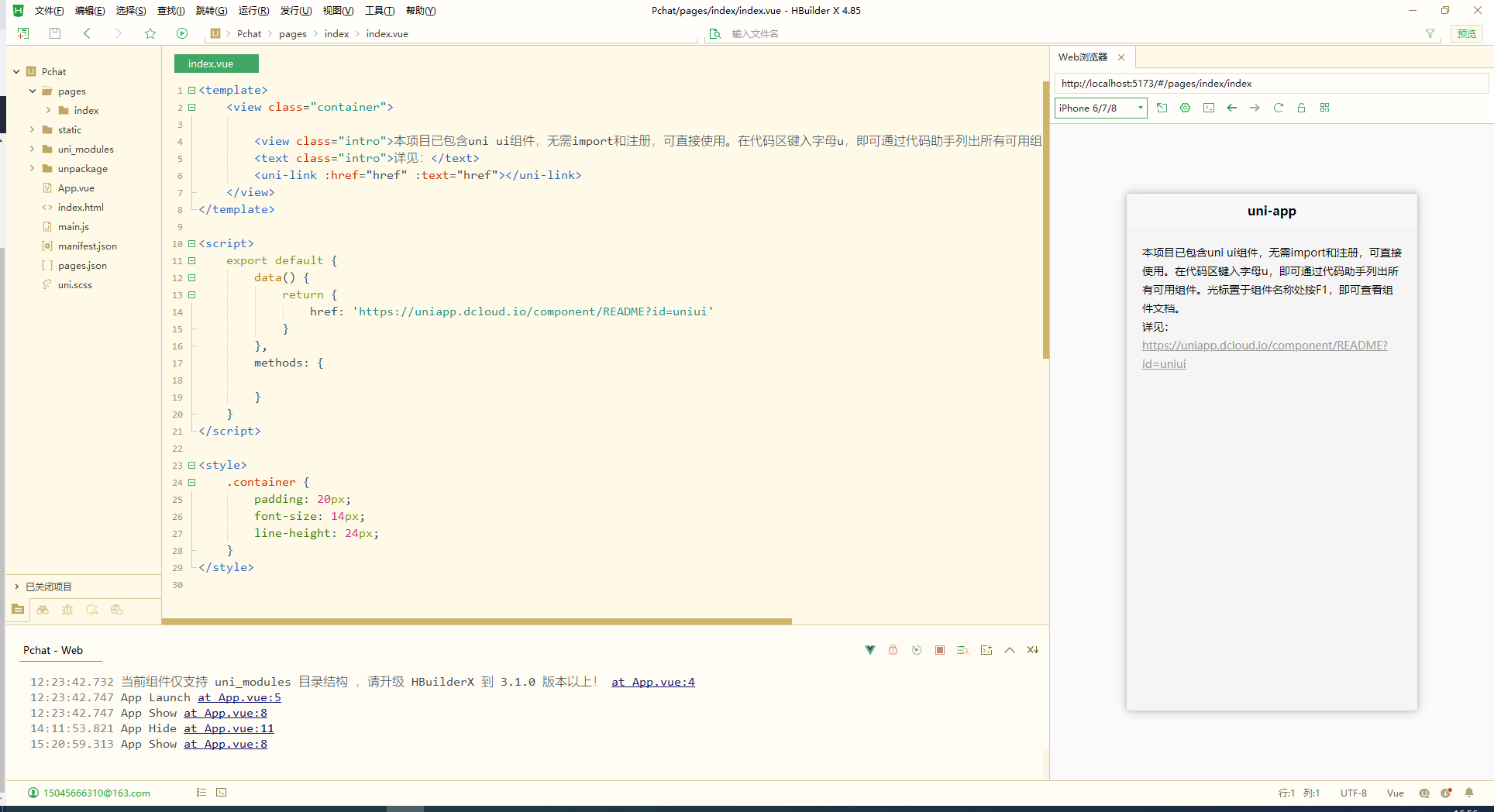
文章目录
第一章:uni-app 与 Vue3 融合的架构解析
1.1 uni-app 框架概述与技术栈演进
uni-app 是一个基于 Vue.js 的跨平台开发框架,开发者编写一套代码,可发布到 iOS、Android、Web(响应式)、以及各种小程序平台。随着 Vue3 的正式发布,uni-app 也在 2021 年正式支持 Vue3 版本,这标志着 uni-app 开发进入了一个新的时代。
uni-app 对 Vue3 的支持时间线:
- 2021年6月:uni-app 发布 Vue3 版本公开测试
- 2021年9月:Vue3 版本正式发布
- 2022年:全面优化 Vue3 支持,增加 Composition API 完整支持
- 2023年至今:持续完善生态,提升开发体验
1.2 Vue3 在 uni-app 中的架构差异
在 uni-app 中使用 Vue3 与传统的 Web 开发有几个关键架构差异:
编译层差异:
// uni-app 的编译过程
源代码(Vue3 + uni-app API) → uni-app 编译器 → 各平台原生代码

// 与传统 Vue3 编译对比
传统 Vue3: .vue文件 → Vite/Webpack → 浏览器可执行代码
uni-app Vue3: .vue文件 → uni-app编译器 → 多平台适配代码
运行时差异:
- uni-app 需要处理多平台运行时环境
- DOM API 的模拟与限制
- 原生组件与 Web 组件的桥接
- 平台特定 API 的统一封装
1.3 项目初始化与配置要点
创建 Vue3 版本的 uni-app 项目:
# 使用 CLI 创建项目(确保 HBuilderX CLI 版本支持 Vue3)
npx @dcloudio/uvm@latest create my-vue3-uniapp

# 或使用 HBuilderX 可视化创建
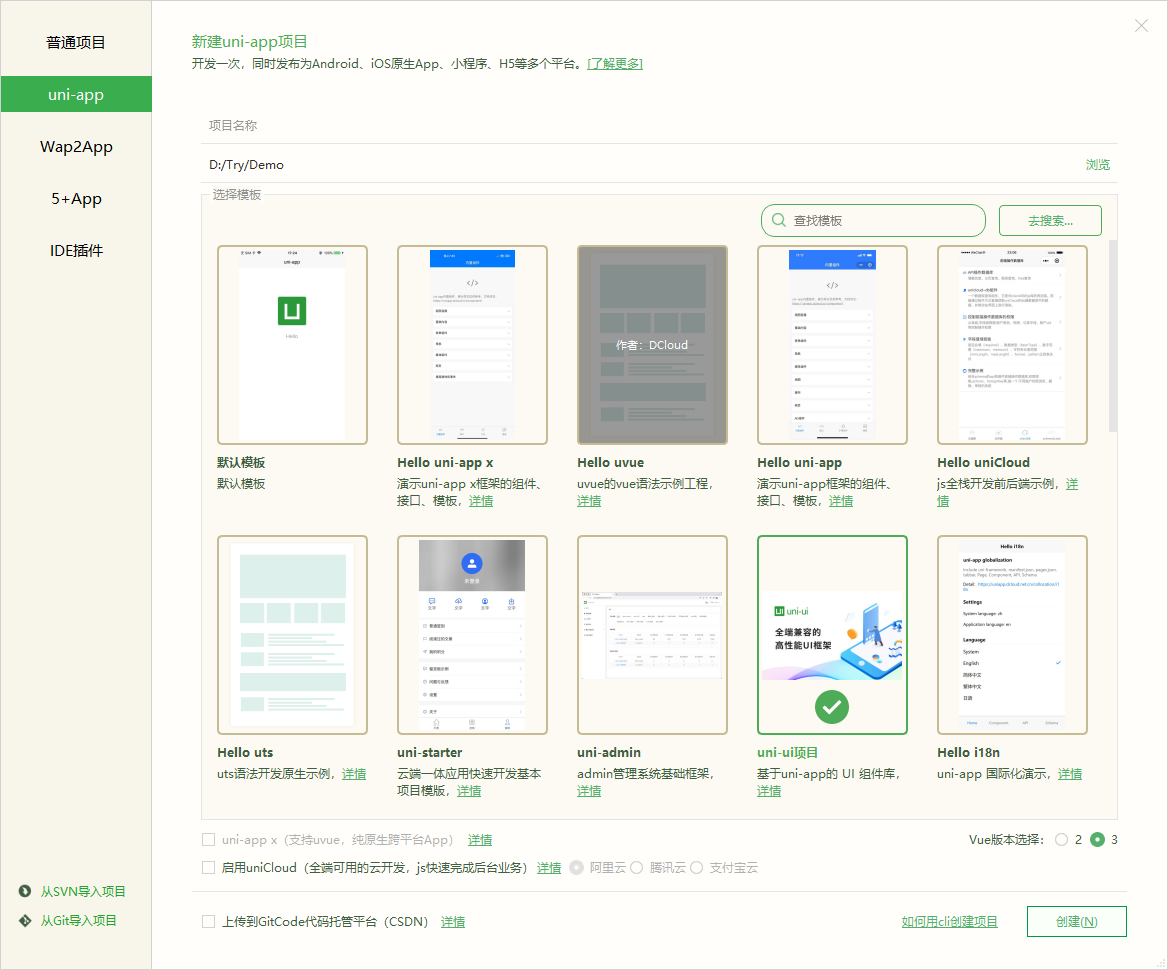
# 1. 文件 → 新建 → 项目
# 2. 选择 uni-app 项目
# 3. 模板选择 Vue3 版本
关键配置文件解析:
// manifest.json - 应用配置
{
  "name": "MyVue3App",
  "appid": "__UNI__XXXXXX",
  "description": "基于Vue3的uni-app应用",
  "versionName": "1.0.0",
  "versionCode": "100",
  "vueVersion": "3", // 必须指定为3
  "app-plus": {
    "nvueCompiler": "uni-app",
    "compilerVersion": 3
  },
  "mp-weixin": {
    "appid": "wx1234567890",
    "setting": {
      "urlCheck": false,
      "es6": true,
      "enhance": true,
      "postcss": true
    },
    "usingComponents": true
  }
}

// package.json - 依赖管理
{
  "name": "my-vue3-uniapp",
  "dependencies": {
    "@dcloudio/uni-app": "^3.0.0",
    "@dcloudio/uni-app-plus": "^3.0.0",
    "vue": "^3.2.0"
  },
  "devDependencies": {
    "@dcloudio/types": "^3.0.0",
    "@dcloudio/uni-automator": "^3.0.0",
    "@dcloudio/uni-cli-shared": "^3.0.0",
    "@dcloudio/vite-plugin-uni": "^3.0.0",
    "@vue/compiler-sfc": "^3.2.0"
  }
}
Vite 配置优化(vue.config.js 替代方案):
// vite.config.js (uni-app Vue3 使用 Vite 作为构建工具)
import { defineConfig } from 'vite'
import uni from '@dcloudio/vite-plugin-uni'

export default defineConfig({
  plugins: [uni()],

  // 优化配置
  resolve: {
    alias: {
      '@': resolve('src'),
      'components': resolve('src/components'),
      'pages': resolve('src/pages'),
      'static': resolve('src/static'),
      'store': resolve('src/store'),
      'utils': resolve('src/utils')
    }
  },

  // 构建优化
  build: {
    minify: 'terser',
    terserOptions: {
      compress: {
        drop_console: process.env.NODE_ENV === 'production',
        drop_debugger: true
      }
    },
    rollupOptions: {
      output: {
        manualChunks(id) {
          // 分包策略
          if (id.includes('node_modules')) {
            if (id.includes('vue')) {
              return 'vue-vendor'
            }
            if (id.includes('lodash') || id.includes('dayjs')) {
              return 'utils-vendor'
            }
            return 'vendor'
          }
        }
      }
    }
  },

  // 开发服务器配置
  server: {
    host: '0.0.0.0',
    port: 3000,
    open: true,
    proxy: {
      '/api': {
        target: 'http://localhost:8080',
        changeOrigin: true,
        rewrite: (path) => path.replace(/^\/api/, '')
      }
    }
  }
})
第二章:Vue3 Composition API 在 uni-app 中的深度应用
2.1 响应式系统在 uni-app 中的特殊处理
Vue3 的响应式系统基于 Proxy,但在 uni-app 的小程序环境中需要特别注意:
基础响应式使用:
<script setup>
import { ref, reactive, computed, watch, watchEffect } from 'vue'

// ref 用于基本类型和DOM引用
const count = ref(0)
const pageRef = ref(null) // 页面或组件引用

// reactive 用于复杂对象
const userInfo = reactive({
  name: '',
  age: 0,
  address: {
    city: '',
    province: ''
  }
})

// computed 计算属性
const userDisplay = computed(() => {
  return `${userInfo.name} (${userInfo.age}岁)`
})

// uni-app 中特殊的响应式处理
// 小程序端 Proxy 限制的注意事项
const safeReactive = (obj) => {
  // 对于需要在小程序端深度监听的对象
  return reactive({
    ...obj,
    // 添加标识,确保响应式
    __isReactive: true
  })
}

// 响应式数据在 uni-app 中的特殊场景
const systemInfo = ref({})

// 获取系统信息(异步API)
onLoad(() => {
  uni.getSystemInfo({
    success: (res) => {
      // 直接赋值会失去响应性
      // systemInfo = res ❌

      // 正确方式:更新ref的值
      systemInfo.value = res

      // 或使用Object.assign
      Object.assign(systemInfo.value, res)
    }
  })
})
</script>
2.2 组合式函数(Composables)的最佳实践
在 uni-app 中创建可复用的组合式函数:
// composables/useUniStorage.ts
import { ref, watch } from 'vue'

/**
 * uni-app 存储的 Composition API 封装
 */
export function useUniStorage<T>(key: string, defaultValue: T) {
  const data = ref<T>(defaultValue)

  // 初始化从存储读取
  try {
    const stored = uni.getStorageSync(key)
    if (stored !== null && stored !== undefined) {
      data.value = stored
    }
  } catch (error) {
    console.error(`读取存储 ${key} 失败:`, error)
  }

  // 监听变化自动存储
  watch(data, (newValue) => {
    try {
      uni.setStorageSync(key, newValue)
    } catch (error) {
      console.error(`存储 ${key} 失败:`, error)
    }
  }, { deep: true })

  // 清除存储的方法
  const clear = () => {
    try {
      uni.removeStorageSync(key)
      data.value = defaultValue
    } catch (error) {
      console.error(`清除存储 ${key} 失败:`, error)
    }
  }

  return {
    data,
    clear
  }
}

// composables/useRequest.ts
import { ref, onUnmounted } from 'vue'

interface RequestOptions {
  url: string
  method?: 'GET' | 'POST' | 'PUT' | 'DELETE'
  data?: any
  header?: Record<string, string>
  timeout?: number
}

/**
 * uni.request 的 Composition API 封装
 */
export function useRequest<T = any>(options: RequestOptions) {
  const loading = ref(false)
  const data = ref<T | null>(null)
  const error = ref<any>(null)
  const task = ref<UniApp.RequestTask | null>(null)

  const execute = async (overrideOptions?: Partial<RequestOptions>) => {
    loading.value = true
    error.value = null

    try {
      const requestOptions: UniApp.RequestOptions = {
        url: options.url,
        method: options.method || 'GET',
        data: options.data,
        header: {
          'Content-Type': 'application/json',
          ...options.header
        },
        timeout: options.timeout || 10000,
        ...overrideOptions
      }

      const result = await new Promise<UniApp.RequestSuccessCallbackResult>((resolve, reject) => {
        const requestTask = uni.request({
          ...requestOptions,
          success: resolve,
          fail: reject
        })
        task.value = requestTask
      })

      data.value = result.data as T
      return result.data as T
    } catch (err) {
      error.value = err
      throw err
    } finally {
      loading.value = false
    }
  }

  // 组件卸载时中止请求
  onUnmounted(() => {
    if (task.value) {
      task.value.abort()
    }
  })

  const abort = () => {
    if (task.value) {
      task.value.abort()
      loading.value = false
    }
  }

  return {
    loading,
    data,
    error,
    execute,
    abort,
    // 快捷方法
    get: (data?: any, overrideOptions?: Partial<RequestOptions>) =>
      execute({ method: 'GET', data, ...overrideOptions }),
    post: (data?: any, overrideOptions?: Partial<RequestOptions>) =>
      execute({ method: 'POST', data, ...overrideOptions })
  }
}
2.3 生命周期钩子的变化与适配
Vue3 生命周期与 uni-app 生命周期的融合:
<script setup>
import {
  onBeforeMount,
  onMounted,
  onBeforeUpdate,
  onUpdated,
  onBeforeUnmount,
  onUnmounted,
  onActivated,
  onDeactivated
} from 'vue'

// Vue3 生命周期
onBeforeMount(() => {
  console.log('Vue3: beforeMount')
})

onMounted(() => {
  console.log('Vue3: mounted')
  // uni-app 页面初始化逻辑
  initPage()
})

onBeforeUnmount(() => {
  console.log('Vue3: beforeUnmount')
  // 清理工作
  cleanup()
})

// uni-app 页面生命周期
// 需要在 pages.json 中配置的页面才能使用
// 注意:Vue3 setup 中需要特殊处理

// 方式1:使用 uni-app 的 hooks(如果框架提供了)
import { onLoad, onShow, onHide, onReady, onUnload } from '@dcloudio/uni-app'

// 方式2:使用 uni-app 生命周期钩子(兼容写法)
const onLoad = (options) => {
  console.log('uni-app: onLoad', options)
  // 获取页面参数
  const query = options

  // 场景值处理(小程序)
  if (query.scene) {
    handleScene(query.scene)
  }
}

const onShow = () => {
  console.log('uni-app: onShow')
  // 页面显示时的逻辑
  updatePageData()
}

const onHide = () => {
  console.log('uni-app: onHide')
  // 页面隐藏时的逻辑
  savePageState()
}

const onReady = () => {
  console.log('uni-app: onReady')
  // 页面初次渲染完成
  initDom()
}

const onUnload = () => {
  console.log('uni-app: onUnload')
  // 页面卸载
  destroyResources()
}

// 方式3:对于组件,使用 Vue3 生命周期
// 页面和组件的生命周期使用区别
</script>

<!-- 页面模板中可以直接使用 uni-app 生命周期 -->
<script>
// 传统 Options API 写法中可以直接定义
export default {
  // uni-app 页面生命周期
  onLoad(options) {
    console.log('页面加载:', options)
  },

  onShow() {
    console.log('页面显示')
  },

  // Vue3 Composition API 与 Options API 混合使用
  setup() {
    // Composition API 逻辑
    return {}
  }
}
</script>
第三章:uni-app 组件系统与 Vue3 的集成
3.1 uni-app 内置组件的 Vue3 写法
<template>
  <!-- 视图容器 -->
  <view class="container">
    <!-- 滚动视图 -->
    <scroll-view
      scroll-y
      :scroll-top="scrollTop"
      @scroll="handleScroll"
      class="scroll-container"
    >
      <!-- 条件渲染 -->
      <view v-if="showHeader" class="header">
        <text class="title">{{ pageTitle }}</text>
      </view>

      <!-- 列表渲染 -->
      <view
        v-for="(item, index) in listData"
        :key="item.id"
        class="list-item"
        @click="handleItemClick(item)"
      >
        <text>{{ index + 1 }}. {{ item.name }}</text>
        <text class="sub-text">{{ item.description }}</text>
      </view>

      <!-- 加载更多 -->
      <view v-if="loading" class="loading">
        <text>加载中...</text>
      </view>

      <view v-else-if="hasMore" class="load-more" @click="loadMore">
        <text>点击加载更多</text>
      </view>

      <view v-else class="no-more">
        <text>没有更多数据了</text>
      </view>
    </scroll-view>

    <!-- 表单组件 -->
    <form @submit="handleSubmit" @reset="handleReset">
      <view class="form-group">
        <text class="label">用户名:</text>
        <input
          v-model="formData.username"
          type="text"
          placeholder="请输入用户名"
          :focus="autoFocus"
          @input="handleInput"
          @focus="handleFocus"
          @blur="handleBlur"
        />
      </view>

      <view class="form-group">
        <text class="label">密码:</text>
        <input
          v-model="formData.password"
          :type="showPassword ? 'text' : 'password'"
          placeholder="请输入密码"
          @confirm="handleConfirm"
        />
        <text @click="togglePassword" class="toggle-password">
          {{ showPassword ? '隐藏' : '显示' }}
        </text>
      </view>

      <view class="form-group">
        <text class="label">性别:</text>
        <radio-group @change="handleGenderChange">
          <label v-for="gender in genderOptions" :key="gender.value">
            <radio :value="gender.value" :checked="formData.gender === gender.value" />
            <text>{{ gender.label }}</text>
          </label>
        </radio-group>
      </view>

      <!-- 按钮 -->
      <button
        type="primary"
        :loading="submitting"
        @click="handleSubmit"
        :disabled="!formValid"
      >
        提交
      </button>

      <button type="default" @click="handleReset">
        重置
      </button>
    </form>

    <!-- 弹窗组件 -->
    <uni-popup ref="popup" type="center">
      <view class="popup-content">
        <text class="popup-title">提示</text>
        <text class="popup-message">{{ popupMessage }}</text>
        <view class="popup-buttons">
          <button @click="closePopup">取消</button>
          <button type="primary" @click="confirmAction">确定</button>
        </view>
      </view>
    </uni-popup>
  </view>
</template>

<script setup>
import { ref, reactive, computed, nextTick } from 'vue'
import { onLoad, onReachBottom, onPullDownRefresh } from '@dcloudio/uni-app'

// 响应式数据
const scrollTop = ref(0)
const showHeader = ref(true)
const loading = ref(false)
const hasMore = ref(true)
const autoFocus = ref(false)
const showPassword = ref(false)
const submitting = ref(false)

// 复杂数据使用 reactive
const formData = reactive({
  username: '',
  password: '',
  gender: 'male'
})

const listData = ref([
  { id: 1, name: '项目1', description: '描述1' },
  { id: 2, name: '项目2', description: '描述2' }
])

const genderOptions = [
  { value: 'male', label: '男' },
  { value: 'female', label: '女' },
  { value: 'other', label: '其他' }
]

const popupMessage = ref('')

// 计算属性
const formValid = computed(() => {
  return formData.username.trim() && formData.password.trim()
})

const pageTitle = computed(() => {
  return `当前用户: ${formData.username || '未登录'}`
})

// 方法
const handleScroll = (e) => {
  scrollTop.value = e.detail.scrollTop
}

const handleItemClick = (item) => {
  uni.navigateTo({
    url: `/pages/detail/detail?id=${item.id}`
  })
}

const loadMore = async () => {
  if (loading.value || !hasMore.value) return

  loading.value = true
  try {
    // 模拟加载数据
    await new Promise(resolve => setTimeout(resolve, 1000))

    const newData = Array.from({ length: 5 }, (_, i) => ({
      id: listData.value.length + i + 1,
      name: `项目${listData.value.length + i + 1}`,
      description: `描述${listData.value.length + i + 1}`
    }))

    listData.value.push(...newData)

    // 模拟数据加载完毕
    if (listData.value.length >= 20) {
      hasMore.value = false
    }
  } finally {
    loading.value = false
  }
}

const togglePassword = () => {
  showPassword.value = !showPassword.value
}

const handleGenderChange = (e) => {
  formData.gender = e.detail.value
}

const handleSubmit = async () => {
  if (!formValid.value) {
    showPopup('请填写完整信息')
    return
  }

  submitting.value = true
  try {
    // 提交逻辑
    await submitForm(formData)
    showPopup('提交成功')
  } catch (error) {
    showPopup('提交失败: ' + error.message)
  } finally {
    submitting.value = false
  }
}

const handleReset = () => {
  Object.assign(formData, {
    username: '',
    password: '',
    gender: 'male'
  })
}

// uni-app 生命周期
onLoad((options) => {
  console.log('页面参数:', options)
  if (options.autoFocus) {
    autoFocus.value = true
  }
})

onReachBottom(() => {
  loadMore()
})

onPullDownRefresh(async () => {
  // 下拉刷新逻辑
  await refreshData()
  uni.stopPullDownRefresh()
})

// 弹窗相关
const popup = ref()

const showPopup = (message) => {
  popupMessage.value = message
  popup.value.open()
}

const closePopup = () => {
  popup.value.close()
}

const confirmAction = () => {
  // 确认操作
  popup.value.close()
}
</script>

<style lang="scss">
.container {
  padding: 20rpx;
}

.scroll-container {
  height: 500rpx;
}

.list-item {
  padding: 20rpx;
  border-bottom: 1rpx solid #eee;

  .sub-text {
    color: #666;
    font-size: 24rpx;
    display: block;
    margin-top: 10rpx;
  }
}

.form-group {
  margin-bottom: 30rpx;

  .label {
    display: block;
    margin-bottom: 10rpx;
    font-weight: bold;
  }

  input {
    border: 1rpx solid #ddd;
    padding: 15rpx;
    border-radius: 8rpx;
  }
}

.toggle-password {
  margin-left: 20rpx;
  color: #007aff;
}

.popup-content {
  background: white;
  padding: 40rpx;
  border-radius: 16rpx;

  .popup-title {
    font-size: 32rpx;
    font-weight: bold;
    display: block;
    margin-bottom: 20rpx;
  }

  .popup-buttons {
    display: flex;
    justify-content: flex-end;
    margin-top: 30rpx;

    button {
      margin-left: 20rpx;
    }
  }
}
</style>
3.2 自定义组件的 Vue3 写法
<!-- components/UserCard.vue -->
<template>
  <view
    class="user-card"
    :class="{ 'user-card--active': active }"
    @click="handleClick"
  >
    <!-- 插槽使用 -->
    <view v-if="$slots.header" class="user-card__header">
      <slot name="header"></slot>
    </view>

    <!-- 默认插槽 -->
    <view class="user-card__content">
      <!-- 作用域插槽 -->
      <slot :user="userInfo" :index="index">
        <!-- 默认内容 -->
        <image
          v-if="userInfo.avatar"
          :src="userInfo.avatar"
          class="user-card__avatar"
          mode="aspectFill"
        />
        <view v-else class="user-card__avatar-default">
          <text>{{ userInfo.name?.charAt(0) || '?' }}</text>
        </view>

        <view class="user-card__info">
          <text class="user-card__name">{{ userInfo.name || '未知用户' }}</text>
          <text v-if="userInfo.description" class="user-card__desc">
            {{ userInfo.description }}
          </text>
        </view>
      </slot>
    </view>

    <!-- 具名插槽 -->
    <view v-if="$slots.footer" class="user-card__footer">
      <slot name="footer"></slot>
    </view>

    <!-- 组件内按钮 -->
    <view v-if="showActions" class="user-card__actions">
      <button
        v-for="action in actions"
        :key="action.label"
        :type="action.type || 'default'"
        size="mini"
        @click.stop="handleAction(action)"
      >
        {{ action.label }}
      </button>
    </view>
  </view>
</template>

<script setup>
import { computed } from 'vue'

// 定义 Props
const props = defineProps({
  // 基础类型
  user: {
    type: Object,
    required: true,
    default: () => ({})
  },

  index: {
    type: Number,
    default: 0
  },

  active: {
    type: Boolean,
    default: false
  },

  showActions: {
    type: Boolean,
    default: true
  },

  // 验证函数
  actions: {
    type: Array,
    default: () => [],
    validator: (value) => {
      return value.every(item =>
        item && typeof item === 'object' && item.label
      )
    }
  }
})

// 定义 Emits
const emit = defineEmits({
  // 无验证函数
  click: null,

  // 有验证函数
  action: (payload) => {
    return payload && typeof payload === 'object'
  }
})

// 计算属性
const userInfo = computed(() => {
  // 合并默认值
  return {
    name: '匿名用户',
    avatar: '',
    description: '',
    ...props.user
  }
})

// 方法
const handleClick = () => {
  emit('click', {
    user: userInfo.value,
    index: props.index
  })
}

const handleAction = (action) => {
  emit('action', {
    action,
    user: userInfo.value,
    index: props.index
  })

  // 如果 action 有处理函数,则执行
  if (typeof action.handler === 'function') {
    action.handler(userInfo.value, props.index)
  }
}
</script>

<style lang="scss" scoped>
.user-card {
  background: #fff;
  border-radius: 16rpx;
  padding: 24rpx;
  margin: 20rpx;
  box-shadow: 0 2rpx 12rpx rgba(0, 0, 0, 0.1);

  &--active {
    border: 2rpx solid #007aff;
    background: #f0f8ff;
  }

  &__content {
    display: flex;
    align-items: center;
  }

  &__avatar {
    width: 100rpx;
    height: 100rpx;
    border-radius: 50%;
    margin-right: 20rpx;

    &-default {
      width: 100rpx;
      height: 100rpx;
      border-radius: 50%;
      background: #007aff;
      display: flex;
      align-items: center;
      justify-content: center;
      margin-right: 20rpx;

      text {
        color: white;
        font-size: 40rpx;
        font-weight: bold;
      }
    }
  }

  &__info {
    flex: 1;
  }

  &__name {
    display: block;
    font-size: 32rpx;
    font-weight: bold;
    margin-bottom: 8rpx;
  }

  &__desc {
    display: block;
    font-size: 26rpx;
    color: #666;
  }

  &__actions {
    margin-top: 20rpx;
    display: flex;
    justify-content: flex-end;
    gap: 10rpx;
  }
}
</script>
3.3 组件间通信的高级模式
<!-- 父组件使用示例 -->
<template>
  <view class="parent-container">
    <UserCard
      v-for="(user, index) in users"
      :key="user.id"
      :user="user"
      :index="index"
      :show-actions="true"
      :actions="cardActions"
      @click="handleCardClick"
      @action="handleCardAction"
    >
      <!-- 具名插槽内容 -->
      <template #header>
        <view class="card-header">
          <text class="badge">VIP {{ index + 1 }}</text>
        </view>
      </template>

      <!-- 作用域插槽内容 -->
      <template #default="{ user, index }">
        <view class="custom-content">
          <image :src="user.avatar" class="custom-avatar" />
          <view class="custom-info">
            <text class="custom-name">{{ user.name }}</text>
            <text class="custom-email">{{ user.email }}</text>
          </view>
        </view>
      </template>

      <!-- 底部插槽 -->
      <template #footer>
        <view class="card-footer">
          <text class="footer-text">最后活跃: {{ user.lastActive }}</text>
        </view>
      </template>
    </UserCard>

    <!-- 动态组件 -->
    <component
      :is="currentComponent"
      :key="componentKey"
      :config="componentConfig"
      @update="handleComponentUpdate"
    />

    <!-- Teleport 使用(H5端支持) -->
    <Teleport to="body" v-if="showModal">
      <view class="modal-overlay">
        <view class="modal-content">
          <slot name="modal"></slot>
        </view>
      </view>
    </Teleport>
  </view>
</template>

<script setup>
import { ref, reactive, provide, markRaw } from 'vue'
import UserCard from '@/components/UserCard.vue'
import UserDetail from '@/components/UserDetail.vue'
import UserEdit from '@/components/UserEdit.vue'

// 响应式数据
const users = ref([
  { id: 1, name: '张三', avatar: '/static/avatar1.jpg', email: 'zhangsan@example.com' },
  { id: 2, name: '李四', avatar: '/static/avatar2.jpg', email: 'lisi@example.com' }
])

const currentComponent = ref(null)
const componentKey = ref(0)
const componentConfig = reactive({})
const showModal = ref(false)

// 卡片操作配置
const cardActions = ref([
  { label: '编辑', type: 'primary', handler: editUser },
  { label: '删除', type: 'warn', handler: deleteUser }
])

// 使用 provide/inject 进行深层组件通信
provide('userContext', {
  users,
  refreshUsers: async () => {
    // 刷新用户数据
    users.value = await fetchUsers()
  },
  updateUser: (id, data) => {
    const index = users.value.findIndex(u => u.id === id)
    if (index !== -1) {
      users.value[index] = { ...users.value[index], ...data }
    }
  }
})

// 方法
const handleCardClick = (payload) => {
  console.log('卡片点击:', payload)
  // 跳转到详情页
  uni.navigateTo({
    url: `/pages/user/detail?id=${payload.user.id}`
  })
}

const handleCardAction = (payload) => {
  console.log('卡片操作:', payload)

  switch (payload.action.label) {
    case '编辑':
      openEditComponent(payload.user)
      break
    case '删除':
      confirmDelete(payload.user)
      break
  }
}

const openEditComponent = (user) => {
  currentComponent.value = markRaw(UserEdit)
  componentConfig.user = user
  componentKey.value++ // 强制重新渲染
}

const editUser = (user) => {
  console.log('编辑用户:', user)
  // 编辑逻辑
}

const deleteUser = (user) => {
  uni.showModal({
    title: '确认删除',
    content: `确定删除用户 ${user.name} 吗?`,
    success: (res) => {
      if (res.confirm) {
        users.value = users.value.filter(u => u.id !== user.id)
      }
    }
  })
}

const handleComponentUpdate = (data) => {
  console.log('组件更新:', data)
  // 处理组件更新逻辑
}

// 动态加载组件(代码分割)
const loadDynamicComponent = async () => {
  if (process.env.UNI_PLATFORM === 'h5') {
    // H5 端可以使用动态导入
    const module = await import('@/components/DynamicComponent.vue')
    currentComponent.value = markRaw(module.default)
  } else {
    // 小程序端需要提前导入
    import('@/components/DynamicComponent.vue').then(module => {
      currentComponent.value = markRaw(module.default)
    })
  }
}
</script>

<style lang="scss">
.parent-container {
  padding: 20rpx;
}

.card-header {
  .badge {
    background: #ff9500;
    color: white;
    padding: 4rpx 12rpx;
    border-radius: 20rpx;
    font-size: 24rpx;
  }
}

.custom-content {
  display: flex;
  align-items: center;

  .custom-avatar {
    width: 80rpx;
    height: 80rpx;
    border-radius: 50%;
    margin-right: 20rpx;
  }

  .custom-info {
    flex: 1;

    .custom-name {
      display: block;
      font-size: 28rpx;
      font-weight: bold;
    }

    .custom-email {
      display: block;
      font-size: 24rpx;
      color: #666;
    }
  }
}

.card-footer {
  border-top: 1rpx solid #eee;
  padding-top: 16rpx;
  margin-top: 16rpx;

  .footer-text {
    font-size: 22rpx;
    color: #999;
  }
}

.modal-overlay {
  position: fixed;
  top: 0;
  left: 0;
  right: 0;
  bottom: 0;
  background: rgba(0, 0, 0, 0.5);
  display: flex;
  align-items: center;
  justify-content: center;
  z-index: 9999;

  .modal-content {
    background: white;
    border-radius: 20rpx;
    padding: 40rpx;
    max-width: 600rpx;
    max-height: 80vh;
    overflow: auto;
  }
}
</style>
第四章:状态管理与数据持久化
4.1 Pinia 在 uni-app 中的完整实践
// store/index.ts - Pinia 主文件
import { createPinia } from 'pinia'
import { createPersistedState } from 'pinia-plugin-persistedstate'
import type { App } from 'vue'

const pinia = createPinia()

// 持久化存储配置
pinia.use(createPersistedState({
  storage: {
    getItem(key: string): string | null {
      try {
        return uni.getStorageSync(key)
      } catch (error) {
        console.error('读取存储失败:', error)
        return null
      }
    },
    setItem(key: string, value: string) {
      try {
        uni.setStorageSync(key, value)
      } catch (error) {
        console.error('设置存储失败:', error)
      }
    },
    removeItem(key: string) {
      try {
        uni.removeStorageSync(key)
      } catch (error) {
        console.error('删除存储失败:', error)
      }
    }
  },

  // 序列化配置
  serializer: {
    serialize: JSON.stringify,
    deserialize: JSON.parse
  },

  // 全局配置
  key: (id) => `__pinia__${id}`,
  auto: false // 不自动持久化,需要显式声明
}))

export function setupStore(app: App) {
  app.use(pinia)
}

export { pinia }

// store/modules/user.ts
import { defineStore } from 'pinia'
import { ref, computed } from 'vue'
import type { UserInfo, LoginParams } from '@/types/user'

export const useUserStore = defineStore('user', () => {
  // State
  const token = ref<string>('')
  const userInfo = ref<UserInfo | null>(null)
  const permissions = ref<string[]>([])
  const loginLoading = ref(false)

  // Getters
  const isLogin = computed(() => !!token.value)
  const hasPermission = computed(() => (permission: string) => {
    return permissions.value.includes(permission)
  })
  const userRole = computed(() => userInfo.value?.role || 'guest')

  // Actions
  const login = async (params: LoginParams) => {
    loginLoading.value = true
    try {
      // 调用登录接口
      const response = await uni.request({
        url: '/api/auth/login',
        method: 'POST',
        data: params
      })

      const { token: authToken, user, permissions: userPermissions } = response.data

      // 更新状态
      token.value = authToken
      userInfo.value = user
      permissions.value = userPermissions

      // 存储到本地
      uni.setStorageSync('token', authToken)

      return { success: true, data: user }
    } catch (error) {
      console.error('登录失败:', error)
      throw error
    } finally {
      loginLoading.value = false
    }
  }

  const logout = () => {
    token.value = ''
    userInfo.value = null
    permissions.value = []

    // 清除本地存储
    uni.removeStorageSync('token')
    uni.removeStorageSync('userInfo')

    // 跳转到登录页
    uni.reLaunch({
      url: '/pages/login/login'
    })
  }

  const updateUserInfo = async (info: Partial<UserInfo>) => {
    if (!userInfo.value) return

    try {
      const response = await uni.request({
        url: '/api/user/update',
        method: 'PUT',
        data: info,
        header: {
          'Authorization': `Bearer ${token.value}`
        }
      })

      userInfo.value = { ...userInfo.value, ...info }
      return response.data
    } catch (error) {
      console.error('更新用户信息失败:', error)
      throw error
    }
  }

  const checkAuth = async () => {
    const localToken = uni.getStorageSync('token')
    if (!localToken) return false

    try {
      const response = await uni.request({
        url: '/api/auth/check',
        method: 'GET',
        header: {
          'Authorization': `Bearer ${localToken}`
        }
      })

      if (response.data.valid) {
        token.value = localToken
        userInfo.value = response.data.user
        permissions.value = response.data.permissions
        return true
      }
    } catch (error) {
      console.error('验证token失败:', error)
    }

    return false
  }

  return {
    // State
    token,
    userInfo,
    permissions,
    loginLoading,

    // Getters
    isLogin,
    hasPermission,
    userRole,

    // Actions
    login,
    logout,
    updateUserInfo,
    checkAuth
  }
}, {
  // 持久化配置
  persist: {
    key: 'user-store',
    paths: ['token', 'userInfo', 'permissions'],
    storage: {
      getItem(key) {
        return uni.getStorageSync(key)
      },
      setItem(key, value) {
        uni.setStorageSync(key, value)
      }
    }
  }
})

// store/modules/app.ts
import { defineStore } from 'pinia'
import { ref, computed } from 'vue'

export const useAppStore = defineStore('app', () => {
  // State
  const theme = ref<'light' | 'dark'>('light')
  const language = ref('zh-CN')
  const systemInfo = ref<UniApp.GetSystemInfoResult | null>(null)
  const networkType = ref<UniApp.NetworkType | null>(null)
  const appVersion = ref('1.0.0')
  const showTabBar = ref(true)
  const currentRoute = ref('')

  // Getters
  const isDarkMode = computed(() => theme.value === 'dark')
  const isWideScreen = computed(() => {
    if (!systemInfo.value) return false
    return systemInfo.value.screenWidth > 768
  })
  const isOnline = computed(() => networkType.value !== 'none')

  // Actions
  const initApp = async () => {
    // 获取系统信息
    systemInfo.value = uni.getSystemInfoSync()

    // 获取网络状态
    networkType.value = (await uni.getNetworkType()).networkType

    // 监听网络变化
    uni.onNetworkStatusChange((res) => {
      networkType.value = res.networkType
    })

    // 监听主题变化(H5)
    if (process.env.UNI_PLATFORM === 'h5') {
      const darkModeMedia = window.matchMedia('(prefers-color-scheme: dark)')
      darkModeMedia.addListener((e) => {
        theme.value = e.matches ? 'dark' : 'light'
      })
    }

    // 获取版本信息
    const accountInfo = uni.getAccountInfoSync()
    appVersion.value = accountInfo.miniProgram?.version || '1.0.0'
  }

  const toggleTheme = () => {
    theme.value = theme.value === 'light' ? 'dark' : 'light'
    updateThemeStyle()
  }

  const updateThemeStyle = () => {
    if (theme.value === 'dark') {
      uni.setTabBarStyle({
        backgroundColor: '#1a1a1a',
        color: '#ffffff',
        selectedColor: '#007aff'
      })
    } else {
      uni.setTabBarStyle({
        backgroundColor: '#ffffff',
        color: '#000000',
        selectedColor: '#007aff'
      })
    }
  }

  const setLanguage = (lang: string) => {
    language.value = lang
    uni.setLocale(lang)
  }

  const hideTabBar = () => {
    showTabBar.value = false
    uni.hideTabBar()
  }

  const showTabBarWithAnimation = () => {
    showTabBar.value = true
    uni.showTabBar({
      animation: true
    })
  }

  const updateRoute = (route: string) => {
    currentRoute.value = route
  }

  return {
    // State
    theme,
    language,
    systemInfo,
    networkType,
    appVersion,
    showTabBar,
    currentRoute,

    // Getters
    isDarkMode,
    isWideScreen,
    isOnline,

    // Actions
    initApp,
    toggleTheme,
    setLanguage,
    hideTabBar,
    showTabBarWithAnimation,
    updateRoute
  }
}, {
  persist: {
    key: 'app-store',
    paths: ['theme', 'language'],
    storage: {
      getItem(key) {
        return uni.getStorageSync(key)
      },
      setItem(key, value) {
        uni.setStorageSync(key, value)
      }
    }
  }
})
4.2 全局状态与本地状态的协同
<!-- 在组件中使用状态管理 -->
<template>
  <view class="user-profile">
    <!-- 用户信息展示 -->
    <view v-if="userStore.isLogin" class="profile-card">
      <image :src="userStore.userInfo?.avatar" class="avatar" />
      <view class="info">
        <text class="name">{{ userStore.userInfo?.name }}</text>
        <text class="role">{{ userStore.userRole }}</text>
      </view>
      <button @click="handleLogout" size="mini">退出登录</button>
    </view>

    <!-- 未登录状态 -->
    <view v-else class="login-prompt">
      <text>请先登录</text>
      <button @click="goToLogin" type="primary">立即登录</button>
    </view>

    <!-- 应用设置 -->
    <view class="settings">
      <view class="setting-item">
        <text>主题模式</text>
        <switch
          :checked="appStore.isDarkMode"
          @change="toggleTheme"
          color="#007aff"
        />
      </view>

      <view class="setting-item">
        <text>语言设置</text>
        <picker
          :value="languageIndex"
          :range="languages"
          @change="changeLanguage"
        >
          <view class="picker">
            {{ appStore.language }}
          </view>
        </picker>
      </view>

      <view class="setting-item">
        <text>网络状态</text>
        <text :class="['network-status', appStore.isOnline ? 'online' : 'offline']">
          {{ appStore.isOnline ? '在线' : '离线' }}
        </text>
      </view>

      <view class="setting-item">
        <text>应用版本</text>
        <text class="version">{{ appStore.appVersion }}</text>
      </view>
    </view>

    <!-- 权限测试 -->
    <view class="permission-test">
      <text class="title">权限测试</text>
      <button
        v-if="userStore.hasPermission('user:edit')"
        @click="editProfile"
      >
        编辑资料
      </button>
      <button
        v-if="userStore.hasPermission('admin:dashboard')"
        type="warn"
        @click="goToAdmin"
      >
        管理后台
      </button>
    </view>
  </view>
</template>

<script setup>
import { ref, computed, onMounted } from 'vue'
import { storeToRefs } from 'pinia'
import { useUserStore } from '@/store/modules/user'
import { useAppStore } from '@/store/modules/app'

// 使用 store
const userStore = useUserStore()
const appStore = useAppStore()

// 使用 storeToRefs 保持响应性
const { isLogin, userInfo, userRole } = storeToRefs(userStore)
const { theme, language, isOnline } = storeToRefs(appStore)

// 本地状态
const languages = ref(['zh-CN', 'en-US', 'ja-JP'])
const languageIndex = computed(() =>
  languages.value.findIndex(lang => lang === language.value)
)

// 生命周期
onMounted(() => {
  // 检查登录状态
  userStore.checkAuth()

  // 初始化应用
  appStore.initApp()
})

// 方法
const handleLogout = () => {
  uni.showModal({
    title: '确认退出',
    content: '确定要退出登录吗?',
    success: (res) => {
      if (res.confirm) {
        userStore.logout()
      }
    }
  })
}

const goToLogin = () => {
  uni.navigateTo({
    url: '/pages/login/login'
  })
}

const toggleTheme = () => {
  appStore.toggleTheme()
}

const changeLanguage = (e) => {
  const index = e.detail.value
  appStore.setLanguage(languages.value[index])
}

const editProfile = () => {
  uni.navigateTo({
    url: '/pages/user/edit'
  })
}

const goToAdmin = () => {
  uni.navigateTo({
    url: '/pages/admin/dashboard'
  })
}
</script>

<style lang="scss" scoped>
.user-profile {
  padding: 30rpx;
}

.profile-card {
  display: flex;
  align-items: center;
  background: linear-gradient(135deg, #667eea 0%, #764ba2 100%);
  padding: 40rpx;
  border-radius: 20rpx;
  margin-bottom: 40rpx;
  color: white;

  .avatar {
    width: 120rpx;
    height: 120rpx;
    border-radius: 50%;
    border: 4rpx solid white;
    margin-right: 30rpx;
  }

  .info {
    flex: 1;

    .name {
      display: block;
      font-size: 36rpx;
      font-weight: bold;
      margin-bottom: 10rpx;
    }

    .role {
      display: block;
      font-size: 28rpx;
      opacity: 0.9;
    }
  }

  button {
    background: rgba(255, 255, 255, 0.2);
    color: white;
    border: 2rpx solid white;
  }
}

.login-prompt {
  text-align: center;
  padding: 60rpx 30rpx;
  background: #f5f5f5;
  border-radius: 20rpx;
  margin-bottom: 40rpx;

  text {
    display: block;
    font-size: 32rpx;
    color: #666;
    margin-bottom: 30rpx;
  }
}

.settings {
  background: white;
  border-radius: 20rpx;
  padding: 0 30rpx;
  margin-bottom: 40rpx;

  .setting-item {
    display: flex;
    justify-content: space-between;
    align-items: center;
    padding: 30rpx 0;
    border-bottom: 1rpx solid #eee;

    &:last-child {
      border-bottom: none;
    }

    text {
      font-size: 32rpx;
      color: #333;
    }

    .picker {
      color: #007aff;
      font-size: 32rpx;
    }

    .network-status {
      font-size: 28rpx;
      padding: 8rpx 16rpx;
      border-radius: 20rpx;

      &.online {
        background: #e8f5e9;
        color: #4caf50;
      }

      &.offline {
        background: #ffebee;
        color: #f44336;
      }
    }

    .version {
      color: #666;
      font-size: 28rpx;
    }
  }
}

.permission-test {
  background: white;
  border-radius: 20rpx;
  padding: 30rpx;

  .title {
    display: block;
    font-size: 32rpx;
    font-weight: bold;
    margin-bottom: 30rpx;
    color: #333;
  }

  button {
    margin-bottom: 20rpx;

    &:last-child {
      margin-bottom: 0;
    }
  }
}
</style>
第五章:性能优化与最佳实践
5.1 编译时与运行时优化
Vite 配置优化:
// vite.config.js - 深度优化配置
import { defineConfig } from 'vite'
import uni from '@dcloudio/vite-plugin-uni'
import { visualizer } from 'rollup-plugin-visualizer'
import viteCompression from 'vite-plugin-compression'

export default defineConfig(({ mode }) => {
  const isProduction = mode === 'production'

  return {
    plugins: [
      uni(),

      // 包分析工具(开发环境使用)
      !isProduction && visualizer({
        open: true,
        gzipSize: true,
        brotliSize: true
      }),

      // Gzip 压缩
      isProduction && viteCompression({
        verbose: true,
        disable: false,
        threshold: 10240,
        algorithm: 'gzip',
        ext: '.gz'
      })
    ],

    // 构建配置
    build: {
      target: 'es2015',
      minify: isProduction ? 'terser' : false,
      sourcemap: !isProduction,

      // 分包优化
      rollupOptions: {
        output: {
          manualChunks: {
            // 基础库分包
            'vue-vendor': ['vue', 'pinia', 'vue-router'],
            'uni-vendor': ['@dcloudio/uni-app'],
            'utils-vendor': ['lodash-es', 'dayjs', 'axios'],
            'ui-vendor': ['@dcloudio/uni-ui'],

            // 按路由分包
            'pages-home': ['src/pages/index/index.vue'],
            'pages-user': ['src/pages/user/**/*.vue'],
            'pages-admin': ['src/pages/admin/**/*.vue']
          },

          // 文件名哈希策略
          chunkFileNames: 'assets/js/[name]-[hash].js',
          entryFileNames: 'assets/js/[name]-[hash].js',
          assetFileNames: 'assets/[ext]/[name]-[hash].[ext]'
        }
      },

      // terser 配置
      terserOptions: {
        compress: {
          drop_console: isProduction,
          drop_debugger: isProduction,
          pure_funcs: isProduction ? ['console.log'] : []
        },
        mangle: {
          safari10: true
        }
      }
    },

    // 开发服务器优化
    server: {
      hmr: {
        overlay: true
      },
      fs: {
        strict: false,
        allow: ['..']
      }
    },

    // 依赖优化
    optimizeDeps: {
      include: [
        'vue',
        'pinia',
        '@dcloudio/uni-app',
        '@dcloudio/uni-ui'
      ],
      exclude: ['@dcloudio/uni-app-plus']
    },

    // 解析配置
    resolve: {
      alias: {
        '@': '/src',
        'vue': 'vue/dist/vue.esm-bundler.js'
      }
    }
  }
})
代码分割与懒加载:
<!-- 路由级懒加载配置 -->
<script setup>
import { defineAsyncComponent, shallowRef, onMounted } from 'vue'

// 组件级懒加载
const LazyComponent = defineAsyncComponent(() =>
  import('@/components/LazyComponent.vue')
)

// 带加载状态的异步组件
const HeavyComponent = defineAsyncComponent({
  loader: () => import('@/components/HeavyComponent.vue'),
  loadingComponent: () => import('@/components/LoadingSpinner.vue'),
  errorComponent: () => import('@/components/ErrorComponent.vue'),
  delay: 200,
  timeout: 3000,
  suspensible: false
})

// 条件加载
const showHeavyComponent = ref(false)

// 图片懒加载指令
const vLazyLoad = {
  mounted(el, binding) {
    const observer = new IntersectionObserver((entries) => {
      entries.forEach(entry => {
        if (entry.isIntersecting) {
          const img = el.querySelector('img')
          if (img) {
            img.src = binding.value
            observer.unobserve(el)
          }
        }
      })
    })

    observer.observe(el)
  }
}
</script>

<template>
  <!-- 异步组件使用 -->
  <Suspense>
    <template #default>
      <LazyComponent v-if="showLazy" />
    </template>
    <template #fallback>
      <view class="loading">加载中...</view>
    </template>
  </Suspense>

  <!-- 条件渲染优化 -->
  <view v-if="!showHeavyComponent">
    <button @click="showHeavyComponent = true">加载重型组件</button>
  </view>
  <HeavyComponent v-else />

  <!-- 图片懒加载 -->
  <view v-lazy-load="imageUrl" class="image-container">
    <image class="placeholder" src="/static/placeholder.jpg" />
  </view>
</template>
5.2 内存管理与性能监控
// utils/performance.js - 性能监控工具
class PerformanceMonitor {
  constructor() {
    this.metrics = new Map()
    this.startTime = Date.now()
    this.init()
  }

  init() {
    // 监听页面性能
    if (typeof uni !== 'undefined') {
      this.setupUniPerformance()
    }

    // 内存警告监听(小程序)
    if (uni.onMemoryWarning) {
      uni.onMemoryWarning(this.handleMemoryWarning.bind(this))
    }

    // 页面隐藏/显示监听
    uni.onAppHide(this.onAppHide.bind(this))
    uni.onAppShow(this.onAppShow.bind(this))
  }

  setupUniPerformance() {
    // 关键生命周期耗时
    const lifecycles = ['onLoad', 'onShow', 'onReady', 'onHide']

    lifecycles.forEach(lifecycle => {
      const original = Page.prototype[lifecycle]
      if (original) {
        Page.prototype[lifecycle] = function(...args) {
          const start = performance.now()
          const result = original.apply(this, args)
          const end = performance.now()

          console.log(`${lifecycle} 耗时: ${(end - start).toFixed(2)}ms`)

          // 上报性能数据
          this.reportPerformance(lifecycle, end - start)

          return result
        }
      }
    })
  }

  handleMemoryWarning(res) {
    console.warn('内存警告:', res)

    // 清理缓存
    this.cleanupMemory()

    // 上报内存警告
    this.reportMemoryWarning(res)
  }

  cleanupMemory() {
    // 清理不需要的缓存
    const caches = [
      'imageCache',
      'dataCache',
      'componentCache'
    ]

    caches.forEach(cacheKey => {
      try {
        uni.removeStorageSync(cacheKey)
      } catch (error) {
        console.error(`清理缓存 ${cacheKey} 失败:`, error)
      }
    })

    // 触发垃圾回收提示
    if (uni.triggerGC) {
      uni.triggerGC()
    }
  }

  onAppHide() {
    this.appHideTime = Date.now()

    // 记录页面停留时间
    const stayTime = Date.now() - this.pageEnterTime
    this.reportPageStayTime(stayTime)
  }

  onAppShow() {
    this.pageEnterTime = Date.now()
  }

  // 性能数据上报
  reportPerformance(event, duration) {
    const data = {
      event,
      duration,
      timestamp: Date.now(),
      platform: process.env.UNI_PLATFORM,
      url: this.getCurrentRoute()
    }

    // 发送到监控服务器
    this.sendToAnalytics('performance', data)
  }

  // 内存警告上报
  reportMemoryWarning(warning) {
    const data = {
      type: 'memory_warning',
      level: warning.level,
      timestamp: Date.now(),
      platform: process.env.UNI_PLATFORM
    }

    this.sendToAnalytics('memory', data)
  }

  // 页面停留时间上报
  reportPageStayTime(stayTime) {
    const data = {
      type: 'page_stay',
      duration: stayTime,
      page: this.getCurrentRoute(),
      timestamp: Date.now()
    }

    this.sendToAnalytics('page', data)
  }

  sendToAnalytics(type, data) {
    // 实际项目中应该发送到监控服务器
    console.log(`[Analytics ${type}]:`, data)

    // 使用 request 发送
    uni.request({
      url: 'https://analytics.example.com/track',
      method: 'POST',
      data: {
        type,
        data,
        appId: '__UNI__XXXXXX'
      },
      header: {
        'Content-Type': 'application/json'
      }
    })
  }

  getCurrentRoute() {
    const pages = getCurrentPages()
    return pages.length > 0 ? pages[pages.length - 1].route : ''
  }

  // 静态方法:开始计时
  static startMark(name) {
    performance.mark(`start-${name}`)
  }

  // 静态方法:结束计时
  static endMark(name) {
    performance.mark(`end-${name}`)
    performance.measure(name, `start-${name}`, `end-${name}`)

    const measures = performance.getEntriesByName(name)
    if (measures.length > 0) {
      return measures[0].duration
    }
    return 0
  }
}

// 全局性能监控实例
export const performanceMonitor = new PerformanceMonitor()

// 性能优化工具函数
export const performanceUtils = {
  // 防抖函数
  debounce(func, wait, immediate = false) {
    let timeout
    return function executedFunction(...args) {
      const context = this
      const later = function() {
        timeout = null
        if (!immediate) func.apply(context, args)
      }
      const callNow = immediate && !timeout
      clearTimeout(timeout)
      timeout = setTimeout(later, wait)
      if (callNow) func.apply(context, args)
    }
  },

  // 节流函数
  throttle(func, limit) {
    let inThrottle
    return function(...args) {
      const context = this
      if (!inThrottle) {
        func.apply(context, args)
        inThrottle = true
        setTimeout(() => inThrottle = false, limit)
      }
    }
  },

  // 批量更新优化
  batchUpdate(callback) {
    // 使用 nextTick 批量更新
    return new Promise(resolve => {
      this.$nextTick(() => {
        callback()
        resolve()
      })
    })
  },

  // 图片预加载
  preloadImages(urls) {
    return Promise.all(
      urls.map(url => {
        return new Promise((resolve, reject) => {
          const img = new Image()
          img.onload = resolve
          img.onerror = reject
          img.src = url
        })
      })
    )
  },

  // 清理无用数据
  cleanupUnusedData(store, maxAge = 7 * 24 * 60 * 60 * 1000) {
    const now = Date.now()
    const keys = uni.getStorageInfoSync().keys

    keys.forEach(key => {
      try {
        const item = uni.getStorageSync(key)
        if (item && item._timestamp && now - item._timestamp > maxAge) {
          uni.removeStorageSync(key)
        }
      } catch (error) {
        console.error(`清理数据 ${key} 失败:`, error)
      }
    })
  }
}
5.3 渲染优化策略
<!-- 列表渲染优化示例 -->
<template>
  <!-- 虚拟列表容器 -->
  <scroll-view
    scroll-y
    class="virtual-list-container"
    :style="{ height: containerHeight + 'px' }"
    @scroll="handleScroll"
    :scroll-top="scrollTop"
  >
    <!-- 占位元素,撑开滚动区域 -->
    <view :style="{ height: totalHeight + 'px' }"></view>

    <!-- 可视区域内容 -->
    <view
      class="visible-items"
      :style="{ transform: `translateY(${offsetY}px)` }"
    >
      <!-- 使用 v-memo 优化重复渲染 -->
      <view
        v-for="item in visibleItems"
        :key="item.id"
        v-memo="[item.id, item.status]"
        class="list-item"
        :class="{ 'list-item--active': item.active }"
      >
        <UserCard
          :user="item"
          @click="selectItem(item)"
        />
      </view>
    </view>
  </scroll-view>

  <!-- 分页加载指示器 -->
  <view v-if="loading" class="loading-indicator">
    <uni-load-more status="loading"></uni-load-more>
  </view>
</template>

<script setup>
import { ref, computed, watchEffect, shallowRef } from 'vue'
import { useVirtualList } from '@/composables/useVirtualList'

// 使用虚拟列表 Hook
const {
  containerRef,
  visibleItems,
  totalHeight,
  offsetY,
  handleScroll
} = useVirtualList({
  data: listData,
  itemHeight: 100,
  containerHeight: 500,
  buffer: 5
})

// 大数据量列表
const listData = shallowRef([])
const loading = ref(false)
const page = ref(1)
const hasMore = ref(true)

// 分页加载数据
const loadData = async () => {
  if (loading.value || !hasMore.value) return

  loading.value = true
  try {
    const response = await uni.request({
      url: '/api/data/list',
      data: {
        page: page.value,
        pageSize: 20
      }
    })

    const newData = response.data.items
    if (newData.length > 0) {
      listData.value = [...listData.value, ...newData]
      page.value++
    } else {
      hasMore.value = false
    }
  } finally {
    loading.value = false
  }
}

// 初始加载
onMounted(() => {
  loadData()
})

// 滚动到底部加载更多
const handleScrollToBottom = () => {
  if (hasMore.value) {
    loadData()
  }
}

// 选中项目
const selectedItems = ref(new Set())

const selectItem = (item) => {
  if (selectedItems.value.has(item.id)) {
    selectedItems.value.delete(item.id)
  } else {
    selectedItems.value.add(item.id)
  }
}

// 使用计算属性优化渲染
const activeItemCount = computed(() => {
  return listData.value.filter(item => item.active).length
})

const selectedItemCount = computed(() => {
  return selectedItems.value.size
})

// 使用 watchEffect 处理副作用
watchEffect(() => {
  // 当选中项目变化时更新 UI
  if (selectedItemCount.value > 0) {
    uni.setNavigationBarTitle({
      title: `已选中 ${selectedItemCount.value} 项`
    })
  }
})

// 性能监控
const renderCount = ref(0)

onUpdated(() => {
  renderCount.value++

  if (renderCount.value % 10 === 0) {
    console.log(`组件已渲染 ${renderCount.value} 次`)
  }
})
</script>

<style lang="scss">
.virtual-list-container {
  position: relative;
  overflow: hidden;
}

.visible-items {
  position: absolute;
  top: 0;
  left: 0;
  right: 0;
  will-change: transform; /* 启用GPU加速 */
}

.list-item {
  transition: all 0.3s ease;

  &--active {
    background-color: #e3f2fd;
    border-left: 4rpx solid #2196f3;
  }
}

.loading-indicator {
  text-align: center;
  padding: 20rpx;
  background: rgba(255, 255, 255, 0.9);
  position: sticky;
  bottom: 0;
}
</style>
第六章:跨平台兼容性处理
6.1 平台特性检测与条件编译
// utils/platform.js - 平台检测工具
export const platformUtils = {
  // 获取当前平台
  getPlatform() {
    return process.env.UNI_PLATFORM
  },

  // 判断是否为特定平台
  isH5: process.env.UNI_PLATFORM === 'h5',
  isWeapp: process.env.UNI_PLATFORM === 'mp-weixin',
  isAlipay: process.env.UNI_PLATFORM === 'mp-alipay',
  isBaidu: process.env.UNI_PLATFORM === 'mp-baidu',
  isToutiao: process.env.UNI_PLATFORM === 'mp-toutiao',
  isQQ: process.env.UNI_PLATFORM === 'mp-qq',
  isApp: process.env.UNI_PLATFORM === 'app',
  isIos: process.env.UNI_PLATFORM === 'app' && uni.getSystemInfoSync().platform === 'ios',
  isAndroid: process.env.UNI_PLATFORM === 'app' && uni.getSystemInfoSync().platform === 'android',

  // 条件编译执行
  platformExecute(platformHandlers) {
    const platform = this.getPlatform()
    const handler = platformHandlers[platform]

    if (handler && typeof handler === 'function') {
      return handler()
    }

    // 默认处理
    if (platformHandlers.default && typeof platformHandlers.default === 'function') {
      return platformHandlers.default()
    }

    return null
  },

  // 平台特定的样式类
  getPlatformClass(baseClass) {
    const platform = this.getPlatform()
    return `${baseClass} ${baseClass}--${platform}`
  },

  // API 兼容性包装
  async compatibleRequest(options) {
    return this.platformExecute({
      'h5': async () => {
        // H5 端使用 fetch
        const response = await fetch(options.url, {
          method: options.method,
          headers: options.header,
          body: options.data ? JSON.stringify(options.data) : null
        })
        return response.json()
      },

      'mp-weixin': async () => {
        // 小程序端使用 uni.request
        return new Promise((resolve, reject) => {
          uni.request({
            ...options,
            success: resolve,
            fail: reject
          })
        })
      },

      'app': async () => {
        // App 端使用 uni.request
        return new Promise((resolve, reject) => {
          uni.request({
            ...options,
            success: resolve,
            fail: reject
          })
        })
      },

      default: async () => {
        // 默认使用 uni.request
        return new Promise((resolve, reject) => {
          uni.request({
            ...options,
            success: resolve,
            fail: reject
          })
        })
      }
    })
  },

  // 导航兼容性处理
  navigateTo(url) {
    this.platformExecute({
      'h5': () => {
        // H5 端使用 window.location 或 vue-router
        if (typeof window !== 'undefined') {
          window.location.href = url
        }
      },

      'mp-weixin': () => {
        // 小程序端使用 uni.navigateTo
        uni.navigateTo({ url })
      },

      'app': () => {
        // App 端使用 uni.navigateTo
        uni.navigateTo({ url })
      },

      default: () => {
        uni.navigateTo({ url })
      }
    })
  },

  // 分享功能兼容
  setupShare(options) {
    this.platformExecute({
      'mp-weixin': () => {
        // 微信小程序分享配置
        uni.showShareMenu({
          withShareTicket: true,
          menus: ['shareAppMessage', 'shareTimeline']
        })

        // 页面分享配置
        return {
          onShareAppMessage() {
            return {
              title: options.title,
              path: options.path,
              imageUrl: options.imageUrl
            }
          },

          onShareTimeline() {
            return {
              title: options.title,
              query: options.query,
              imageUrl: options.imageUrl
            }
          }
        }
      },

      'app': () => {
        // App 端分享
        plus.share.getServices((services) => {
          // 配置分享服务
        })
      },

      default: () => {
        // 其他平台分享处理
        console.log('分享功能:', options)
      }
    })
  }
}

// 条件编译指令
export const conditionalCompile = {
  // 条件编译模板指令
  install(app) {
    app.directive('platform', {
      beforeMount(el, binding) {
        const platform = process.env.UNI_PLATFORM
        const value = binding.value

        if (typeof value === 'object') {
          // 对象形式:{ include: [], exclude: [] }
          if (value.include && !value.include.includes(platform)) {
            el.style.display = 'none'
          }
          if (value.exclude && value.exclude.includes(platform)) {
            el.style.display = 'none'
          }
        } else if (typeof value === 'string') {
          // 字符串形式:平台名称
          if (value !== platform) {
            el.style.display = 'none'
          }
        } else if (Array.isArray(value)) {
          // 数组形式:多个平台
          if (!value.includes(platform)) {
            el.style.display = 'none'
          }
        }
      }
    })

    app.directive('if-platform', {
      beforeMount(el, binding) {
        const platform = process.env.UNI_PLATFORM
        const value = binding.value

        if (Array.isArray(value)) {
          if (!value.includes(platform)) {
            el.parentNode?.removeChild(el)
          }
        } else if (value !== platform) {
          el.parentNode?.removeChild(el)
        }
      }
    })
  }
}
6.2 平台特定组件的统一封装
<!-- components/PlatformImage.vue -->
<template>
  <!-- H5 端使用 img -->
  <img
    v-if="isH5"
    :src="src"
    :alt="alt"
    :class="className"
    :style="style"
    @load="handleLoad"
    @error="handleError"
  />

  <!-- 小程序端使用 image -->
  <image
    v-else
    :src="src"
    :mode="mode"
    :lazy-load="lazyLoad"
    :class="className"
    :style="style"
    @load="handleLoad"
    @error="handleError"
    v-bind="$attrs"
  />
</template>

<script setup>
import { computed } from 'vue'
import { platformUtils } from '@/utils/platform'

const props = defineProps({
  src: {
    type: String,
    required: true
  },
  alt: {
    type: String,
    default: ''
  },
  mode: {
    type: String,
    default: 'scaleToFill'
  },
  lazyLoad: {
    type: Boolean,
    default: false
  },
  className: {
    type: String,
    default: ''
  },
  style: {
    type: Object,
    default: () => ({})
  }
})

const emit = defineEmits(['load', 'error'])

const isH5 = platformUtils.isH5

// 处理图片加载
const handleLoad = (event) => {
  emit('load', event)
}

// 处理图片错误
const handleError = (event) => {
  emit('error', event)

  // 可以在这里添加默认图片逻辑
  if (props.fallbackSrc) {
    // 回退到默认图片
  }
}

// 平台特定的样式
const platformStyle = computed(() => {
  const baseStyle = props.style

  if (platformUtils.isWeapp) {
    // 微信小程序特定样式
    return {
      ...baseStyle,
      'wx-mode': props.mode
    }
  }

  if (platformUtils.isApp) {
    // App 端特定样式
    return {
      ...baseStyle,
      'app-image': true
    }
  }

  return baseStyle
})
</script>

<style lang="scss" scoped>
// 平台特定的样式
:deep(img) {
  max-width: 100%;
  height: auto;
}

:deep(image) {
  &[mode="aspectFit"] {
    object-fit: contain;
  }

  &[mode="aspectFill"] {
    object-fit: cover;
  }

  &[mode="widthFix"] {
    width: 100%;
    height: auto;
  }

  &[mode="heightFix"] {
    height: 100%;
    width: auto;
  }
}
</style>
<!-- components/PlatformScrollView.vue -->
<template>
  <!-- H5 端使用 div + CSS -->
  <div
    v-if="isH5"
    ref="scrollContainer"
    :class="['scroll-container', containerClass]"
    :style="containerStyle"
    @scroll="handleScroll"
  >
    <slot></slot>

    <!-- 下拉刷新(H5端实现) -->
    <div
      v-if="enablePullDownRefresh"
      ref="pullDownRef"
      :class="['pull-down-refresh', pullDownClass]"
      :style="pullDownStyle"
    >
      <slot name="pull-down" :status="pullDownStatus">
        <div class="default-pull-down">
          {{ pullDownText }}
        </div>
      </slot>
    </div>

    <!-- 上拉加载更多 -->
    <div
      v-if="enableReachBottom"
      ref="reachBottomRef"
      :class="['reach-bottom', reachBottomClass]"
      :style="reachBottomStyle"
    >
      <slot name="reach-bottom" :status="reachBottomStatus">
        <div class="default-reach-bottom">
          {{ reachBottomText }}
        </div>
      </slot>
    </div>
  </div>

  <!-- 小程序和 App 端使用 scroll-view -->
  <scroll-view
    v-else
    :scroll-y="scrollY"
    :scroll-x="scrollX"
    :scroll-top="scrollTop"
    :scroll-left="scrollLeft"
    :scroll-into-view="scrollIntoView"
    :scroll-with-animation="scrollWithAnimation"
    :scroll-animation-duration="scrollAnimationDuration"
    :enable-back-to-top="enableBackToTop"
    :enable-flex="enableFlex"
    :show-scrollbar="showScrollbar"
    :refresher-enabled="enablePullDownRefresh"
    :refresher-triggered="pullDownTriggered"
    :lower-threshold="lowerThreshold"
    :upper-threshold="upperThreshold"
    :class="containerClass"
    :style="containerStyle"
    @scroll="handleScroll"
    @scrolltoupper="handleScrollToUpper"
    @scrolltolower="handleScrollToLower"
    @refresherpulling="handleRefresherPulling"
    @refresherrefresh="handleRefresherRefresh"
    @refresherrestore="handleRefresherRestore"
    @refresherabort="handleRefresherAbort"
    v-bind="$attrs"
  >
    <slot></slot>

    <!-- 上拉加载更多插槽 -->
    <view
      v-if="enableReachBottom"
      slot="lower"
      :class="['reach-bottom', reachBottomClass]"
      :style="reachBottomStyle"
    >
      <slot name="reach-bottom" :status="reachBottomStatus">
        <view class="default-reach-bottom">
          {{ reachBottomText }}
        </view>
      </slot>
    </view>
  </scroll-view>
</template>

<script setup>
import { ref, computed, onMounted, onUnmounted } from 'vue'
import { platformUtils } from '@/utils/platform'

const props = defineProps({
  // 通用属性
  scrollY: {
    type: Boolean,
    default: true
  },
  scrollX: {
    type: Boolean,
    default: false
  },
  scrollTop: {
    type: [Number, String],
    default: 0
  },
  scrollLeft: {
    type: [Number, String],
    default: 0
  },
  scrollIntoView: {
    type: String,
    default: ''
  },
  scrollWithAnimation: {
    type: Boolean,
    default: false
  },
  scrollAnimationDuration: {
    type: Number,
    default: 300
  },
  enableBackToTop: {
    type: Boolean,
    default: false
  },
  enableFlex: {
    type: Boolean,
    default: false
  },
  showScrollbar: {
    type: Boolean,
    default: false
  },

  // 下拉刷新
  enablePullDownRefresh: {
    type: Boolean,
    default: false
  },
  pullDownThreshold: {
    type: Number,
    default: 50
  },

  // 上拉加载更多
  enableReachBottom: {
    type: Boolean,
    default: false
  },
  lowerThreshold: {
    type: Number,
    default: 50
  },
  upperThreshold: {
    type: Number,
    default: 50
  },

  // 样式
  containerClass: {
    type: String,
    default: ''
  },
  containerStyle: {
    type: Object,
    default: () => ({})
  },
  pullDownClass: {
    type: String,
    default: ''
  },
  reachBottomClass: {
    type: String,
    default: ''
  }
})

const emit = defineEmits([
  'scroll',
  'scroll-to-upper',
  'scroll-to-lower',
  'pull-down-refresh',
  'reach-bottom'
])

const isH5 = platformUtils.isH5

// H5 端特定逻辑
const scrollContainer = ref(null)
const pullDownRef = ref(null)
const reachBottomRef = ref(null)

const pullDownStatus = ref('waiting') // waiting, pulling, refreshing, completed
const reachBottomStatus = ref('waiting') // waiting, loading, no-more

const pullDownTriggered = ref(false)

// 下拉刷新文本
const pullDownText = computed(() => {
  switch (pullDownStatus.value) {
    case 'pulling': return '下拉刷新'
    case 'refreshing': return '刷新中...'
    case 'completed': return '刷新完成'
    default: return '下拉刷新'
  }
})

// 上拉加载文本
const reachBottomText = computed(() => {
  switch (reachBottomStatus.value) {
    case 'loading': return '加载中...'
    case 'no-more': return '没有更多了'
    default: return '上拉加载更多'
  }
})

// H5 端下拉刷新实现
let startY = 0
let currentY = 0
let isPulling = false

const handleTouchStart = (e) => {
  if (!props.enablePullDownRefresh) return

  const scrollTop = scrollContainer.value.scrollTop
  if (scrollTop > 0) return

  startY = e.touches[0].clientY
  isPulling = true
}

const handleTouchMove = (e) => {
  if (!isPulling || !props.enablePullDownRefresh) return

  currentY = e.touches[0].clientY
  const deltaY = currentY - startY

  if (deltaY > 0) {
    e.preventDefault()

    if (deltaY <= props.pullDownThreshold) {
      pullDownStatus.value = 'pulling'
      updatePullDownStyle(deltaY)
    } else {
      pullDownStatus.value = 'refreshing'
      updatePullDownStyle(props.pullDownThreshold)

      // 触发刷新
      emit('pull-down-refresh')
    }
  }
}

const handleTouchEnd = () => {
  if (!isPulling) return

  if (pullDownStatus.value === 'refreshing') {
    // 保持刷新状态
  } else {
    // 恢复原状
    pullDownStatus.value = 'waiting'
    updatePullDownStyle(0)
  }

  isPulling = false
}

const updatePullDownStyle = (height) => {
  if (pullDownRef.value) {
    pullDownRef.value.style.height = `${height}px`
    pullDownRef.value.style.transform = `translateY(${height}px)`
  }
}

// H5 端上拉加载更多
const handleScroll = (e) => {
  if (isH5) {
    const container = scrollContainer.value
    const scrollHeight = container.scrollHeight
    const scrollTop = container.scrollTop
    const clientHeight = container.clientHeight

    // 检查是否滚动到底部
    if (props.enableReachBottom &&
        scrollHeight - scrollTop - clientHeight < props.lowerThreshold &&
        reachBottomStatus.value === 'waiting') {
      reachBottomStatus.value = 'loading'
      emit('reach-bottom')
    }
  }

  emit('scroll', e)
}

// 完成下拉刷新
const completePullDown = () => {
  if (isH5) {
    pullDownStatus.value = 'completed'
    setTimeout(() => {
      pullDownStatus.value = 'waiting'
      updatePullDownStyle(0)
    }, 1000)
  } else {
    pullDownTriggered.value = false
  }
}

// 完成上拉加载
const completeReachBottom = (hasMore = true) => {
  reachBottomStatus.value = hasMore ? 'waiting' : 'no-more'
}

// 小程序端事件处理
const handleScrollToUpper = (e) => {
  emit('scroll-to-upper', e)
}

const handleScrollToLower = (e) => {
  if (props.enableReachBottom && reachBottomStatus.value === 'waiting') {
    reachBottomStatus.value = 'loading'
    emit('reach-bottom', e)
  }
}

const handleRefresherPulling = (e) => {
  pullDownTriggered.value = true
  emit('pull-down-refresh', e)
}

const handleRefresherRefresh = (e) => {
  // 下拉刷新触发
}

const handleRefresherRestore = (e) => {
  pullDownTriggered.value = false
}

const handleRefresherAbort = (e) => {
  pullDownTriggered.value = false
}

// 生命周期
onMounted(() => {
  if (isH5 && props.enablePullDownRefresh) {
    const container = scrollContainer.value
    container.addEventListener('touchstart', handleTouchStart)
    container.addEventListener('touchmove', handleTouchMove)
    container.addEventListener('touchend', handleTouchEnd)
  }
})

onUnmounted(() => {
  if (isH5 && props.enablePullDownRefresh) {
    const container = scrollContainer.value
    container.removeEventListener('touchstart', handleTouchStart)
    container.removeEventListener('touchmove', handleTouchMove)
    container.removeEventListener('touchend', handleTouchEnd)
  }
})

// 暴露方法给父组件
defineExpose({
  completePullDown,
  completeReachBottom,
  scrollTo: (options) => {
    if (isH5) {
      scrollContainer.value.scrollTo(options)
    }
  },
  scrollIntoView: (selector) => {
    if (isH5) {
      const element = scrollContainer.value.querySelector(selector)
      if (element) {
        element.scrollIntoView({ behavior: 'smooth' })
      }
    }
  }
})
</script>

<style lang="scss" scoped>
.scroll-container {
  position: relative;
  overflow: auto;
  -webkit-overflow-scrolling: touch;

  &.scroll-y {
    overflow-y: auto;
    overflow-x: hidden;
  }

  &.scroll-x {
    overflow-x: auto;
    overflow-y: hidden;
  }
}

.pull-down-refresh {
  position: absolute;
  top: -50px;
  left: 0;
  right: 0;
  height: 50px;
  display: flex;
  align-items: center;
  justify-content: center;
  transition: transform 0.3s ease;
}

.reach-bottom {
  display: flex;
  align-items: center;
  justify-content: center;
  padding: 20rpx;
  color: #666;
  font-size: 28rpx;
}

// 小程序端样式
scroll-view {
  &.scroll-y {
    overflow-y: scroll;
  }

  &.scroll-x {
    overflow-x: scroll;
  }
}
</style>
第七章:TypeScript 深度集成
7.1 类型定义与配置
// types/uni-app.d.ts - uni-app 类型扩展
import '@dcloudio/types'

// 扩展 uni 命名空间
declare namespace UniApp {
  interface RequestOptions {
    timeout?: number
    dataType?: string
    responseType?: string
    sslVerify?: boolean
    withCredentials?: boolean
    firstIpv4?: boolean
  }

  interface RequestSuccessCallbackResult {
    cookies?: string[]
    profile?: any
  }

  interface GetSystemInfoResult {
    safeArea?: {
      top: number
      bottom: number
      left: number
      right: number
      width: number
      height: number
    }
    safeAreaInsets?: {
      top: number
      bottom: number
      left: number
      right: number
    }
  }
}

// Vue 组件类型扩展
declare module '@vue/runtime-core' {
  export interface GlobalComponents {
    // uni-app 内置组件
    UniButton: typeof import('@dcloudio/uni-ui')['UniButton']
    UniIcons: typeof import('@dcloudio/uni-ui')['UniIcons']
    UniBadge: typeof import('@dcloudio/uni-ui')['UniBadge']
    UniCard: typeof import('@dcloudio/uni-ui')['UniCard']
    UniCollapse: typeof import('@dcloudio/uni-ui')['UniCollapse']
    UniCollapseItem: typeof import('@dcloudio/uni-ui')['UniCollapseItem']
    UniCombox: typeof import('@dcloudio/uni-ui')['UniCombox']
    UniCountdown: typeof import('@dcloudio/uni-ui')['UniCountdown']
    UniDataChecklist: typeof import('@dcloudio/uni-ui')['UniDataChecklist']
    UniDataPicker: typeof import('@dcloudio/uni-ui')['UniDataPicker']
    UniDateformat: typeof import('@dcloudio/uni-ui')['UniDateformat']
    UniDrawer: typeof import('@dcloudio/uni-ui')['UniDrawer']
    UniFab: typeof import('@dcloudio/uni-ui')['UniFab']
    UniFav: typeof import('@dcloudio/uni-ui')['UniFav']
    UniFilePicker: typeof import('@dcloudio/uni-ui')['UniFilePicker']
    UniForms: typeof import('@dcloudio/uni-ui')['UniForms']
    UniFormsItem: typeof import('@dcloudio/uni-ui')['UniFormsItem']
    UniGoodsNav: typeof import('@dcloudio/uni-ui')['UniGoodsNav']
    UniGrid: typeof import('@dcloudio/uni-ui')['UniGrid']
    UniGridItem: typeof import('@dcloudio/uni-ui')['UniGridItem']
    UniGroup: typeof import('@dcloudio/uni-ui')['UniGroup']
    UniIcons: typeof import('@dcloudio/uni-ui')['UniIcons']
    UniIndexedList: typeof import('@dcloudio/uni-ui')['UniIndexedList']
    UniLink: typeof import('@dcloudio/uni-ui')['UniLink']
    UniList: typeof import('@dcloudio/uni-ui')['UniList']
    UniListItem: typeof import('@dcloudio/uni-ui')['UniListItem']
    UniLoadMore: typeof import('@dcloudio/uni-ui')['UniLoadMore']
    UniNavBar: typeof import('@dcloudio/uni-ui')['UniNavBar']
    UniNoticeBar: typeof import('@dcloudio/uni-ui')['UniNoticeBar']
    UniNumberBox: typeof import('@dcloudio/uni-ui')['UniNumberBox']
    UniPagination: typeof import('@dcloudio/uni-ui')['UniPagination']
    UniPopup: typeof import('@dcloudio/uni-ui')['UniPopup']
    UniRate: typeof import('@dcloudio/uni-ui')['UniRate']
    UniSearchBar: typeof import('@dcloudio/uni-ui')['UniSearchBar']
    UniSegmentedControl: typeof import('@dcloudio/uni-ui')['UniSegmentedControl']
    UniSteps: typeof import('@dcloudio/uni-ui')['UniSteps']
    UniSwiperDot: typeof import('@dcloudio/uni-ui')['UniSwiperDot']
    UniSwipeAction: typeof import('@dcloudio/uni-ui')['UniSwipeAction']
    UniTable: typeof import('@dcloudio/uni-ui')['UniTable']
    UniTag: typeof import('@dcloudio/uni-ui')['UniTag']
    UniTitle: typeof import('@dcloudio/uni-ui')['UniTitle']
    UniTooltip: typeof import('@dcloudio/uni-ui')['UniTooltip']
    UniTransition: typeof import('@dcloudio/uni-ui')['UniTransition']
  }

  export interface ComponentCustomProperties {
    $uni: typeof uni
    $platform: string
  }
}

// 扩展 Window 对象
interface Window {
  __wxjs_environment?: 'miniprogram' | 'browser'
  uni?: any
}

export {}

// types/api.d.ts - API 类型定义
export interface ApiResponse<T = any> {
  code: number
  data: T
  message: string
  success: boolean
}

export interface PaginationParams {
  page?: number
  pageSize?: number
  sortBy?: string
  sortOrder?: 'asc' | 'desc'
}

export interface PaginationResult<T> {
  items: T[]
  total: number
  page: number
  pageSize: number
  totalPages: number
}

// types/user.d.ts - 用户相关类型
export interface UserInfo {
  id: string | number
  username: string
  nickname?: string
  avatar?: string
  email?: string
  phone?: string
  gender?: 'male' | 'female' | 'unknown'
  birthday?: string
  role: UserRole
  permissions: string[]
  status: 'active' | 'inactive' | 'banned'
  createdAt: string
  updatedAt: string
}

export type UserRole = 'admin' | 'user' | 'guest' | 'vip'

export interface LoginParams {
  username: string
  password: string
  rememberMe?: boolean
}

export interface RegisterParams {
  username: string
  password: string
  email?: string
  phone?: string
  nickname?: string
}

// types/components.d.ts - 组件 Props 类型
import type { PropType } from 'vue'

export type ButtonType = 'default' | 'primary' | 'success' | 'warning' | 'error'
export type ButtonSize = 'default' | 'mini' | 'small' | 'medium' | 'large'
export type ButtonShape = 'square' | 'circle' | 'round'

export interface ButtonProps {
  type?: ButtonType
  size?: ButtonSize
  shape?: ButtonShape
  plain?: boolean
  disabled?: boolean
  loading?: boolean
  icon?: string
  iconPosition?: 'left' | 'right'
}

export type InputType = 'text' | 'number' | 'idcard' | 'digit' | 'password'
export type InputMode = 'normal' | 'search'

export interface InputProps {
  type?: InputType
  modelValue?: string | number
  placeholder?: string
  disabled?: boolean
  maxlength?: number
  confirmType?: 'done' | 'go' | 'next' | 'search' | 'send'
  autoFocus?: boolean
  focus?: boolean
  password?: boolean
}

// types/store.d.ts - 状态管理类型
import type { StoreDefinition } from 'pinia'

export interface UserState {
  token: string
  userInfo: UserInfo | null
  permissions: string[]
  loginLoading: boolean
}

export interface AppState {
  theme: 'light' | 'dark'
  language: string
  systemInfo: UniApp.GetSystemInfoResult | null
  networkType: UniApp.NetworkType | null
  appVersion: string
  showTabBar: boolean
  currentRoute: string
}

export interface CartItem {
  id: string
  productId: string
  name: string
  price: number
  quantity: number
  image: string
  sku?: string
}

export interface CartState {
  items: CartItem[]
  total: number
  selectedItems: string[]
}
7.2 类型安全的组件开发
<!-- components/TypedButton.vue -->
<template>
  <button
    :class="buttonClasses"
    :style="buttonStyles"
    :disabled="disabled || loading"
    :loading="loading"
    @click="handleClick"
    @touchstart="handleTouchStart"
    @touchend="handleTouchEnd"
  >
    <!-- 加载状态 -->
    <view v-if="loading" class="button-loading">
      <uni-icons type="spinner-cycle" size="16" color="currentColor" animated />
      <text v-if="loadingText" class="loading-text">{{ loadingText }}</text>
    </view>

    <!-- 图标 -->
    <view v-else-if="icon" class="button-icon" :class="iconPositionClass">
      <uni-icons :type="icon" size="16" color="currentColor" />
    </view>

    <!-- 文本内容 -->
    <text
      v-if="$slots.default || text"
      class="button-text"
      :class="{ 'button-text--with-icon': icon }"
    >
      <slot>{{ text }}</slot>
    </text>
  </button>
</template>

<script setup lang="ts">
import { computed, withDefaults } from 'vue'
import type { ButtonType, ButtonSize, ButtonShape, ButtonProps } from '@/types/components'

interface Emits {
  (e: 'click', event: MouseEvent | TouchEvent): void
  (e: 'touchstart', event: TouchEvent): void
  (e: 'touchend', event: TouchEvent): void
}

const props = withDefaults(defineProps<{
  // 基础属性
  type?: ButtonType
  size?: ButtonSize
  shape?: ButtonShape
  text?: string
  disabled?: boolean
  loading?: boolean
  loadingText?: string

  // 图标
  icon?: string
  iconPosition?: 'left' | 'right'

  // 样式
  plain?: boolean
  block?: boolean
  round?: boolean
  customClass?: string
  customStyle?: Record<string, string | number>

  // 事件
  throttleDelay?: number
}>(), {
  type: 'default',
  size: 'medium',
  shape: 'square',
  iconPosition: 'left',
  plain: false,
  block: false,
  round: false,
  throttleDelay: 300
})

const emit = defineEmits<Emits>()

// 计算属性
const buttonClasses = computed(() => {
  const classes = [
    'typed-button',
    `typed-button--${props.type}`,
    `typed-button--${props.size}`,
    `typed-button--${props.shape}`,
    props.customClass
  ]

  if (props.plain) classes.push('typed-button--plain')
  if (props.block) classes.push('typed-button--block')
  if (props.round) classes.push('typed-button--round')
  if (props.disabled) classes.push('typed-button--disabled')
  if (props.loading) classes.push('typed-button--loading')

  return classes.filter(Boolean).join(' ')
})

const buttonStyles = computed(() => {
  return props.customStyle || {}
})

const iconPositionClass = computed(() => {
  return `button-icon--${props.iconPosition}`
})

// 节流处理
let lastClickTime = 0

const handleClick = (event: MouseEvent | TouchEvent) => {
  const now = Date.now()

  // 节流处理
  if (now - lastClickTime < props.throttleDelay) {
    return
  }

  lastClickTime = now

  // 防止重复点击
  if (props.disabled || props.loading) {
    return
  }

  emit('click', event)
}

const handleTouchStart = (event: TouchEvent) => {
  emit('touchstart', event)
}

const handleTouchEnd = (event: TouchEvent) => {
  emit('touchend', event)
}

// 暴露方法给父组件
defineExpose({
  focus: () => {
    // 聚焦处理
  },
  blur: () => {
    // 失焦处理
  }
})
</script>

<style lang="scss" scoped>
.typed-button {
  position: relative;
  display: inline-flex;
  align-items: center;
  justify-content: center;
  border: none;
  outline: none;
  cursor: pointer;
  transition: all 0.3s ease;
  font-family: inherit;
  user-select: none;
  -webkit-tap-highlight-color: transparent;

  // 类型样式
  &--default {
    background-color: #f5f5f5;
    color: #333;

    &:not(.typed-button--disabled):active {
      background-color: #e8e8e8;
    }
  }

  &--primary {
    background-color: #007aff;
    color: white;

    &:not(.typed-button--disabled):active {
      background-color: #0056cc;
    }
  }

  &--success {
    background-color: #4cd964;
    color: white;

    &:not(.typed-button--disabled):active {
      background-color: #2ac845;
    }
  }

  &--warning {
    background-color: #f0ad4e;
    color: white;

    &:not(.typed-button--disabled):active {
      background-color: #ec971f;
    }
  }

  &--error {
    background-color: #dd524d;
    color: white;

    &:not(.typed-button--disabled):active {
      background-color: #d3322c;
    }
  }

  // 尺寸样式
  &--mini {
    padding: 4px 8px;
    font-size: 12px;
    height: 24px;

    .button-icon {
      margin: 0 4px;
    }
  }

  &--small {
    padding: 6px 12px;
    font-size: 14px;
    height: 32px;

    .button-icon {
      margin: 0 6px;
    }
  }

  &--medium {
    padding: 8px 16px;
    font-size: 16px;
    height: 40px;

    .button-icon {
      margin: 0 8px;
    }
  }

  &--large {
    padding: 12px 24px;
    font-size: 18px;
    height: 48px;

    .button-icon {
      margin: 0 12px;
    }
  }

  // 形状样式
  &--square {
    border-radius: 4px;
  }

  &--round {
    border-radius: 20px;
  }

  &--circle {
    border-radius: 50%;
    width: 40px;
    height: 40px;
    padding: 0;

    &.typed-button--mini {
      width: 24px;
      height: 24px;
    }

    &.typed-button--small {
      width: 32px;
      height: 32px;
    }

    &.typed-button--large {
      width: 48px;
      height: 48px;
    }
  }

  // 变体样式
  &--plain {
    background-color: transparent;
    border: 1px solid currentColor;

    &.typed-button--default {
      color: #666;
      border-color: #ddd;
    }

    &.typed-button--primary {
      color: #007aff;
      border-color: #007aff;
    }

    &.typed-button--success {
      color: #4cd964;
      border-color: #4cd964;
    }

    &.typed-button--warning {
      color: #f0ad4e;
      border-color: #f0ad4e;
    }

    &.typed-button--error {
      color: #dd524d;
      border-color: #dd524d;
    }
  }

  &--block {
    display: flex;
    width: 100%;
  }

  // 状态样式
  &--disabled {
    opacity: 0.5;
    cursor: not-allowed;
  }

  &--loading {
    cursor: wait;
  }
}

.button-loading {
  display: flex;
  align-items: center;

  .loading-text {
    margin-left: 8px;
  }
}

.button-icon {
  display: flex;
  align-items: center;

  &--left {
    order: 1;
  }

  &--right {
    order: 3;
  }
}

.button-text {
  order: 2;

  &--with-icon {
    &.button-icon--left {
      margin-left: 8px;
    }

    &.button-icon--right {
      margin-right: 8px;
    }
  }
}
</style>
7.3 类型安全的 API 调用
// utils/request.ts - 类型安全的请求封装
import type { ApiResponse, PaginationParams, PaginationResult } from '@/types/api'

interface RequestConfig extends UniApp.RequestOptions {
  params?: Record<string, any>
  transformRequest?: (data: any) => any
  transformResponse?: (data: any) => any
  validateStatus?: (status: number) => boolean
}

class RequestError extends Error {
  constructor(
    public code: number,
    public message: string,
    public data?: any
  ) {
    super(message)
    this.name = 'RequestError'
  }
}

export class HttpClient {
  private baseURL: string
  private defaultConfig: RequestConfig

  constructor(baseURL = '', config: Partial<RequestConfig> = {}) {
    this.baseURL = baseURL
    this.defaultConfig = {
      method: 'GET',
      header: {
        'Content-Type': 'application/json',
        'X-Requested-With': 'XMLHttpRequest'
      },
      timeout: 10000,
      dataType: 'json',
      responseType: 'text',
      validateStatus: (status) => status >= 200 && status < 300,
      ...config
    }
  }

  // 请求拦截器
  private requestInterceptors: ((config: RequestConfig) => RequestConfig | Promise<RequestConfig>)[] = []
  private responseInterceptors: ((response: any) => any | Promise<any>)[] = []
  private errorInterceptors: ((error: any) => any | Promise<any>)[] = []

  useRequestInterceptor(
    interceptor: (config: RequestConfig) => RequestConfig | Promise<RequestConfig>
  ) {
    this.requestInterceptors.push(interceptor)
  }

  useResponseInterceptor(
    interceptor: (response: any) => any | Promise<any>
  ) {
    this.responseInterceptors.push(interceptor)
  }

  useErrorInterceptor(
    interceptor: (error: any) => any | Promise<any>
  ) {
    this.errorInterceptors.push(interceptor)
  }

  private async executeInterceptors(
    interceptors: ((value: any) => any | Promise<any>)[],
    initialValue: any
  ): Promise<any> {
    let value = initialValue

    for (const interceptor of interceptors) {
      value = await interceptor(value)
    }

    return value
  }

  // 核心请求方法
  async request<T = any>(url: string, config: Partial<RequestConfig> = {}): Promise<T> {
    try {
      // 合并配置
      const mergedConfig = {
        ...this.defaultConfig,
        ...config,
        header: {
          ...this.defaultConfig.header,
          ...config.header
        }
      }

      // 处理请求参数
      if (mergedConfig.params) {
        const params = new URLSearchParams()
        Object.entries(mergedConfig.params).forEach(([key, value]) => {
          if (value !== null && value !== undefined) {
            params.append(key, String(value))
          }
        })
        const queryString = params.toString()
        if (queryString) {
          url += (url.includes('?') ? '&' : '?') + queryString
        }
        delete mergedConfig.params
      }

      // 请求拦截器
      const finalConfig = await this.executeInterceptors(
        this.requestInterceptors,
        { ...mergedConfig, url: this.baseURL + url }
      )

      // 发起请求
      const response = await new Promise<UniApp.RequestSuccessCallbackResult>((resolve, reject) => {
        uni.request({
          ...finalConfig,
          success: resolve,
          fail: reject
        })
      })

      // 验证状态码
      if (finalConfig.validateStatus && !finalConfig.validateStatus(response.statusCode)) {
        throw new RequestError(
          response.statusCode,
          `Request failed with status code ${response.statusCode}`,
          response.data
        )
      }

      // 响应拦截器
      let processedResponse = response.data
      processedResponse = await this.executeInterceptors(
        this.responseInterceptors,
        processedResponse
      )

      // 响应转换
      if (finalConfig.transformResponse) {
        processedResponse = finalConfig.transformResponse(processedResponse)
      }

      return processedResponse as T
    } catch (error) {
      // 错误拦截器
      let processedError = error
      processedError = await this.executeInterceptors(
        this.errorInterceptors,
        processedError
      )

      throw processedError
    }
  }

  // 快捷方法
  get<T = any>(url: string, config?: Partial<RequestConfig>) {
    return this.request<T>(url, { ...config, method: 'GET' })
  }

  post<T = any>(url: string, data?: any, config?: Partial<RequestConfig>) {
    return this.request<T>(url, { ...config, method: 'POST', data })
  }

  put<T = any>(url: string, data?: any, config?: Partial<RequestConfig>) {
    return this.request<T>(url, { ...config, method: 'PUT', data })
  }

  delete<T = any>(url: string, config?: Partial<RequestConfig>) {
    return this.request<T>(url, { ...config, method: 'DELETE' })
  }

  patch<T = any>(url: string, data?: any, config?: Partial<RequestConfig>) {
    return this.request<T>(url, { ...config, method: 'PATCH', data })
  }
}

// API 服务类示例
export class UserService {
  constructor(private http: HttpClient) {}

  // 用户登录
  async login(params: { username: string; password: string }) {
    return this.http.post<ApiResponse<{
      token: string
      user: UserInfo
      permissions: string[]
    }>>('/api/auth/login', params)
  }

  // 获取用户信息
  async getUserInfo(userId: string | number) {
    return this.http.get<ApiResponse<UserInfo>>(`/api/users/${userId}`)
  }

  // 更新用户信息
  async updateUserInfo(userId: string | number, data: Partial<UserInfo>) {
    return this.http.put<ApiResponse<UserInfo>>(`/api/users/${userId}`, data)
  }

  // 获取用户列表(分页)
  async getUserList(params: PaginationParams & {
    keyword?: string
    role?: UserRole
    status?: UserInfo['status']
  }) {
    return this.http.get<ApiResponse<PaginationResult<UserInfo>>>('/api/users', { params })
  }

  // 上传用户头像
  async uploadAvatar(userId: string | number, filePath: string) {
    return new Promise<ApiResponse<{ avatar: string }>>((resolve, reject) => {
      uni.uploadFile({
        url: `${this.http['baseURL']}/api/users/${userId}/avatar`,
        filePath,
        name: 'avatar',
        success: (res) => {
          try {
            const data = JSON.parse(res.data)
            resolve(data)
          } catch (error) {
            reject(new Error('Failed to parse response'))
          }
        },
        fail: reject
      })
    })
  }
}

// 全局请求实例配置
const httpClient = new HttpClient(import.meta.env.VITE_API_BASE_URL)

// 请求拦截器:添加 token
httpClient.useRequestInterceptor(async (config) => {
  const token = uni.getStorageSync('token')
  if (token) {
    config.header = {
      ...config.header,
      Authorization: `Bearer ${token}`
    }
  }
  return config
})

// 响应拦截器:处理通用响应格式
httpClient.useResponseInterceptor((response) => {
  if (response && typeof response === 'object' && 'code' in response) {
    const apiResponse = response as ApiResponse

    if (apiResponse.code === 200) {
      return apiResponse.data
    } else {
      throw new RequestError(apiResponse.code, apiResponse.message, apiResponse.data)
    }
  }
  return response
})

// 错误拦截器:统一错误处理
httpClient.useErrorInterceptor((error) => {
  console.error('Request error:', error)

  // 处理网络错误
  if (error.errMsg && error.errMsg.includes('network')) {
    uni.showToast({
      title: '网络连接失败',
      icon: 'none'
    })
  }

  // 处理认证错误
  if (error.code === 401) {
    uni.removeStorageSync('token')
    uni.showToast({
      title: '登录已过期,请重新登录',
      icon: 'none'
    })

    setTimeout(() => {
      uni.reLaunch({
        url: '/pages/login/login'
      })
    }, 1500)
  }

  // 处理业务错误
  if (error.code && error.code !== 200) {
    uni.showToast({
      title: error.message || '请求失败',
      icon: 'none'
    })
  }

  throw error
})

// 导出服务实例
export const userService = new UserService(httpClient)
export { httpClient }
第八章:构建与部署优化
8.1 多环境配置
// 环境配置管理
// config/index.js
const configs = {
  development: {
    baseURL: 'http://localhost:3000/api',
    appId: 'dev_app_id',
    debug: true,
    console: true
  },

  test: {
    baseURL: 'https://test.example.com/api',
    appId: 'test_app_id',
    debug: true,
    console: false
  },

  staging: {
    baseURL: 'https://staging.example.com/api',
    appId: 'staging_app_id',
    debug: false,
    console: false
  },

  production: {
    baseURL: 'https://api.example.com/api',
    appId: 'prod_app_id',
    debug: false,
    console: false
  }
}

// 获取当前环境
const getEnv = () => {
  // 优先使用命令行参数
  if (process.env.UNI_APP_ENV) {
    return process.env.UNI_APP_ENV
  }

  // 次优先使用编译模式
  if (process.env.NODE_ENV === 'production') {
    return 'production'
  }

  // 默认开发环境
  return 'development'
}

// 获取配置
export const getConfig = () => {
  const env = getEnv()
  return configs[env] || configs.development
}

// 环境变量注入
export const env = {
  // 基础信息
  MODE: getEnv(),
  BASE_URL: getConfig().baseURL,
  APP_ID: getConfig().appId,

  // 功能开关
  DEBUG: getConfig().debug,
  CONSOLE_LOG: getConfig().console,

  // 平台信息
  PLATFORM: process.env.UNI_PLATFORM,
  SUB_PLATFORM: process.env.UNI_SUB_PLATFORM,

  // 版本信息
  VERSION: process.env.UNI_APP_VERSION,
  VERSION_CODE: process.env.UNI_APP_VERSION_CODE,

  // 编译信息
  COMPILE_TIME: new Date().toISOString(),
  GIT_COMMIT: process.env.GIT_COMMIT || 'unknown'
}

// vite.config.js - 环境变量注入
import { defineConfig, loadEnv } from 'vite'
import uni from '@dcloudio/vite-plugin-uni'

export default defineConfig(({ mode }) => {
  // 加载环境变量
  const env = loadEnv(mode, process.cwd(), '')

  return {
    plugins: [uni()],

    define: {
      // 注入环境变量
      'import.meta.env': {
        ...env,
        MODE: mode,
        DEV: mode === 'development',
        PROD: mode === 'production'
      }
    },

    // 环境特定的构建配置
    build: {
      sourcemap: mode === 'development',
      minify: mode === 'production' ? 'terser' : false,

      rollupOptions: {
        output: {
          // 开发环境不添加 hash,方便调试
          entryFileNames: mode === 'development'
            ? 'assets/js/[name].js'
            : 'assets/js/[name]-[hash].js',

          chunkFileNames: mode === 'development'
            ? 'assets/js/[name].js'
            : 'assets/js/[name]-[hash].js',

          assetFileNames: mode === 'development'
            ? 'assets/[ext]/[name].[ext]'
            : 'assets/[ext]/[name]-[hash].[ext]'
        }
      }
    }
  }
})
8.2 自动化构建脚本
// package.json - 构建脚本配置
{
  "name": "my-vue3-uniapp",
  "version": "1.0.0",
  "scripts": {
    // 开发命令
    "dev:h5": "cross-env UNI_PLATFORM=h5 UNI_APP_ENV=development uni -p h5",
    "dev:weapp": "cross-env UNI_PLATFORM=mp-weixin UNI_APP_ENV=development uni -p mp-weixin",
    "dev:app": "cross-env UNI_PLATFORM=app UNI_APP_ENV=development uni -p app",

    // 构建命令
    "build:h5": "cross-env UNI_PLATFORM=h5 UNI_APP_ENV=production uni build -p h5",
    "build:weapp": "cross-env UNI_PLATFORM=mp-weixin UNI_APP_ENV=production uni build -p mp-weixin",
    "build:app": "cross-env UNI_PLATFORM=app UNI_APP_ENV=production uni build -p app",

    // 多平台构建
    "build:all": "npm run build:h5 && npm run build:weapp && npm run build:app",

    // 测试环境构建
    "build:test:h5": "cross-env UNI_PLATFORM=h5 UNI_APP_ENV=test uni build -p h5",
    "build:test:weapp": "cross-env UNI_PLATFORM=mp-weixin UNI_APP_ENV=test uni build -p mp-weixin",

    // 预览命令
    "preview:h5": "serve dist/build/h5",
    "preview:weapp": "open dist/build/mp-weixin",

    // 代码检查
    "lint": "eslint src --ext .vue,.js,.ts",
    "lint:fix": "eslint src --ext .vue,.js,.ts --fix",
    "type-check": "vue-tsc --noEmit",

    // 单元测试
    "test:unit": "vitest",
    "test:unit:coverage": "vitest --coverage",

    // E2E 测试
    "test:e2e": "playwright test",
    "test:e2e:ui": "playwright test --ui",

    // 自动化部署
    "deploy:h5": "npm run build:h5 && node scripts/deploy-h5.js",
    "deploy:weapp": "npm run build:weapp && node scripts/deploy-weapp.js",

    // 代码分析
    "analyze": "cross-env ANALYZE=true npm run build:h5",
    "size": "size-limit",

    // 版本管理
    "version:patch": "npm version patch && git push && git push --tags",
    "version:minor": "npm version minor && git push && git push --tags",
    "version:major": "npm version major && git push && git push --tags",

    // 文档生成
    "docs": "vue-docgen-web-types --outDir docs",
    "docs:build": "vitepress build docs"
  },
  "devDependencies": {
    "@dcloudio/uni-automator": "^3.0.0",
    "@dcloudio/uni-cli-shared": "^3.0.0",
    "@dcloudio/vite-plugin-uni": "^3.0.0",
    "@size-limit/preset-app": "^8.0.0",
    "@types/node": "^18.0.0",
    "@vitejs/plugin-vue": "^4.0.0",
    "@vue/eslint-config-typescript": "^11.0.0",
    "@vue/tsconfig": "^0.4.0",
    "cross-env": "^7.0.0",
    "eslint": "^8.0.0",
    "playwright": "^1.35.0",
    "rollup-plugin-visualizer": "^5.9.0",
    "serve": "^14.0.0",
    "size-limit": "^8.0.0",
    "typescript": "^5.0.0",
    "vite": "^4.0.0",
    "vitepress": "^1.0.0",
    "vitest": "^0.32.0",
    "vue-tsc": "^1.6.0"
  }
}
// scripts/deploy-h5.js - H5 部署脚本
#!/usr/bin/env node

const fs = require('fs-extra')
const path = require('path')
const { execSync } = require('child_process')
const chalk = require('chalk')
const inquirer = require('inquirer')

class DeployH5 {
  constructor() {
    this.distDir = path.join(process.cwd(), 'dist/build/h5')
    this.config = this.loadConfig()
  }

  loadConfig() {
    const configPath = path.join(process.cwd(), 'deploy.config.js')

    if (fs.existsSync(configPath)) {
      return require(configPath)
    }

    return {
      outputDir: this.distDir,
      upload: {
        type: 'oss', // oss, cos, qiniu, ftp, ssh
        config: {}
      },
      cdn: {
        enable: false,
        domain: ''
      },
      backup: {
        enable: true,
        maxCount: 5
      }
    }
  }

  async deploy() {
    console.log(chalk.blue('🚀 开始部署 H5 应用...'))

    try {
      // 1. 检查构建目录
      await this.checkDistDir()

      // 2. 备份旧版本
      if (this.config.backup.enable) {
        await this.backupOldVersion()
      }

      // 3. 上传到服务器
      await this.uploadFiles()

      // 4. 刷新 CDN
      if (this.config.cdn.enable) {
        await this.refreshCDN()
      }

      // 5. 发送通知
      await this.sendNotification()

      console.log(chalk.green('✅ 部署成功!'))
    } catch (error) {
      console.error(chalk.red('❌ 部署失败:'), error.message)
      process.exit(1)
    }
  }

  async checkDistDir() {
    console.log(chalk.cyan('📁 检查构建目录...'))

    if (!fs.existsSync(this.distDir)) {
      throw new Error(`构建目录不存在:${this.distDir}`)
    }

    const files = fs.readdirSync(this.distDir)
    if (files.length === 0) {
      throw new Error('构建目录为空')
    }

    // 检查必要文件
    const requiredFiles = ['index.html', 'assets']
    requiredFiles.forEach(file => {
      const filePath = path.join(this.distDir, file)
      if (!fs.existsSync(filePath)) {
        throw new Error(`必要文件缺失:${file}`)
      }
    })

    console.log(chalk.green('✅ 构建目录检查通过'))
  }

  async backupOldVersion() {
    console.log(chalk.cyan('💾 备份旧版本...'))

    const backupDir = path.join(process.cwd(), 'backups')
    if (!fs.existsSync(backupDir)) {
      fs.mkdirpSync(backupDir)
    }

    // 获取当前版本
    const packageJson = require(path.join(process.cwd(), 'package.json'))
    const version = packageJson.version
    const timestamp = new Date().toISOString().replace(/[:.]/g, '-')

    const backupName = `v${version}-${timestamp}`
    const backupPath = path.join(backupDir, backupName)

    // 复制文件
    fs.copySync(this.distDir, backupPath)

    // 清理旧备份
    this.cleanOldBackups(backupDir)

    console.log(chalk.green(`✅ 备份完成:${backupName}`))
  }

  cleanOldBackups(backupDir) {
    const backups = fs.readdirSync(backupDir)
      .filter(name => name.startsWith('v'))
      .sort()
      .reverse()

    if (backups.length > this.config.backup.maxCount) {
      const toDelete = backups.slice(this.config.backup.maxCount)
      toDelete.forEach(name => {
        const backupPath = path.join(backupDir, name)
        fs.removeSync(backupPath)
        console.log(chalk.yellow(`🗑️  删除旧备份:${name}`))
      })
    }
  }

  async uploadFiles() {
    console.log(chalk.cyan('☁️  上传文件到服务器...'))

    const { upload } = this.config

    switch (upload.type) {
      case 'oss':
        await this.uploadToOSS(upload.config)
        break
      case 'cos':
        await this.uploadToCOS(upload.config)
        break
      case 'qiniu':
        await this.uploadToQiniu(upload.config)
        break
      case 'ftp':
        await this.uploadToFTP(upload.config)
        break
      case 'ssh':
        await this.uploadToSSH(upload.config)
        break
      default:
        throw new Error(`不支持的上传类型:${upload.type}`)
    }

    console.log(chalk.green('✅ 文件上传完成'))
  }

  async uploadToOSS(config) {
    const OSS = require('ali-oss')
    const client = new OSS(config)

    const files = this.getAllFiles(this.distDir)

    for (const file of files) {
      const relativePath = path.relative(this.distDir, file)
      const objectName = relativePath.replace(/\\/g, '/')

      console.log(chalk.gray(`  上传:${objectName}`))

      await client.put(objectName, file)
    }
  }

  getAllFiles(dir) {
    let results = []
    const list = fs.readdirSync(dir)

    list.forEach(file => {
      const filePath = path.join(dir, file)
      const stat = fs.statSync(filePath)

      if (stat && stat.isDirectory()) {
        results = results.concat(this.getAllFiles(filePath))
      } else {
        results.push(filePath)
      }
    })

    return results
  }

  async refreshCDN() {
    console.log(chalk.cyan('🔄 刷新 CDN 缓存...'))

    const { cdn } = this.config

    if (cdn.type === 'aliyun') {
      await this.refreshAliyunCDN(cdn.config)
    }

    console.log(chalk.green('✅ CDN 刷新完成'))
  }

  async sendNotification() {
    console.log(chalk.cyan('📢 发送部署通知...'))

    // 发送到钉钉/企业微信/飞书等
    const packageJson = require(path.join(process.cwd(), 'package.json'))
    const message = {
      title: '部署通知',
      content: `应用 ${packageJson.name} v${packageJson.version} 部署成功`,
      time: new Date().toLocaleString(),
      platform: 'H5'
    }

    // 实际项目中集成通知服务
    console.log(chalk.green('✅ 通知发送完成'))
  }

  async run() {
    const answers = await inquirer.prompt([
      {
        type: 'confirm',
        name: 'confirm',
        message: '确认部署到生产环境?',
        default: false
      },
      {
        type: 'list',
        name: 'environment',
        message: '选择部署环境:',
        choices: ['production', 'staging', 'test'],
        when: (answers) => answers.confirm
      }
    ])

    if (!answers.confirm) {
      console.log(chalk.yellow('⚠️  部署已取消'))
      return
    }

    // 设置环境变量
    process.env.UNI_APP_ENV = answers.environment

    await this.deploy()
  }
}

// 执行部署
const deployer = new DeployH5()
deployer.run()
8.3 监控与错误追踪
// utils/monitor.js - 应用监控系统
class ApplicationMonitor {
  constructor() {
    this.config = {
      appId: '__UNI__XXXXXX',
      version: '1.0.0',
      endpoint: 'https://monitor.example.com/api',
      sampleRate: 1.0, // 采样率
      maxBatchSize: 20,
      flushInterval: 10000 // 10秒
    }

    this.queue = []
    this.timer = null
    this.initialized = false
  }

  init(config = {}) {
    Object.assign(this.config, config)

    // 监听错误
    this.setupErrorHandlers()

    // 监听性能
    this.setupPerformanceObserver()

    // 监听用户行为
    this.setupUserBehaviorTracking()

    // 启动定时上报
    this.startFlushTimer()

    this.initialized = true
    console.log('ApplicationMonitor initialized')
  }

  setupErrorHandlers() {
    // Vue 错误处理器
    const vueApp = getApp()
    if (vueApp && vueApp.config) {
      vueApp.config.errorHandler = (err, vm, info) => {
        this.captureError(err, {
          type: 'vue',
          component: vm?.$options?.name,
          lifecycle: info
        })
      }
    }

    // Promise 错误
    window.addEventListener('unhandledrejection', (event) => {
      this.captureError(event.reason, {
        type: 'promise',
        unhandled: true
      })
    })

    // 资源加载错误
    window.addEventListener('error', (event) => {
      if (event.target && (event.target.src || event.target.href)) {
        this.captureError(new Error('Resource load failed'), {
          type: 'resource',
          resource: event.target.src || event.target.href,
          tag: event.target.tagName
        })
      }
    }, true)

    // uni-app API 错误
    const originalRequest = uni.request
    uni.request = (options) => {
      const startTime = Date.now()

      return originalRequest({
        ...options,
        success: (res) => {
          const duration = Date.now() - startTime

          // 记录慢请求
          if (duration > 3000) {
            this.capturePerformance({
              type: 'slow_request',
              url: options.url,
              method: options.method,
              duration,
              status: res.statusCode
            })
          }

          options.success && options.success(res)
        },
        fail: (err) => {
          this.captureError(err, {
            type: 'request',
            url: options.url,
            method: options.method
          })

          options.fail && options.fail(err)
        }
      })
    }
  }

  setupPerformanceObserver() {
    if (typeof PerformanceObserver !== 'undefined') {
      // 监听长任务
      const longTaskObserver = new PerformanceObserver((list) => {
        list.getEntries().forEach((entry) => {
          if (entry.duration > 50) {
            this.capturePerformance({
              type: 'long_task',
              duration: entry.duration,
              startTime: entry.startTime,
              name: entry.name
            })
          }
        })
      })

      longTaskObserver.observe({ entryTypes: ['longtask'] })

      // 监听资源加载
      const resourceObserver = new PerformanceObserver((list) => {
        list.getEntries().forEach((entry) => {
          if (entry.duration > 2000) {
            this.capturePerformance({
              type: 'slow_resource',
              name: entry.name,
              duration: entry.duration,
              initiatorType: entry.initiatorType
            })
          }
        })
      })

      resourceObserver.observe({ entryTypes: ['resource'] })
    }
  }

  setupUserBehaviorTracking() {
    // 页面访问
    const originalNavigateTo = uni.navigateTo
    uni.navigateTo = (options) => {
      this.trackPageView(options.url)
      return originalNavigateTo(options)
    }

    // 按钮点击
    document.addEventListener('click', (event) => {
      const element = event.target
      const trackData = this.extractTrackData(element)

      if (trackData) {
        this.trackEvent('click', trackData)
      }
    }, true)

    // 表单提交
    document.addEventListener('submit', (event) => {
      this.trackEvent('form_submit', {
        formId: event.target.id,
        formAction: event.target.action
      })
    }, true)
  }

  extractTrackData(element) {
    if (!element) return null

    // 从 data-track 属性提取数据
    const trackAttr = element.getAttribute('data-track')
    if (trackAttr) {
      try {
        return JSON.parse(trackAttr)
      } catch (error) {
        return { action: trackAttr }
      }
    }

    // 从类名或 ID 推断
    const id = element.id
    const className = element.className

    if (id || className) {
      return {
        element: id || className.split(' ')[0],
        tag: element.tagName.toLowerCase()
      }
    }

    return null
  }

  captureError(error, metadata = {}) {
    const errorEvent = {
      type: 'error',
      timestamp: Date.now(),
      error: {
        name: error.name,
        message: error.message,
        stack: error.stack
      },
      metadata,
      context: this.getContext()
    }

    this.addToQueue(errorEvent)

    // 开发环境直接打印
    if (process.env.NODE_ENV === 'development') {
      console.error('Captured error:', errorEvent)
    }
  }

  capturePerformance(data) {
    const performanceEvent = {
      type: 'performance',
      timestamp: Date.now(),
      data,
      context: this.getContext()
    }

    this.addToQueue(performanceEvent)
  }

  trackPageView(url) {
    const pageEvent = {
      type: 'pageview',
      timestamp: Date.now(),
      url,
      context: this.getContext()
    }

    this.addToQueue(pageEvent)
  }

  trackEvent(name, data = {}) {
    const event = {
      type: 'event',
      timestamp: Date.now(),
      name,
      data,
      context: this.getContext()
    }

    this.addToQueue(event)
  }

  getContext() {
    const pages = getCurrentPages()
    const currentPage = pages[pages.length - 1]

    return {
      appId: this.config.appId,
      version: this.config.version,
      platform: process.env.UNI_PLATFORM,
      route: currentPage?.route || '',
      query: currentPage?.options || {},
      network: uni.getNetworkType(),
      system: uni.getSystemInfoSync(),
      userAgent: navigator.userAgent,
      timestamp: Date.now()
    }
  }

  addToQueue(event) {
    // 采样控制
    if (Math.random() > this.config.sampleRate) {
      return
    }

    this.queue.push(event)

    // 达到批量大小立即上报
    if (this.queue.length >= this.config.maxBatchSize) {
      this.flush()
    }
  }

  startFlushTimer() {
    if (this.timer) {
      clearInterval(this.timer)
    }

    this.timer = setInterval(() => {
      if (this.queue.length > 0) {
        this.flush()
      }
    }, this.config.flushInterval)
  }

  async flush() {
    if (this.queue.length === 0) return

    const batch = [...this.queue]
    this.queue = []

    try {
      await this.sendToServer(batch)
    } catch (error) {
      // 发送失败,重新加入队列(前5条)
      this.queue.unshift(...batch.slice(0, 5))

      // 指数退避重试
      setTimeout(() => this.flush(), 5000)
    }
  }

  async sendToServer(events) {
    const response = await uni.request({
      url: `${this.config.endpoint}/collect`,
      method: 'POST',
      data: {
        appId: this.config.appId,
        events
      },
      header: {
        'Content-Type': 'application/json'
      }
    })

    if (response.statusCode !== 200) {
      throw new Error(`Server responded with ${response.statusCode}`)
    }

    return response.data
  }

  // 手动上报方法
  logError(error, metadata) {
    this.captureError(error, metadata)
  }

  logPerformance(metric, value) {
    this.capturePerformance({
      type: 'custom_performance',
      metric,
      value
    })
  }

  setUser(user) {
    this.user = user
  }

  setTag(key, value) {
    this.tags = this.tags || {}
    this.tags[key] = value
  }

  // 销毁清理
  destroy() {
    if (this.timer) {
      clearInterval(this.timer)
      this.timer = null
    }

    this.queue = []
    this.initialized = false
  }
}

// 全局监控实例
export const monitor = new ApplicationMonitor()

// 使用示例
monitor.init({
  appId: '__UNI__XXXXXX',
  version: '1.0.0',
  endpoint: 'https://monitor.example.com/api',
  sampleRate: 0.1 // 10%采样率
})

// 在 Vue 应用中使用
export const installMonitor = (app) => {
  app.config.globalProperties.$monitor = monitor

  // 提供注入
  app.provide('monitor', monitor)
}

// 错误边界组件
const ErrorBoundary = defineComponent({
  name: 'ErrorBoundary',

  props: {
    fallback: {
      type: [String, Object, Function],
      default: null
    },
    onError: {
      type: Function,
      default: null
    }
  },

  data() {
    return {
      hasError: false,
      error: null,
      errorInfo: null
    }
  },

  errorCaptured(err, vm, info) {
    this.hasError = true
    this.error = err
    this.errorInfo = info

    // 上报错误
    monitor.captureError(err, {
      type: 'error_boundary',
      component: vm?.$options?.name,
      lifecycle: info
    })

    // 调用自定义错误处理
    if (this.onError) {
      this.onError(err, vm, info)
    }

    // 阻止错误继续向上传播
    return false
  },

  render() {
    if (this.hasError) {
      if (this.fallback) {
        return typeof this.fallback === 'function'
          ? this.fallback({ error: this.error, errorInfo: this.errorInfo })
          : this.fallback
      }

      return h('div', { class: 'error-boundary' }, [
        h('h3', '出错了'),
        h('p', this.error?.message || '未知错误'),
        h('button', {
          onClick: () => {
            this.hasError = false
            this.error = null
            this.errorInfo = null
          }
        }, '重试')
      ])
    }

    return this.$slots.default?.()
  }
})

export { ErrorBoundary }
第九章:实战案例与最佳实践总结
9.1 电商应用完整示例
<!-- pages/product/detail.vue - 商品详情页 -->
<template>
  <view class="product-detail">
    <!-- 自定义导航栏 -->
    <uni-nav-bar
      title="商品详情"
      left-icon="back"
      :right-text="favorited ? '已收藏' : '收藏'"
      @clickLeft="goBack"
      @clickRight="toggleFavorite"
    />

    <!-- 轮播图 -->
    <swiper
      class="product-swiper"
      :indicator-dots="true"
      :autoplay="false"
      circular
    >
      <swiper-item v-for="(image, index) in product.images" :key="index">
        <image
          :src="image"
          mode="aspectFit"
          class="product-image"
          @click="previewImage(index)"
        />
      </swiper-item>
    </swiper>

    <!-- 商品信息 -->
    <view class="product-info">
      <view class="product-header">
        <view class="product-title">
          <text class="title">{{ product.title }}</text>
          <uni-tag
            v-if="product.tag"
            :text="product.tag"
            type="error"
            size="small"
          />
        </view>

        <view class="product-price">
          <text class="current-price">¥{{ product.price }}</text>
          <text v-if="product.originalPrice" class="original-price">
            ¥{{ product.originalPrice }}
          </text>
          <text class="discount" v-if="product.discount">
            {{ product.discount }}折
          </text>
        </view>
      </view>

      <!-- 商品属性 -->
      <view class="product-attributes">
        <view
          v-for="attr in product.attributes"
          :key="attr.name"
          class="attribute-item"
        >
          <text class="attribute-name">{{ attr.name }}:</text>
          <text class="attribute-value">{{ attr.value }}</text>
        </view>
      </view>

      <!-- 商品描述 -->
      <view class="product-description">
        <rich-text :nodes="product.description"></rich-text>
      </view>
    </view>

    <!-- SKU 选择器 -->
    <ProductSkuSelector
      v-if="showSkuSelector"
      :product="product"
      :skus="product.skus"
      v-model="selectedSku"
      @change="handleSkuChange"
    />

    <!-- 底部操作栏 -->
    <view class="product-actions">
      <view class="action-buttons">
        <button
          class="cart-button"
          @click="addToCart"
          :disabled="!selectedSku"
        >
          <uni-icons type="cart" size="24" color="#fff" />
          <text>加入购物车</text>
        </button>

        <button
          class="buy-button"
          type="primary"
          @click="buyNow"
          :disabled="!selectedSku"
        >
          立即购买
        </button>
      </view>
    </view>
  </view>
</template>

<script setup lang="ts">
import { ref, computed, onLoad } from 'vue'
import { storeToRefs } from 'pinia'
import { useProductStore } from '@/store/modules/product'
import { useCartStore } from '@/store/modules/cart'
import { useUserStore } from '@/store/modules/user'
import ProductSkuSelector from '@/components/ProductSkuSelector.vue'

// Store
const productStore = useProductStore()
const cartStore = useCartStore()
const userStore = useUserStore()

const { currentProduct: product } = storeToRefs(productStore)
const { isLogin } = storeToRefs(userStore)

// 组件状态
const showSkuSelector = ref(false)
const selectedSku = ref(null)
const favorited = ref(false)
const loading = ref(false)

// 计算属性
const hasStock = computed(() => {
  return selectedSku.value ? selectedSku.value.stock > 0 : false
})

const canAddToCart = computed(() => {
  return isLogin.value && selectedSku.value && hasStock.value
})

// 生命周期
onLoad(async (options) => {
  const productId = options.id

  if (productId) {
    loading.value = true
    try {
      await productStore.fetchProductDetail(productId)
      await productStore.checkFavorite(productId)
      favorited.value = productStore.isFavorite
    } catch (error) {
      uni.showToast({
        title: '加载失败',
        icon: 'error'
      })
    } finally {
      loading.value = false
    }
  }
})

// 方法
const goBack = () => {
  uni.navigateBack()
}

const previewImage = (index: number) => {
  uni.previewImage({
    current: index,
    urls: product.value.images
  })
}

const toggleFavorite = async () => {
  if (!isLogin.value) {
    uni.navigateTo({
      url: '/pages/login/login'
    })
    return
  }

  try {
    if (favorited.value) {
      await productStore.removeFavorite(product.value.id)
      favorited.value = false
      uni.showToast({
        title: '已取消收藏',
        icon: 'success'
      })
    } else {
      await productStore.addFavorite(product.value.id)
      favorited.value = true
      uni.showToast({
        title: '收藏成功',
        icon: 'success'
      })
    }
  } catch (error) {
    uni.showToast({
      title: '操作失败',
      icon: 'error'
    })
  }
}

const handleSkuChange = (sku) => {
  selectedSku.value = sku
  showSkuSelector.value = false
}

const addToCart = async () => {
  if (!canAddToCart.value) {
    if (!isLogin.value) {
      uni.navigateTo({
        url: '/pages/login/login'
      })
    } else if (!selectedSku.value) {
      showSkuSelector.value = true
    } else if (!hasStock.value) {
      uni.showToast({
        title: '库存不足',
        icon: 'error'
      })
    }
    return
  }

  try {
    await cartStore.addToCart({
      productId: product.value.id,
      skuId: selectedSku.value.id,
      quantity: 1
    })

    uni.showToast({
      title: '已加入购物车',
      icon: 'success'
    })

    // 显示购物车动画
    showCartAnimation()
  } catch (error) {
    uni.showToast({
      title: '添加失败',
      icon: 'error'
    })
  }
}

const buyNow = async () => {
  if (!canAddToCart.value) {
    if (!isLogin.value) {
      uni.navigateTo({
        url: '/pages/login/login'
      })
    } else if (!selectedSku.value) {
      showSkuSelector.value = true
    } else if (!hasStock.value) {
      uni.showToast({
        title: '库存不足',
        icon: 'error'
      })
    }
    return
  }

  // 创建订单
  try {
    const order = await cartStore.createOrder({
      items: [{
        productId: product.value.id,
        skuId: selectedSku.value.id,
        quantity: 1,
        price: product.value.price
      }],
      type: 'direct'
    })

    // 跳转到确认订单页
    uni.navigateTo({
      url: `/pages/order/confirm?orderId=${order.id}`
    })
  } catch (error) {
    uni.showToast({
      title: '创建订单失败',
      icon: 'error'
    })
  }
}

const showCartAnimation = () => {
  // 实现加入购物车动画
  const query = uni.createSelectorQuery()
  query.select('.cart-button').boundingClientRect()
  query.select('.product-image').boundingClientRect()

  query.exec((res) => {
    if (res[0] && res[1]) {
      const buttonRect = res[0]
      const imageRect = res[1]

      // 创建动画节点
      const animationNode = document.createElement('div')
      animationNode.style.cssText = `
        position: fixed;
        width: 20px;
        height: 20px;
        border-radius: 50%;
        background: #007aff;
        z-index: 9999;
        pointer-events: none;
        left: ${imageRect.left + imageRect.width / 2}px;
        top: ${imageRect.top + imageRect.height / 2}px;
      `
      document.body.appendChild(animationNode)

      // 执行动画
      const animation = animationNode.animate([
        {
          transform: 'translate(0, 0) scale(1)',
          opacity: 1
        },
        {
          transform: `translate(${buttonRect.left - imageRect.left}px, ${buttonRect.top - imageRect.top}px) scale(0.5)`,
          opacity: 0.5
        }
      ], {
        duration: 600,
        easing: 'cubic-bezier(0.42, 0, 0.58, 1)'
      })

      animation.onfinish = () => {
        document.body.removeChild(animationNode)
      }
    }
  })
}
</script>

<style lang="scss" scoped>
.product-detail {
  padding-bottom: 100rpx;
}

.product-swiper {
  width: 100%;
  height: 750rpx;

  .product-image {
    width: 100%;
    height: 100%;
  }
}

.product-info {
  padding: 30rpx;
  background: white;

  .product-header {
    margin-bottom: 30rpx;

    .product-title {
      display: flex;
      align-items: center;
      margin-bottom: 20rpx;

      .title {
        font-size: 36rpx;
        font-weight: bold;
        margin-right: 20rpx;
        flex: 1;
      }
    }

    .product-price {
      display: flex;
      align-items: center;

      .current-price {
        font-size: 48rpx;
        color: #ff5000;
        font-weight: bold;
        margin-right: 20rpx;
      }

      .original-price {
        font-size: 28rpx;
        color: #999;
        text-decoration: line-through;
        margin-right: 20rpx;
      }

      .discount {
        font-size: 24rpx;
        color: white;
        background: #ff5000;
        padding: 4rpx 12rpx;
        border-radius: 20rpx;
      }
    }
  }

  .product-attributes {
    margin-bottom: 30rpx;

    .attribute-item {
      display: flex;
      margin-bottom: 10rpx;
      font-size: 28rpx;

      .attribute-name {
        color: #666;
        min-width: 120rpx;
      }

      .attribute-value {
        color: #333;
        flex: 1;
      }
    }
  }

  .product-description {
    line-height: 1.6;
    color: #333;
  }
}

.product-actions {
  position: fixed;
  bottom: 0;
  left: 0;
  right: 0;
  background: white;
  border-top: 1rpx solid #eee;
  padding: 20rpx;
  box-shadow: 0 -2rpx 10rpx rgba(0, 0, 0, 0.1);

  .action-buttons {
    display: flex;
    gap: 20rpx;

    button {
      flex: 1;
      height: 80rpx;
      border-radius: 40rpx;
      display: flex;
      align-items: center;
      justify-content: center;
      font-size: 32rpx;

      &.cart-button {
        background: linear-gradient(135deg, #667eea 0%, #764ba2 100%);
        color: white;

        uni-icons {
          margin-right: 10rpx;
        }
      }

      &.buy-button {
        background: linear-gradient(135deg, #f093fb 0%, #f5576c 100%);
        color: white;
      }

      &:disabled {
        opacity: 0.5;
      }
    }
  }
}
</style>
9.2 最佳实践总结
1. 架构设计原则
分层架构:
- 表现层(Views):负责UI展示和用户交互
- 业务层(Services):封装业务逻辑和API调用
- 数据层(Stores):管理应用状态和数据
- 工具层(Utils):提供通用工具函数
组件设计原则:
- 单一职责:每个组件只负责一个功能
- 可复用性:通过Props和Slots提供灵活性
- 可测试性:组件逻辑清晰,易于测试
- 可维护性:代码结构清晰,注释完善
2. 性能优化策略
编译时优化:
- 使用Vite进行快速构建
- 配置合理的代码分割
- 开启Tree Shaking
- 使用按需引入
运行时优化:
- 虚拟列表处理长列表
- 图片懒加载和预加载
- 合理使用缓存策略
- 避免不必要的重新渲染
内存管理:
- 及时清理无用资源
- 避免内存泄漏
- 使用弱引用存储大对象
- 监控内存使用情况
3. 代码质量保证
代码规范:
- 使用ESLint + Prettier统一代码风格
- 配置提交前检查
- 使用TypeScript增强类型安全
- 编写清晰的注释和文档
测试策略:
- 单元测试:测试工具函数和业务逻辑
- 组件测试:测试UI组件功能
- E2E测试:测试完整用户流程
- 性能测试:监控关键性能指标
4. 跨平台开发要点
平台差异处理:
- 使用条件编译处理平台特定代码
- 统一API封装,屏蔽平台差异
- 设计响应式布局,适配不同屏幕
- 提供平台特定的用户体验
性能调优:
- 小程序端注意包体积限制
- App端优化启动速度
- H5端优化首屏加载
- 各平台使用各自的性能优化技巧
5. 开发工作流优化
自动化流程:
- 自动化构建和部署
- 自动化测试
- 自动化代码检查
- 自动化文档生成
团队协作:
- 使用Git规范提交信息
- 配置代码审查流程
- 建立组件库和工具库
- 分享技术经验和最佳实践
6. 安全注意事项
数据安全:
- 敏感数据加密存储
- API请求使用HTTPS
- 输入数据验证和过滤
- 防止XSS和CSRF攻击
用户隐私:
- 明确告知用户数据收集
- 提供隐私设置选项
- 合规处理用户数据
- 定期安全审计
7. 持续改进机制
监控体系:
- 错误监控和上报
- 性能监控和分析
- 用户行为分析
- 业务指标监控
反馈循环:
- 收集用户反馈
- 分析使用数据
- 定期技术复盘
- 持续优化迭代
9.3 未来发展趋势
Vue3 生态发展:
- Composition API 更加成熟
- Volar 更好的TypeScript支持
- 新的响应式优化
- 更好的开发工具链
uni-app 发展方向:
- 更完善的多端支持
- 更好的性能表现
- 更丰富的生态组件
- 更好的开发体验
跨平台技术演进:
- Web标准的不断完善
- 小程序生态的持续发展
- 混合开发技术的成熟
- 新的跨平台解决方案
在实际开发中,应该根据项目需求灵活运用这些技术,并持续学习和探索新的解决方案。





 扫一扫
扫一扫


 1220
1220

 被折叠的 条评论
为什么被折叠?
被折叠的 条评论
为什么被折叠?
 到【灌水乐园】发言





