


docker-compose部署qwen2-vl-7b模型
准备工作
1、安装较新版本的docker-compose
2、安装docker-nvidia
3、下载qwen2-vl-7b的模型文件,参考:https://modelscope.cn/models/Qwen/Qwen2-VL-7B-Instruct
4、建议先仔细查看官方git网址:https://github.com/QwenLM/Qwen2-VL
docker-compose.yml
version: '3.8'  # 使用版本3.8以支持更多功能

services:
  qwen2:
    image: qwenllm/qwenvl:2-cu121
    container_name: qwen2
    command: bash -c "python -m vllm.entrypoints.openai.api_server --served-model-name qwen2-vl:7b --limit-mm-per-prompt image=5 --model Qwen2-VL-7B-Instruct"
    deploy:
      resources:
        reservations:
          devices:
            - capabilities: [gpu]
    environment:
      - NVIDIA_VISIBLE_DEVICES=all  # 设置所有可见的GPU
      - NVIDIA_DRIVER_CAPABILITIES=compute,utility  # 设置驱动能力
    ipc: host  # 使用宿主机的IPC命名空间
    network_mode: host  # 使用宿主机的网络
    ports:
      - "8000:8000"
    volumes:
      - /data/app/big_model/Qwen2-VL-7B-Instruct/:/data/shared/Qwen/Qwen2-VL-7B-Instruct/  # 挂载数据卷
    restart: unless-stopped  # 容器停止后不自动重启
其中,–limit-mm-per-prompt image=5表示上下文最多支持5张图片。
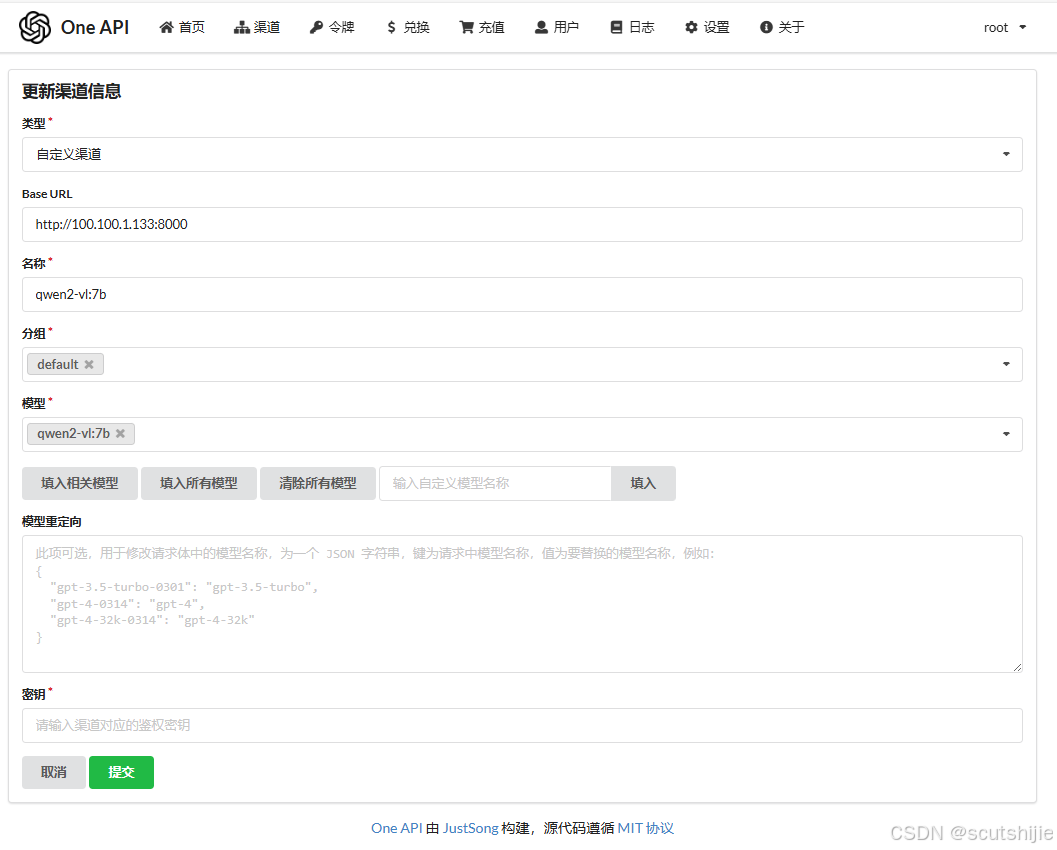
–served-model-name qwen2-vl:7b表示模型名称为qwen2-vl:7b,这个在one-api的大模型管理组件中需要指定的模型名字。
–model Qwen2-VL-7B-Instruct这个指定模型文件的位置,通过volumes参数指定外挂。容器进入后的默认初始位置为/data/shared/Qwen/
/data/app/big_model/Qwen2-VL-7B-Instruct/为本例子中存放模型文件的位置,可自行定义。
遇到的报错
Error in applying chat template from request: At most 1 image(s) may be provided in one request
这个是因为默认的上下文限制了只能有一张图片,通过设置–limit-mm-per-prompt image启动参数解决。
在ONE-API设置
测试脚本
curl http://localhost:8000/v1/chat/completions \
    -H "Content-Type: application/json" \
    -d '{
    "model": "qwen2-vl:7b",
    "messages": [
    {"role": "system", "content": "You are a helpful assistant."},
    {"role": "user", "content": [
        {"type": "image_url", "image_url": {"url": "https://modelscope.oss-cn-beijing.aliyuncs.com/resource/qwen.png"}},
        {"type": "text", "text": "What is the text in the illustrate?"}
    ]}
    ]
    }'





 扫一扫
扫一扫


 1014
1014

 被折叠的 条评论
为什么被折叠?
被折叠的 条评论
为什么被折叠?
 到【灌水乐园】发言





