





在deekseek禁止使用接口后,阿里云百炼上线了Deepseek大模型阿里云百炼,在我们进入百炼云后需要创建自己的key,第一次注册会送100w的token,有效期5-6个月左右吧。
下图就是百炼云获取key的路径。
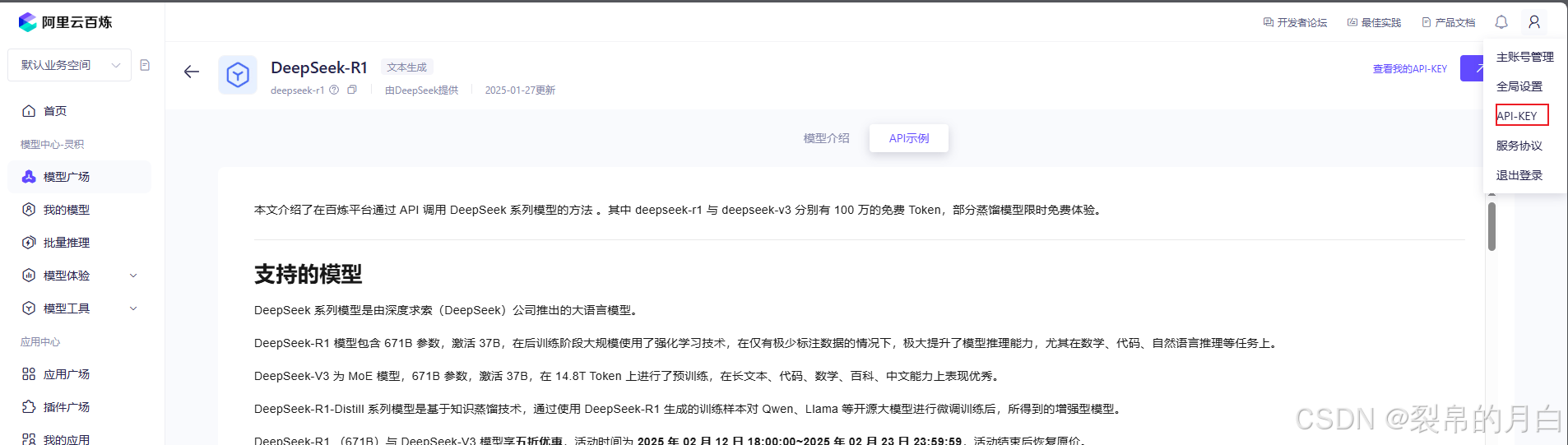
然后就是vue项目接入ai大模型的步骤,他有自带的api案例,但是是需要接入openai的插件,案例如下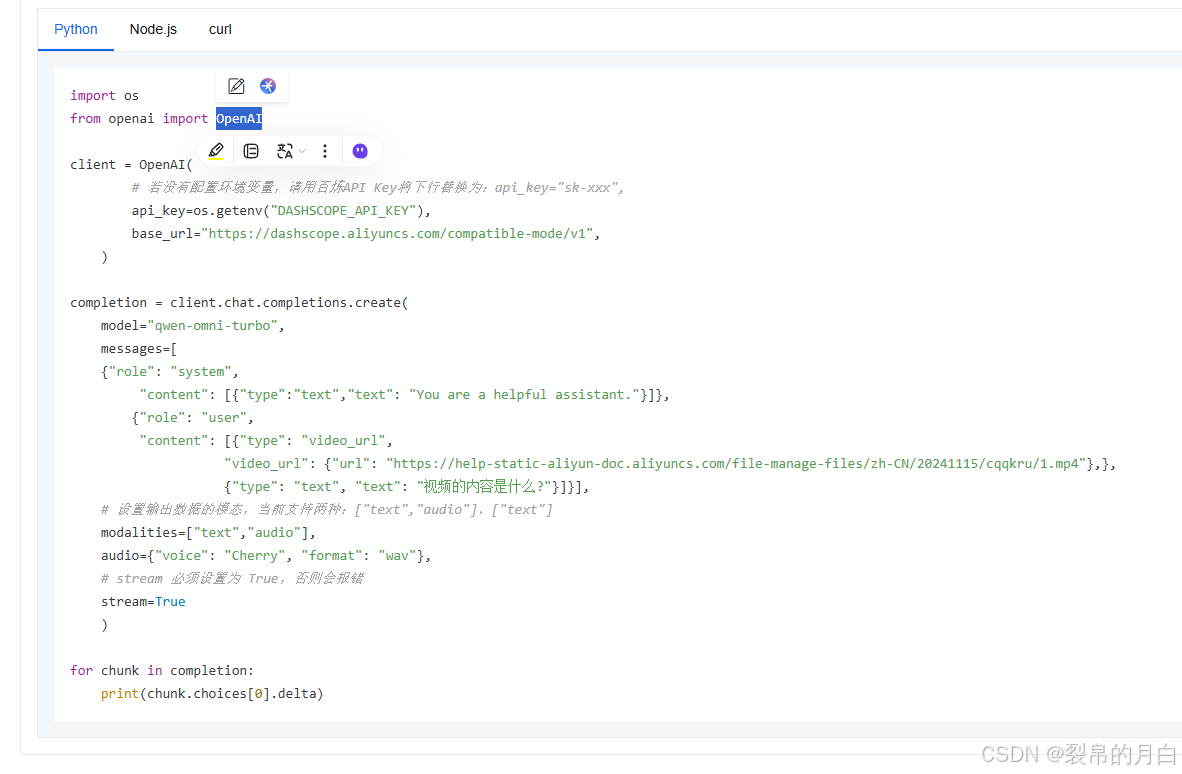
而我使用的是通过fetch的方式直接去使用接口,
我这使用的是多轮对话的形式并且使用的是通义的大模型(这个是自己去选择的)
const chatHistory = ref([
  {
    role: "system",
    content: [{ type: "text", text: "You are a helpful assistant." }],
  },
]);
const submit = async () => {
  responseMessage.value = "";
  // 添加用户的消息到对话历史
  chatHistory.value.push({ role: "user", content: value.value });
  try {
    const response = await fetch(
      "https://dashscope.aliyuncs.com/compatible-mode/v1/chat/completions",
      {
        method: "POST",
        headers: {
          "Content-Type": "application/json",
          Authorization: "Bearer 替换为你的实际API Key", // 替换为你的实际API Key
        },
        body: JSON.stringify({
          model: "qwen-omni-turbo",//使用模型
          messages: chatHistory.value, // 使用完整的对话历史,
          stream: true,
        }),
      }
    );

    if (!response.ok) {
      throw new Error("Network response was not ok");
    }
    console.log("Response:", response);

    const reader = response.body?.getReader();
    const decoder = new TextDecoder("utf-8");
    let done = false;
    let partialData = "";

    while (!done) {
      const { value: chunk, done: chunkDone } =
        (await reader?.read()) as ReadableStreamReadResult<Uint8Array>;
      if (chunk) {
        const chunkStr = decoder.decode(chunk, { stream: true });
        partialData += chunkStr;

        // 处理可能的多行数据
        const lines = partialData.split("\n");
        for (let i = 0; i < lines.length - 1; i++) {
          const line = lines[i].trim();
          if (line.startsWith("data: ")) {
            const data = line.substring(6);
            const parsedData = JSON.parse(data);
            responseMessage.value += parsedData.choices[0].delta.content || "";
          } else if (line.startsWith("[DONE]")) {
            console.log("[DONE]");
          }
        }
        partialData = lines[lines.length - 1];
      }
      done = chunkDone;
    }
    chatHistory.value.push({
      role: "assistant",
      content: responseMessage.value,
    });

  } catch (error) {
    console.error("Error:", error);
  }
};不同的模型参数也不一样,比如文本的,文本+图片的,文本+视频的等等。其实主要就是里面的参数不一样即message的参数
以下是文本+图片的参数 具体克参考百炼云api接口的文档
messages: [
        {"role": "system",
             "content": [{"type":"text","text": "You are a helpful assistant."}]},
            {"role": "user",
             "content": [{"type": "image_url",
                        "image_url": {"url": "https://help-static-aliyun-doc.aliyuncs.com/file-manage-files/zh-CN/20241022/emyrja/dog_and_girl.jpeg"},},
                        {"type": "text", "text": "图中描绘的是什么景象?"}]}],





 扫一扫
扫一扫


 760
760

 被折叠的 条评论
为什么被折叠?
被折叠的 条评论
为什么被折叠?
 到【灌水乐园】发言





