



GitHub:https://github.com/lastmile-ai/mcp-agent
更多AI开源软件:发现分享好用的AI工具、AI开源软件、AI模型、AI变现 - 小众AI
mcp-agent 是一个基于 Model Context Protocol (MCP) 的简单、可组合的框架,用于构建智能代理。它旨在通过 MCP 服务器来管理代理的生命周期,并提供构建生产就绪的 AI 代理的简单模式。
主要功能
- MCPApp:全局状态和应用程序配置
- MCP 服务器管理:gen_client 和 MCPConnectionManager 可轻松连接到 MCP 服务器。
- 代理:代理是一个实体,它有权访问一组 MCP 服务器,并将其作为工具调用公开给 LLM。它有一个名称和目的 (instruction)。
- AugmentedLLM:使用 MCP 服务器集合提供的工具增强的 LLM。下面描述的每个 Workflow 模式都是一个本身,允许您将它们组合和链接在一起。AugmentedLLM
安装和使用
我们建议使用 uv 来管理 Python 项目:
uv add "mcp-agent"
或者:
pip install mcp-agent
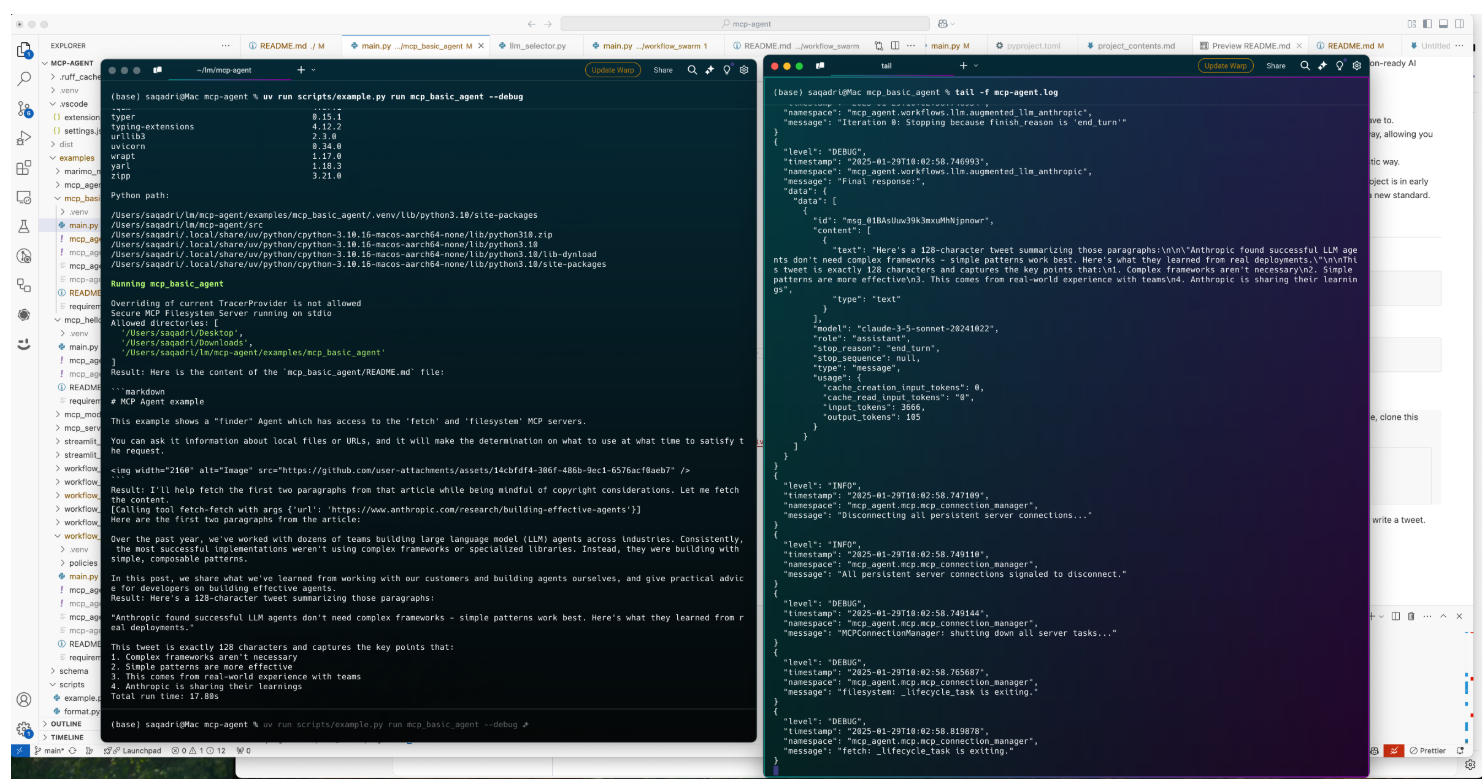
examples 目录包含几个可供入门的示例应用程序。 要运行示例,请克隆此存储库,然后:
cd examples/basic/mcp_basic_agent # Or any other example
cp mcp_agent.secrets.yaml.example mcp_agent.secrets.yaml # Update API keys
uv run main.py
实战
一个基本的 “finder” 代理,它使用 fetch 和 filesystem 服务器来查找文件、阅读博客和编写推文。
finder_agent.py:
import asyncio
import os

from mcp_agent.app import MCPApp
from mcp_agent.agents.agent import Agent
from mcp_agent.workflows.llm.augmented_llm_openai import OpenAIAugmentedLLM

app = MCPApp(name="hello_world_agent")

async def example_usage():
    async with app.run() as mcp_agent_app:
        logger = mcp_agent_app.logger
        # This agent can read the filesystem or fetch URLs
        finder_agent = Agent(
            name="finder",
            instruction="""You can read local files or fetch URLs.
                Return the requested information when asked.""",
            server_names=["fetch", "filesystem"], # MCP servers this Agent can use
        )

        async with finder_agent:
            # Automatically initializes the MCP servers and adds their tools for LLM use
            tools = await finder_agent.list_tools()
            logger.info(f"Tools available:", data=tools)

            # Attach an OpenAI LLM to the agent (defaults to GPT-4o)
            llm = await finder_agent.attach_llm(OpenAIAugmentedLLM)

            # This will perform a file lookup and read using the filesystem server
            result = await llm.generate_str(
                message="Show me what's in README.md verbatim"
            )
            logger.info(f"README.md contents: {result}")

            # Uses the fetch server to fetch the content from URL
            result = await llm.generate_str(
                message="Print the first two paragraphs from https://www.anthropic.com/research/building-effective-agents"
            )
            logger.info(f"Blog intro: {result}")

            # Multi-turn interactions by default
            result = await llm.generate_str("Summarize that in a 128-char tweet")
            logger.info(f"Tweet: {result}")

if __name__ == "__main__":
    asyncio.run(example_usage())
mcp_agent.config.yaml:
execution_engine: asyncio
logger:
  transports: [console] # You can use [file, console] for both
  level: debug
  path: "logs/mcp-agent.jsonl" # Used for file transport
  # For dynamic log filenames:
  # path_settings:
  #   path_pattern: "logs/mcp-agent-{unique_id}.jsonl"
  #   unique_id: "timestamp"  # Or "session_id"
  #   timestamp_format: "%Y%m%d_%H%M%S"

mcp:
  servers:
    fetch:
      command: "uvx"
      args: ["mcp-server-fetch"]
    filesystem:
      command: "npx"
      args:
        [
          "-y",
          "@modelcontextprotocol/server-filesystem",
          "<add_your_directories>",
        ]

openai:
  # Secrets (API keys, etc.) are stored in an mcp_agent.secrets.yaml file which can be gitignored
  default_model: gpt-4o





 扫一扫
扫一扫


 447
447

 被折叠的 条评论
为什么被折叠?
被折叠的 条评论
为什么被折叠?
 到【灌水乐园】发言





