



 本文介绍了一种Unity2D开发中实现地图动态加载的方法,通过将地图划分为441块,根据玩家视角调整实时加载和显示地图对象,提高了游戏性能。
UNITY 2D开发,对地图划分为21x21=441块,改变每一块的图片加载,达到显示地图对象的目的。
不好意思,这是一种非常笨的办法。。。
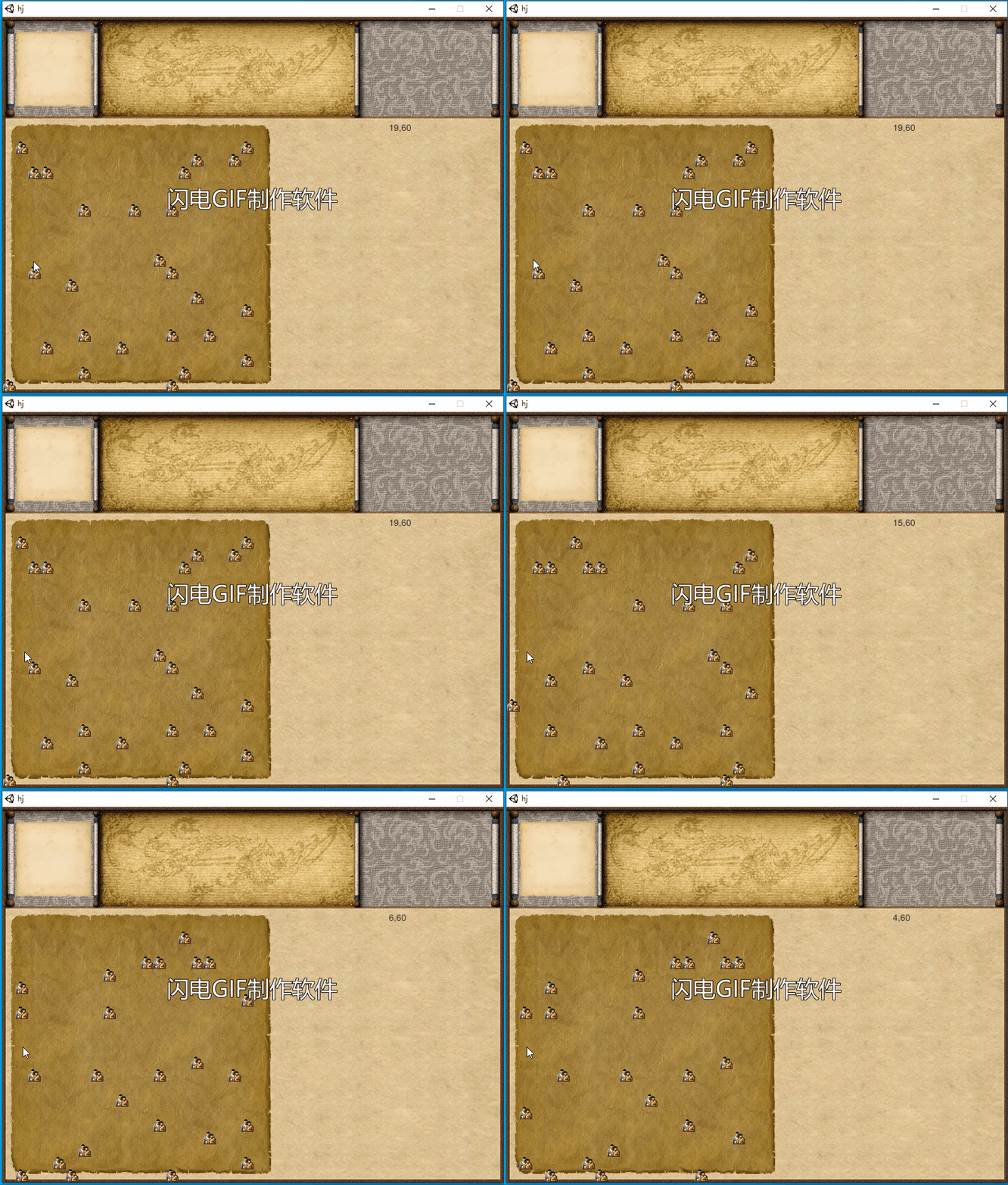
核心代码:
using System.Collections;
using System.Collections.Generic;
using UnityEngine;
using UnityEngine.UI;
using UnityEngine.EventSystems;
using UnityEngine.Events;
using System.Linq;


public class scriptbase : MonoBehaviour {

    public static List<Vector4> MyGlobal ;


    List<Vector4> points;
    List<Vector4> max441;

    List<GameObject> list;

    GameObject[,] go;

    int map_lefttop_x, map_lefttop_y;

    void Start()
    {


      //  InvokeRepeating("Do", 0, 0.1f);


        points = new List<Vector4>();  //1000个坐标初始化
        for (int i = 0; i < 1000; i++)
        { points.Add(new Vector4(Random.Range(0, 120), Random.Range(0, 120),i)); }

        max441 = new List<Vector4>();

        //二维数组,声明 441个GO对象
         go = new GameObject[21, 21];

        for (int i = 0; i < 20; i++)
        {
            for (int j = 0; j < 20; j++)
            {
                go[i,j] = new GameObject();
                go[i,j].transform.SetParent(GameObject.Find("Image420").transform); //挂到父物体上
                go[i,j].AddComponent<RectTransform>();
                go[i,j].AddComponent<RawImage>();

                EventTriggerListener.Get(go[i,j]).onClick = OnButtonClick;//按键事件

                go[i, j].SetActive(false);
            }
        }


    }


    private void OnButtonClick(GameObject go)
    {
        Debug.Log(go.name.ToString());
        GameObject.Find("Text2").GetComponent<Text>().text = "村民 ID:" + go.name.ToString();
    }

   // Update is called once per frame
    void FixedUpdate()

    {
    }


    void Do()
    {
        // new WaitForSeconds(0.01f);
        ////////////////////////////////////////////////////////////////////

        if (Input.mousePosition.y < 40 && Input.mousePosition.y > 10)
        //if (Input.GetKeyDown(KeyCode.UpArrow))
        {

            map_lefttop_y--;

            //1、查询坐标点阵数据
            var turemap = from Vector4 in points where Vector4.x >= map_lefttop_x && Vector4.x <= (map_lefttop_x + 20) && Vector4.y >= map_lefttop_y && Vector4.y <= (map_lefttop_y + 20) select Vector4;

            //2、清空原来441个点阵数据
            max441.Clear();

            //3、新坐标加到441个点中
            foreach (Vector4 m in turemap)
            {
                Vector4 n = new Vector4();
                n = m;
                n.y = n.y - map_lefttop_y;
                n.x = n.x - map_lefttop_x;
                max441.Add(n);
            }

            //4、屏幕对象停止
            for (int i = 0; i < 20; i++)
            {
                for (int j = 0; j < 20; j++)
                {
                    go[i, j].SetActive(false);
                }
            }

            //5、屏幕对象活动
            for (int i = 0; i < 20; i++)
            {
                for (int j = 0; j < 20; j++)
                {
                    foreach (Vector4 v in max441)
                    {
                        if ((v.x == i) && (v.y == j))
                        {
                            go[i, j].GetComponent<RectTransform>().localPosition = new Vector3(20 * i, 20 * j, 0);
                            go[i, j].GetComponent<RawImage>().texture = (Texture2D)Resources.Load("villager");
                            go[i, j].GetComponent<RawImage>().SetNativeSize();
                            go[i, j].SetActive(true);
                            go[i, j].name = v.z.ToString();

                            break;
                        }
                    }
                }
            }
        }
        ////////////////////////////////////////////////////////////////////
        else if (Input.mousePosition.y < 430 && Input.mousePosition.y > 410)
        //if (Input.GetKeyDown(KeyCode.DownArrow))

        {

            map_lefttop_y++;
            var turemap = from Vector4 in points where Vector4.x >= map_lefttop_x && Vector4.x <= (map_lefttop_x + 20) && Vector4.y >= map_lefttop_y && Vector4.y <= (map_lefttop_y + 20) select Vector4;

            max441.Clear();
            foreach (Vector4 m in turemap)
            {
                Vector4 n = new Vector4();
                n = m;
                n.y = n.y - map_lefttop_y;
                n.x = n.x - map_lefttop_x;
                max441.Add(n);
            }


            for (int i = 0; i < 20; i++)
            {
                for (int j = 0; j < 20; j++)
                {
                    go[i, j].SetActive(false);
                }
            }

            for (int i = 0; i < 20; i++)
            {
                for (int j = 0; j < 20; j++)
                {
                    foreach (Vector4 v in max441)
                    {
                        if ((v.x == i) && (v.y == j))
                        {
                            go[i, j].GetComponent<RectTransform>().localPosition = new Vector3(20 * i, 20 * j, 0);
                            go[i, j].GetComponent<RawImage>().texture = (Texture2D)Resources.Load("villager");
                            go[i, j].GetComponent<RawImage>().SetNativeSize();
                            go[i, j].SetActive(true);
                            go[i, j].name = v.z.ToString();

                            break;
                        }
                    }
                }
            }
        }
        ///////////////////////////////////////////////////////////////////////////////////////
        else if (Input.mousePosition.x < 36 && Input.mousePosition.x > 16)
        //if (Input.GetKeyDown(KeyCode.LeftArrow))

        {

            map_lefttop_x--;
            var turemap = from Vector4 in points where Vector4.x >= map_lefttop_x && Vector4.x <= (map_lefttop_x + 20) && Vector4.y >= map_lefttop_y && Vector4.y <= (map_lefttop_y + 20) select Vector4;

            max441.Clear();
            foreach (Vector4 m in turemap)
            {
                Vector4 n = new Vector4();
                n = m;
                n.x = n.x - map_lefttop_x;
                n.y = n.y - map_lefttop_y;
                max441.Add(n);
            }


            for (int i = 0; i < 20; i++)
            {
                for (int j = 0; j < 20; j++)
                {
                    go[i, j].SetActive(false);
                }
            }

            for (int i = 0; i < 20; i++)
            {
                for (int j = 0; j < 20; j++)
                {
                    foreach (Vector4 v in max441)
                    {
                        if ((v.x == i) && (v.y == j))
                        {
                            go[i, j].GetComponent<RectTransform>().localPosition = new Vector3(20 * i, 20 * j, 0);
                            go[i, j].GetComponent<RawImage>().texture = (Texture2D)Resources.Load("villager");
                            go[i, j].GetComponent<RawImage>().SetNativeSize();
                            go[i, j].SetActive(true);
                            go[i, j].name = v.z.ToString();

                            break;
                        }
                    }
                }
            }
        }


        ///////////////////////////////////////////////////////////////////////////////////////////////////////////
        else if ( Input.mousePosition.x<420 && Input.mousePosition.x>400  )
        //if (Input.GetKeyDown(KeyCode.RightArrow))
        {

            map_lefttop_x++;
            var turemap = from Vector4 in points where Vector4.x >= map_lefttop_x && Vector4.x <= (map_lefttop_x + 20) && Vector4.y >= map_lefttop_y && Vector4.y <= (map_lefttop_y + 20) select Vector4;


            max441.Clear();
            foreach (Vector4 m in turemap)
            {
                Vector4 n = new Vector4();
                n = m;
                n.x= n.x - map_lefttop_x;
                n.y = n.y - map_lefttop_y;
                max441.Add(n);
            }


            for (int i = 0; i < 20; i++)
            {
                for (int j = 0; j < 20; j++)
                {
                    go[i, j].SetActive(false);
                }
            }

            for (int i = 0; i < 20; i++)
            {
                for (int j = 0; j < 20; j++)
                {
                    foreach(Vector4 v in max441 )
                    {
                        if ((v.x == i) && (v.y == j))
                        {
                            go[i, j].GetComponent<RectTransform>().localPosition = new Vector3(20 * i, 20 * j, 0);
                            go[i, j].GetComponent<RawImage>().texture = (Texture2D)Resources.Load("villager");
                            go[i, j].GetComponent<RawImage>().SetNativeSize();
                            go[i, j].SetActive(true);
                            go[i, j].name = v.z.ToString();

                            break;
                        }
                    }
                }
            }


        }

        GameObject.Find("Textmouse").GetComponent<Text>().text = map_lefttop_x + "," + map_lefttop_y;
      //  GameObject.Find("Textmouse").GetComponent<Text>().text = Input.mousePosition.ToString();

    }


    void showpic()
    {
    }


void OnGUI()
{
}


}


/*
       list = new List<GameObject>();
       for (int i = 0; i < 441; i++)
       { list.Add(new GameObject("A" + i.ToString())); }

       foreach (GameObject go in list)
       {

           go.transform.SetParent(GameObject.Find("Image420").transform); //挂到父物体上
          // go.AddComponent<RectTransform>();
          // go.GetComponent<RectTransform>().localPosition = new Vector3(20 * Random.Range(0, 120), 20 * Random.Range(0, 120), 0);
         //  go.GetComponent<RectTransform>().pivot.Set(10, 10);

           RawImage img = go.AddComponent<RawImage>();
           img.texture = (Texture2D)Resources.Load("villager");
           img.SetNativeSize();

           EventTriggerListener.Get(go).onClick = OnButtonClick;//按键事件
       }
*/





 扫一扫
扫一扫


 2466
2466

 被折叠的 条评论
为什么被折叠?
被折叠的 条评论
为什么被折叠?
 到【灌水乐园】发言





